Win XP not pass Genuine Windows Eval.?

jllipke

Member
I have a buddy of mine that had a bad row of viruses and crap go through his computer. They are gone now but now it says that it did not pass with genuine Windows evaluation.

I hear that OS is screwed, but is this true and what can I do for it ??
It is running on Windows XP service pack 2
 
And most likely, it isn't virus free yet. I've seen this in the past. What was used to remove the infections?
 
Ok, do the following and post the logs.

Please download Malwarebytes' Anti-Malware from here or here and save it to your desktop.
  • Double-click mbam-setup.exe and follow the prompts to install the program.
  • At the end, be sure a checkmark is placed next to
    • Update Malwarebytes' Anti-Malware
    • and Launch Malwarebytes' Anti-Malware
  • then click Finish.
  • If an update is found, it will download and install the latest version. Please keep updating until it says you have the latest version.
  • Once the program has loaded, select Perform quick scan, then click Scan.
  • When the scan is complete, click OK, then Show Results to view the results.
  • Be sure that everything is checked, and click Remove Selected.
  • A log will be saved automatically which you can access by clicking on the Logs tab within Malwarebytes' Anti-Malware

If for some reason Malwarebytes will not install or run please download and run Rkill.scr, Rkill.exe, or Rkill.com. If you are still having issues running rkill then try downloading these renamed versions of the same program.

EXPLORER.EXE
IEXPLORE.EXE
USERINIT.EXE
WINLOGON.EXE

But DO NOT reboot the system and then try installing or running Malwarebytes. If Rkill (which is a black box) appears and then disappears right away or you get a message saying rkill is infected, keep trying to run rkill until it over powers the infection and temporarily kills it. Once a log appears on the screen, you can try running malwarebytes or downloading other programs.


Download the HijackThis installer from here.
Run the installer and choose Install, indicating that you accept the licence agreement. The installer will place a shortcut on your desktop and launch HijackThis.

Click Do a system scan and save a logfile

Most of what HijackThis lists will be harmless or even essential, don't fix anything yet.

When the hijackthis log appears in a notepad file, click on the edit menu, click select all, then click on the edit menu again and click on copy. Come back to your reply and right click on your mouse and click on paste.

Post the logfile that HijackThis produces along with the Malwarebytes Anti-Malware log
 
" this is the first log on maliwarebytes"

Folders Infected: 0
Files Infected: 6

Memory Processes Infected:
(No malicious items detected)

Memory Modules Infected:
(No malicious items detected)

Registry Keys Infected:
HKEY_CURRENT_USER\SOFTWARE\Microsoft\Windows\CurrentVersion\Ext\Stats\{00A6FAF1-072E-44CF-8957-5838F569A31D} (Adware.MyWebSearch) -> Quarantined and deleted successfully.
HKEY_LOCAL_MACHINE\SOFTWARE\Microsoft\Windows\CurrentVersion\Ext\PreApproved\{1D4DB7D2-6EC9-47a3-BD87-1E41684E07BB} (Adware.MyWebSearch) -> Quarantined and deleted successfully.
HKEY_LOCAL_MACHINE\SOFTWARE\Microsoft\Internet Explorer\Low Rights\RunDll32Policy\f3ScrCtr.dll (Adware.MyWebSearch) -> Quarantined and deleted successfully.
HKEY_LOCAL_MACHINE\SOFTWARE\Microsoft\Multimedia\WMPlayer\Schemes\f3pss (Adware.MyWebSearch) -> Quarantined and deleted successfully.
HKEY_LOCAL_MACHINE\SYSTEM\CurrentControlSet\Enum\Root\LEGACY_SVRWSC (Trojan.Agent) -> Quarantined and deleted successfully.

Registry Values Infected:
(No malicious items detected)

Registry Data Items Infected:
HKEY_CURRENT_USER\SOFTWARE\Microsoft\Windows\CurrentVersion\Explorer\Advanced\Start_ShowHelp (PUM.Hijack.StartMenu) -> Bad: (0) Good: (1) -> Quarantined and deleted successfully.
HKEY_LOCAL_MACHINE\SOFTWARE\Microsoft\Security Center\FirewallDisableNotify (PUM.Disabled.SecurityCenter) -> Bad: (1) Good: (0) -> Quarantined and deleted successfully.

Folders Infected:
(No malicious items detected)

Files Infected:
c:\documents and settings\Lis\Desktop\shopathome_toolbar(3).exe (Adware.Sahat) -> Quarantined and deleted successfully.
c:\documents and settings\Lis\Desktop\couponalert.exe (Adware.FunWeb) -> Quarantined and deleted successfully.
c:\RECYCLER\s-1-5-21-1757981266-1078145449-1060284298-1004\Dc27.exe (Adware.FunWeb) -> Quarantined and deleted successfully.
c:\WINDOWS\system32\config\systemprofile\local settings\temporary internet files\5.tmp (Trojan.Dropper) -> Quarantined and deleted successfully.
c:\WINDOWS\system32\config\systemprofile\local settings\temporary internet files\7.tmp (Trojan.Dropper) -> Quarantined and deleted successfully.
c:\WINDOWS\system32\config\systemprofile\local settings\temporary internet files\F.tmp (Trojan.Dropper) -> Quarantined and deleted successfully.
 
"this is the second log of maliwarebytes"

Malwarebytes' Anti-Malware 1.51.2.1300
www.malwarebytes.org

Database version: 7622

Windows 5.1.2600 Service Pack 3
Internet Explorer 8.0.6001.18702

11/20/2011 9:27:42 PM
mbam-log-2011-11-20 (21-27-42).txt

Scan type: Quick scan
Objects scanned: 188705
Time elapsed: 47 minute(s), 45 second(s)

Memory Processes Infected: 0
Memory Modules Infected: 0
Registry Keys Infected: 5
Registry Values Infected: 0
Registry Data Items Infected: 2
Folders Infected: 0
Files Infected: 6

Memory Processes Infected:
(No malicious items detected)

Memory Modules Infected:
(No malicious items detected)

Registry Keys Infected:
HKEY_CURRENT_USER\SOFTWARE\Microsoft\Windows\CurrentVersion\Ext\Stats\{00A6FAF1-072E-44CF-8957-5838F569A31D} (Adware.MyWebSearch) -> Quarantined and deleted successfully.
HKEY_LOCAL_MACHINE\SOFTWARE\Microsoft\Windows\CurrentVersion\Ext\PreApproved\{1D4DB7D2-6EC9-47a3-BD87-1E41684E07BB} (Adware.MyWebSearch) -> Quarantined and deleted successfully.
HKEY_LOCAL_MACHINE\SOFTWARE\Microsoft\Internet Explorer\Low Rights\RunDll32Policy\f3ScrCtr.dll (Adware.MyWebSearch) -> Quarantined and deleted successfully.
HKEY_LOCAL_MACHINE\SOFTWARE\Microsoft\Multimedia\WMPlayer\Schemes\f3pss (Adware.MyWebSearch) -> Quarantined and deleted successfully.
HKEY_LOCAL_MACHINE\SYSTEM\CurrentControlSet\Enum\Root\LEGACY_SVRWSC (Trojan.Agent) -> Quarantined and deleted successfully.

Registry Values Infected:
(No malicious items detected)

Registry Data Items Infected:
HKEY_CURRENT_USER\SOFTWARE\Microsoft\Windows\CurrentVersion\Explorer\Advanced\Start_ShowHelp (PUM.Hijack.StartMenu) -> Bad: (0) Good: (1) -> Quarantined and deleted successfully.
HKEY_LOCAL_MACHINE\SOFTWARE\Microsoft\Security Center\FirewallDisableNotify (PUM.Disabled.SecurityCenter) -> Bad: (1) Good: (0) -> Quarantined and deleted successfully.

Folders Infected:
(No malicious items detected)

Files Infected:
c:\documents and settings\Lis\Desktop\shopathome_toolbar(3).exe (Adware.Sahat) -> Quarantined and deleted successfully.
c:\documents and settings\Lis\Desktop\couponalert.exe (Adware.FunWeb) -> Quarantined and deleted successfully.
c:\RECYCLER\s-1-5-21-1757981266-1078145449-1060284298-1004\Dc27.exe (Adware.FunWeb) -> Quarantined and deleted successfully.
c:\WINDOWS\system32\config\systemprofile\local settings\temporary internet files\5.tmp (Trojan.Dropper) -> Quarantined and deleted successfully.
c:\WINDOWS\system32\config\systemprofile\local settings\temporary internet files\7.tmp (Trojan.Dropper) -> Quarantined and deleted successfully.
c:\WINDOWS\system32\config\systemprofile\local settings\temporary internet files\F.tmp (Trojan.Dropper) -> Quarantined and deleted successfully.
 
"this is the third log of maliware bytes"

Malwarebytes Anti-Malware (Trial) 1.60.0.1800
www.malwarebytes.org

Database version: v2012.01.25.05

Windows XP Service Pack 3 x86 NTFS
Internet Explorer 8.0.6001.18702
Lis :: XODOS [administrator]

Protection: Disabled

1/25/2012 3:13:10 PM
mbam-log-2012-01-25 (15-13-10).txt

Scan type: Quick scan
Scan options enabled: Memory | Startup | Registry | File System | Heuristics/Extra | Heuristics/Shuriken | PUP | PUM
Scan options disabled: P2P
Objects scanned: 177433
Time elapsed: 14 minute(s), 10 second(s)

Memory Processes Detected: 0
(No malicious items detected)

Memory Modules Detected: 0
(No malicious items detected)

Registry Keys Detected: 0
(No malicious items detected)

Registry Values Detected: 1
HKCU\SOFTWARE\Microsoft\Windows\CurrentVersion\Run|CLCKR (Trojan.Downloader) -> Data: "C:\Documents and Settings\Lis\Local Settings\Application Data\Microsoft\nvvsvc.exe" -> Quarantined and deleted successfully.

Registry Data Items Detected: 0
(No malicious items detected)

Folders Detected: 0
(No malicious items detected)

Files Detected: 1
C:\Documents and Settings\Lis\Local Settings\Application Data\Microsoft\nvvsvc.exe (Trojan.Downloader) -> Quarantined and deleted successfully.

(end)
 
"this is the forth log of maliwarebytes"

17:29:15 Lis MESSAGE Protection started successfully
17:29:36 Lis MESSAGE IP Protection started successfully
17:34:24 Lis ERROR Scheduled update failed: Timeout failed with error code 0
21:36:46 Lis MESSAGE Protection started successfully
21:37:11 Lis MESSAGE IP Protection started successfully
 
"this is the fifth log of maliwarebytes"

2012/01/25 15:59:44 -0600 XODOS Lis MESSAGE Starting protection
2012/01/25 16:00:05 -0600 XODOS Lis MESSAGE Protection started successfully
2012/01/25 16:00:08 -0600 XODOS Lis MESSAGE Starting IP protection
2012/01/25 16:00:23 -0600 XODOS Lis MESSAGE IP Protection started successfully
 
"this is the Hijackthis log"

Logfile of Trend Micro HijackThis v2.0.4
Scan saved at 4:29:13 PM, on 1/25/2012
Platform: Windows XP SP3 (WinNT 5.01.2600)
MSIE: Internet Explorer v8.00 (8.00.6001.18702)
Boot mode: Normal

Running processes:
C:\WINDOWS\System32\smss.exe
C:\WINDOWS\system32\winlogon.exe
C:\WINDOWS\system32\services.exe
C:\WINDOWS\system32\lsass.exe
C:\WINDOWS\system32\svchost.exe
C:\WINDOWS\System32\svchost.exe
C:\Program Files\Sygate\SPF\smc.exe
C:\Program Files\AVAST Software\Avast\AvastSvc.exe
C:\WINDOWS\system32\spoolsv.exe
C:\Program Files\AVG\AVG2012\avgwdsvc.exe
C:\Program Files\Bonjour\mDNSResponder.exe
C:\WINDOWS\system32\LxrSII1s.exe
C:\WINDOWS\system32\nvsvc32.exe
C:\WINDOWS\system32\HPZipm12.exe
C:\WINDOWS\system32\svchost.exe
C:\WINDOWS\system32\WgaTray.exe
C:\WINDOWS\Explorer.EXE
C:\Program Files\Malwarebytes' Anti-Malware\mbamservice.exe
C:\Program Files\Microsoft Security Client\msseces.exe
C:\Program Files\Malwarebytes' Anti-Malware\mbamgui.exe
C:\Program Files\Messenger\msmsgs.exe
C:\Documents and Settings\Lis\Local Settings\Application Data\Lexar Media\LxrAutorun.exe
C:\WINDOWS\system32\ctfmon.exe
C:\Program Files\Spybot - Search & Destroy\TeaTimer.exe
C:\Program Files\Mozilla Firefox\firefox.exe
C:\Program Files\Mozilla Firefox\plugin-container.exe
C:\Program Files\Malwarebytes' Anti-Malware\mbam.exe
C:\WINDOWS\system32\msiexec.exe
C:\Program Files\Trend Micro\HiJackThis\HiJackThis.exe

R1 - HKCU\Software\Microsoft\Internet Explorer\Main,Search Page = http://go.microsoft.com/fwlink/?LinkId=54896
R0 - HKCU\Software\Microsoft\Internet Explorer\Main,Start Page = about:blank
R1 - HKLM\Software\Microsoft\Internet Explorer\Main,Search Page = http://go.microsoft.com/fwlink/?LinkId=54896
R0 - HKLM\Software\Microsoft\Internet Explorer\Main,Start Page = about:blank
R1 - HKCU\Software\Microsoft\Windows\CurrentVersion\Internet Settings,ProxyOverride = *.local
O2 - BHO: AcroIEHelperStub - {18DF081C-E8AD-4283-A596-FA578C2EBDC3} - C:\Program Files\Common Files\Adobe\Acrobat\ActiveX\AcroIEHelperShim.dll
O2 - BHO: WormRadar.com IESiteBlocker.NavFilter - {3CA2F312-6F6E-4B53-A66E-4E65E497C8C0} - C:\Program Files\AVG\AVG2012\avgssie.dll
O2 - BHO: Spybot-S&D IE Protection - {53707962-6F74-2D53-2644-206D7942484F} - C:\Program Files\Spybot - Search & Destroy\SDHelper.dll
O2 - BHO: Java(tm) Plug-In SSV Helper - {761497BB-D6F0-462C-B6EB-D4DAF1D92D43} - C:\Program Files\Java\jre6\bin\ssv.dll
O2 - BHO: avast! WebRep - {8E5E2654-AD2D-48bf-AC2D-D17F00898D06} - C:\Program Files\AVAST Software\Avast\aswWebRepIE.dll
O2 - BHO: Java(tm) Plug-In 2 SSV Helper - {DBC80044-A445-435b-BC74-9C25C1C588A9} - C:\Program Files\Java\jre6\bin\jp2ssv.dll
O2 - BHO: JQSIEStartDetectorImpl - {E7E6F031-17CE-4C07-BC86-EABFE594F69C} - C:\Program Files\Java\jre6\lib\deploy\jqs\ie\jqs_plugin.dll
O3 - Toolbar: avast! WebRep - {8E5E2654-AD2D-48bf-AC2D-D17F00898D06} - C:\Program Files\AVAST Software\Avast\aswWebRepIE.dll
O4 - HKLM\..\Run: [SmcService] C:\PROGRA~1\Sygate\SPF\smc.exe -startgui
O4 - HKLM\..\Run: [NvCplDaemon] RUNDLL32.EXE NvQTwk,NvCplDaemon initialize
O4 - HKLM\..\Run: [nwiz] nwiz.exe /install
O4 - HKLM\..\Run: [Adobe Reader Speed Launcher] "C:\Program Files\Adobe\Reader 9.0\Reader\Reader_sl.exe"
O4 - HKLM\..\Run: [MSC] "c:\Program Files\Microsoft Security Client\msseces.exe" -hide -runkey
O4 - HKLM\..\Run: [QuickTime Task] "C:\Program Files\QuickTime\qttask.exe" -atboottime
O4 - HKLM\..\Run: [AVG_TRAY] "C:\Program Files\AVG\AVG2012\avgtray.exe"
O4 - HKLM\..\Run: [avast] "C:\Program Files\AVAST Software\Avast\avastUI.exe" /nogui
O4 - HKLM\..\Run: [Malwarebytes' Anti-Malware] "C:\Program Files\Malwarebytes' Anti-Malware\mbamgui.exe" /starttray
O4 - HKCU\..\Run: [MSMSGS] "C:\Program Files\Messenger\msmsgs.exe" /background
O4 - HKCU\..\Run: [LxrAutorun] C:\Documents and Settings\Lis\Local Settings\Application Data\Lexar Media\LxrAutorun.exe
O4 - HKCU\..\Run: [ctfmon.exe] C:\WINDOWS\system32\ctfmon.exe
O4 - HKCU\..\Run: [SpybotSD TeaTimer] C:\Program Files\Spybot - Search & Destroy\TeaTimer.exe
O4 - HKUS\S-1-5-18\..\Run: [DWQueuedReporting] "c:\PROGRA~1\COMMON~1\MICROS~1\DW\dwtrig20.exe" -t (User 'SYSTEM')
O4 - HKUS\.DEFAULT\..\Run: [DWQueuedReporting] "c:\PROGRA~1\COMMON~1\MICROS~1\DW\dwtrig20.exe" -t (User 'Default user')
O8 - Extra context menu item: &Search - ?s=100000337&p=ZUxdm0805CUS&si=&a=xj925HlKq3zpp_aKWsYlFQ&n=2010121507
O9 - Extra button: Bonjour - {7F9DB11C-E358-4ca6-A83D-ACC663939424} - C:\Program Files\Bonjour\ExplorerPlugin.dll
O9 - Extra button: (no name) - {DFB852A3-47F8-48C4-A200-58CAB36FD2A2} - C:\Program Files\Spybot - Search & Destroy\SDHelper.dll
O9 - Extra 'Tools' menuitem: Spybot - Search && Destroy Configuration - {DFB852A3-47F8-48C4-A200-58CAB36FD2A2} - C:\Program Files\Spybot - Search & Destroy\SDHelper.dll
O9 - Extra button: (no name) - {e2e2dd38-d088-4134-82b7-f2ba38496583} - C:\WINDOWS\Network Diagnostic\xpnetdiag.exe
O9 - Extra 'Tools' menuitem: @xpsp3res.dll,-20001 - {e2e2dd38-d088-4134-82b7-f2ba38496583} - C:\WINDOWS\Network Diagnostic\xpnetdiag.exe
O9 - Extra button: Messenger - {FB5F1910-F110-11d2-BB9E-00C04F795683} - C:\Program Files\Messenger\msmsgs.exe
O9 - Extra 'Tools' menuitem: Windows Messenger - {FB5F1910-F110-11d2-BB9E-00C04F795683} - C:\Program Files\Messenger\msmsgs.exe
O15 - Trusted Zone: *.clonewarsadventures.com
O15 - Trusted Zone: *.freerealms.com
O15 - Trusted Zone: *.soe.com
O15 - Trusted Zone: *.sony.com
O16 - DPF: {B94C2238-346E-4C5E-9B36-8CC627F35574} (VMware Remote Console Plug-in 2.5.0.00000) -
O18 - Protocol: linkscanner - {F274614C-63F8-47D5-A4D1-FBDDE494F8D1} - C:\Program Files\AVG\AVG2012\avgpp.dll (file missing)
O23 - Service: avast! Antivirus - AVAST Software - C:\Program Files\AVAST Software\Avast\AvastSvc.exe
O23 - Service: AVG Firewall (avgfws) - Unknown owner - C:\Program Files\AVG\AVG2012\avgfws.exe (file missing)
O23 - Service: AVGIDSAgent - Unknown owner - C:\Program Files\AVG\AVG2012\AVGIDSAgent.exe (file missing)
O23 - Service: AVG WatchDog (avgwd) - AVG Technologies CZ, s.r.o. - C:\Program Files\AVG\AVG2012\avgwdsvc.exe
O23 - Service: Bonjour Service - Apple Inc. - C:\Program Files\Bonjour\mDNSResponder.exe
O23 - Service: Google Update Service (gupdate) (gupdate) - Google Inc. - C:\Program Files\Google\Update\GoogleUpdate.exe
O23 - Service: Google Update Service (gupdatem) (gupdatem) - Google Inc. - C:\Program Files\Google\Update\GoogleUpdate.exe
O23 - Service: iPod Service - Apple Inc. - C:\Program Files\iPod\bin\iPodService.exe
O23 - Service: Java Quick Starter (JavaQuickStarterService) - Sun Microsystems, Inc. - C:\Program Files\Java\jre6\bin\jqs.exe
O23 - Service: Lexar Secure II (LxrSII1s) - Lexar Media, Inc. - C:\WINDOWS\system32\LxrSII1s.exe
O23 - Service: MBAMService - Malwarebytes Corporation - C:\Program Files\Malwarebytes' Anti-Malware\mbamservice.exe
O23 - Service: NVIDIA Driver Helper Service (NVSvc) - NVIDIA Corporation - C:\WINDOWS\system32\nvsvc32.exe
O23 - Service: Pml Driver HPZ12 - HP - C:\WINDOWS\system32\HPZipm12.exe
O23 - Service: Sygate Personal Firewall Pro (SmcService) - Sygate Technologies, Inc. - C:\Program Files\Sygate\SPF\smc.exe
O23 - Service: WLTRYSVC - Unknown owner - C:\WINDOWS\system32\wltrysvc.exe

--
End of file - 7322 bytes
 
A big problem I see right away is that you have AVAST and AVG running at bootup. You need to uninstall one or the other, you can't have 2 running at the same time. You also need to do the following after uninstalling one of them.

Download and Run ComboFix
If you already have Combofix, please delete this copy and download it again as it's being updated regularly.
  • Download this file here :

    Combofix

  • When the page loads click on the blue combofix download link next to the BleepingComputer Mirror.
  • Save the file to your windows desktop. The combofix icon will look like this when it has downloaded to your desktop.

    cf-icon.jpg
  • We are almost ready to start ComboFix, but before we do so, we need to take some preventative measures so that there are no conflicts with other programs when running ComboFix. At this point you should do the following:

  • Close all open Windows including this one.
  • Close or disable all running Antivirus, Antispyware, and Firewall programs as they may interfere with the proper running of ComboFix. Instructions on disabling these type of programs can be found here.
    Once these two steps have been completed, double-click on the ComboFix icon found on your desktop. Please note, that once you start ComboFix you should not click anywhere on the ComboFix window as it can cause the program to stall. In fact, when ComboFix is running, do not touch your computer at all. The scan could take a while, so please be patient.
  • Please click on I agree on the disclaimer window.
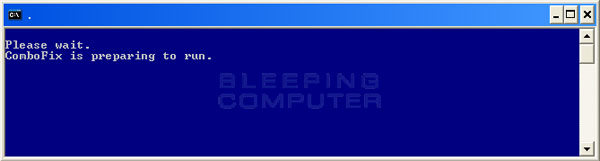
  • ComboFix will now install itself on to your computer. When it is done, a blue screen will appear as shown below.

    cf-preparing.jpg

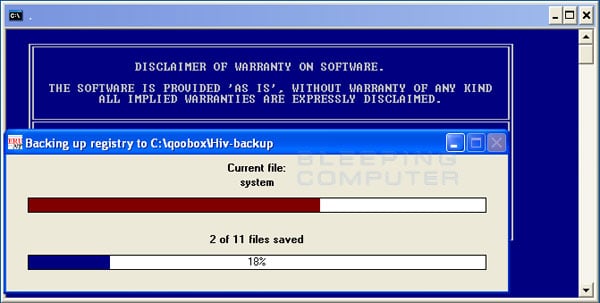
  • ComboFix is now preparing to run. When it has finished ComboFix will automatically attempt to create a System Restore point so that if any problems occur while using the program you can restore back to your previous configuration. When ComboFix has finished creating the restore point, it will then backup your Windows Registry as shown in the image below.

    erunt.jpg

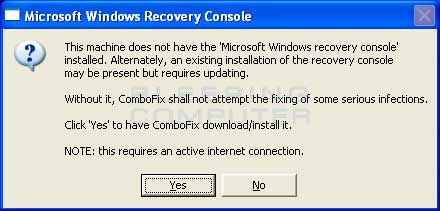
  • Once the Windows Registry has finished being backed up, ComboFix will attempt to detect if you have the Windows Recovery Console installed. If you already have it installed, you can skip to this section and continue reading. Otherwise you will see the following message as shown below:

    recovery-console-prompt.jpg

  • At the above message box, please click on the Yes button in order for ComboFix to continue. Please follow the steps and instructions given by ComboFix in order to finish the installation of the Recovery Console.
  • Please click on yes in the next window to continue scanning for malware.
  • ComboFix will now disconnect your computer from the Internet, so do not be surprised or concerned if you receive any warnings stating that you are no longer on the Internet. When ComboFix has finished it will automatically restore your Internet connection.
  • ComboFix will now start scanning your computer for known infections. This procedure can take some time, so please be patient.
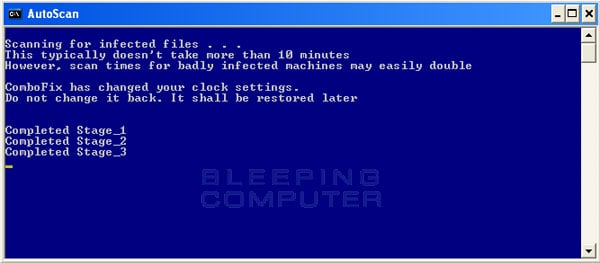
  • While the program is scanning your computer, it will change your clock format, so do not be concerned when you see this happen. When ComboFix is finished it will restore your clock settings to their previous settings. You will also see the text in the ComboFix window being updated as it goes through the various stages of its scan. An example of this can be seen below.

    still-scanning-clockchanges.jpg

  • When ComboFix has finished running, you will see a screen stating that it is preparing the log report.
  • This can take a while, so please be patient. If you see your Windows desktop disappear, do not worry. This is normal and ComboFix will restore your desktop before it is finished. Eventually you will see a new screen that states the program is almost finished and telling you the programs log file, or report, will be located at C:\ComboFix.txt.
  • When ComboFix has finished, it will automatically close the program and change your clock back to its original format. It will then display the log file automatically for you.
  • Now you just click on the edit menu and click on select all, then click on the edit menu again and click on copy. Then come to the forum in your reply and right click on your mouse and click on paste.


In your next reply please post:
  • The ComboFix log
  • A fresh HiJackThis log
  • An update on how your computer is running
 
I can't figure out how to uninstall avg because it doesn't say avg is in the installed programs, but when I search AVG it finds TONS of files. I tried deleting them all but it said "cannot delete 'whatever it is' Access is denied. make sure the disk isn't full or full protected and that the file is not currently in use". What can I do?
 
I still can't run Combofix because it says AVG internet security is still on after I ran that link you put in. Also when I search AVG again it still has all of it.
 
Ok I found the files,in the recycling bin (I feel stupid) lol but combofix still says that AVG internet security is still running.

I checked the add ons in Mozilla but it is not in there
 
Last edited:
"Alright I got the Log"

ComboFix 12-01-23.02 - Lis 01/25/2012 21:53:23.1.1 - x86
Microsoft Windows XP Professional 5.1.2600.3.1252.1.1033.18.1023.577 [GMT -6:00]
Running from: c:\documents and settings\Lis\My Documents\Downloads\ComboFix.exe
AV: avast! Antivirus *Disabled/Updated* {7591DB91-41F0-48A3-B128-1A293FD8233D}
AV: AVG Internet Security 2012 *Enabled/Updated* {17DDD097-36FF-435F-9E1B-52D74245D6BF}
AV: Microsoft Security Essentials *Disabled/Updated* {BCF43643-A118-4432-AEDE-D861FCBCFCDF}
AV: Microsoft Security Essentials *Disabled/Updated* {EDB4FA23-53B8-4AFA-8C5D-99752CCA7095}
FW: AVG Firewall *Disabled* {8decf618-9569-4340-b34a-d78d28969b66}
.
.
((((((((((((((((((((((((((((((((((((((( Other Deletions )))))))))))))))))))))))))))))))))))))))))))))))))
.
.
c:\documents and settings\All Users\Application Data\TEMP
c:\documents and settings\Lis\Local Settings\Application Data\Lexar Media\LxrAutorun.exe
c:\windows\system32\Cache
c:\windows\system32\Cache\272512937d9e61a4.fb
c:\windows\system32\Cache\287204568329e189.fb
c:\windows\system32\Cache\28bc8f716fd76a47.fb
c:\windows\system32\Cache\2c53092c95605355.fb
c:\windows\system32\Cache\3917078cb68ec657.fb
c:\windows\system32\Cache\590ba23ce359fd0c.fb
c:\windows\system32\Cache\610289e025a3ee9a.fb
c:\windows\system32\Cache\651c5d3cdbfb8bd1.fb
c:\windows\system32\Cache\6c59ac5e7e7a3ad0.fb
c:\windows\system32\Cache\ad10a52aff5e038d.fb
c:\windows\system32\Cache\c17612172034f293.fb
c:\windows\system32\Cache\c4d28dca2e7648be.fb
c:\windows\system32\Cache\d201ef9910cd39de.fb
c:\windows\system32\Cache\d2e94710a5708128.fb
c:\windows\system32\Cache\d79b9dfe81484ec4.fb
c:\windows\system32\Cache\e0de16f883bea794.fb
.
c:\windows\system32\drivers\usbehci.sys . . . is missing!!
.
.
((((((((((((((((((((((((( Files Created from 2011-12-26 to 2012-01-26 )))))))))))))))))))))))))))))))
.
.
2012-01-25 22:27 . 2012-01-25 22:27 388096 ----a-r- c:\documents and settings\Lis\Application Data\Microsoft\Installer\{45A66726-69BC-466B-A7A4-12FCBA4883D7}\HiJackThis.exe
2012-01-25 22:27 . 2012-01-25 22:27 -------- d-----w- c:\program files\Trend Micro
2012-01-25 21:09 . 2011-12-10 21:24 20464 ----a-w- c:\windows\system32\drivers\mbam.sys
2012-01-25 21:09 . 2012-01-25 21:10 -------- d-----w- c:\program files\Malwarebytes' Anti-Malware
2012-01-25 20:37 . 2012-01-25 20:45 -------- d-----w- c:\windows\SxsCaPendDel
2012-01-25 15:52 . 2012-01-25 15:53 -------- d-----w- c:\program files\Spybot - Search & Destroy
2012-01-23 23:29 . 2012-01-23 23:29 -------- d-----w- c:\program files\CCleaner
2012-01-23 03:02 . 2012-01-23 03:02 29904 ----a-w- c:\documents and settings\All Users\Application Data\Microsoft\Microsoft Antimalware\Definition Updates\{E1FD07C2-F6E6-4DB5-80EE-81F14F32EA93}\MpKsl43d57b38.sys
2012-01-23 02:34 . 2012-01-23 02:34 29904 ----a-w- c:\documents and settings\All Users\Application Data\Microsoft\Microsoft Antimalware\Definition Updates\{E1FD07C2-F6E6-4DB5-80EE-81F14F32EA93}\MpKsl306d9a7c.sys
2012-01-23 02:22 . 2012-01-23 02:22 29904 ----a-w- c:\documents and settings\All Users\Application Data\Microsoft\Microsoft Antimalware\Definition Updates\{E1FD07C2-F6E6-4DB5-80EE-81F14F32EA93}\MpKsl99a40312.sys
2012-01-23 02:11 . 2011-11-28 17:51 20568 ----a-w- c:\windows\system32\drivers\aswFsBlk.sys
2012-01-23 02:11 . 2011-11-28 17:53 314456 ----a-w- c:\windows\system32\drivers\aswSP.sys
2012-01-23 02:11 . 2011-11-28 17:52 34392 ----a-w- c:\windows\system32\drivers\aswRdr.sys
2012-01-23 02:11 . 2011-11-28 17:52 52952 ----a-w- c:\windows\system32\drivers\aswTdi.sys
2012-01-23 02:11 . 2011-11-28 17:53 435032 ----a-w- c:\windows\system32\drivers\aswSnx.sys
2012-01-23 02:11 . 2011-11-28 17:52 111320 ----a-w- c:\windows\system32\drivers\aswmon2.sys
2012-01-23 02:11 . 2011-11-28 17:51 105176 ----a-w- c:\windows\system32\drivers\aswmon.sys
2012-01-23 02:11 . 2011-11-28 17:48 30808 ----a-w- c:\windows\system32\drivers\aavmker4.sys
2012-01-23 02:10 . 2011-11-28 18:01 41184 ----a-w- c:\windows\avastSS.scr
2012-01-23 02:10 . 2011-11-28 18:01 199816 ----a-w- c:\windows\system32\aswBoot.exe
2012-01-23 02:09 . 2012-01-23 02:09 -------- d-----w- c:\program files\AVAST Software
2012-01-23 02:09 . 2012-01-23 02:09 -------- d-----w- c:\documents and settings\All Users\Application Data\AVAST Software
2012-01-23 01:39 . 2012-01-23 01:39 92771 ----a-w- c:\documents and settings\All Users\Application Data\1327282435.bdinstall.bin
2012-01-23 01:29 . 2012-01-23 01:29 48211 ----a-w- c:\documents and settings\All Users\Application Data\1327282061.bdinstall.bin
2012-01-20 21:45 . 2009-06-25 19:20 1446264 ----a-w- c:\program files\Mozilla Firefox\plugins\npLegitCheckPlugin.dll
2012-01-12 00:20 . 2012-01-12 00:20 370958 ----a-w- c:\documents and settings\All Users\Application Data\1326326272.bdinstall.bin
2012-01-12 00:12 . 2012-01-12 00:12 -------- d-----w- c:\documents and settings\All Users\Application Data\Bitdefender
2012-01-12 00:09 . 2008-11-08 00:55 16928 ------w- c:\windows\system32\spmsgXP_2k3.dll
2012-01-11 23:59 . 2012-01-11 23:59 -------- d-----w- c:\documents and settings\Lis\Application Data\QuickScan
2011-12-30 21:22 . 2011-12-30 21:22 -------- d-----w- c:\documents and settings\Lis\Local Settings\Application Data\SCE
2011-12-30 21:15 . 2011-12-30 21:15 -------- d-----w- c:\program files\Sony Online Entertainment
2011-12-30 21:15 . 2011-12-30 21:15 -------- d-----w- c:\documents and settings\Lis\Application Data\Sony Online Entertainment
.
.
.
(((((((((((((((((((((((((((((((((((((((( Find3M Report ))))))))))))))))))))))))))))))))))))))))))))))))))))
.
2011-11-25 21:57 . 2008-11-27 04:45 293376 ----a-w- c:\windows\system32\winsrv.dll
2011-11-23 13:25 . 2008-11-27 04:45 1859584 ----a-w- c:\windows\system32\win32k.sys
2011-11-21 10:47 . 2011-12-22 22:33 6823496 ----a-w- c:\documents and settings\All Users\Application Data\Microsoft\Microsoft Antimalware\Definition Updates\{E1FD07C2-F6E6-4DB5-80EE-81F14F32EA93}\mpengine.dll
2011-11-21 10:47 . 2010-12-07 12:37 6823496 ----a-w- c:\documents and settings\All Users\Application Data\Microsoft\Microsoft Antimalware\Definition Updates\Backup\mpengine.dll
2011-11-20 02:52 . 2011-08-20 14:44 414368 ----a-w- c:\windows\system32\FlashPlayerCPLApp.cpl
2011-11-18 12:35 . 2008-11-27 04:45 60416 ----a-w- c:\windows\system32\packager.exe
2011-11-16 14:21 . 2008-11-27 04:45 354816 ----a-w- c:\windows\system32\winhttp.dll
2011-11-16 14:21 . 2008-11-27 04:45 152064 ----a-w- c:\windows\system32\schannel.dll
2011-11-04 19:20 . 2008-11-27 04:45 916992 ----a-w- c:\windows\system32\wininet.dll
2011-11-04 19:20 . 2008-11-27 04:45 43520 ------w- c:\windows\system32\licmgr10.dll
2011-11-04 19:20 . 2008-11-27 04:45 1469440 ------w- c:\windows\system32\inetcpl.cpl
2011-11-04 11:23 . 2008-11-27 04:45 385024 ------w- c:\windows\system32\html.iec
2011-11-03 15:28 . 2008-11-27 04:45 386048 ----a-w- c:\windows\system32\qdvd.dll
2011-11-03 15:28 . 2008-11-27 04:45 1292288 ------w- c:\windows\system32\quartz.dll
2011-11-01 16:07 . 2008-11-27 04:45 1288704 ----a-w- c:\windows\system32\ole32.dll
2011-10-28 05:31 . 2008-11-27 04:45 33280 ----a-w- c:\windows\system32\csrsrv.dll
2012-01-02 22:27 . 2012-01-02 22:27 121816 ----a-w- c:\program files\mozilla firefox\components\browsercomps.dll
.
.
((((((((((((((((((((((((((((((((((((( Reg Loading Points ))))))))))))))))))))))))))))))))))))))))))))))))))
.
.
*Note* empty entries & legit default entries are not shown
REGEDIT4
.
[HKEY_LOCAL_MACHINE\software\microsoft\windows\currentversion\explorer\shelliconoverlayidentifiers\00avast]
@="{472083B0-C522-11CF-8763-00608CC02F24}"
[HKEY_CLASSES_ROOT\CLSID\{472083B0-C522-11CF-8763-00608CC02F24}]
2011-11-28 18:01 122512 ----a-w- c:\program files\AVAST Software\Avast\ashShell.dll
.
[HKEY_CURRENT_USER\SOFTWARE\Microsoft\Windows\CurrentVersion\Run]
"SpybotSD TeaTimer"="c:\program files\Spybot - Search & Destroy\TeaTimer.exe" [2009-01-26 2144088]
.
[HKEY_LOCAL_MACHINE\SOFTWARE\Microsoft\Windows\CurrentVersion\Run]
"NvCplDaemon"="NvQTwk" [X]
"SmcService"="c:\progra~1\Sygate\SPF\smc.exe" [2004-08-14 2532576]
"nwiz"="nwiz.exe" [2002-08-08 372736]
"Adobe Reader Speed Launcher"="c:\program files\Adobe\Reader 9.0\Reader\Reader_sl.exe" [2008-06-12 34672]
"MSC"="c:\program files\Microsoft Security Client\msseces.exe" [2011-06-15 997920]
"QuickTime Task"="c:\program files\QuickTime\qttask.exe" [2009-11-11 417792]
"avast"="c:\program files\AVAST Software\Avast\avastUI.exe" [2011-11-28 3744552]
"Malwarebytes' Anti-Malware"="c:\program files\Malwarebytes' Anti-Malware\mbamgui.exe" [2011-12-24 460872]
.
[HKEY_USERS\.DEFAULT\Software\Microsoft\Windows\CurrentVersion\Run]
"DWQueuedReporting"="c:\progra~1\COMMON~1\MICROS~1\DW\dwtrig20.exe" [2007-02-26 437160]
.
[HKEY_LOCAL_MACHINE\SYSTEM\CurrentControlSet\Control\SafeBoot\Minimal\MsMpSvc]
@="Service"
.
[HKEY_LOCAL_MACHINE\SYSTEM\CurrentControlSet\Control\SafeBoot\Minimal\Wdf01000.sys]
@="Driver"
.
R1 aswSnx;aswSnx;c:\windows\system32\drivers\aswSnx.sys [1/22/2012 8:11 PM 435032]
R1 aswSP;aswSP;c:\windows\system32\drivers\aswSP.sys [1/22/2012 8:11 PM 314456]
R2 aswFsBlk;aswFsBlk;c:\windows\system32\drivers\aswFsBlk.sys [1/22/2012 8:11 PM 20568]
R2 LxrSII1d;Secure II Driver;c:\windows\system32\drivers\LxrSII1d.sys [7/29/2011 2:18 PM 63448]
R2 MBAMService;MBAMService;c:\program files\Malwarebytes' Anti-Malware\mbamservice.exe [1/25/2012 3:09 PM 652872]
R3 MBAMProtector;MBAMProtector;c:\windows\system32\drivers\mbam.sys [1/25/2012 3:09 PM 20464]
S0 TfFsMon;TfFsMon;c:\windows\system32\drivers\TfFsMon.sys --> c:\windows\system32\drivers\TfFsMon.sys [?]
S0 TfSysMon;TfSysMon;c:\windows\system32\drivers\TfSysMon.sys --> c:\windows\system32\drivers\TfSysMon.sys [?]
S1 MpKsl306d9a7c;MpKsl306d9a7c;c:\documents and settings\All Users\Application Data\Microsoft\Microsoft Antimalware\Definition Updates\{E1FD07C2-F6E6-4DB5-80EE-81F14F32EA93}\MpKsl306d9a7c.sys [1/22/2012 8:34 PM 29904]
S1 MpKsl6a7a04c1;MpKsl6a7a04c1;\??\c:\documents and settings\All Users\Application Data\Microsoft\Microsoft Antimalware\Definition Updates\{7065E4D5-A88D-4142-9ADA-F4EBCB9B8E05}\MpKsl6a7a04c1.sys --> c:\documents and settings\All Users\Application Data\Microsoft\Microsoft Antimalware\Definition Updates\{7065E4D5-A88D-4142-9ADA-F4EBCB9B8E05}\MpKsl6a7a04c1.sys [?]
S1 MpKsl8d4a12dc;MpKsl8d4a12dc;\??\c:\documents and settings\All Users\Application Data\Microsoft\Microsoft Antimalware\Definition Updates\{62F3CDD5-3521-4367-9F6B-BB20BB3CEDF8}\MpKsl8d4a12dc.sys --> c:\documents and settings\All Users\Application Data\Microsoft\Microsoft Antimalware\Definition Updates\{62F3CDD5-3521-4367-9F6B-BB20BB3CEDF8}\MpKsl8d4a12dc.sys [?]
S1 MpKsl8f3aacff;MpKsl8f3aacff;\??\c:\documents and settings\All Users\Application Data\Microsoft\Microsoft Antimalware\Definition Updates\{3B6CEF36-23B5-47A5-9574-9A9633A4EA00}\MpKsl8f3aacff.sys --> c:\documents and settings\All Users\Application Data\Microsoft\Microsoft Antimalware\Definition Updates\{3B6CEF36-23B5-47A5-9574-9A9633A4EA00}\MpKsl8f3aacff.sys [?]
S1 MpKsl99a40312;MpKsl99a40312;c:\documents and settings\All Users\Application Data\Microsoft\Microsoft Antimalware\Definition Updates\{E1FD07C2-F6E6-4DB5-80EE-81F14F32EA93}\MpKsl99a40312.sys [1/22/2012 8:22 PM 29904]
S1 MpKsldf50c8cc;MpKsldf50c8cc;\??\c:\documents and settings\All Users\Application Data\Microsoft\Microsoft Antimalware\Definition Updates\{7964DAE1-46E0-4138-9E65-7034339ABA6C}\MpKsldf50c8cc.sys --> c:\documents and settings\All Users\Application Data\Microsoft\Microsoft Antimalware\Definition Updates\{7964DAE1-46E0-4138-9E65-7034339ABA6C}\MpKsldf50c8cc.sys [?]
S2 gupdate;Google Update Service (gupdate);c:\program files\Google\Update\GoogleUpdate.exe [12/24/2009 10:27 PM 135664]
S3 gupdatem;Google Update Service (gupdatem);c:\program files\Google\Update\GoogleUpdate.exe [12/24/2009 10:27 PM 135664]
S3 kwndis;Kyocera Wireless NDIS Driver;c:\windows\system32\drivers\kwndis.sys [7/24/2007 11:58 PM 112512]
S3 NetWlan5;Symbol Based 802.11b Wireless LAN Card Driver;c:\windows\system32\drivers\NetWlan5.sys [3/15/2010 6:40 PM 132695]
S3 PTUMWBus;PANTECH USB Modem V2 Composite Device Driver;c:\windows\system32\DRIVERS\PTUMWBus.sys --> c:\windows\system32\DRIVERS\PTUMWBus.sys [?]
S3 PTUMWCDF;PANTECH USB Modem V2 Installation CD;c:\windows\system32\DRIVERS\PTUMWCDF.sys --> c:\windows\system32\DRIVERS\PTUMWCDF.sys [?]
S3 PTUMWFLT;PTUMWNET Filter Driver;c:\windows\system32\DRIVERS\PTUMWFLT.sys --> c:\windows\system32\DRIVERS\PTUMWFLT.sys [?]
S3 PTUMWMdm;PANTECH USB Modem V2 Modem Driver;c:\windows\system32\DRIVERS\PTUMWMdm.sys --> c:\windows\system32\DRIVERS\PTUMWMdm.sys [?]
S3 PTUMWNET;PANTECH USB Modem V2 WWAN Driver;c:\windows\system32\DRIVERS\PTUMWNET.sys --> c:\windows\system32\DRIVERS\PTUMWNET.sys [?]
S3 PTUMWVsp;PANTECH USB Modem V2 Diagnostic Port;c:\windows\system32\DRIVERS\PTUMWVsp.sys --> c:\windows\system32\DRIVERS\PTUMWVsp.sys [?]
S3 TfNetMon;TfNetMon;\??\c:\windows\system32\drivers\TfNetMon.sys --> c:\windows\system32\drivers\TfNetMon.sys [?]
.
Contents of the 'Scheduled Tasks' folder
.
2012-01-26 c:\windows\Tasks\GoogleUpdateTaskMachineCore.job
- c:\program files\Google\Update\GoogleUpdate.exe [2009-12-25 04:26]
.
2012-01-26 c:\windows\Tasks\GoogleUpdateTaskMachineUA.job
- c:\program files\Google\Update\GoogleUpdate.exe [2009-12-25 04:26]
.
.
------- Supplementary Scan -------
.
uStart Page = about:blank
mStart Page = about:blank
uInternet Settings,ProxyOverride = *.local
Trusted Zone: clonewarsadventures.com
Trusted Zone: freerealms.com
Trusted Zone: soe.com
Trusted Zone: sony.com
TCP: DhcpNameServer = 192.168.7.254
DPF: {B94C2238-346E-4C5E-9B36-8CC627F35574}
FF - ProfilePath - c:\documents and settings\Lis\Application Data\Mozilla\Firefox\Profiles\l7k7u9im.default\
FF - prefs.js: browser.search.selectedEngine - Google
FF - prefs.js: browser.startup.homepage - hxxp://en-US.start2.mozilla.com/firefox?client=firefox-a&rls=org.mozilla:en-US:official
FF - prefs.js: keyword.URL - chrome://browser-region/locale/region.properties
.
- - - - ORPHANS REMOVED - - - -
.
WebBrowser-{E7DF6BFF-55A5-4EB7-A673-4ED3E9456D39} - (no file)
HKCU-Run-LxrAutorun - c:\documents and settings\Lis\Local Settings\Application Data\Lexar Media\LxrAutorun.exe
.
.
.
**************************************************************************
.
catchme 0.3.1398 W2K/XP/Vista - rootkit/stealth malware detector by Gmer, http://www.gmer.net
Rootkit scan 2012-01-25 22:29
Windows 5.1.2600 Service Pack 3 NTFS
.
scanning hidden processes ...
.
scanning hidden autostart entries ...
.
scanning hidden files ...
.
scan completed successfully
hidden files: 0
.
**************************************************************************
.
[HKEY_LOCAL_MACHINE\System\ControlSet002\Services\vsdatant]
"ImagePath"=""
.
--------------------- DLLs Loaded Under Running Processes ---------------------
.
- - - - - - - > 'explorer.exe'(1656)
c:\windows\system32\WININET.dll
c:\windows\system32\ieframe.dll
c:\windows\system32\SSSensor.dll
c:\windows\system32\webcheck.dll
.
------------------------ Other Running Processes ------------------------
.
c:\program files\Sygate\SPF\smc.exe
c:\program files\AVAST Software\Avast\AvastSvc.exe
c:\program files\Bonjour\mDNSResponder.exe
c:\windows\system32\LxrSII1s.exe
c:\windows\system32\nvsvc32.exe
c:\windows\system32\HPZipm12.exe
c:\windows\system32\WgaTray.exe
.
**************************************************************************
.
Completion time: 2012-01-25 22:37:41 - machine was rebooted
ComboFix-quarantined-files.txt 2012-01-26 04:37
.
Pre-Run: 31,799,382,016 bytes free
Post-Run: 32,049,287,168 bytes free
.
WindowsXP-KB310994-SP2-Pro-BootDisk-ENU.exe
[boot loader]
timeout=2
default=multi(0)disk(0)rdisk(0)partition(1)\WINDOWS
[operating systems]
c:\cmdcons\BOOTSECT.DAT="Microsoft Windows Recovery Console" /cmdcons
UnsupportedDebug="do not select this" /debug
multi(0)disk(0)rdisk(0)partition(1)\WINDOWS="Microsoft Windows XP Professional" /noexecute=optin /fastdetect
[spybotsd]
timeout.old=30
.
- - End Of File - - 8097E5789B818DC7A4E66838261FA8F5

 
Back
Top