Are you trying to install flash player on Windows 2000 or older?
If so,that OS has different DLL functions and a lot less than XP has and for today's things those functions ARE NEEDED in order for most of the software to work.Every DLL file has so called CLASSES,METHODS,FUNCTIONS and so on and each one of them contains functions for certain things in order for them to work wether it is OS itself or ANY type of software.
The error called "The procedure entry point setvbuf could not be located in the dynamic link library KERNEL32.dll" which you are getting is caused by the file called "KERNEL32.dll".Windows 2000 AND Windows XP both have that file called "KERNEL32.dll",but the classes,methods,functions and so on (programming code) in the Windows XP "KERNEL32.dll" file are very different and contains a lot bug fixes and a lot of added new enhanced features which "KERNEL32.dll" file in WINDOWS 2000 DOES NOT CONTAIN/HAVE.And unforcenately most of today's software/programs NEEDS those KERNEL32.dll functions in order to work which of course are NOT included in Windows 2000 "KERNEL32.dll" file.
That is why older software DOES work on Windows 2000 since those newer functions (Windows XP) when that old software was made still did not exist or they were in the development.
But today is 2012. and a LOT of new made software including that new flash player depends on those newer DLL functions in order to work which were not included in Windows 2000 OS or older OS(s).
You CAN make a backup of the original "KERNEL32.dll" file (just in case) and then replace it with the newer one since the newer one contains all old functions plus those new functions which are neccessary like in your case.
Be sure to do that OUTSIDE the Windows environment.Use Linux Ubuntu to do that.
However be careful since that CAN cause serious problems because using DLL files from newer OS such as Windows XP on older OS such as Windows 2000 is always a bad idea,but feel free to try.
If you experience any problems,just use Linux Ubuntu to return the original DLL file back.
The best solution to your problem is to use Windows XP with the service pack 1 or newer.
This is one of the reasons why I make my own DLL files for my own software so that it never ever depends on OS DLL files and on that way it works perfectly even on Windows 98 first edition.
Cheers!


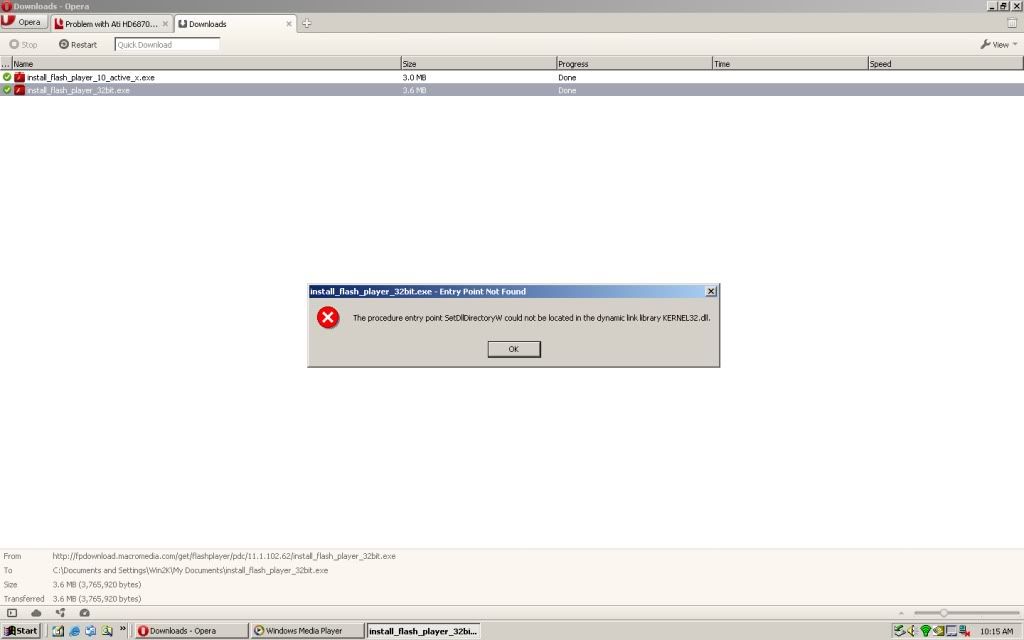 to be exact. Well, is there anything I can do? or am I stuck with running form Media Players Radio?

