bootmgr is missing

gnarkilljboy

New Member
I have just formated my pc, and reinstalled windows 7 ultimate. I can Boot into windows fine if I leave the windows 7 boot disc in the drive, but if i try and boot without it in, I get "BOOTMGR is missing, press ctrl+alt+del"

How do I fix this?
 
You will need to do a repair install of windows 7. If you have more than one hard drive in your system please remove the drive that you are not installing windows 7 to. Are you dual booting by chance?
 
Bootmgr

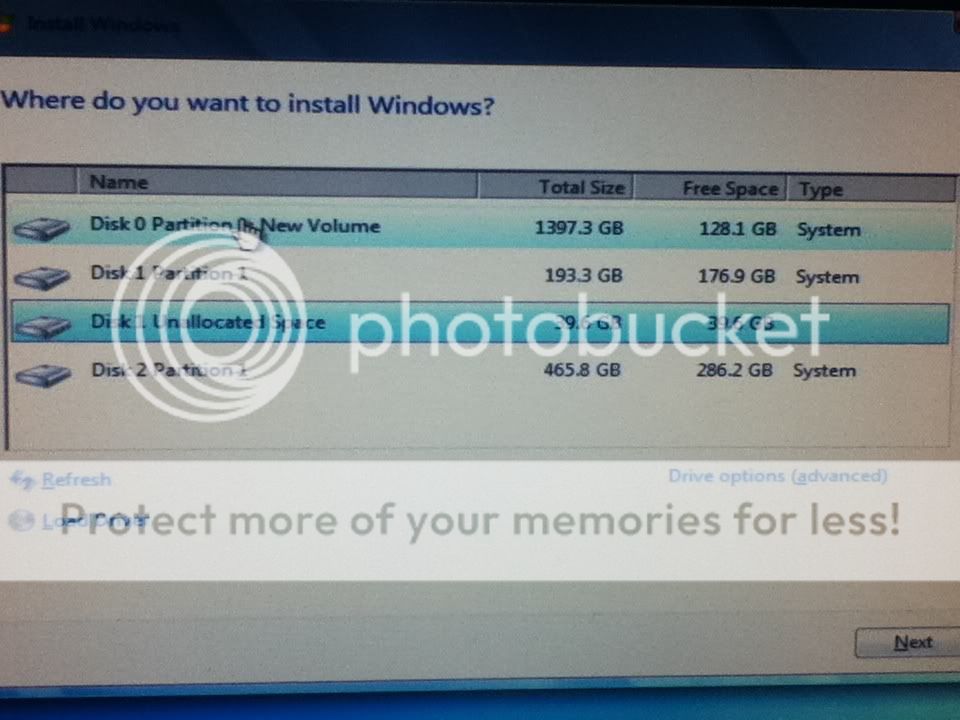
I used to have a dual boot to xp, but I deleted that as well. I have a 1.5TB hdd, a 250gb hdd, that I boot my windows from, and a 500gb hdd. The 250gb has a partition on it of 40gb that I used to have xp on. I have tried doin te repair, and the rebuild from the boot disc, and neither worked. I have to have the boot disc in to bypass the error, but I never had that error before when I had the dual boot.

Here is a pic if it helps:

f78f30cb.jpg


The disk 1 partition 1 is what I have win 7 installed to.
 
Last edited:
Well, it seems that your boot files were on a different drive and thats why it won't boot without the dvd in the drive. I would say remove all other drives and do a fresh install of windows 7.
 
I have tried that link before I posted, and it didn't work. I will try removing the other drives and then installing, after I get home from work. Why would it be installing stuff to other drives?
 
Back
Top