
Can this Be Deleted Safely?

sup2jzgte

New Member
What is this 18Gigs on my Hard Drive labeled as BACKUP? It came to brother that way from dell, is there anyway I can delete this and free it up the space?

The catcher is Dell did not ANY Cd's with this PC at all so if I have to format the entire drive I dont have anyway of putting the drivers back in or Windows. I have no clue where my XP CD went I still have my XP code, but my disk is gone. Anyone have any suggestions?
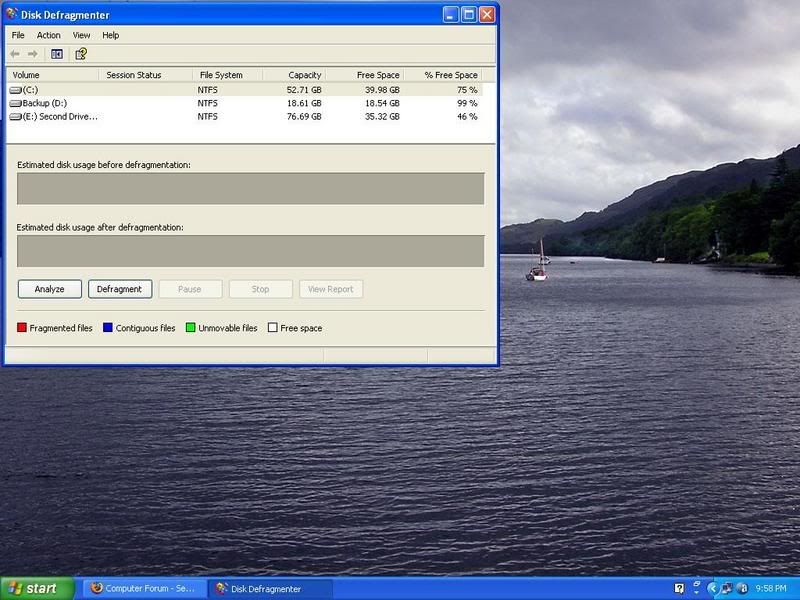

hd.jpg
 
Borrow a friend's XP CD and burn it, perfectly leagle. Then you can free up that 18 gigs.

None of my friends have an XP disk I asked every single one of them. See half of my friends are to dumb and stoned all the time to care about much and the other half Knows nothing about PC's. It kind of sucks being a jock that knows A LITTLE BIT about Pc's because all your friends turn out to either lack a functioning brain or dont give a damn about to much more than practice. The only reason I even got into computers is because I work behind all day and most of my day is boring to I decided to start a hobby and learn about PC's, so sadly I'm SOL so far.

IF someone has a spare disk to sell or not let me know. I dont need any codes or anything I still have all mine, just not the disk.


What about the Drivers for the MOBO? They didnt send me any disks
 
Drivers for anything probably up to ten years old could be found somewhere online, and I'm assuming you have a relitively newer computer, so it should be no problem.
 
That is the recovery partition Dell uses so that they can save the cost of shipping a recovery CD. I think the keys are CTRL + F11 during the BIOS screen to access it. I'm pretty sure it's CTRL + F# anyway, try them all, they also have a diagnostic system (I think that one is CTRL+F10)
 
That is the recovery partition Dell uses so that they can save the cost of shipping a recovery CD. I think the keys are CTRL + F11 during the BIOS screen to access it. I'm pretty sure it's CTRL + F# anyway, try them all, they also have a diagnostic system (I think that one is CTRL+F10)

SO does that drive hold my operating files that I use to run windows or can I delete that and still run the PC without having to reinstall everything?
 
You can delete it but you will be unable to restore your computer to factory defaults.

HMMM so what you are saying is if I delete it and there is an issue I'm SOL because Dell does not send Discs with the PC's Instead they take up 18 gigs of Space on your HD. On my last HP there was a feature that I could make back up disks, do you know if there is anyway I can do that with this?
 
I don't know of anyway and Microsoft would be of no help getting a windows CD either.
We called up Microsoft and we were informed by Willow at Microsoft that OEMs are responsible for providing their own CDs, that Microsoft only supports OEM CDs for companies that are currently out of business or that do not provide a disc – you can pay $45 for a replacement CD… except in the case where the company is on a list of multinational corporations. Dell is on that list, meaning Microsoft could not come to our aid. We were told that if Dell would not provide a disc, we would have to purchase the disc at retail
Dell sometimes can be pursuaded to mail you an OS disk as well as a software/driver disk that can restore the system, it can take a bit of work but it can be done (I've gotten a set free of charge even though they charge you $25 or something if you order them with your PC, I also got new RAM free :D) When I get home I can take a look at my laptop and see if the ghost image(s), dell system recovery (stripped version of ghost) and the diagnostic tool can be burned to CD/DVDs.
 
I don't know of anyway and Microsoft would be of no help getting a windows CD either.Dell sometimes can be pursuaded to mail you an OS disk as well as a software/driver disk that can restore the system, it can take a bit of work but it can be done (I've gotten a set free of charge even though they charge you $25 or something if you order them with your PC, I also got new RAM free :D) When I get home I can take a look at my laptop and see if the ghost image(s), dell system recovery (stripped version of ghost) and the diagnostic tool can be burned to CD/DVDs.

Yeah I know what you mean about MS I emailed them and got pretty much the same answer. It is annoying because I need that extra space because this pc is going have about 4 or 5 HD's in it and that is about it, just for storage. You would think that I'm asking them for activation codes, but all I want is the software I already have the Codes, just not the disk. I tried to open up the back up drive and I could not get into it, so I guess I'm just going to eat those crazy 18 gigs of valuable space :(
 
I would recommend not deleting it...just go through your harddrive and see what you can delete...look in places like temp. download folders in the Windows folder...there can sometimes be 10's of gigs worth of stuff there that you don't need....

Worst comes to worst, pick up another drive on Newegg...it's not like they're THAT expensive..I bought 2 250gb drives for about $150 (total) a few months ago...
 
I would recommend not deleting it...just go through your harddrive and see what you can delete...look in places like temp. download folders in the Windows folder...there can sometimes be 10's of gigs worth of stuff there that you don't need....

Worst comes to worst, pick up another drive on Newegg...it's not like they're THAT expensive..I bought 2 250gb drives for about $150 (total) a few months ago...

Yeah I know what you mean, its just hard to believe that 18gigs is being used for a few drivers and XP

On a side not I got through running avast and AVG through all my drives and guess what.....................Drive D my Backup partion is infected with 38 viruses, mostly trojens, but the annoying thing is Avast and AVG keep saying they cant be removed. I'm going to keep messing with it to see what I can do.
 
Ok so after emailed Dell and the BBB I received the following:

Operating System Disk

Drivers and Utilities Disk

So now my question is can I delete the Backup Partition now since I have the Windows and drivers disks?


On a side note, when push comes to shove and Dell is backed into a corner they work pretty dang fast. They my disks over night Fedex air to my door.
 
Yes, the CDs will restore everything like the recovery partition does.

Cool, just out of curiosity is there any real benefit to leaving the partition?


Now I'm not sure if this is a shady area or not, but since these disks are made for the Dell PC and I highly doubt I can install the Windows on some other system. Can I make a back up copy of these disks just incase I lose or break the originals?
 
Last edited:
The Dell XP disc is basically a stripped XP CD with a Dell logo stamped on it. They are usually locked to Dell PCs. I don't know what Dells license says about copying the discs but I'd imagine it says you can't.
 
The Dell XP disc is basically a stripped XP CD with a Dell logo stamped on it. They are usually locked to Dell PCs. I don't know what Dells license says about copying the discs but I'd imagine it says you can't.

Kind of figured, but I hope I can delete this partition without having to restore my whole pc
 
Back
Top