Cannot format c or boot windows

MastahUK

New Member
I originally had a virus that affected all the exe files on my PC, and now I cannot even boot windows - it starts to log in and then instantly logs out automatically. All I can do is enter safe mode, or the safe mode command prompt. I have everything backed up already, so I'd just like to know how I can access a DOS prompt after startup in order to format C.

When I've tried to format from within safe mode, is says something about the drive being used by another process, which I suspect is because windows is already operating on the drive I'm trying to format. Another problem is that I do not have a disk drive in my PC, and so cannot therefore enter a boot disk to load during startup. What other options do I have?
 
I was thinking of perhaps just replacing the hard drive completely, but thought I'd check here before I splurge out. Would replacing the internal hard drive essentially be the same as formatting the one I already have, thus fixing my problem?
 
ok so. just a couple of questions:

are you running a legit version of the OS your running?
i assume you are either running windows 98 or 95 seen as your talking about dos. (windows xp does not run dos).
all you need to do to format the disk is put the windows os disk in at boot-up; while the system is booting up, keep pressing F8. (its either F8 or F12) your system should then ask you if you want to enter setup, click yes and just follow the options on screen. I think it will ask you if you want to perform a quick format or a complete format. choose complete format. reinstall windows and go from there.

if this still dont solve your problem, i suggest the new hard disk thing.

though if your running a non-legit operating system, then i suggest formatting your hard disk, purchasing a legit version of windows, and installing that one.
 
I am running a legit version of Windows XP Home edition actually, but I moved to university and left my disk back at home! Since I'm a student though, I'm able to download Windows XP Professional for free and burn this to a CD. I've done this on somebody elses computer and have inserted the CD, but are you saying that I have to put the CD in as it is booting up? Because I did not do this. Currently it just seems to boot up normally despite the windows os disk being there.

You say about pressing F8.....I've done this but it just gives me options about safe mode, system restore (which had no effect) and a couple of other things I can't remember. It didn't mention anything about entering into setup though.
 
If you dont need the info on the drive you could use killdisk.
search at google.
download and put on floppy.
insert into computer
kill disk
ive used this many times for various reasons
 
Sounds good, except for the fact that I do not have a floppy disk drive on my PC as I mentioned in my first post. Is there another way I can use this killdisk thing? If not, I guess I'll buy a new hard drive tomorrow.
 
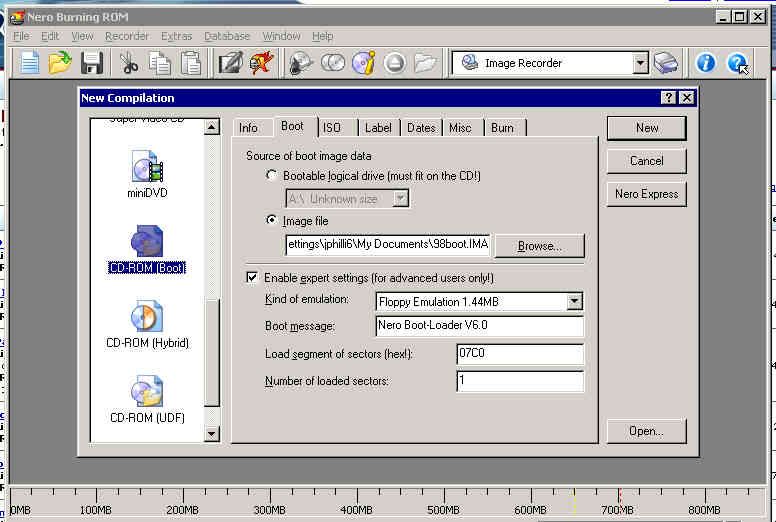
You just need to boot off a disk instead of your hard drive. You can use nero to burn a Windows 98 bootdisk on to a CD instead of a floppy. I happen to have a floppy image of it that nero can use to make a boot CD.

http://home.ripway.com/2005-5/305834/98boot.IMA


Just tell nero to burn bootable Cd and use this image.
It will use a portion of the CD to emulate a floppy disk. This portion will be the A: drive. If you had a physical floppy drive it would become B:.

You can put other files on this CD. But unless you boot with CD-ROM support you won't see them. They're not put on the floppy emulation portion of the CD so the rest of the CD gets its own drive letter.

The same thing can be done with a physical floppy disk as well by selecting bootable logic drive instead of image file. So if you had a killdisk floppy on another machine you could make a CD with it.

Here is a screen capture of Nero with the proper settings selected:
bootcd.jpg
 
i know this wont help but just a suggestion but have you trying making the computer read the windows disk when you turn on the computer that is if you want to reformat it
 
Back
Top