OK i have a problem on a site. it won't remember me on a site. all the other sites are fine except this one. as long as i don't close my browser I'm good but as soon as i do sol. I have put the site as a trusted site and still nothing and even reset my preferences. I'm using IE7 and have tried other browsers as well. none else seems to be having this problem on the site

You are using an out of date browser. It may not display this or other websites correctly.
You should upgrade or use an alternative browser.
You should upgrade or use an alternative browser.
Computer Help (IE7)
- Thread starter joker5656
- Start date

cohen
New Member
OK, it won't remember it in history??
Try this and see what it does, read it carefully as it will remove everything in the temporary folder!
*NOTE* CCleaner deletes EVERYTHING out of temp/temporary folders. If you have anything in a temp folder, back it up or move it to a permanent folder prior to running CCleaner!
Download CCleaner from here to clean temp files from your computer.
Download: CCleaner (freeware)
http://www.majorgeeks.com/download4191.html
Run the installer, and uncheck the option to install Yahoo toolbar (unless you want Yahoo toolbar).
Once installed, run CCleaner click the Windows [tab]
The following should be selected by default, if not, please select:
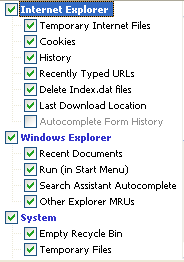
Next: click Options click the Settings tab
Uncheck: "Only delete files older than 48 hrs.", click Ok
Then click Run Cleaner (bottom right) then Exit
Try this and see what it does, read it carefully as it will remove everything in the temporary folder!
*NOTE* CCleaner deletes EVERYTHING out of temp/temporary folders. If you have anything in a temp folder, back it up or move it to a permanent folder prior to running CCleaner!
Download CCleaner from here to clean temp files from your computer.
- Double click on the file to start the installation of the program.
- Select your language and click OK, then next.
- Read the license agreement and click I Agree.
- Click next to use the default install location. Click Install then finish to complete installation.
- Double click the CCleaner shortcut on the desktop to start the program.
- On the "Windows" tab, under "Internet Explorer," uncheck "Cookies" if you do not want them deleted. (If deleted, you will likely need to reenter your passwords at all sites where a cookie is used to recognize you when you visit).
- If you use either the Firefox or Mozilla browsers, the box to uncheck for "Cookies" is on the Applications tab, under Firefox/Mozilla.
- Click on the "Options" icon at the left side of the window, then click on "Advanced."
deselect "Only delete files in Windows Temp folders older than 48 hours." - Click on the "Cleaner" icon on the left side of the window, then click Run Cleaner to run the program.
- Caution: It is not recommended that you use the "Issues" feature unless you are very familiar with the registry as it has been known to find legitimate items.
- After CCleaner has completed its process, click Exit.
Download: CCleaner (freeware)
http://www.majorgeeks.com/download4191.html
Run the installer, and uncheck the option to install Yahoo toolbar (unless you want Yahoo toolbar).
Once installed, run CCleaner click the Windows [tab]
The following should be selected by default, if not, please select:
Next: click Options click the Settings tab
Uncheck: "Only delete files older than 48 hrs.", click Ok
Then click Run Cleaner (bottom right) then Exit

GameMaster
New Member
Lol that way he won't be remembered on any sites 
Try importing cookies, it's kinda complicated, maybe someone else knows more about it...
Try importing cookies, it's kinda complicated, maybe someone else knows more about it...

GameMaster
New Member
Use Firefox!! It is much better at keeping track of your passwords. You can even set a Master Password.
Alright after you see:
a) Another good user post an answer
and
b) A thanks and good bye post
YOU: DON'T POST, SHUT UP.
Ok ? You're ruining and hijacking every thread on Security and every thread on this forum and I mean like EVERY.
Guys, don't.
I can't believe I received an infraction for every little ****ing wrong detail I posted but you guys are miracles, you can post more than 4000 posts in 2 months arguing and everything and you will never ever get an infraction. Sucks.