Computer not recognizing Hard Drive

Jdsmitty10

New Member
Hello,
New to the forum.

I had an HP laptop running windows vista go dead on me which turns out it was probably the motherboard from what the symtoms are and what I read online.

I have a desktop running windows xp. In my research I found that I could get a SATA hard drive enclosure and access my laptop files on my desktop.

I bought an enclosure and installed the hard drive but when I plug it in to my desktop computer I cannot locate the drive anywhere.

I have checked in My computer and in disk management. Nothing in either area. I have tried on my work computer also an cannot get it to recognize the hard drive.

When plugged in the light comes on on the enclosure and I can hear the hard drive spinning but the computer doesn't even show that something was plugged in. I have tried multiple usb ports and both types of cables that came with the enclosure.

My questions are
1. Does it not showing up mean the hard drive is shot?
2. Is there any thing i can do to make my computer recognize the hard drive?


Any help is MUCH appreciated as there are ALOT of pictures of our little ones on that hard drive which I backed up with Norton but can't seem to access those back up files(if anyone has pointers on that that would be great too).

Thanks,
Jon
 
i think becuz it's oem system, hp drive will only work on the laptop it was installed in
and vice versa, i have a hp laptop too and wanted to install a cloned ssd from hp hdd, did not work
hopefully someone else can help you, and with better news, it wud help too if you had
original install disk, some mdls didn't come with one, regards
 
i think becuz it's oem system, hp drive will only work on the laptop it was installed in
and vice versa, i have a hp laptop too and wanted to install a cloned ssd from hp hdd, did not work
hopefully someone else can help you, and with better news, it wud help too if you had
original install disk, some mdls didn't come with one, regards

No, thats not true. Of course a cloned drive will not work in a different system then what the original drive was in.

Jdsmitty10,

Since this is a sata hard drive, just connect it to your system like a regular hard drive and take the external case out of the equation. You may have a bad external case. All you need to do is connect a sata power and data cable to it. If you still can't access the drive then the drive is most likely shot.
 
i have a kingston ide to sata usb plug in i just tried it, drive shows up when i click start then computer and it show as drive p:removable disk - i can then read files on harddrive.
 
i have a kingston ide to sata usb plug in i just tried it, drive shows up when i click start then computer and it show as drive p:removable disk - i can then read files on harddrive.

There is one other port on the enclosure I have not tried since I don't have the right cable for it. Maybe it is a sata plug? I could snap a pic when I get home
 
No, thats not true. Of course a cloned drive will not work in a different system then what the original drive was in.

Jdsmitty10,

Since this is a sata hard drive, just connect it to your system like a regular hard drive and take the external case out of the equation. You may have a bad external case. All you need to do is connect a sata power and data cable to it. If you still can't access the drive then the drive is most likely shot.

So is this possible with a 2.5" laptop drive in a desktop?
 
So is this possible with a 2.5" laptop drive in a desktop?

Yes, the size doesn't matter. Like I said all you need to do is connect a power and data cable and it will work. The size of the connectors are the same for 2.5 and 3.5 drives.
 
Yes, the size doesn't matter. Like I said all you need to do is connect a power and data cable and it will work. The size of the connectors are the same for 2.5 and 3.5 drives.

Do you recommend this over buying and trying another enclosure? This one is brand new
 
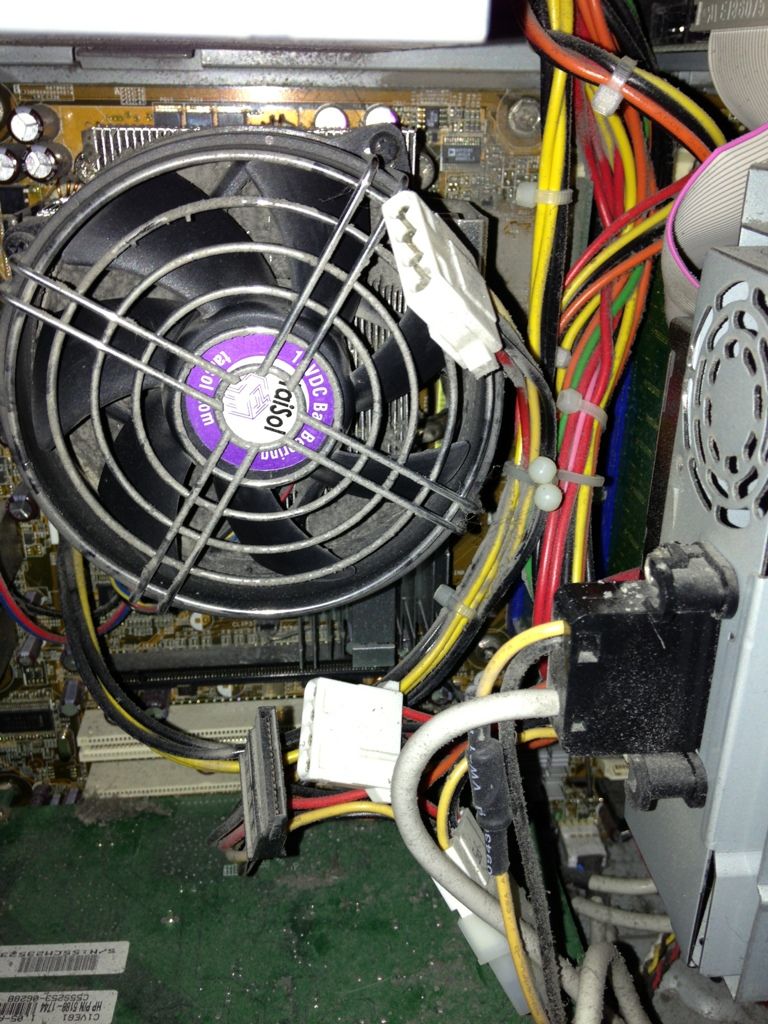
Can you tell me if I need a power cable or just a sata cable by looking at these pics?
Is this a spare power plug?
45F0FD8A-7FC4-4CDB-887A-234FCF832F2A-4032-000001F0ACF7C48F.jpg


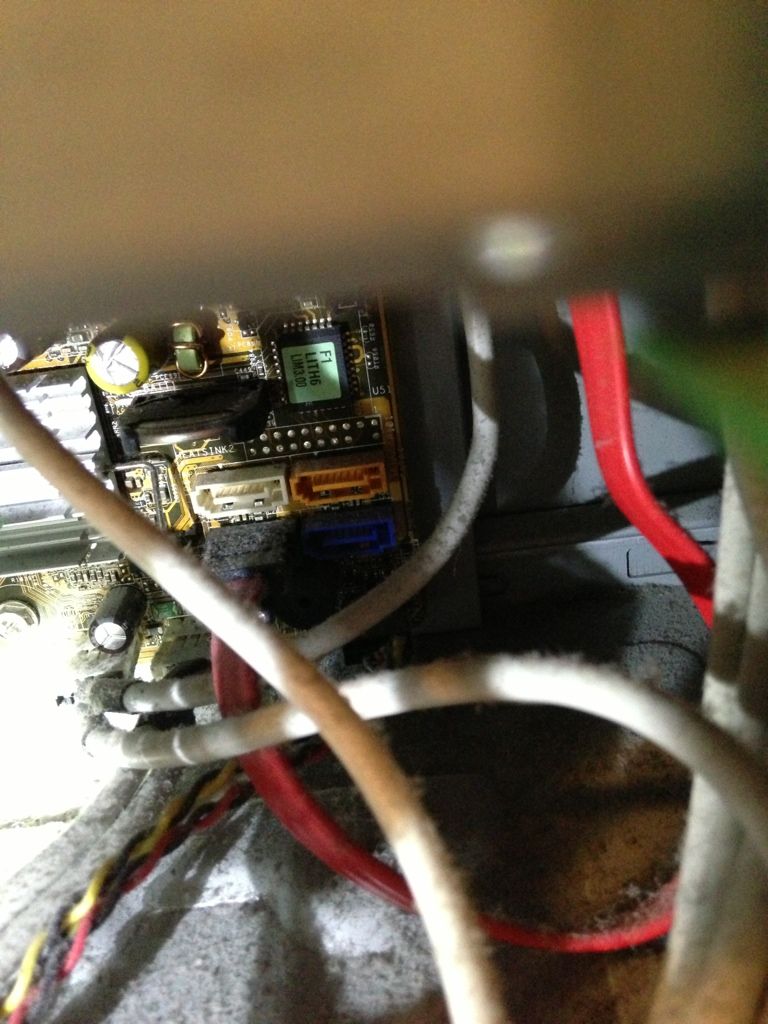
And does it matter which port I plug the sata cable to looking at this pic?
Is there a certain order they should be used?
78C81826-9E78-4CD1-BF67-8C50AB036B24-4032-0000020377E9A004.jpg


I just ordered another enclosure and a sata cable from Walmart. I am assuming the one plug in the first pic is a spare power for the drive as it goes from that black plug to I think the power source. I will try the second enclosure and if that doesn't work I will try direct install. If that doesn't work I guess my drive is shot eh? How can I tell if it is for sure? Is there a way
 
Not sure why you bought another external when all you have to do is hook up like a regular drive. Yes, the black plug next to the white one is a sata power plug and you can plug the sata data cable into any of those sata ports.
 
Not sure why you bought another external when all you have to do is hook up like a regular drive. Yes, the black plug next to the white one is a sata power plug and you can plug the sata data cable into any of those sata ports.

I bought an enclosure only because I was making an order site to store at Walmart and wanted to have all possible things this time and don't want to order again and wait. But I am leaning toward a direct install but not sure yet cause it would be nice to use as an external hard drive
 
Well the new enclosure came and I am accessing files!!! I am going to use te enclosure over install it inside the comp since this desktop is ready to be upgraded with a new comp so I will keep the enclosure as and external HD.. Thanks everyone for the suggestions! It appeared instantly this time. First enclosure must of been junk.
 
Good to hear. Just make sure you take a can of compressed air and blow out that case and heatsink/fan, you have a lot of dust inside there.
 
Good to hear. Just make sure you take a can of compressed air and blow out that case and heatsink/fan, you have a lot of dust inside there.
I hear ya. It was quite a mess in there. So just open it up and use a can of compressed air? What about my air compressor on a low psi?
 
Don't use an air compressor as it could have a lot of moisture in the line. Just use a can of compressed air and keep the can upright so you don't spray liquid out. When spraying the heatsink/fan area hold the fan so it don't overrpm and break.
 
Back
Top