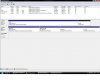
Hi, I currently have winxp pro, ubuntu, and vista business 64 bit triple booted on my PC. A view of my partitions in the vista disk management is attached.
I have transferred all my important files from the xp partition to the vista partition, and would now like to delete, reformat, and reinstall xp on the xp partition, since my xp installation is corrupted.
However, as shown in the picture, it lists the xp partition as being the system partition, and when trying to reformat or delete the partition, I get an error message, saying I'm unable to do it.
I think this has something to do with the boot information being stored on the xp partition but I'm not sure.
Could someone give me a little step by step of how to go about this?
The second thing I wanted to do was to have a single bootloader for all three operating systems, and memtest86+. Currently I'm faced first with the GRUB loader, from which I select windows vista longhorn loader, and within that I can select vista, or 'earlier version of windows (winxp). Is it possible to combine all bootpaths into a single bootloader? If so how?
Thanks alot
I have transferred all my important files from the xp partition to the vista partition, and would now like to delete, reformat, and reinstall xp on the xp partition, since my xp installation is corrupted.
However, as shown in the picture, it lists the xp partition as being the system partition, and when trying to reformat or delete the partition, I get an error message, saying I'm unable to do it.
I think this has something to do with the boot information being stored on the xp partition but I'm not sure.
Could someone give me a little step by step of how to go about this?
The second thing I wanted to do was to have a single bootloader for all three operating systems, and memtest86+. Currently I'm faced first with the GRUB loader, from which I select windows vista longhorn loader, and within that I can select vista, or 'earlier version of windows (winxp). Is it possible to combine all bootpaths into a single bootloader? If so how?
Thanks alot