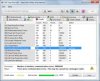
Extremely High HDD CRC Error Count

zacharyb

New Member
Today I decided to run a drive health check on my HDD that shipped with my Dell Studio XPS 1645. Everything checked good except the "Ultra DMA CRC Error Count" which came to an astonishing value of 39968904 and increases with each check of the drive (~2 minutes). The drive in question is a Toshiba MK5056GSYF 500GB 2.5" SATA drive. The drive has not given me any read errors and Windows has not flagged it as a problem as of yet. The screenshot of the drive diagnostic is below for any non-believers!

http://tinypic.com/r/2d8kvoo/7

My question, is this an error on the HDD Diagnostic utility or do I actually have a problem with the drive? I'm trying to decide whether to go through the Dell Hell Customer Service Line to get a fix since i'm still under warranty.
 

Attachments

  • 12-April-2011_17-21.jpg
    12-April-2011_17-21.jpg
    19.3 KB · Views: 1,746
I would run a hard drive error check using Windows check disk.

To use check disk do the following:

Hold down the Windows key and then press "E." Right click the drive you wish to check and left click "Properties." Left click the "Tools" tab and under Error Checking left click "Check Now . . ."

See if that diagnostic tool finds any errors.
 
Here is my chkdsk data, I didn't see anything abnormal but maybe you see something?

TimeCreated : 4/12/2011 8:28:34 PM
Message :

Checking file system on C:
The type of the file system is NTFS.
Volume label is OS.


A disk check has been scheduled.
Windows will now check the disk.

CHKDSK is verifying files (stage 1 of 3)...
Cleaning up instance tags for file 0x22792.
418560 file records processed.
File verification completed.
435 large file records processed.
0 bad file records processed.
0 EA records processed.
60 reparse records processed.
CHKDSK is verifying indexes (stage 2 of 3)...
501036 index entries processed.
Index verification completed.
0 unindexed files scanned.
0 unindexed files recovered.
CHKDSK is verifying security descriptors (stage 3 of 3)...
418560 file SDs/SIDs processed.
Cleaning up 1289 unused index entries from index $SII of file 0x9.
Cleaning up 1289 unused index entries from index $SDH of file 0x9.
Cleaning up 1289 unused security descriptors.
Security descriptor verification completed.
41239 data files processed.
CHKDSK is verifying Usn Journal...
34289552 USN bytes processed.
Usn Journal verification completed.
CHKDSK discovered free space marked as allocated in the
master file table (MFT) bitmap.
CHKDSK discovered free space marked as allocated in the volume bitmap.
Windows has made corrections to the file system.

472985397 KB total disk space.
125798012 KB in 263255 files.
135276 KB in 41240 indexes.
0 KB in bad sectors.
533949 KB in use by the system.
65536 KB occupied by the log file.
346518160 KB available on disk.

4096 bytes in each allocation unit.
118246349 total allocation units on disk.
86629540 allocation units available on disk.

Internal Info:
00 63 06 00 7b a5 04 00 4f 20 08 00 00 00 00 00 .c..{...O ......
a8 0a 00 00 3c 00 00 00 00 00 00 00 00 00 00 00 ....<...........
00 00 00 00 00 00 00 00 00 00 00 00 00 00 00 00 ................

Windows has finished checking your disk.
Please wait while your computer restarts.
 
From my perspective it appears that Windows check disk fixed some errors but the hard drive looks fine. I would run another check disk in a week to make sure there is nothing wrong with your hard drive.

Be sure to back up all your valued data to a separate storage device. It will prevent you from losing important information in the future.
 
I seem to remember this check being somewhat less useful than the others, this is what I've found about it. Take it for what you will, it doesn't mean it's useless but it doesn't necessarily mean there is a problem. As 2048 said, that check disk showed some minor hiccups but nothing serious.
This parameter is considered informational by the most hardware vendors. Although degradation of this parameter can be an indicator of drive aging and/or potential electromechanical problems, it does not directly indicate imminent drive failure. Regular backup is recommended. Pay closer attention to other parameters and overall drive health.
 
Last edited:
Okay guys, tonight Dell started running its monthly hardware test and it failed my hard drive test during the surface scan. Would you say its time to give Dell tech support that call? I just wanna avoid time without my PC, i'm a college student and finals are in two weeks and, well, laptops have become essential for notes and such.


Dell Support Center Log File

Thursday, April 14, 2011 1:32:10 AM
Overall Result: Failed

TOSHIBA MK5056GSYF ATA Device
Vendor: Toshiba

Model Number: TOSHIBA MK5056GSYF

Serial Number: 307UT0DET

Firmware Revision: LJ001D

Size: 465.8 GB

Cache Size: 16 MB

Temperature: 44 C

Physical Sector Size: 512 B

Logical Sector Size: 512 B

Logical Sector Count: 976773168

Supported Standards: ATA8-ACS, ATA/ATAPI-7, ATA/ATAPI-6, ATA/ATAPI-5

OS - C:
File System: NTFS

Volume Serial Number: 4E46-78A9

Volume Capacity: 451.07 GB

Volume Free Space: 326.28 GB

Volume Used Space: 124.79 GB


SMART Status Test
Test Started 4/14/2011 1:16:51 AM
Test Finished: Passed 4/14/2011 1:16:53 AM


SMART Thresholds Test
Test Started 4/14/2011 1:16:53 AM
Test Finished: Passed 4/14/2011 1:16:55 AM


Targeted Read Test
Test Started 4/14/2011 1:16:55 AM
Test Finished: Passed 4/14/2011 1:16:59 AM


Random Seek Test
Test Started 4/14/2011 1:16:59 AM
Test Finished: Passed 4/14/2011 1:17:55 AM


Funnel Seek Test
Test Started 4/14/2011 1:17:55 AM
Test Finished: Passed 4/14/2011 1:19:20 AM


Surface Scan Test
Test Started 4/14/2011 1:19:20 AM
Test Finished: Passed 4/14/2011 1:22:42 AM


Surface Scan Test - 2
Test Started 4/14/2011 1:22:42 AM
Error Message: There was an error reading sector 961701661. 4/14/2011 1:25:06 AM
Error Message: There was an error reading sector 961702543. 4/14/2011 1:25:46 AM
Error Message: There was an error reading sector 961703425. 4/14/2011 1:26:23 AM
Error Message: There was an error reading sector 961704307. 4/14/2011 1:27:02 AM
Error Message: There was an error reading sector 961705189. 4/14/2011 1:27:40 AM
Error Message: There was an error reading sector 961707142. 4/14/2011 1:28:23 AM
Error Message: There was an error reading sector 961708024. 4/14/2011 1:28:58 AM
Error Message: There was an error reading sector 961708906. 4/14/2011 1:29:43 AM
Error Message: There was an error reading sector 961709788. 4/14/2011 1:30:27 AM
Error Message: There was an error reading sector 961709851. 4/14/2011 1:31:30 AM
Error Message: Maximum errors of 10 exceeded. Canceling test. 4/14/2011 1:31:30 AM
Test Finished: Failed 4/14/2011 1:31:32 AM


SMART Extended Self Test
Test Not Started 4/14/2011 1:16:50 AM


SMART Thresholds Test - 2
Test Not Started 4/14/2011 1:16:50 AM


Product Version: 3.0.5744.02

 
Have you copied all valued data to a separate storage device yet? It sounds to me like you may be in for problems with this hard drive. Your data that is not backed up is in danger of being lost.

I would wait until after your finals before you call Dell if you cannot live without your laptop.
 
Dell is sending a "technician" to replace the hard drive for me (apparently i'm not qualified enough for them to just send me the hardware and let me install it). Data is backed up on my new 2TB External HDD (knew it would come in handy for something!). But, on the bright side, I won't even have to send my computer off to them. I know that extended warranty with in-home service would come in handy for something!!! Thanks for your guidance guys, you've been a great help.
:good::good:
 
Back
Top