Hard Disk failure HELP!!

memooo

New Member
I have windows 7 x86 Ultimate
My 2TB WD harddisk yesterday suddenly didn't work, when i restart my pc it shows unknown and it wants me to initialize......
i didnt do anything not even format, and i want to accesses the HDD and take a very important files
is there anyway to fix the HDD without formatting or partitioning the HDD ?
heres the 2 pics
i need help :(

free image hosting


gif image hosting
 
As I can see,your HDD is not even initialized.
You must initialize it in order to use it.

You said you did not do anything.Tell me something...how do you disconnect that HDD from the computer?
Do you just disconnect it on force or do you use the SAFE REMOVE HARDWARE option?
Also what was the last thing you did on that HDD and how did you disconnect it the last time?

Try this first:

Boot from the Windows CD disk and go to the Recovery Console.If in there you can see that HDD including it's drive letter (let's say it's "Z:") then check the disk for errors.Use this syntax to fix it:

chkdsk.exe Z: /f /r /x /v


Also try to access that HDD using Linux Ubuntu.Just boot Ubuntu from the CD-ROM disk and then when it's loaded,try to access that HDD.


Report back with the results.


Cheers!
 
I agree with what S.T.A.R.S. suggested with using an Ubuntu disk.

Use the Ubuntu installation disk to get access to your hard drive with problems. Do not use the disk to install. Just use the option try Ubuntu without installing it.

Once you have done this you can also connect an external hard drive to your system and move the desired files to the external drive.

If you have any questions just ask.
 
it was initialized and working but my computer hanged and i had to reset it, after that its given me exactly whats in the picture, i don't want to initialize it so the data wont be lost.

how to use the recovery console?
and im downloading Ubuntu now to try it and see what will happen, because i want to access data without initialize or format
 
I would download the western digital drive diagnostic to a cd and boot to a cd and do the long extended test to see if there are errors on the drive that has screwed up the partition table on it.
 
how to use the recovery console?
and im downloading Ubuntu now to try it and see what will happen, because i want to access data without initialize or format

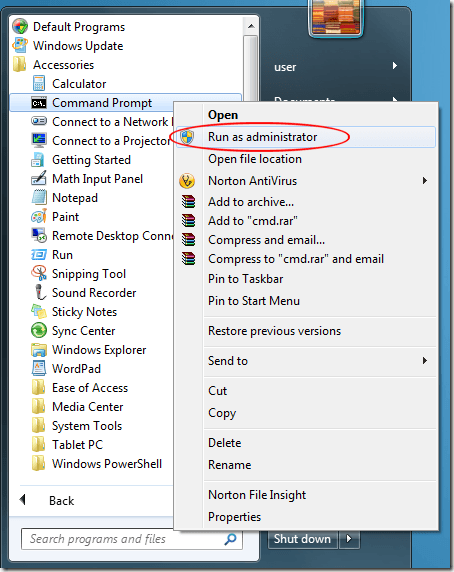
Recovery console:
Windows7CommandPromptRunasAdministrator_thumb.png


Ubuntu:
Places-Computer.png


Then locate your HDD:
ubuntu_config_02.png
 
Western Digital makes a lot of quality hard drives. Seagate and Samsung also make some great models of hard drive disks.
 
Recovery console:
Windows7CommandPromptRunasAdministrator_thumb.png


Ubuntu:
Places-Computer.png


Then locate your HDD:
ubuntu_config_02.png

sorry for late reply .... busy :D
i tryed ubuntu and its not showing my HDD
what i did, i intialize my hdd on windows 7 (without formating it), then i boot ubuntu without installing it, after that its not showing me the HDD i initialize it
where did i go wrong?
 
Last edited:
Back
Top