
hd partition question

wiZ

New Member
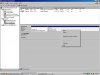
hey guys first of all im a noob so sorry if this is a stupid question. im just wondering what that "31 MB FAT"(see pic) is and how come when i right click drive c theres no option to make partition?
im not really trying to create partitions on my hard drive right now just curious and i want to learn how all this computer stuff works.
thanks
 

Attachments

  • hdpartition.JPG
    hdpartition.JPG
    93 KB · Views: 86
What kind of computer do you have? Companies like Dell usually have a small FAT partition that contain bootable diagnostic software.

As far as creating new partitions in Windows, if the primary partition is as big as the drive, you cannot create a new one. You would have to shrink the current partition. Only Windows 7 (and Vista I think) have that ability.

In your case if you wanted to shrink it, you'd download and burn a LiveCD of G-Parted and shrink your main partition. You can then go back into Windows (or even do it in GParted) and create a new partition with the desired file system.
 
What kind of computer do you have? Companies like Dell usually have a small FAT partition that contain bootable diagnostic software.

As far as creating new partitions in Windows, if the primary partition is as big as the drive, you cannot create a new one. You would have to shrink the current partition. Only Windows 7 (and Vista I think) have that ability.

In your case if you wanted to shrink it, you'd download and burn a LiveCD of G-Parted and shrink your main partition. You can then go back into Windows (or even do it in GParted) and create a new partition with the desired file system.

yes i have a dell optiplex 170l. some questions id like to ask:

a.) what is the purpose of the FAT partition?
b.) so you cant create partitions using the disk management tool in windows xp?
c.) lets say i want to create partitions with my drive c right now, is that going to erase the data i have in that drive?
 
yes i have a dell optiplex 170l. some questions id like to ask:

a.) what is the purpose of the FAT partition?

Like I said before, it's most likely diagnostic software. You can access it on boot up by pressing F12 at the Dell splash screen and selecting "Diagnostics".

b.) so you cant create partitions using the disk management tool in windows xp?

As I said before, if you don't have any space left on the drive, then you cannot create anymore partitions. However, if you had a slave drive that was completely blank, you could create as many partitions in whatever size you want.

c.) lets say i want to create partitions with my drive c right now, is that going to erase the data i have in that drive?

Also as I said before, you don't have any space to do so. Depending on how much space you currently have taken up on your current partition ( I see you have a little over 8GB of free space left), you could use GParted to shrink the current partition and create another partition on the same drive. Windows will not allow you to delete the partition that has the current version of Windows running on it because otherwise nothing would happen. There is always a chance that GParted can screw up and you can lose your data, but it's fairly rare, and GParted is a good program.
 
Last edited:
Like I said before, it's most likely diagnostic software. You can access it on boot up by pressing F12 at the Dell splash screen and selecting "Diagnostics".


As I said before, if you don't have any space left on the drive, then you cannot create anymore partitions. However, if you had a slave drive that was completely blank, you could create as many partitions in whatever size you want.


Also as I said before, you don't have any space to do so. Depending on how much space you currently have taken up on your current partition ( I see you have a little over 8GB of free space left), you could use GParted to shrink the current partition and create another partition on the same drive. Windows will not allow you to delete the partition that has the current version of Windows running on it because otherwise nothing would happen. There is always a chance that GParted can screw up and you can lose your data, but it's fairly rare, and GParted is a good program.

lol sorry for the annoying questions but thank you very much for answering them. im learning a lot from this forum. thanks again
 
Back
Top