HDD death, reinstalling windows 7 issue

7immyJ

New Member
I apologize ahead of time if this is in the wrong section. I have no idea where the problem is.

I'm very new to this. I did buy my PC piece by piece and put it together and it worked! :) Eventually though, my hard drive just died on me(bad sectors). Just got the new one and I'm trying to load up windows 7 and it's telling me "No device drivers were found. Make sure that the installation media contains the correct drivers, and then click OK.". This is the same disc I used to instal it the first time without any problems. I can't click format or new until I load the drivers. I looked this up and found a tutorial telling me to download Gparted and delete all devices other than the hard drive. I watched him do this and then when he loaded windows boot disc again, it recognized his hard drive. I can't get to this step though. In Gparted, when I try to load devices, I get a "Libparted Bug Found - Invalid partition table - recursive partition on /dev/srO" I'm in over my head. I'll add this piece of info too if in case it helps, but I doubt it. The device it is showing in Gparted only says 133.00 MB and my hard drive is 500 GB

The goal is just to reinstall windows. If you have any ideas on what I could attempt to do before having to pay for someone else to figure it out, it would be greatly appreciated as I am broke beyond belief! Plus, I like to learn these things, sort of a masochist like that. but like I said...very new to anything beyond putting it together.

Thanks, Tim.
 
It seems there is a partition on the drive somehow. Do you have another system so that you can put this drive into and delete the existing partitions? Windows 7 installer should see the drive just fine unless you are running a raid setup in the bios. If the sata controller is set to ahci or IDE the installer will see the drive.
 
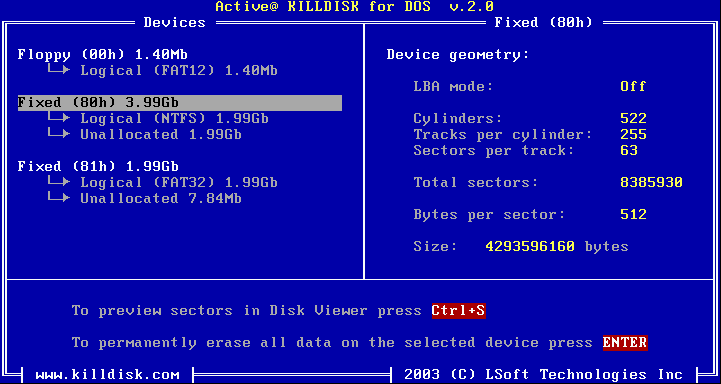
Have you tryed using DOS tool called KILL DISK to completely erase the drive and THEN try to install Windows 7?
Killdisk.gif
 
I googled raid and no, haven't done that. This is a brand new HDD and the only one, opened it and plugged it in...no clue how it would have something on it unless when I attempted to load windows it put something on it. When my HDD died a stick or ram went with it(says the guy at the comp repair place, don't know if he was just trying to sell shit though) Could I have a virus that is somewhere other than the HDD? I know nothing about viruses so I don't know what they can get in to.

I have not tried any MSDOS tool, I will download that and try now. I'll post once I've done this.

Thanks so much for the replies guys. Seriously hope it's not a virus. I had bitdefender, but like I said, don't know what viruses are capable of.

EDIT...I can't use that DOS tool. I don't have another PC to hook it up to unless there is some type of USB wire I can purchase to hook the HDD up to this laptop that I'm on now. I'll look in to that now.

I'm also going to read on how to check this "If the sata controller is set to ahci or IDE the installer will see the drive. "
 
Last edited:
No, a virus won't cause this. Check your bios settings for the sata controller setting. Make sure it says AHCI or IDE
 
Alright, my BIOS main screen is stretched so I can't see much. The buttons on the monitor don't help to resize it. I got into advanced mode though and my sata settings are...

OnChip SATA Channel - Enabled
SATA Port1 - Port4 - AHCI
SATA Port5 - Port6 -AHCI
S.M.A.R.T. Status Check Enabled
SATA ESP on PORT1 - Disabled
SATA ESP on PORT2 - Disabled
SATA ESP on PORT3 - Disabled
SATA ESP on PORT4 - Disabled

Also, something that scares me. In my BIOS Advanced screen I'm gettin' like 8 bit nintendo graphic scribbling behind the options listed above. I'm going to attach a screen shot. May just be normal...guess I didn't really have to type all that out. lol
 
Last edited:
Your sata ports look configured correctly. I would be concerned with the artifacting going on. Usually signs of bad video card or ram. Can you try a different video card or different ram?
 
I was planning on ordering another 8 gigs of ram since he told me that one stick had failed. I really hope it's not the graphics card though, I can't afford another atm.

Is it safe to remove one stick, reboot, see if the graphics are fixed, if not, replace and remove the other and do the same? If not, I will purchase the ram and wait for them to get here, then get back to you. I have 8 gigs(two sticks).

Could this be causing the driver error though?

EDIT - Also the guy at the PC repair place forgot his boot disc in my rom, so I'm not sure if I can check the issue with this.
 
Last edited:
Bad ram could cause this issue. Why don't you download and create a memtest cd to run diagnostic on your memory?


http://www.memtest86.com/downloads/memtest86-iso.zip

Download this zip file, unzip it, then use software that will write iso images to a cd and then boot to the cd to test your ram.

You can also borrow a video card from someone to diagnose your card. What video card and make and model of power supply do you have?
 
Graphics card = msi cyclone 2 n550 gtx-ti

Power supply = Ocz 600W model ocz600mxsp

I don't have anyone to borrow a graphics card from.

I'm going to burn that program with poweriso now.
 
Here's what it has so far. Not sure if the test repeats, so I figured I'd just give an update.
 

Attachments

  • photo.jpg
    photo.jpg
    73.1 KB · Views: 45
Looks like you have bad memory. You can run memtest on each individual stick to find the bad one. Memtest will keep running until you stop it. But you want to run a few passes on each stick just to make sure.
 
Alright, I'm going to do that tonight and find the bad one, then try again to install Windows and see if it changes anything.

Thanks a lot for the help! :D I'll post once all that is done.
 
I ran two passes on one stick with no errors, but graphics are still messed up like that in BIOS and Windows still doesn't recognize the hard drive. "Insert floppy or CD with drivers" Something along those lines. Can't unplug the graphics card 'cause my monitor plugs in to it. :( ::shrugs:: Any other ideas before I give in and bring it to the shop?
 
So you only have 1 stick of ram installed to test? If so then your only other possibility is a bad video card or motherboard.
 
Wait you said that you cannot see everything in BIOS because the image is stretched out.
This can happen sometimes and usually pressing the AUTO button on the monitor will automatically adjust the image to the correct borders and you should be able to see everything.

Also have you tryed a different monitor if the above did not help?

Have you tryed to load BIOS optimal defaults and then save changes to CMOS?

If your video card has more than one video port,have you tryed others as well?

If your monitor has more than one video port,have you tryed others as well?


So try that first BEFORE even considering buying a new video card.

As for HDD,Windows MUST be able to detect it and install on it.Unless if the HDD is bad,but you said it's not...you said you just got a new one so it MUST work.

As for the KILL DISK,you do NOT need to hook the drive on USB port to be able to erase it with KILL DISK.Just connect it in the computer's motherboard like you did and erase it that way.Of course be sure that both cables are plugged in...the POWER cable and the SATA (data) cable.
 
::face palm:: I didn't want to return to tell you this, but it will stay on my mind if I don't. Thank you John for all the help man. I hope you both have a sense of humor and don't hate me for this...lol STARS, you're the man. Thank you for knowing how stupid people are. LOL I feel I must say that this doesn't carry over to the rest of my life, well, not everywhere! Everyone is stupid about something...so here it is...forgot to plug the power into the HDD :eek: ...there's soooo many wires in there man! rofl (out of embarrassment). I just got off the phone with best buy $70 just to check the PC out. Figured I'd stop by here one more time before I did that. Oh man...I'll stop my rambling now. THANK YOU BOTH!!! Windows recognizes the HDD, reinstalling now and buying some new ram.

Is this the dumbest post ever? :confused:
 
::face palm:: I didn't want to return to tell you this, but it will stay on my mind if I don't. Thank you John for all the help man. I hope you both have a sense of humor and don't hate me for this...lol STARS, you're the man. Thank you for knowing how stupid people are. LOL I feel I must say that this doesn't carry over to the rest of my life, well, not everywhere! Everyone is stupid about something...so here it is...forgot to plug the power into the HDD :eek: ...there's soooo many wires in there man! rofl (out of embarrassment). I just got off the phone with best buy $70 just to check the PC out. Figured I'd stop by here one more time before I did that. Oh man...I'll stop my rambling now. THANK YOU BOTH!!! Windows recognizes the HDD, reinstalling now and buying some new ram.

Is this the dumbest post ever? :confused:

Every peace of hardware needs power to run lol. :D

What happened to you was that Windows saw the drive's logic/circuit board which was connected with the SATA wire to your motherboard,but could not read/write anything from the platters because they were not spinning since the POWER cable was not plugged in lol.
 
Back
Top