Help need urgent help clearing computer.

chriswade

New Member
Hey
last night my computer had a fit while i was on the internet. basically i cant open anything. if i try clicking a desktop icon it comes up with the (which program would you like to open this application with) screen and then fails. if i try opening something like control panel or any folder it comes up with windows explorer has stopped working so i cant do system restore or anything. ive tried restarting the comp and hitting f8, f9, f11 and the only one ive found is repair system, when i hit that it takes me to windows log in screen and thats it. it recognises no password or username. i dont mind clearing everything off it just i dont know how now.

im really lost for options now so if anyone can help that would be amazing.

oh and im using windows vista home premium.
 
Sounds like you got hit my malware. Can you boot into safe mode and run things normally? Boot into safe mode by pressing the f8 ket on bootup and select safe mode with networking. I would then start by scanning for malware using the following procedure.

Please download Malwarebytes' Anti-Malware from here or here and save it to your desktop.
  • Double-click mbam-setup.exe and follow the prompts to install the program.
  • At the end, be sure a checkmark is placed next to
    • Update Malwarebytes' Anti-Malware
    • and Launch Malwarebytes' Anti-Malware
  • then click Finish.
  • If an update is found, it will download and install the latest version. Please keep updating until it says you have the latest version.
  • Once the program has loaded, select Perform quick scan, then click Scan.
  • When the scan is complete, click OK, then Show Results to view the results.
  • Be sure that everything is checked, and click Remove Selected.
  • A log will be saved automatically which you can access by clicking on the Logs tab within Malwarebytes' Anti-Malware

If for some reason Malwarebytes will not install or run please download and run Rkill.scr, Rkill.exe, or Rkill.com. If you are still having issues running rkill then try downloading these renamed versions of the same program.

EXPLORER.EXE
IEXPLORE.EXE
USERINIT.EXE
WINLOGON.EXE

But DO NOT reboot the system and then try installing or running Malwarebytes. If Rkill (which is a black box) appears and then disappears right away or you get a message saying rkill is infected, keep trying to run rkill until it over powers the infection and temporarily kills it. Once a log appears on the screen, you can try running malwarebytes or downloading other programs.


Download the HijackThis installer from here.
Run the installer and choose Install, indicating that you accept the licence agreement. The installer will place a shortcut on your desktop and launch HijackThis.

Click Do a system scan and save a logfile

Most of what HijackThis lists will be harmless or even essential, don't fix anything yet.

When the hijackthis log appears in a notepad file, click on the edit menu, click select all, then click on the edit menu again and click on copy. Come back to your reply and right click on your mouse and click on paste.

Post the logfile that HijackThis produces along with the Malwarebytes Anti-Malware log
 
thanks, running it in safe mode doesnt work properly but works better than in normal mode so ill see if i can do it and let you know.
 
i am running in safe mode with networking. anyway managed to get onto google chrome. tried running Malwarebytes' Anti-Malware but when i clicked run it came up with the usual choose which program you want to run this with coz windows explorer not working so that dint work, so i clicked rkill.scr and the black screen came up and dissapeared 3 times, then it did its business and its juts finished and this is what the log said.

This log file is located at C:\rkill.log.
Please post this only if requested to by the person helping you.
Otherwise you can close this log when you wish.

Rkill was run on 19/10/2011 at 18:22:42.
Operating System: Windows Vista (TM) Home Premium


Processes terminated by Rkill or while it was running:

C:\Users\Chris\AppData\Local\Google\Chrome\Application\chrome.exe


Rkill completed on 19/10/2011 at 18:23:55.

they are jut the pages i had open to read this forum, but it seems in safe mode that i can access my usual stuff now where as before i couldnt. so now im gonna proceed with the next bit of the post so so far so good.
 
ok just ran the anti malware program now and got 25 infected objects, did the scan and removed selected and this is the log.

Malwarebytes' Anti-Malware 1.51.2.1300
www.malwarebytes.org

Database version: 7983

Windows 6.0.6001 Service Pack 1 (Safe Mode)
Internet Explorer 8.0.6001.18999

19/10/2011 19:00:10
mbam-log-2011-10-19 (19-00-10).txt

Scan type: Quick scan
Objects scanned: 169962
Time elapsed: 2 minute(s), 38 second(s)

Memory Processes Infected: 0
Memory Modules Infected: 0
Registry Keys Infected: 5
Registry Values Infected: 3
Registry Data Items Infected: 1
Folders Infected: 1
Files Infected: 15

Memory Processes Infected:
(No malicious items detected)

Memory Modules Infected:
(No malicious items detected)

Registry Keys Infected:
HKEY_CLASSES_ROOT\CLSID\{0ECD8469-CA6E-4876-B748-3B5527FA25A1} (Trojan.Agent.WSGen) -> Quarantined and deleted successfully.
HKEY_LOCAL_MACHINE\SOFTWARE\Microsoft\Windows\CurrentVersion\Explorer\Browser Helper Objects\{0ECD8469-CA6E-4876-B748-3B5527FA25A1} (Trojan.Agent.WSGen) -> Quarantined and deleted successfully.
HKEY_CURRENT_USER\SOFTWARE\Microsoft\Windows\CurrentVersion\Ext\Settings\{0ECD8469-CA6E-4876-B748-3B5527FA25A1} (Trojan.Agent.WSGen) -> Quarantined and deleted successfully.
HKEY_CURRENT_USER\SOFTWARE\Microsoft\Windows\CurrentVersion\Ext\Stats\{0ECD8469-CA6E-4876-B748-3B5527FA25A1} (Trojan.Agent.WSGen) -> Quarantined and deleted successfully.
HKEY_CLASSES_ROOT\.fsharproj (Trojan.BHO) -> Quarantined and deleted successfully.

Registry Values Infected:
HKEY_USERS\.DEFAULT\SOFTWARE\Microsoft\Windows\CurrentVersion\Run\senrmodk70.exe (Trojan.FakeAlert) -> Value: senrmodk70.exe -> Quarantined and deleted successfully.
HKEY_CURRENT_USER\SOFTWARE\Microsoft\Windows\CurrentVersion\Run\MicrosoftUpdate (Trojan.Agent) -> Value: MicrosoftUpdate -> Quarantined and deleted successfully.
HKEY_USERS\.DEFAULT\SOFTWARE\Microsoft\Windows\CurrentVersion\Run\MicrosoftUpdate (Trojan.Agent) -> Value: MicrosoftUpdate -> Quarantined and deleted successfully.

Registry Data Items Infected:
HKEY_LOCAL_MACHINE\SYSTEM\CurrentControlSet\Services\LanmanServer\Parameters\ServiceDll (Hijack.LanmanServer) -> Bad: (%CommonProgramFiles%\microsoft shared\qastoenr.mps) Good: (%SystemRoot%\System32\srvsvc.dll) -> Quarantined and deleted successfully.

Folders Infected:
c:\Windows\System32\config\systemprofile\AppData\Roaming\microsoft\Windows\start menu\Programs\zentom system guard (Rogue.ZentomSystemGuard) -> Quarantined and deleted successfully.

Files Infected:
c:\Windows\System32\config\systemprofile\AppData\Roaming\17ceb9c4232cdc46dc530592e83e41c4\senrmodk70.exe (Trojan.FakeAlert) -> Quarantined and deleted successfully.
c:\Windows\diagadvhost.exe (Trojan.FakeAlert) -> Quarantined and deleted successfully.
c:\Users\Chris\AppData\Roaming\Adobe\shed\thr1.chm (Malware.Trace) -> Quarantined and deleted successfully.
c:\Users\Chris\AppData\Roaming\Adobe\plugs\mmc165.exe (Trojan.Agent.Gen) -> Quarantined and deleted successfully.
c:\Users\Chris\AppData\Roaming\Adobe\plugs\mmc352626032.txt (Trojan.Agent.Gen) -> Quarantined and deleted successfully.
c:\Users\Chris\AppData\Roaming\Adobe\plugs\mmc352668231.txt (Trojan.Agent.Gen) -> Quarantined and deleted successfully.
c:\Users\Chris\AppData\Roaming\Adobe\plugs\mmc47.exe (Trojan.Agent.Gen) -> Quarantined and deleted successfully.
c:\Windows\System32\config\systemprofile\AppData\Roaming\microsoft\Windows\start menu\Programs\Startup\zentom system guard.lnk (Rogue.ZentomSystemGuard) -> Quarantined and deleted successfully.
c:\Windows\System32\config\systemprofile\Desktop\zentom system guard.lnk (Rogue.ZentomSystemGuard) -> Quarantined and deleted successfully.
c:\Windows\System32\config\systemprofile\AppData\Roaming\microsoft\internet explorer\quick launch\zentom system guard.lnk (Rogue.ZentomSystemGuard) -> Quarantined and deleted successfully.
c:\Windows\System32\config\systemprofile\AppData\Roaming\microsoft\Windows\start menu\Programs\zentom system guard\zentom system guard.lnk (Rogue.ZentomSystemGuard) -> Quarantined and deleted successfully.
c:\Windows\System32\config\systemprofile\AppData\Roaming\microsoft\Windows\start menu\Programs\zentom system guard\uninstall.lnk (Rogue.ZentomSystemGuard) -> Quarantined and deleted successfully.
c:\Windows\System32\wscui32.dll (Trojan.Agent.WSGen) -> Quarantined and deleted successfully.
c:\Windows\System32\config\systemprofile\local settings\application data\microsoft\microsoftupdate\microsoftupdt32.exe (Trojan.Agent) -> Quarantined and deleted successfully.
c:\Windows\System32\config\systemprofile\AppData\Local\microsoft\microsoftupdate\microsoftupdt32.exe (Trojan.Agent) -> Quarantined and deleted successfully.
 
so far ive done all this in safe mode. is this correct. ive come to run the hijackthis but when i run it it says it cant in safe mode.

after completing antimalware it said to restart the compuetr but i havnt yet. should i restart it in normal mode and run hijackthis?

after ive done that is it safe to use my comp as normal orr post the log and wait for replies?

thanks
 
so i restarted my comp in normal mode and installed hijack this
this is the log from hijack this

Logfile of Trend Micro HijackThis v2.0.4
Scan saved at 19:47:44, on 19/10/2011
Platform: Windows Vista SP1 (WinNT 6.00.1905)
MSIE: Internet Explorer v8.00 (8.00.6001.18999)
Boot mode: Normal

Running processes:
C:\Windows\system32\Dwm.exe
C:\Windows\system32\taskeng.exe
C:\Windows\Explorer.EXE
C:\Program Files\Sigmatel\C-Major Audio\WDM\sttray.exe
C:\Program Files\Common Files\Java\Java Update\jusched.exe
C:\Program Files\Intel\Intel Matrix Storage Manager\IAAnotif.exe
C:\Program Files\Adobe\Reader 9.0\Reader\reader_sl.exe
C:\Program Files\QuickTime\qttask.exe
C:\Program Files\DivX\DivX Update\DivXUpdate.exe
C:\Program Files\Saitek\SD6\Software\ProfilerU.exe
C:\Program Files\Saitek\SD6\Software\SaiMfd.exe
C:\Program Files\Malwarebytes' Anti-Malware\mbamgui.exe
C:\Program Files\Steam\steam.exe
C:\Program Files\WIDCOMM\Bluetooth Software\BTTray.exe
C:\Program Files\ATI Technologies\ATI.ACE\Core-Static\MOM.EXE
C:\Program Files\XPSMiniViewGadget\XPSMiniViewGadget.exe
C:\Program Files\WIDCOMM\Bluetooth Software\BtStackServer.exe
C:\Program Files\ATI Technologies\ATI.ACE\Core-Static\CCC.exe
C:\Program Files\Internet Explorer\iexplore.exe
C:\Windows\system32\SearchFilterHost.exe
C:\Windows\system32\SearchProtocolHost.exe
C:\Program Files\Trend Micro\HiJackThis\HiJackThis.exe

R1 - HKCU\Software\Microsoft\Internet Explorer\Main,Default_Page_URL = http://www.google.co.uk/ig/dell?hl=en&client=dell-usuk&channel=uk&ibd=6081115
R1 - HKCU\Software\Microsoft\Internet Explorer\Main,Search Page = http://go.microsoft.com/fwlink/?LinkId=54896
R0 - HKCU\Software\Microsoft\Internet Explorer\Main,Start Page = http://www.google.co.uk/
R1 - HKLM\Software\Microsoft\Internet Explorer\Main,Default_Page_URL = http://www.google.co.uk/ig/dell?hl=en&client=dell-usuk&channel=uk&ibd=6081115
R1 - HKLM\Software\Microsoft\Internet Explorer\Main,Default_Search_URL = http://go.microsoft.com/fwlink/?LinkId=54896
R1 - HKLM\Software\Microsoft\Internet Explorer\Main,Search Page = http://go.microsoft.com/fwlink/?LinkId=54896
R0 - HKLM\Software\Microsoft\Internet Explorer\Main,Start Page = http://go.microsoft.com/fwlink/?LinkId=69157
R0 - HKLM\Software\Microsoft\Internet Explorer\Search,SearchAssistant =
R0 - HKLM\Software\Microsoft\Internet Explorer\Search,CustomizeSearch =
R1 - HKCU\Software\Microsoft\Internet Explorer\Main,Window Title = Internet Explorer provided by Dell
R0 - HKCU\Software\Microsoft\Internet Explorer\Toolbar,LinksFolderName =
O2 - BHO: AcroIEHelperStub - {18DF081C-E8AD-4283-A596-FA578C2EBDC3} - c:\Program Files\Common Files\Adobe\Acrobat\ActiveX\AcroIEHelperShim.dll
O2 - BHO: (no name) - {77BEA5FD-DD3F-415F-A349-8A866295AC02} - C:\Windows\system32\fastsrch.dll
O2 - BHO: (no name) - {7E853D72-626A-48EC-A868-BA8D5E23E045} - (no file)
O2 - BHO: Browser Address Error Redirector - {CA6319C0-31B7-401E-A518-A07C3DB8F777} - C:\Program Files\Dell\BAE\BAE.dll
O2 - BHO: Java(tm) Plug-In 2 SSV Helper - {DBC80044-A445-435b-BC74-9C25C1C588A9} - C:\Program Files\Java\jre6\bin\jp2ssv.dll
O4 - HKLM\..\Run: [Windows Defender] %ProgramFiles%\Windows Defender\MSASCui.exe -hide
O4 - HKLM\..\Run: [ECenter] C:\Dell\E-Center\EULALauncher.exe
O4 - HKLM\..\Run: [Bluetooth HCI Monitor] RunDll32 HCIMNTR.DLL,RunCheckHCIMode
O4 - HKLM\..\Run: [SigmatelSysTrayApp] C:\Program Files\SigmaTel\C-Major Audio\WDM\sttray.exe
O4 - HKLM\..\Run: [SunJavaUpdateSched] "C:\Program Files\Common Files\Java\Java Update\jusched.exe"
O4 - HKLM\..\Run: [IAAnotif] "C:\Program Files\Intel\Intel Matrix Storage Manager\Iaanotif.exe"
O4 - HKLM\..\Run: [StartCCC] "C:\Program Files\ATI Technologies\ATI.ACE\Core-Static\CLIStart.exe"
O4 - HKLM\..\Run: [Adobe Reader Speed Launcher] "c:\Program Files\Adobe\Reader 9.0\Reader\Reader_sl.exe"
O4 - HKLM\..\Run: [QuickTime Task] "C:\Program Files\QuickTime\qttask.exe" -atboottime
O4 - HKLM\..\Run: [DivXUpdate] "C:\Program Files\DivX\DivX Update\DivXUpdate.exe" /CHECKNOW
O4 - HKLM\..\Run: [ProfilerU] C:\Program Files\Saitek\SD6\Software\ProfilerU.exe
O4 - HKLM\..\Run: [SaiMfd] C:\Program Files\Saitek\SD6\Software\SaiMfd.exe
O4 - HKLM\..\Run: [Malwarebytes' Anti-Malware] "C:\Program Files\Malwarebytes' Anti-Malware\mbamgui.exe" /starttray
O4 - HKCU\..\Run: [Steam] "C:\Program Files\Steam\Steam.exe" -silent
O4 - HKCU\..\Run: [EA Core] "C:\Program Files\Electronic Arts\EADM\Core.exe" -silent
O4 - HKCU\..\Run: [Google Update] "C:\Users\Chris\AppData\Local\Google\Update\GoogleUpdate.exe" /c
O4 - HKCU\..\Run: [{41398AD4-2E09-83E4-F5C7-C9182C0ED057}] C:\Users\Chris\AppData\Roaming\Gaehub\ihebzoa.exe
O4 - HKUS\S-1-5-19\..\Run: [Sidebar] %ProgramFiles%\Windows Sidebar\Sidebar.exe /detectMem (User 'LOCAL SERVICE')
O4 - HKUS\S-1-5-19\..\Run: [WindowsWelcomeCenter] rundll32.exe oobefldr.dll,ShowWelcomeCenter (User 'LOCAL SERVICE')
O4 - HKUS\S-1-5-19\..\Run: [MicrosoftUpdate] C:\Windows\system32\config\systemprofile\AppData\Local\Microsoft\MicrosoftUpdate\Microsoftupdt32.exe (User 'LOCAL SERVICE')
O4 - HKUS\S-1-5-20\..\Run: [Sidebar] %ProgramFiles%\Windows Sidebar\Sidebar.exe /detectMem (User 'NETWORK SERVICE')
O4 - .DEFAULT User Startup: igwyfe.exe (User 'Default user')
O4 - .DEFAULT User Startup: okhido.exe (User 'Default user')
O4 - .DEFAULT User Startup: sopevo.exe (User 'Default user')
O4 - Global Startup: Bluetooth.lnk = ?
O8 - Extra context menu item: Send image to &Bluetooth Device... - C:\Program Files\WIDCOMM\Bluetooth Software\btsendto_ie_ctx.htm
O8 - Extra context menu item: Send page to &Bluetooth Device... - C:\Program Files\WIDCOMM\Bluetooth Software\btsendto_ie.htm
O9 - Extra button: @btrez.dll,-4015 - {CCA281CA-C863-46ef-9331-5C8D4460577F} - C:\Program Files\WIDCOMM\Bluetooth Software\btsendto_ie.htm
O9 - Extra 'Tools' menuitem: @btrez.dll,-12650 - {CCA281CA-C863-46ef-9331-5C8D4460577F} - C:\Program Files\WIDCOMM\Bluetooth Software\btsendto_ie.htm
O20 - Winlogon Notify: GoToAssist - C:\Program Files\Citrix\GoToAssist\514\G2AWinLogon.dll
O22 - SharedTaskScheduler: Component Categories cache daemon - {8C7461EF-2B13-11d2-BE35-3078302C2030} - C:\Windows\system32\browseui.dll
O23 - Service: Ati External Event Utility - ATI Technologies Inc. - C:\Windows\system32\Ati2evxx.exe
O23 - Service: Bluetooth Service (btwdins) - Broadcom Corporation. - C:\Program Files\WIDCOMM\Bluetooth Software\bin\btwdins.exe
O23 - Service: GoToAssist - Citrix Online, a division of Citrix Systems, Inc. - C:\Program Files\Citrix\GoToAssist\514\g2aservice.exe
O23 - Service: Intel(R) Matrix Storage Event Monitor (IAANTMON) - Intel Corporation - C:\Program Files\Intel\Intel Matrix Storage Manager\Iaantmon.exe
O23 - Service: InstallDriver Table Manager (IDriverT) - Macrovision Corporation - C:\Program Files\Common Files\InstallShield\Driver\11\Intel 32\IDriverT.exe
O23 - Service: MBAMService - Malwarebytes Corporation - C:\Program Files\Malwarebytes' Anti-Malware\mbamservice.exe
O23 - Service: PnkBstrA - Unknown owner - C:\Windows\system32\PnkBstrA.exe
O23 - Service: LiveShare P2P Server 10 (RoxLiveShare10) - Unknown owner - C:\Program Files\Common Files\Roxio Shared\10.0\SharedCOM\RoxLiveShare10.exe (file missing)
O23 - Service: SessionLauncher - Unknown owner - C:\Users\ADMINI~1\AppData\Local\Temp\DX9\SessionLauncher.exe (file missing)
O23 - Service: SigmaTel Audio Service (STacSV) - SigmaTel, Inc. - C:\Windows\system32\STacSV.exe
O23 - Service: Steam Client Service - Valve Corporation - C:\Program Files\Common Files\Steam\SteamService.exe
O23 - Service: Windows Live Setup Service (WLSetupSvc) - Unknown owner - C:\Program Files\Windows Live\installer\WLSetupSvc.exe

--
End of file - 7664 bytes


my computer seems to be working fine now. can i use as normal or do i need to do anything else?

also antimalware is open in the bottom right corner. do i leave that open at all times?

thanks

 
It seems you are still infected.

Download and Run ComboFix
If you already have Combofix, please delete this copy and download it again as it's being updated regularly.
  • Download this file here :

    Combofix

  • When the page loads click on the blue combofix download link next to the BleepingComputer Mirror.
  • Save the file to your windows desktop. The combofix icon will look like this when it has downloaded to your desktop.

    cf-icon.jpg
  • We are almost ready to start ComboFix, but before we do so, we need to take some preventative measures so that there are no conflicts with other programs when running ComboFix. At this point you should do the following:

  • Close all open Windows including this one.
  • Close or disable all running Antivirus, Antispyware, and Firewall programs as they may interfere with the proper running of ComboFix. Instructions on disabling these type of programs can be found here.
    Once these two steps have been completed, double-click on the ComboFix icon found on your desktop. Please note, that once you start ComboFix you should not click anywhere on the ComboFix window as it can cause the program to stall. In fact, when ComboFix is running, do not touch your computer at all. The scan could take a while, so please be patient.
  • Please click on I agree on the disclaimer window.
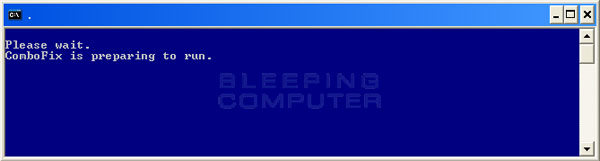
  • ComboFix will now install itself on to your computer. When it is done, a blue screen will appear as shown below.

    cf-preparing.jpg

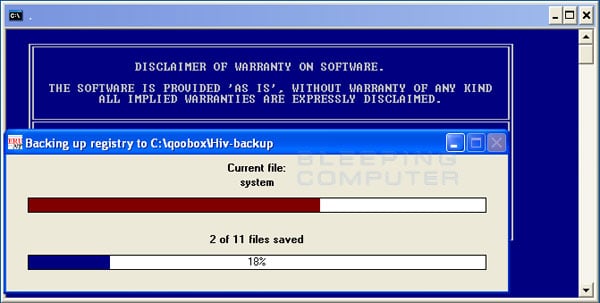
  • ComboFix is now preparing to run. When it has finished ComboFix will automatically attempt to create a System Restore point so that if any problems occur while using the program you can restore back to your previous configuration. When ComboFix has finished creating the restore point, it will then backup your Windows Registry as shown in the image below.

    erunt.jpg

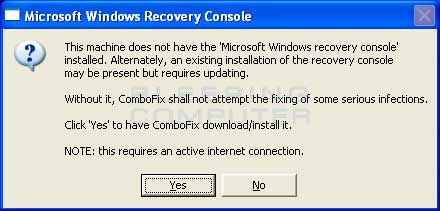
  • Once the Windows Registry has finished being backed up, ComboFix will attempt to detect if you have the Windows Recovery Console installed. If you already have it installed, you can skip to this section and continue reading. Otherwise you will see the following message as shown below:

    recovery-console-prompt.jpg

  • At the above message box, please click on the Yes button in order for ComboFix to continue. Please follow the steps and instructions given by ComboFix in order to finish the installation of the Recovery Console.
  • Please click on yes in the next window to continue scanning for malware.
  • ComboFix will now disconnect your computer from the Internet, so do not be surprised or concerned if you receive any warnings stating that you are no longer on the Internet. When ComboFix has finished it will automatically restore your Internet connection.
  • ComboFix will now start scanning your computer for known infections. This procedure can take some time, so please be patient.
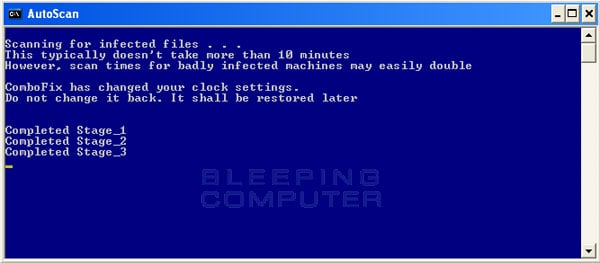
  • While the program is scanning your computer, it will change your clock format, so do not be concerned when you see this happen. When ComboFix is finished it will restore your clock settings to their previous settings. You will also see the text in the ComboFix window being updated as it goes through the various stages of its scan. An example of this can be seen below.

    still-scanning-clockchanges.jpg

  • When ComboFix has finished running, you will see a screen stating that it is preparing the log report.
  • This can take a while, so please be patient. If you see your Windows desktop disappear, do not worry. This is normal and ComboFix will restore your desktop before it is finished. Eventually you will see a new screen that states the program is almost finished and telling you the programs log file, or report, will be located at C:\ComboFix.txt.
  • When ComboFix has finished, it will automatically close the program and change your clock back to its original format. It will then display the log file automatically for you.
  • Now you just click on the edit menu and click on select all, then click on the edit menu again and click on copy. Then come to the forum in your reply and right click on your mouse and click on paste.


In your next reply please post:
  • The ComboFix log
  • A fresh HiJackThis log
  • An update on how your computer is running
 
my computer seemed to be running ok, but as you said i was still infected in downloaded combo fix. i closed all programs including the anti malwre that was running. then the problems started again. i double clicke combifix and little box came up with green bar above it as if it wa installing then up came windows explorer has stopped working, then windows command proccessor has stopped working. then the installing screen went off and nothing.

dunno wat to do now.
 
also if i try double clicking combofix again it says something about unable to find
c:32788r22fwjfw\pev.3xe

and gives me options of ignore, abort
 
basically because ive had so many problems, i ran a couple of the things you told me too so i could access my control panel. then i restored it too a point before it went wrong and now it seems to be working fine.

i couldnt get the combofix to work at all.
 
Since you have done a system restore, you still need to rescan your system with malwarebytes.
 
this is what i got

Malwarebytes' Anti-Malware 1.51.2.1300
www.malwarebytes.org

Database version: 7986

Windows 6.0.6001 Service Pack 1
Internet Explorer 8.0.6001.18999

20/10/2011 08:28:40
mbam-log-2011-10-20 (08-28-40).txt

Scan type: Quick scan
Objects scanned: 171486
Time elapsed: 2 minute(s), 53 second(s)

Memory Processes Infected: 0
Memory Modules Infected: 0
Registry Keys Infected: 0
Registry Values Infected: 0
Registry Data Items Infected: 0
Folders Infected: 0
Files Infected: 5

Memory Processes Infected:
(No malicious items detected)

Memory Modules Infected:
(No malicious items detected)

Registry Keys Infected:
(No malicious items detected)

Registry Values Infected:
(No malicious items detected)

Registry Data Items Infected:
(No malicious items detected)

Folders Infected:
(No malicious items detected)

Files Infected:
c:\Windows\Temp\0.19109875050652936.exe (Exploit.Drop.2) -> Quarantined and deleted successfully.
c:\Windows\System32\config\systemprofile\AppData\Roaming\Adobe\shed\thr1.chm (Malware.Trace) -> Quarantined and deleted successfully.
c:\Windows\System32\config\systemprofile\AppData\Roaming\Adobe\plugs\mmc10660031.txt (Trojan.Agent.Gen) -> Quarantined and deleted successfully.
c:\Windows\System32\config\systemprofile\AppData\Roaming\Adobe\plugs\mmc141.exe (Trojan.Agent.Gen) -> Quarantined and deleted successfully.
c:\Windows\System32\config\systemprofile\AppData\Roaming\Adobe\plugs\mmc244.exe (Trojan.Agent.Gen) -> Quarantined and deleted successfully.
 
Post a hijackthis log as I'm worried about a few entries that might not have disappeared.
 
Back
Top