Help with RAM please

Nerazzurri

New Member
At the moment I have - DDR333 or 400mhz SDRAM, non ECC, (dual channel?), 512mb x 2, 166mhz, pc2700, Intel 865GV chipset.

I'd like to upgrade to 2gb (that's the maximum the system supports anyway). My questions are - What does DIMM mean/is it significant? Should I find out what mother boards the new memory is compatible with? Which PC standard do I want, does it matter? Is it OK to put higher MHZ memory in?

Hope that makes enough sense for someone to help me. Happy to provide any important informationthatI've left out. I have a Dell Dimension 3000.

Any help would be great thanks, Gavin.
 
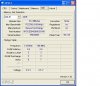
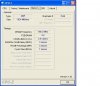
I'd recommend you to donwload and run cpu-z, then post some screenshots to see what kind of memory you have...
 
Thanks for the screenie advice. Sorry can't post more - apparently this is my upload limit. Basically I want more RAM to get the best/improve frame rate, from a game I'm playing just now.
 

Attachments

  • untitled5.JPG
    untitled5.JPG
    42 KB · Views: 53
  • untitled4.JPG
    untitled4.JPG
    33.5 KB · Views: 53
Last edited:
At the moment I have - DDR333 or 400mhz SDRAM, non ECC, (dual channel?), 512mb x 2, 166mhz, pc2700, Intel 865GV chipset.

I'd like to upgrade to 2gb (that's the maximum the system supports anyway). My questions are - What does DIMM mean/is it significant? Should I find out what mother boards the new memory is compatible with? Which PC standard do I want, does it matter? Is it OK to put higher MHZ memory in?

Hope that makes enough sense for someone to help me. Happy to provide any important informationthatI've left out. I have a Dell Dimension 3000.

Any help would be great thanks, Gavin.

as you can see, you have 2 ram sticks in dual channel. you have ddr memory wich runs at 166 mhz (333ddr). I believe that if you add more ram you will disable the dual channel support..

you can add a 400 mhz stick, but you must configure it to run at 333mhz.
 
I thought this might help. The only thing different is I added a NVidia 6200 card.

http://support.euro.dell.com/support/edocs/systems/dim3000/en/SM/specs.htm#wp1075776

I don't speak english very well, but if memory connectors means memory slots, then you'll have to sell one of your sticks to add more ram, because that page says your computer has only two "memory connectors"

you can sell both sticks and buy two 1gb ddr400 sticks, but I don't know if it's worth it...
 
Yes, it has 2 memory slots. I would say the best way to improve your framerate would be to get a faster video card. You have 1GB of RAM now, it might not be PC3200 but 2GB of PC3200 would do less for you than a faster video card.
 
Yes, it has 2 memory slots. I would say the best way to improve your framerate would be to get a faster video card. You have 1GB of RAM now, it might not be PC3200 but 2GB of PC3200 would do less for you than a faster video card.

I got the NVidia 6200 a few months ago. At the time it was about the best I could find. Because it's an old PCI there wasn't much choice. It served its purpose in as much as I needed something DirectX9c compatible.

Is there maybe any settings with it I could change, other than those in the NVidia control panel?
 
Yes, I see that your system doesn't have an AGP port, I didn't check that before. I think the fastest PCI card is an FX5500, it's also DX9 compatible, but not DX9C.

I don't think a RAM upgrade will make much difference though, you may be best off saving until you can get a new system. I wouldn't expect driver performance tweaks to do a whole lot either.
 
Is there maybe any settings with it I could change, other than those in the NVidia control panel?

I think that you can activate some pipelines on that card. it's not for sure, but you can give it a try... search internet or this forum... you need rivatuner.
 
I have read that NVidia only cut the pipelines on the 6200's with certain chip numbers. Would it be worthwhile downloading something like coolbits and trying that??
 
Yes, if you mix speeds or timings the slower one will be used for all RAM you have. Otherwise it should work fine, I would just avoid mixing voltages (ie get all 1.8v or all 1.9v)
 
Back
Top