You are using an out of date browser. It may not display this or other websites correctly.
You should upgrade or use an alternative browser.
You should upgrade or use an alternative browser.
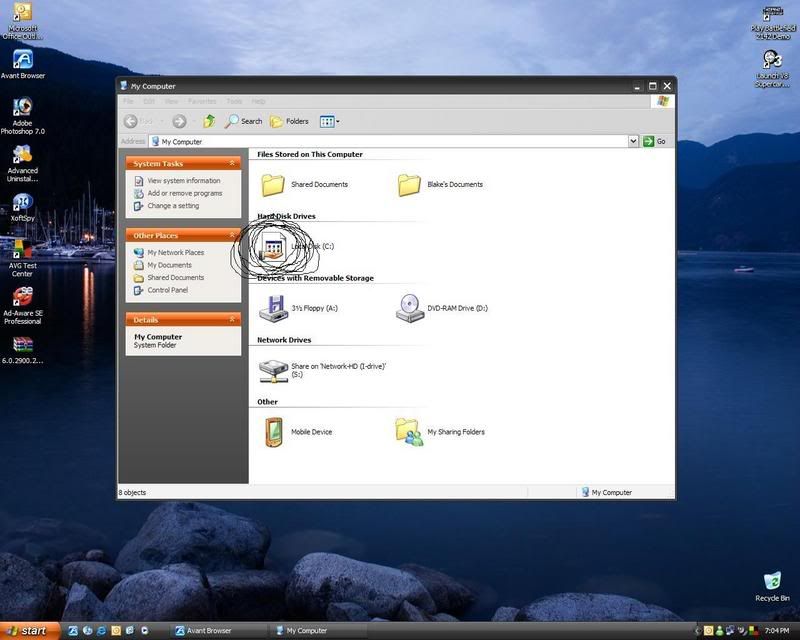
Help with windows icons
- Thread starter TEKKA
- Start date


TEKKA
New Member
Try:
start -> run -> sfc /scannow
and
chkdsk /p /r -> after you start your computer in Recovery Console
Let us know if that worked...
Damn, didn't work... Thanks anyway.

!!I'm not sure that that will work in Vista so before you try that back up your system (registry).!!
Copy blue text into Notpad:
Windows Registry Editor Version 5.00
[HKEY_LOCAL_MACHINE\SOFTWARE\Classes\Drive]
@="Dysk"
"EditFlags"=dword:000001d2
"BrowserFlags"=dword:00000008
[HKEY_LOCAL_MACHINE\SOFTWARE\Classes\Drive\DefaultIcon]
@=hex(2):25,53,79,73,74,65,6d,52,6f,6f,74,25,5c,53,79,73,74,65,6d,33,32,5c,73,\
68,65,6c,6c,33,32,2e,64,6c,6c,2c,38,00
[HKEY_LOCAL_MACHINE\SOFTWARE\Classes\Drive\shell]
@=""
[HKEY_LOCAL_MACHINE\SOFTWARE\Classes\Drive\shell\find]
"SuppressionPolicy"=dword:00000080
[HKEY_LOCAL_MACHINE\SOFTWARE\Classes\Drive\shell\find\command]
@=hex(2):25,53,79,73,74,65,6d,52,6f,6f,74,25,5c,45,78,70,6c,6f,72,65,72,2e,65,\
78,65,00
[HKEY_LOCAL_MACHINE\SOFTWARE\Classes\Drive\shell\find\ddeexec]
@="[FindFolder(\"%l\", %I)]"
"NoActivateHandler"=""
[HKEY_LOCAL_MACHINE\SOFTWARE\Classes\Drive\shell\find\ddeexec\application]
@="Folders"
[HKEY_LOCAL_MACHINE\SOFTWARE\Classes\Drive\shell\find\ddeexec\topic]
@="AppProperties"
[HKEY_LOCAL_MACHINE\SOFTWARE\Classes\Drive\shellex]
[HKEY_LOCAL_MACHINE\SOFTWARE\Classes\Drive\shellex\ContextMenuHandlers]
[HKEY_LOCAL_MACHINE\SOFTWARE\Classes\Drive\shellex\ContextMenuHandlers\Offline Files]
@="{750fdf0e-2a26-11d1-a3ea-080036587f03}"
[HKEY_LOCAL_MACHINE\SOFTWARE\Classes\Drive\shellex\ContextMenuHandlers\Sharing]
@="{f81e9010-6ea4-11ce-a7ff-00aa003ca9f6}"
[HKEY_LOCAL_MACHINE\SOFTWARE\Classes\Drive\shellex\ContextMenuHandlers\{59099400-57FF-11CE-BD94-0020AF85B590}]
[HKEY_LOCAL_MACHINE\SOFTWARE\Classes\Drive\shellex\ContextMenuHandlers\{fbeb8a05-beee-4442-804e-409d6c4515e9}]
@=""
[HKEY_LOCAL_MACHINE\SOFTWARE\Classes\Drive\shellex\FolderExtensions]
[HKEY_LOCAL_MACHINE\SOFTWARE\Classes\Drive\shellex\FolderExtensions\{fbeb8a05-beee-4442-804e-409d6c4515e9}]
@=""
"DriveMask"=dword:00000020
[HKEY_LOCAL_MACHINE\SOFTWARE\Classes\Drive\shellex\PropertySheetHandlers]
[HKEY_LOCAL_MACHINE\SOFTWARE\Classes\Drive\shellex\PropertySheetHandlers\Sharing]
@="{f81e9010-6ea4-11ce-a7ff-00aa003ca9f6}"
[HKEY_LOCAL_MACHINE\SOFTWARE\Classes\Drive\shellex\PropertySheetHandlers\{1F2E5C40-9550-11CE-99D2-00AA006E086C}]
[HKEY_LOCAL_MACHINE\SOFTWARE\Classes\Drive\shellex\PropertySheetHandlers\{596AB062-B4D2-4215-9F74-E9109B0A8153}]
@=""
[HKEY_LOCAL_MACHINE\SOFTWARE\Classes\Drive\shellex\PropertySheetHandlers\{7988B573-EC89-11cf-9C00-00AA00A14F56}]
@=""
[HKEY_LOCAL_MACHINE\SOFTWARE\Classes\Drive\shellex\PropertySheetHandlers\{ECCDF543-45CC-11CE-B9BF-0080C87CDBA6}]
[HKEY_LOCAL_MACHINE\SOFTWARE\Classes\Drive\shellex\PropertySheetHandlers\{fbeb8a05-beee-4442-804e-409d6c4515e9}]
@=""
Windows Registry Editor Version 5.00
[HKEY_CLASSES_ROOT\Drive]
@="Dysk"
"EditFlags"=hex:d2,01,00,00
[HKEY_CLASSES_ROOT\Drive\DefaultIcon]
@=hex(2):25,00,53,00,79,00,73,00,74,00,65,00,6d,00,52,00,6f,00,6f,00,74,00,25,\
00,5c,00,53,00,79,00,73,00,74,00,65,00,6d,00,33,00,32,00,5c,00,73,00,68,00,\
65,00,6c,00,6c,00,33,00,32,00,2e,00,64,00,6c,00,6c,00,2c,00,38,00,00,00
[HKEY_CLASSES_ROOT\Drive\shell]
@="none"
[HKEY_CLASSES_ROOT\Drive\shell\find]
"SuppressionPolicy"=dword:00000080
[HKEY_CLASSES_ROOT\Drive\shell\find\command]
@=hex(2):25,00,53,00,79,00,73,00,74,00,65,00,6d,00,52,00,6f,00,6f,00,74,00,25,\
00,5c,00,45,00,78,00,70,00,6c,00,6f,00,72,00,65,00,72,00,2e,00,65,00,78,00,\
65,00,00,00
[HKEY_CLASSES_ROOT\Drive\shell\find\ddeexec]
@="[FindFolder(\"%l\", %I)]"
"NoActivateHandler"=""
[HKEY_CLASSES_ROOT\Drive\shell\find\ddeexec\application]
@="Folders"
[HKEY_CLASSES_ROOT\Drive\shell\find\ddeexec\topic]
@="AppProperties"
File > Save as... > change Save as Type to All Files > and save as: fix.reg.
Run that file (double click ) > accept > restart computer.
It's working perfectly under XP. I never tried that in Vista.
But with backup you should be ok.
Your call
P.S.
Let us know...
Copy blue text into Notpad:
Windows Registry Editor Version 5.00
[HKEY_LOCAL_MACHINE\SOFTWARE\Classes\Drive]
@="Dysk"
"EditFlags"=dword:000001d2
"BrowserFlags"=dword:00000008
[HKEY_LOCAL_MACHINE\SOFTWARE\Classes\Drive\DefaultIcon]
@=hex(2):25,53,79,73,74,65,6d,52,6f,6f,74,25,5c,53,79,73,74,65,6d,33,32,5c,73,\
68,65,6c,6c,33,32,2e,64,6c,6c,2c,38,00
[HKEY_LOCAL_MACHINE\SOFTWARE\Classes\Drive\shell]
@=""
[HKEY_LOCAL_MACHINE\SOFTWARE\Classes\Drive\shell\find]
"SuppressionPolicy"=dword:00000080
[HKEY_LOCAL_MACHINE\SOFTWARE\Classes\Drive\shell\find\command]
@=hex(2):25,53,79,73,74,65,6d,52,6f,6f,74,25,5c,45,78,70,6c,6f,72,65,72,2e,65,\
78,65,00
[HKEY_LOCAL_MACHINE\SOFTWARE\Classes\Drive\shell\find\ddeexec]
@="[FindFolder(\"%l\", %I)]"
"NoActivateHandler"=""
[HKEY_LOCAL_MACHINE\SOFTWARE\Classes\Drive\shell\find\ddeexec\application]
@="Folders"
[HKEY_LOCAL_MACHINE\SOFTWARE\Classes\Drive\shell\find\ddeexec\topic]
@="AppProperties"
[HKEY_LOCAL_MACHINE\SOFTWARE\Classes\Drive\shellex]
[HKEY_LOCAL_MACHINE\SOFTWARE\Classes\Drive\shellex\ContextMenuHandlers]
[HKEY_LOCAL_MACHINE\SOFTWARE\Classes\Drive\shellex\ContextMenuHandlers\Offline Files]
@="{750fdf0e-2a26-11d1-a3ea-080036587f03}"
[HKEY_LOCAL_MACHINE\SOFTWARE\Classes\Drive\shellex\ContextMenuHandlers\Sharing]
@="{f81e9010-6ea4-11ce-a7ff-00aa003ca9f6}"
[HKEY_LOCAL_MACHINE\SOFTWARE\Classes\Drive\shellex\ContextMenuHandlers\{59099400-57FF-11CE-BD94-0020AF85B590}]
[HKEY_LOCAL_MACHINE\SOFTWARE\Classes\Drive\shellex\ContextMenuHandlers\{fbeb8a05-beee-4442-804e-409d6c4515e9}]
@=""
[HKEY_LOCAL_MACHINE\SOFTWARE\Classes\Drive\shellex\FolderExtensions]
[HKEY_LOCAL_MACHINE\SOFTWARE\Classes\Drive\shellex\FolderExtensions\{fbeb8a05-beee-4442-804e-409d6c4515e9}]
@=""
"DriveMask"=dword:00000020
[HKEY_LOCAL_MACHINE\SOFTWARE\Classes\Drive\shellex\PropertySheetHandlers]
[HKEY_LOCAL_MACHINE\SOFTWARE\Classes\Drive\shellex\PropertySheetHandlers\Sharing]
@="{f81e9010-6ea4-11ce-a7ff-00aa003ca9f6}"
[HKEY_LOCAL_MACHINE\SOFTWARE\Classes\Drive\shellex\PropertySheetHandlers\{1F2E5C40-9550-11CE-99D2-00AA006E086C}]
[HKEY_LOCAL_MACHINE\SOFTWARE\Classes\Drive\shellex\PropertySheetHandlers\{596AB062-B4D2-4215-9F74-E9109B0A8153}]
@=""
[HKEY_LOCAL_MACHINE\SOFTWARE\Classes\Drive\shellex\PropertySheetHandlers\{7988B573-EC89-11cf-9C00-00AA00A14F56}]
@=""
[HKEY_LOCAL_MACHINE\SOFTWARE\Classes\Drive\shellex\PropertySheetHandlers\{ECCDF543-45CC-11CE-B9BF-0080C87CDBA6}]
[HKEY_LOCAL_MACHINE\SOFTWARE\Classes\Drive\shellex\PropertySheetHandlers\{fbeb8a05-beee-4442-804e-409d6c4515e9}]
@=""
Windows Registry Editor Version 5.00
[HKEY_CLASSES_ROOT\Drive]
@="Dysk"
"EditFlags"=hex:d2,01,00,00
[HKEY_CLASSES_ROOT\Drive\DefaultIcon]
@=hex(2):25,00,53,00,79,00,73,00,74,00,65,00,6d,00,52,00,6f,00,6f,00,74,00,25,\
00,5c,00,53,00,79,00,73,00,74,00,65,00,6d,00,33,00,32,00,5c,00,73,00,68,00,\
65,00,6c,00,6c,00,33,00,32,00,2e,00,64,00,6c,00,6c,00,2c,00,38,00,00,00
[HKEY_CLASSES_ROOT\Drive\shell]
@="none"
[HKEY_CLASSES_ROOT\Drive\shell\find]
"SuppressionPolicy"=dword:00000080
[HKEY_CLASSES_ROOT\Drive\shell\find\command]
@=hex(2):25,00,53,00,79,00,73,00,74,00,65,00,6d,00,52,00,6f,00,6f,00,74,00,25,\
00,5c,00,45,00,78,00,70,00,6c,00,6f,00,72,00,65,00,72,00,2e,00,65,00,78,00,\
65,00,00,00
[HKEY_CLASSES_ROOT\Drive\shell\find\ddeexec]
@="[FindFolder(\"%l\", %I)]"
"NoActivateHandler"=""
[HKEY_CLASSES_ROOT\Drive\shell\find\ddeexec\application]
@="Folders"
[HKEY_CLASSES_ROOT\Drive\shell\find\ddeexec\topic]
@="AppProperties"
File > Save as... > change Save as Type to All Files > and save as: fix.reg.
Run that file (double click
) > accept > restart computer.It's working perfectly under XP. I never tried that in Vista.
But with backup you should be ok.
Your call
P.S.
Let us know...
Last edited: