
How do i install Win XP Pro?

dr.nick

New Member
Hey, i have just got my self a Siemens Amilo M3438G laptop with win XP Home already installed. But i would like to make 2 partitions and install win Xp PRO insted. However ... when i insert the XP Pro CD and try to install it, it says something like: "Setup did not find any hard disk drives installed in your computer, setup cannot continue, press F3 to quit."

I have read on the siemens support forum that i need a bootable CD with ATA drivers. But i dont know how to make such a CD.

Do anyone know if its true that i need to create such a CD, if yes, how? A "step-by-step guide for newbies" would really be helpfull.


Here is a pic of my Device Manager:
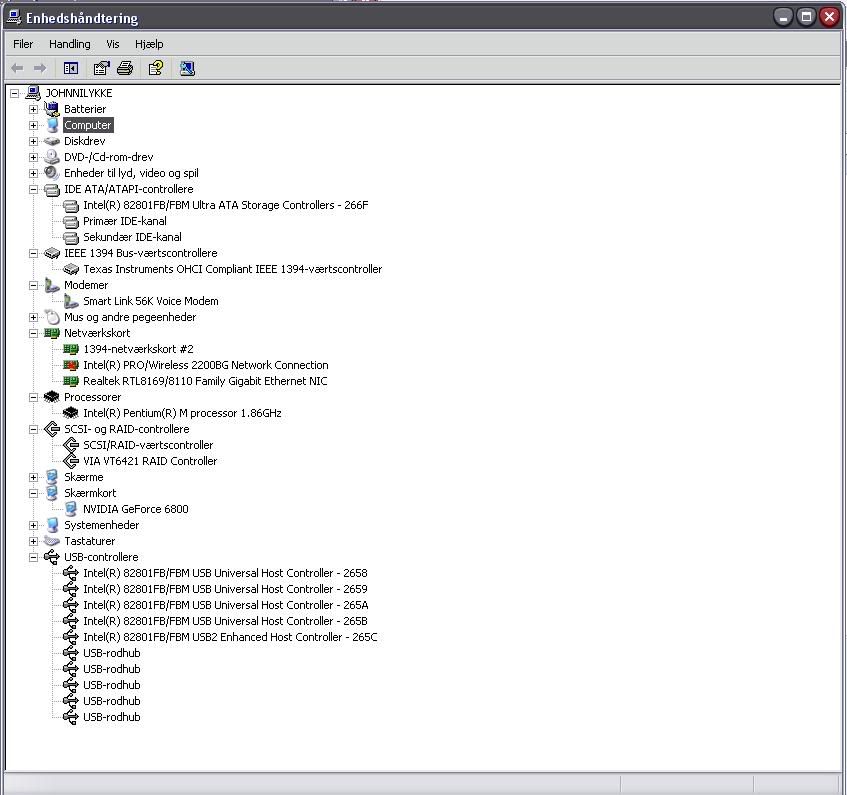
untitled.jpg


Thanks!
 
The WinXP Pro should be bootable already. Just make sure your computer boots off the CD drive. It'll walk you through the setup.
 
No S-ATA drive on XP pro installation...

Hey, i have just got my self a Siemens Amilo M3438G laptop with win XP Home already installed. But i would like to make 2 partitions and install win Xp PRO insted. However ... when i insert the XP Pro CD and try to install it, it says something like: "Setup did not find any hard disk drives installed in your computer, setup cannot continue, press F3 to quit."

I have read on the siemens support forum that i need a bootable CD with ATA drivers. But i dont know how to make such a CD.

Do anyone know if its true that i need to create such a CD, if yes, how? A "step-by-step guide for newbies" would really be helpfull.

Well..... the regular XP pro installation cd don't have S-ATA drivers for the laptop harddrive and in this case it require a floppy disc or a USB device that the XP pro installation can recognize and this is very hard to find so your best option is to request a recovery disc from Fujitsu's homepage and this will cost you some cash or try to find one to download....(wich will prove to be a real pain in the ASS!:mad:)

Recovery CD is the answer to your problem since it already contains the S-ATA drivers for your harddrive try to find one and the problem will be solved....
 
Back
Top