I don't understand a thing about HDD... help please?

Trio

New Member
I read this sites guide, but there are so many acronyms and numbers... I can't understand a thing lol, just trying to make sense of it gives me a head ache :|. Can someone help me out?

I'm just going to use SATA drive/slots/connectors, not planning on using IDE (IDE are for floppys, right? Or any device in general?) unless I need to to boot my OS (someone said I didn't have to). The mobo I want to use is either ASUS Commando or ASUS Rampage Formula, but they both have 6x SATA 8G (I don't understand what the 8G means) ports and 1x ATA-133 port.

I'm looking for an HDD that has 500-400GBs, maybe a little more. Planning on using it for a gaming rig.

Sorry if I used the acronyms incorrectly, or if anything else didn't make any sense. So many acronyms and numbers... Thanks in advance for answering.
 
If you have that many SATA ports, then you can get SATA HDD's and SATA optical drives (CD-ROM, DVD-ROM, etc.)

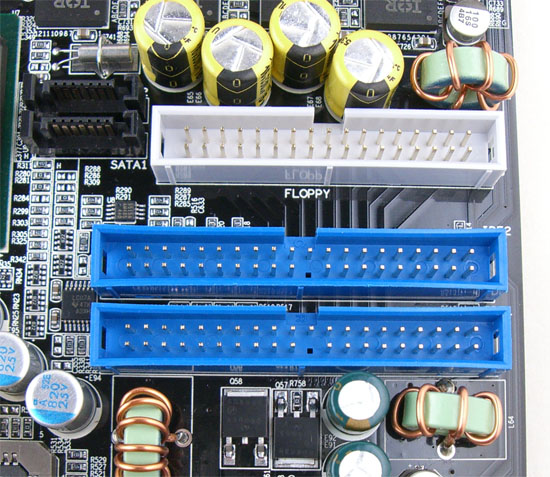
The IDE would be for HDD and CD-ROM/DVD-ROM, etc.
Smaller IDE ports are for floppies.
dn800sliide.jpg
 
Ooh, ok.

The guide talks about EIDE, ATA, PATA, PIO, DMA, UDMA, SCSI, Word, Burst, Controller, NCQ, Partitioning and Formatting, Cache, Spindle Speed and Access Time. Do I have to worry about these?

PIO, DMA, UDMA, SCSI and Ultra SCSI seem to be how fast data is transported... but I don't understand it?
 
Don't worry about SCSI, you likely will never use it. EIDA, ATA, PATA, IDE are generally used as the name of the same interface (the one in the pic above). PIO, DMA, UDMA are transfer speed specs for S/P ATA controllers, as long as your drive is set to run at the fastest (should be by default) you don't have to worry. If it's running on PIO or something slow, you'll probably notice and we can tell you how to fix it.

You will have to partition/format but that will be done as part of the OS install or can be done easily in windows if you have it already installed. You can search for how to do it here on the forums, I've posted the method several times.

More cache can mean a drive is faster but after a certain point it wont make much difference. Spindle speed is also important for how fast a drive is. The faster the spindle the faster the drive.
 
Don't worry about SCSI, you likely will never use it. EIDA, ATA, PATA, IDE are generally used as the name of the same interface (the one in the pic above). PIO, DMA, UDMA are transfer speed specs for S/P ATA controllers, as long as your drive is set to run at the fastest (should be by default) you don't have to worry. If it's running on PIO or something slow, you'll probably notice and we can tell you how to fix it.

You will have to partition/format but that will be done as part of the OS install or can be done easily in windows if you have it already installed. You can search for how to do it here on the forums, I've posted the method several times.

More cache can mean a drive is faster but after a certain point it wont make much difference. Spindle speed is also important for how fast a drive is. The faster the spindle the faster the drive.

Ok, so... UDMA is the fastest, and PIO is the slowest? And those are default speeds so I won't have to worry about them? Ok

So I really only have to worry about getting a SATA, Spindle Speed and Cache? Alright.

So, whats the maximum GB a HDD has? I think I used an imaginary number in my first post... (500-400GB). And are the PIO and UDMA speeds listed in the guide... well, up to date? (Having trouble wording this)
 
Last edited:
Well the BIOS and drive will support UDMA, and windows should set the controller to UDMA by default.

You can get some pretty big drives now at least 1TB.
 
Well the BIOS and drive will support UDMA, and windows should set the controller to UDMA by default.

You can get some pretty big drives now at least 1TB.

Yeah, I just did a search on HDD and I found one, but I'm not so sure about it... Here are two I'm interested in

One is the Seagate Barracuda. Capacity=1TB, RPM=7200, Cache=32MB, Average Latency= 4.15ms

And the Samsung Spinpoint. Capacity= 750GB, RPM=7200, Cache-32MB, Average Seek time= 8.9ms, Average Latency= 4.17ms

Cache is important, but so is RPM, and these two are pretty huge, so will only having 7200 RPM be a problem? Also, I won't be storing a whole lot of files (I just want to play games), so I don't need a whole lot of space, but I want a fast HDD. Are there smaller sized HDDs that have 32MB Cache? Or just a plain average HDD thats great for gaming? My price limit is about $250 and less...


@Voyager- lulz.
 
Last edited:
Well the BIOS and drive will support UDMA, and windows should set the controller to UDMA by default.

You can get some pretty big drives now at least 1TB.

Every time I look at your icon of Bender I laugh!
 
Yeah, I just did a search on HDD and I found one, but I'm not so sure about it... Here are two I'm interested in

One is the Seagate Barracuda. Capacity=1TB, RPM=7200, Cache=32MB, Average Latency= 4.15ms

And the Samsung Spinpoint. Capacity= 750GB, RPM=7200, Cache-32MB, Average Seek time= 8.9ms, Average Latency= 4.17ms

Cache is important, but so is RPM, and these two are pretty huge, so will only having 7200 RPM be a problem? Also, I won't be storing a whole lot of files (I just want to play games), so I don't need a whole lot of space, but I want a fast HDD. Are there smaller sized HDDs that have 32MB Cache? Or just a plain average HDD thats great for gaming? My price limit is about $250 and less...


@Voyager- lulz.

I can't/won't speak for anyone else, but I personally have always found RPM to be far more useful and important than cache size. There's no need to spend $250. You won't be storing a whole lot of files? Of course you will; I guarantee you will somehow, someday, fill all the space on a drive, no matter how big it is.

My personal recommendation is to buy this Seagate:
750GB, SATA, 32MB cache, 5 year warranty, just $130 :)
http://www.newegg.com/Product/Product.aspx?Item=N82E16822148298
 
Last edited:
Arch found the Bender image for me. I have no idea where she found it but I like it :D

Yeah, I just did a search on HDD and I found one, but I'm not so sure about it... Here are two I'm interested in

One is the Seagate Barracuda. Capacity=1TB, RPM=7200, Cache=32MB, Average Latency= 4.15ms

And the Samsung Spinpoint. Capacity= 750GB, RPM=7200, Cache-32MB, Average Seek time= 8.9ms, Average Latency= 4.17ms
Either one of those should work well. You don't need 32MB of cache, 16 is plenty. I think both my drives still have 8MB and I'm in no rush to get new ones. You may not be storing a whole lot of files, but sooner or later you'll be storing a few big files, games data files are getting pretty big :)
 
Ok. Thanks for the help Cromwell.

The only thing I don't like about the Seagate Barracuda is there are negative reviews saying it makes a clicking noise while running, than it breaks down. Should I probably go with another one? Also, its only $150 I think, so maybe its cheap for that reason?
 
Back
Top