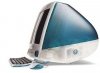
iMac question.

alexandergre

New Member
im thinking to get an iMac 24"(60%) or 20"(40%) but not now since Apple is going to produce a new processor from Intel.
My question is can I have iMac´s desktop extented into two monitors or more?if more, then how many monitors?
Have some one tried it?
 
here is the answer:
Yes, you can have two monitors (the built-in monitor plus a second) connected to your iMac, as explained at Apple.com/imac

Beyond two monitors connected to a single computer, you will want to buy a Mac Pro, not an iMac. The Mac Pro has expansion slots (PCIe slots specifically), which means you can plug in more video cards for more monitors. The Mac Pro has four PCIe slots. If each slot is filled with a video card, and each card supports two monitors, you can have a total of 8 screens connected to your Mac Pro. This type of configuration will work well.

In fact, you might be able to add even more if you use an expansion chassis (for example here's one from Cyclone) to give you 8 more PCIe slots. Start with the built in 4 slots, subtract one for the cable to the expansion chassis, then add 8 on the chassis, and that gives you a total of 11 PCIe slots possible, or 22 connected screens. Note that I've not tested this kind of configuration--you'd be pushing the boundaries with this kind of setup, but it sure would be fun.

Trevor

source: http://forums.macosxhints.com/ by Trevor
many thanks to Trevor and tlarkin.
 
Mac-forums.com is a great place to try and find that answer. However, I believe you can add another monitor to the iMac (and possibly two).
 
mac question

Hi i have a imac and i need to know what i need in order to reset the computer back to normal, ive had it for a while now and i never used it so i need to know what i need to do to reset it to its normal state. i don't know anything about the computer just that i need to reset it because i can use it but when i try to open the programs it looks like they were removed.

that is what my mac looks like, but i don't know anything about it(im a newb)
so please help me out. thnx in advance
 

Attachments

  • imac.jpg
    imac.jpg
    10.7 KB · Views: 37
Back
Top