Installing a larger HD help

stu.zzr

New Member
Hi
I am a real novice so please reply in words of on syllable !!!

I have a lap top, the hard drive is FULL. I bought a new hard drive. I assumed it would be a simple way of increasing capacity, (I have previously used my old hard drive for back up etc).
I put the new HD in a caddy and connected via USB to copy everything from on HD to the other but it was not identified as a HD in “my computer”.

What do I do?
 
You need to go into disk management, partition it and then format it before it will appear in "my computer"
 
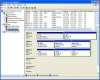
It means that when you buy a new hard drive its not ready yet to hold data. You have to paritition it, meaning you either have to make it one big drive or you can make it into smaller drives. After partitioning it, you have to format it in whatever file system you want, either fat32 or ntfs. After formatting the drive will appear in "my computer". So in order to get to disk management, you can right click on "my computer" click on manage, click on disk management on the left when the page loads. On the right hand side is a list of drives availabe on your system. See on my attached image on the bottom where it has disk 0, 1, and 2. I have 2 or more partitions on each physical drive. Your drive will have 1 big area and no drive letter assigned to it. You right click on that drive and click on new partition. You can follow this article from Microsoft on how to do it.

http://support.microsoft.com/kb/309000
 

Attachments

  • diskmanagement.jpg
    diskmanagement.jpg
    96.2 KB · Views: 51
WOW, I thought it would be simple!!!!!!

Thanks for the explanation. I will give it a go. (You know I will be back, don’t you!)
 
To do the above, do I reinstall my old, full HD and connect the new HD via a caddy and work on the new HD THEN install it into my lap top?
 
So you actually want to transfer everything over to the new hard drive? You will have to clone the drive to the new one or it won't boot when you put it in your laptop. What brand is your new hard drive? The drive maker should have software on their website that can do that for you.
 
Thank you

I would like to thank Johnb35 for his sage advice. My hard drive is installed and working great.

:):):):):)THANKS MATE:):):):):):)
 
Back
Top