
internet problems dealing with cookie spyware (?)

etpiggyfile

New Member
Apparently there are some cookies that are considered spyware when I run my anti-virus scan and they seem to duplicate after being deleted, im not sure. My internet has been lagging a lot and msn/yahoo messengers have problems connectinng to the network. Here is my hijack this log please help me, I've already done a virus scan though I don't know if that affects this:


Logfile of HijackThis v1.99.1
Scan saved at 下午 11:18:04, on 2008/7/30
Platform: Windows XP SP2 (WinNT 5.01.2600)
MSIE: Internet Explorer v6.00 SP2 (6.00.2900.2180)

Running processes:
C:\WINDOWS\System32\smss.exe
C:\WINDOWS\system32\winlogon.exe
C:\WINDOWS\system32\services.exe
C:\WINDOWS\system32\lsass.exe
C:\WINDOWS\system32\svchost.exe
C:\WINDOWS\System32\svchost.exe
C:\WINDOWS\system32\spoolsv.exe
C:\WINDOWS\Explorer.EXE
C:\Program Files\Common Files\Microsoft Shared\VS7Debug\mdm.exe
C:\WINDOWS\system32\nvsvc32.exe
C:\Program Files\Trend Micro\Internet Security\SfCtlCom.exe
C:\WINDOWS\system32\spool\drivers\w32x86\3\hpztsb07.exe
C:\WINDOWS\system32\WService.EXE
C:\WINDOWS\vsnpstd3.exe
C:\Program Files\Common Files\Real\Update_OB\realsched.exe
C:\Program Files\Trend Micro\Internet Security\UfSeAgnt.exe
C:\WINDOWS\system32\svchost.exe
C:\WINDOWS\system32\ctfmon.exe
C:\Program Files\KKBOX\KKBOX_Tray.exe
C:\Program Files\Yahoo!\Messenger\YahooMessenger.exe
C:\Program Files\Windows Live\Messenger\MsnMsgr.Exe
C:\Program Files\Spybot - Search & Destroy\TeaTimer.exe
C:\WINDOWS\system32\DRIVERS\WtSrv.exe
C:\Program Files\Trend Micro\BM\TMBMSRV.exe
C:\PROGRA~1\TRENDM~1\INTERN~2\TmPfw.exe
C:\Program Files\Trend Micro\Internet Security\TmProxy.exe
C:\WINDOWS\system32\wuauclt.exe
C:\Program Files\internet explorer\iexplore.exe
C:\Program Files\Common Files\Microsoft Shared\Windows Live\WLLoginProxy.exe
C:\Program Files\Windows Live\Messenger\usnsvc.exe
C:\Documents and Settings\user\桌面\HijackThis.exe

R3 - URLSearchHook: Yahoo! Toolbar - {EF99BD32-C1FB-11D2-892F-0090271D4F88} - (no file)
O2 - BHO: Adobe PDF Reader Link Helper - {06849E9F-C8D7-4D59-B87D-784B7D6BE0B3} - C:\Program Files\Common Files\Adobe\Acrobat\ActiveX\AcroIEHelper.dll
O2 - BHO: Spybot-S&D IE Protection - {53707962-6F74-2D53-2644-206D7942484F} - C:\Program Files\Spybot - Search & Destroy\SDHelper.dll
O2 - BHO: (no name) - {7E853D72-626A-48EC-A868-BA8D5E23E045} - (no file)
O2 - BHO: Windows Live 登入小幫手 - {9030D464-4C02-4ABF-8ECC-5164760863C6} - C:\Program Files\Common Files\Microsoft Shared\Windows Live\WindowsLiveLogin.dll
O4 - HKLM\..\Run: [NvCplDaemon] RUNDLL32.EXE C:\WINDOWS\system32\NvCpl.dll,NvStartup
O4 - HKLM\..\Run: [HPDJ Taskbar Utility] C:\WINDOWS\system32\spool\drivers\w32x86\3\hpztsb07.exe
O4 - HKLM\..\Run: [WService] WService.EXE
O4 - HKLM\..\Run: [snpstd3] C:\WINDOWS\vsnpstd3.exe
O4 - HKLM\..\Run: [TkBellExe] "C:\Program Files\Common Files\Real\Update_OB\realsched.exe" -osboot
O4 - HKLM\..\Run: [UfSeAgnt.exe] "C:\Program Files\Trend Micro\Internet Security\UfSeAgnt.exe"
O4 - HKLM\..\Run: [Adobe Reader Speed Launcher] "C:\Program Files\Adobe\Reader 8.0\Reader\Reader_sl.exe"
O4 - HKLM\..\Run: [PHIMETIPSYNC] C:\Program Files\Common Files\Microsoft Shared\IME\IMTC65\PHONETIC\TINTLCFG.EXE /PHIMETIPSync
O4 - HKLM\..\Run: [CJIMETIPSYNC] C:\Program Files\Common Files\Microsoft Shared\IME\IMTC65\CHANGJIE\CINTLCFG.EXE /CJIMETIPSync
O4 - HKCU\..\Run: [ctfmon.exe] C:\WINDOWS\system32\ctfmon.exe
O4 - HKCU\..\Run: [KKBOX Tray Icon] C:\Program Files\KKBOX\KKBOX_Tray.exe
O4 - HKCU\..\Run: [Yahoo! Pager] "C:\Program Files\Yahoo!\Messenger\YahooMessenger.exe" -quiet
O4 - HKCU\..\Run: [msnmsgr] "C:\Program Files\Windows Live\Messenger\MsnMsgr.Exe" /background
O4 - HKCU\..\Run: [SpybotSD TeaTimer] C:\Program Files\Spybot - Search & Destroy\TeaTimer.exe
O8 - Extra context menu item: Foxy 下載 - res://C:\Program Files\Foxy\Foxy.exe/download.htm
O8 - Extra context menu item: Foxy 搜尋 - res://C:\Program Files\Foxy\Foxy.exe/search.htm
O8 - Extra context menu item: 匯出至 Microsoft Excel(&X) - res://C:\PROGRA~1\MICROS~2\Office10\EXCEL.EXE/3000
O8 - Extra context menu item: 匯出至 Microsoft Office Excel(&X) - res://C:\PROGRA~1\MICROS~2\OFFICE11\EXCEL.EXE/3000
O9 - Extra button: 參考資料 - {92780B25-18CC-41C8-B9BE-3C9C571A8263} - C:\PROGRA~1\MICROS~2\OFFICE11\REFIEBAR.DLL
O9 - Extra button: (no name) - {DFB852A3-47F8-48C4-A200-58CAB36FD2A2} - C:\Program Files\Spybot - Search & Destroy\SDHelper.dll
O9 - Extra 'Tools' menuitem: Spybot - Search && Destroy Configuration - {DFB852A3-47F8-48C4-A200-58CAB36FD2A2} - C:\Program Files\Spybot - Search & Destroy\SDHelper.dll
O9 - Extra button: Messenger - {FB5F1910-F110-11d2-BB9E-00C04F795683} - C:\Program Files\Messenger\msmsgs.exe
O9 - Extra 'Tools' menuitem: Windows Messenger - {FB5F1910-F110-11d2-BB9E-00C04F795683} - C:\Program Files\Messenger\msmsgs.exe
O14 - IERESET.INF: START_PAGE_URL=Http://www.synnex.com.tw/
O16 - DPF: {0CCA191D-13A6-4E29-B746-314DEE697D83} (Facebook Photo Uploader 5) - http://upload.facebook.com/controls/FacebookPhotoUploader5.cab
O16 - DPF: {30528230-99f7-4bb4-88d8-fa1d4f56a2ab} (YInstStarter Class) - C:\Program Files\Yahoo!\Common\yinsthelper.dll
O16 - DPF: {5C051655-FCD5-4969-9182-770EA5AA5565} (Solitaire Showdown Class) - http://messenger.zone.msn.com/binary/SolitaireShowdown.cab56986.cab
O16 - DPF: {5C6698D9-7BE4-4122-8EC5-291D84DBD4A0} (Facebook Photo Uploader 4 Control) - http://upload.facebook.com/controls/FacebookPhotoUploader3.cab
O16 - DPF: {5D6F45B3-9043-443D-A792-115447494D24} (UnoCtrl Class) - http://messenger.zone.msn.com/ZH-TW/a-UNO1/GAME_UNO1.cab
O16 - DPF: {5F8469B4-B055-49DD-83F7-62B522420ECC} (Facebook Photo Uploader Control) - http://upload.facebook.com/controls/FacebookPhotoUploader.cab
O16 - DPF: {650BBB86-3D77-49BA-A4B2-2455E44EB031} (PasswordMD5ClientCOMCtrl Class) - https://netbank.chb.com.tw/Security/PasswordMD5ClientCOM.cab
O16 - DPF: {97A10DCF-A8AA-806F-1239-AB90AD69A986} (YuantaCAPI Class) - https://ra.yuanta.com.tw/formosoft/YuantaCAPIATL.cab
O16 - DPF: {C3F79A2B-B9B4-4A66-B012-3EE46475B072} (MessengerStatsClient Class) - http://messenger.zone.msn.com/binary/MessengerStatsPAClient.cab56907.cab
O16 - DPF: {F5A7706B-B9C0-4C89-A715-7A0C6B05DD48} (Minesweeper Flags Class) - http://messenger.zone.msn.com/binary/MineSweeper.cab56986.cab
O18 - Protocol: livecall - {828030A1-22C1-4009-854F-8E305202313F} - C:\PROGRA~1\WI1F86~1\MESSEN~1\MSGRAP~1.DLL
O18 - Protocol: msnim - {828030A1-22C1-4009-854F-8E305202313F} - C:\PROGRA~1\WI1F86~1\MESSEN~1\MSGRAP~1.DLL
O18 - Protocol: skype4com - {FFC8B962-9B40-4DFF-9458-1830C7DD7F5D} - C:\PROGRA~1\COMMON~1\Skype\SKYPE4~1.DLL
O20 - Winlogon Notify: igfxcui - C:\WINDOWS\SYSTEM32\igfxsrvc.dll
O20 - Winlogon Notify: WgaLogon - C:\WINDOWS\SYSTEM32\WgaLogon.dll
O21 - SSODL: WPDShServiceObj - {AAA288BA-9A4C-45B0-95D7-94D524869DB5} - C:\WINDOWS\system32\WPDShServiceObj.dll
O23 - Service: Adobe LM Service - Unknown owner - C:\Program Files\Common Files\Adobe Systems Shared\Service\Adobelmsvc.exe
O23 - Service: iPod Service - Apple Computer, Inc. - C:\Program Files\iPod\bin\iPodService.exe
O23 - Service: NBService - Nero AG - C:\Program Files\Nero\Nero 7\Nero BackItUp\NBService.exe
O23 - Service: NVIDIA Display Driver Service (NVSvc) - NVIDIA Corporation - C:\WINDOWS\system32\nvsvc32.exe
O23 - Service: Trend Micro Central Control Component (SfCtlCom) - Trend Micro Inc. - C:\Program Files\Trend Micro\Internet Security\SfCtlCom.exe
O23 - Service: Trend Micro Unauthorized Change Prevention Service (TMBMServer) - Unknown owner - C:\Program Files\Trend Micro\BM\TMBMSRV.exe" /service (file missing)
O23 - Service: Trend Micro Personal Firewall (TmPfw) - Trend Micro Inc. - C:\PROGRA~1\TRENDM~1\INTERN~2\TmPfw.exe
O23 - Service: Trend Micro Proxy Service (tmproxy) - Trend Micro Inc. - C:\Program Files\Trend Micro\Internet Security\TmProxy.exe
O23 - Service: WinTab Service (WinTabService) - Tablet Driver - C:\WINDOWS\system32\DRIVERS\WtSrv.exe
 
Hello, please download and post a log with the newest version of HiJackThis.

Click here to download HJTsetup.exe
  • Save HJTsetup.exe to your desktop.
  • Double click on the HJTsetup.exe icon on your desktop.
  • By default it will install to C:\Program Files\Hijack This.
  • Continue to click Next in the setup dialogue boxes until you get to the Select Additional Tasks dialogue.
  • Put a check by Create a desktop icon then click Next again.
  • Continue to follow the rest of the prompts from there.
  • At the final dialogue box click Finish and it will launch Hijack This.
  • Click on the Do a system scan and save a log file button. It will scan and then ask you to save the log.
  • Click Save to save the log file and then the log will open in notepad.
  • Click on "Edit > Select All" then click on "Edit > Copy" to copy the entire contents of the log.
  • Come back here to this thread and Paste the log in your next reply.
  • DO NOT have Hijack This fix anything yet. Most of what it finds will be harmless or even required.
 
new version log

Logfile of Trend Micro HijackThis v2.0.2
Scan saved at 上午 01:20:27, on 2008/7/31
Platform: Windows XP SP2 (WinNT 5.01.2600)
MSIE: Internet Explorer v6.00 SP2 (6.00.2900.2180)
Boot mode: Normal

Running processes:
C:\WINDOWS\System32\smss.exe
C:\WINDOWS\system32\winlogon.exe
C:\WINDOWS\system32\services.exe
C:\WINDOWS\system32\lsass.exe
C:\WINDOWS\system32\svchost.exe
C:\WINDOWS\System32\svchost.exe
C:\WINDOWS\system32\spoolsv.exe
C:\WINDOWS\Explorer.EXE
C:\Program Files\Common Files\Microsoft Shared\VS7Debug\mdm.exe
C:\WINDOWS\system32\nvsvc32.exe
C:\Program Files\Trend Micro\Internet Security\SfCtlCom.exe
C:\WINDOWS\system32\spool\drivers\w32x86\3\hpztsb07.exe
C:\WINDOWS\system32\WService.EXE
C:\WINDOWS\vsnpstd3.exe
C:\Program Files\Common Files\Real\Update_OB\realsched.exe
C:\Program Files\Trend Micro\Internet Security\UfSeAgnt.exe
C:\WINDOWS\system32\svchost.exe
C:\WINDOWS\system32\ctfmon.exe
C:\Program Files\KKBOX\KKBOX_Tray.exe
C:\Program Files\Yahoo!\Messenger\YahooMessenger.exe
C:\Program Files\Windows Live\Messenger\MsnMsgr.Exe
C:\Program Files\Spybot - Search & Destroy\TeaTimer.exe
C:\WINDOWS\system32\DRIVERS\WtSrv.exe
C:\Program Files\Trend Micro\BM\TMBMSRV.exe
C:\PROGRA~1\TRENDM~1\INTERN~2\TmPfw.exe
C:\Program Files\Trend Micro\Internet Security\TmProxy.exe
C:\WINDOWS\system32\wuauclt.exe
C:\Program Files\Common Files\Microsoft Shared\Windows Live\WLLoginProxy.exe
C:\Program Files\Windows Live\Messenger\usnsvc.exe
C:\Program Files\Internet Explorer\iexplore.exe
C:\Program Files\internet explorer\iexplore.exe
C:\WINDOWS\system32\wuauclt.exe
C:\Program Files\Trend Micro\HijackThis\HijackThis.exe

R3 - URLSearchHook: Yahoo! Toolbar - {EF99BD32-C1FB-11D2-892F-0090271D4F88} - (no file)
O2 - BHO: Adobe PDF Reader Link Helper - {06849E9F-C8D7-4D59-B87D-784B7D6BE0B3} - C:\Program Files\Common Files\Adobe\Acrobat\ActiveX\AcroIEHelper.dll
O2 - BHO: Spybot-S&D IE Protection - {53707962-6F74-2D53-2644-206D7942484F} - C:\Program Files\Spybot - Search & Destroy\SDHelper.dll
O2 - BHO: (no name) - {7E853D72-626A-48EC-A868-BA8D5E23E045} - (no file)
O2 - BHO: Windows Live 登入小幫手 - {9030D464-4C02-4ABF-8ECC-5164760863C6} - C:\Program Files\Common Files\Microsoft Shared\Windows Live\WindowsLiveLogin.dll
O4 - HKLM\..\Run: [NvCplDaemon] RUNDLL32.EXE C:\WINDOWS\system32\NvCpl.dll,NvStartup
O4 - HKLM\..\Run: [HPDJ Taskbar Utility] C:\WINDOWS\system32\spool\drivers\w32x86\3\hpztsb07.exe
O4 - HKLM\..\Run: [WService] WService.EXE
O4 - HKLM\..\Run: [snpstd3] C:\WINDOWS\vsnpstd3.exe
O4 - HKLM\..\Run: [TkBellExe] "C:\Program Files\Common Files\Real\Update_OB\realsched.exe" -osboot
O4 - HKLM\..\Run: [UfSeAgnt.exe] "C:\Program Files\Trend Micro\Internet Security\UfSeAgnt.exe"
O4 - HKLM\..\Run: [Adobe Reader Speed Launcher] "C:\Program Files\Adobe\Reader 8.0\Reader\Reader_sl.exe"
O4 - HKLM\..\Run: [PHIMETIPSYNC] C:\Program Files\Common Files\Microsoft Shared\IME\IMTC65\PHONETIC\TINTLCFG.EXE /PHIMETIPSync
O4 - HKLM\..\Run: [CJIMETIPSYNC] C:\Program Files\Common Files\Microsoft Shared\IME\IMTC65\CHANGJIE\CINTLCFG.EXE /CJIMETIPSync
O4 - HKCU\..\Run: [ctfmon.exe] C:\WINDOWS\system32\ctfmon.exe
O4 - HKCU\..\Run: [KKBOX Tray Icon] C:\Program Files\KKBOX\KKBOX_Tray.exe
O4 - HKCU\..\Run: [Yahoo! Pager] "C:\Program Files\Yahoo!\Messenger\YahooMessenger.exe" -quiet
O4 - HKCU\..\Run: [msnmsgr] "C:\Program Files\Windows Live\Messenger\MsnMsgr.Exe" /background
O4 - HKCU\..\Run: [SpybotSD TeaTimer] C:\Program Files\Spybot - Search & Destroy\TeaTimer.exe
O4 - HKUS\S-1-5-19\..\Run: [ctfmon.exe] ctfmon.exe (User 'LOCAL SERVICE')
O4 - HKUS\S-1-5-20\..\Run: [ctfmon.exe] ctfmon.exe (User 'NETWORK SERVICE')
O4 - HKUS\S-1-5-18\..\Run: [ctfmon.exe] ctfmon.exe (User 'SYSTEM')
O4 - HKUS\.DEFAULT\..\Run: [ctfmon.exe] ctfmon.exe (User 'Default user')
O8 - Extra context menu item: Foxy 下載 - res://C:\Program Files\Foxy\Foxy.exe/download.htm
O8 - Extra context menu item: Foxy 搜尋 - res://C:\Program Files\Foxy\Foxy.exe/search.htm
O8 - Extra context menu item: 匯出至 Microsoft Excel(&X) - res://C:\PROGRA~1\MICROS~2\Office10\EXCEL.EXE/3000
O8 - Extra context menu item: 匯出至 Microsoft Office Excel(&X) - res://C:\PROGRA~1\MICROS~2\OFFICE11\EXCEL.EXE/3000
O9 - Extra button: 參考資料 - {92780B25-18CC-41C8-B9BE-3C9C571A8263} - C:\PROGRA~1\MICROS~2\OFFICE11\REFIEBAR.DLL
O9 - Extra button: (no name) - {DFB852A3-47F8-48C4-A200-58CAB36FD2A2} - C:\Program Files\Spybot - Search & Destroy\SDHelper.dll
O9 - Extra 'Tools' menuitem: Spybot - Search && Destroy Configuration - {DFB852A3-47F8-48C4-A200-58CAB36FD2A2} - C:\Program Files\Spybot - Search & Destroy\SDHelper.dll
O9 - Extra button: Messenger - {FB5F1910-F110-11d2-BB9E-00C04F795683} - C:\Program Files\Messenger\msmsgs.exe
O9 - Extra 'Tools' menuitem: Windows Messenger - {FB5F1910-F110-11d2-BB9E-00C04F795683} - C:\Program Files\Messenger\msmsgs.exe
O14 - IERESET.INF: START_PAGE_URL=Http://www.synnex.com.tw/
O15 - ESC Trusted Zone: http://*.update.microsoft.com
O16 - DPF: {0CCA191D-13A6-4E29-B746-314DEE697D83} (Facebook Photo Uploader 5) - http://upload.facebook.com/controls/FacebookPhotoUploader5.cab
O16 - DPF: {30528230-99f7-4bb4-88d8-fa1d4f56a2ab} (YInstStarter Class) - C:\Program Files\Yahoo!\Common\yinsthelper.dll
O16 - DPF: {5C051655-FCD5-4969-9182-770EA5AA5565} (Solitaire Showdown Class) - http://messenger.zone.msn.com/binary/SolitaireShowdown.cab56986.cab
O16 - DPF: {5C6698D9-7BE4-4122-8EC5-291D84DBD4A0} (Facebook Photo Uploader 4 Control) - http://upload.facebook.com/controls/FacebookPhotoUploader3.cab
O16 - DPF: {5D6F45B3-9043-443D-A792-115447494D24} (UnoCtrl Class) - http://messenger.zone.msn.com/ZH-TW/a-UNO1/GAME_UNO1.cab
O16 - DPF: {5F8469B4-B055-49DD-83F7-62B522420ECC} (Facebook Photo Uploader Control) - http://upload.facebook.com/controls/FacebookPhotoUploader.cab
O16 - DPF: {650BBB86-3D77-49BA-A4B2-2455E44EB031} (PasswordMD5ClientCOMCtrl Class) - https://netbank.chb.com.tw/Security/PasswordMD5ClientCOM.cab
O16 - DPF: {97A10DCF-A8AA-806F-1239-AB90AD69A986} (YuantaCAPI Class) - https://ra.yuanta.com.tw/formosoft/YuantaCAPIATL.cab
O16 - DPF: {C3F79A2B-B9B4-4A66-B012-3EE46475B072} (MessengerStatsClient Class) - http://messenger.zone.msn.com/binary/MessengerStatsPAClient.cab56907.cab
O16 - DPF: {F5A7706B-B9C0-4C89-A715-7A0C6B05DD48} (Minesweeper Flags Class) - http://messenger.zone.msn.com/binary/MineSweeper.cab56986.cab
O18 - Protocol: skype4com - {FFC8B962-9B40-4DFF-9458-1830C7DD7F5D} - C:\PROGRA~1\COMMON~1\Skype\SKYPE4~1.DLL
O23 - Service: Adobe LM Service - Unknown owner - C:\Program Files\Common Files\Adobe Systems Shared\Service\Adobelmsvc.exe
O23 - Service: iPod Service - Apple Computer, Inc. - C:\Program Files\iPod\bin\iPodService.exe
O23 - Service: NBService - Nero AG - C:\Program Files\Nero\Nero 7\Nero BackItUp\NBService.exe
O23 - Service: NVIDIA Display Driver Service (NVSvc) - NVIDIA Corporation - C:\WINDOWS\system32\nvsvc32.exe
O23 - Service: Trend Micro Central Control Component (SfCtlCom) - Trend Micro Inc. - C:\Program Files\Trend Micro\Internet Security\SfCtlCom.exe
O23 - Service: Trend Micro Unauthorized Change Prevention Service (TMBMServer) - Trend Micro Inc. - C:\Program Files\Trend Micro\BM\TMBMSRV.exe
O23 - Service: Trend Micro Personal Firewall (TmPfw) - Trend Micro Inc. - C:\PROGRA~1\TRENDM~1\INTERN~2\TmPfw.exe
O23 - Service: Trend Micro Proxy Service (tmproxy) - Trend Micro Inc. - C:\Program Files\Trend Micro\Internet Security\TmProxy.exe
O23 - Service: WinTab Service (WinTabService) - Tablet Driver - C:\WINDOWS\system32\DRIVERS\WtSrv.exe

--
End of file - 7668 bytes
 
1. - Pls run The following:

Hello,

Download and Run ComboFix
If you already have Combofix, please delete this copy and download it again as it's being updated regularly.
Note: Do not mouseclick combofix's window whilst it's running. That may cause it to stall

Combofix should never take more that 20 minutes including the reboot if malware is detected.
If it does, open Task Manager then Processes tab (press ctrl, alt and del at the same time) and end any processes of findstr, find, sed or swreg, then combofix should continue.
If that happened we want to know, and also what process you had to end.

In your reply:
  • Post the combo fix log
  • Post a Fresh Hijackthis log

Thankyou

2. - Use CCleaner, to clear out your cookies etc. Use it at least once a week.

*NOTE* CCleaner deletes EVERYTHING out of temp/temporary folders. If you have anything in a temp folder, back it up or move it to a permanent folder prior to running CCleaner!

Download CCleaner from here to clean temp files from your computer.
  • Double click on the file to start the installation of the program.
  • Select your language and click OK, then next.
  • Read the license agreement and click I Agree.
  • Click next to use the default install location. Click Install then finish to complete installation.
  • Double click the CCleaner shortcut on the desktop to start the program.
  • On the "Windows" tab, under "Internet Explorer," uncheck "Cookies" if you do not want them deleted. (If deleted, you will likely need to reenter your passwords at all sites where a cookie is used to recognize you when you visit).
  • If you use either the Firefox or Mozilla browsers, the box to uncheck for "Cookies" is on the Applications tab, under Firefox/Mozilla.
  • Click on the "Options" icon at the left side of the window, then click on "Advanced."
    deselect "Only delete files in Windows Temp folders older than 48 hours."
  • Click on the "Cleaner" icon on the left side of the window, then click Run Cleaner to run the program.
  • Caution: It is not recommended that you use the "Issues" feature unless you are very familiar with the registry as it has been known to find legitimate items.
  • After CCleaner has completed its process, click Exit.

Download: CCleaner (freeware)
http://www.majorgeeks.com/download4191.html
Run the installer, and uncheck the option to install Yahoo toolbar (unless you want Yahoo toolbar).
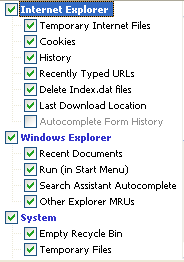
Once installed, run CCleaner click the Windows [tab]
The following should be selected by default, if not, please select:
CCleanerA.png

Next: click Options click the Settings tab
Uncheck: "Only delete files older than 48 hrs.", click Ok
Then click Run Cleaner (bottom right) then Exit
 
combofix + hijackthis

I used combofix before using the ccleaner, is that ok?


ComboFix 08-07-30.02 - user 2008-07-31 23:39:04.1 - NTFSx86
Microsoft Windows XP Home Edition 5.1.2600.2.950.1.1028.18.712 [GMT 8:00]
執行位置: C:\Documents and Settings\user\桌面\ComboFix.exe
* 已建立新的還原點

WARNING -THIS MACHINE DOES NOT HAVE THE RECOVERY CONSOLE INSTALLED !!
.

(((((((((((((((((((((((((((( 2008-06-28 - 2008-07-31 之間建立的檔案 )))))))))))))))))))))))))))))))))
.

2008-07-23 11:59 . 2008-07-23 11:59 230 --a------ C:\WINDOWS\system32\spupdsvc.inf
2008-07-04 16:43 . 2008-07-04 16:43 3,400 --a------ C:\WINDOWS\system32\PerfStringBackup.TMP
2008-06-11 12:45 . 2008-06-15 01:59 269,568 --------- C:\WINDOWS\system32\drivers\bthport.sys
2008-06-11 12:45 . 2008-06-15 01:59 269,568 -----c--- C:\WINDOWS\system32\dllcache\bthport.sys

.
(((((((((((((((((((((((((((((((((((( 近三個月內更動的檔案 )))))))))))))))))))))))))))))))))))))))))))))))
.
2008-07-30 17:20 --------- d-----w C:\Program Files\Trend Micro
2008-07-26 19:49 --------- d-----w C:\Documents and Settings\user\Application Data\Audacity
2008-07-04 15:29 --------- d-----w C:\Documents and Settings\user\Application Data\LimeWire
2008-06-20 17:39 240,640 ----a-w C:\WINDOWS\system32\mswsock.dll
2008-06-20 10:45 360,320 ----a-w C:\WINDOWS\system32\drivers\tcpip.sys
2008-06-20 10:44 138,368 ----a-w C:\WINDOWS\system32\drivers\afd.sys
2008-06-20 09:52 225,920 ----a-w C:\WINDOWS\system32\drivers\tcpip6.sys
2008-06-07 13:26 --------- d-----w C:\Program Files\Foxy
2008-05-28 18:39 --------- d-----w C:\Program Files\Microsoft Works
2008-05-07 05:14 1,269,248 ----a-w C:\WINDOWS\system32\quartz.dll
2008-04-21 07:01 645,120 ----a-w C:\WINDOWS\system32\wininet.dll
.

------- Sigcheck -------

2006-04-20 20:18 360576 b2220c618b42a2212a59d91ebd6fc4b4 C:\WINDOWS\$hf_mig$\KB917953\SP2QFE\tcpip.sys
2007-10-31 00:53 360832 64798ecfa43d78c7178375fcdd16d8c8 C:\WINDOWS\$hf_mig$\KB941644\SP2QFE\tcpip.sys
2008-06-20 18:44 360960 744e57c99232201ae98c49168b918f48 C:\WINDOWS\$hf_mig$\KB951748\SP2QFE\tcpip.sys
2008-06-20 19:51 361600 9aefa14bd6b182d61e3119fa5f436d3d C:\WINDOWS\$hf_mig$\KB951748\SP3GDR\tcpip.sys
2008-06-20 19:59 361600 ad978a1b783b5719720cff204b666c8e C:\WINDOWS\$hf_mig$\KB951748\SP3QFE\tcpip.sys
2004-08-26 20:00 359040 9f4b36614a0fc234525ba224957de55c C:\WINDOWS\$NtUninstallKB917953$\tcpip.sys
2006-04-20 19:51 359808 b4e29943b4b04bd5e7381546848e6669 C:\WINDOWS\$NtUninstallKB941644$\tcpip.sys
2007-10-31 01:20 360064 ed06c31200714e734118f9a47f5df5ce C:\WINDOWS\$NtUninstallKB951748$\tcpip.sys
2008-06-20 18:45 360320 2a5554fc5b1e04e131230e3ce035c3f9 C:\WINDOWS\system32\dllcache\tcpip.sys
2008-06-20 18:45 360320 073941d59ae065910064b728dee981ee C:\WINDOWS\system32\drivers\tcpip.sys
.
(((((((((((((((((((((((((((((((((((((((((( 重要登錄檔 )))))))))))))))))))))))))))))))))))))))))))))))))))))
.
.
REGEDIT4
*注意* 空白或合法的登錄值將不會顯示

[HKEY_CURRENT_USER\SOFTWARE\Microsoft\Windows\CurrentVersion\Run]
"ctfmon.exe"="C:\WINDOWS\system32\ctfmon.exe" [2004-08-26 20:00 15360]
"KKBOX Tray Icon"="C:\Program Files\KKBOX\KKBOX_Tray.exe" [2007-03-22 17:51 458752]
"Yahoo! Pager"="C:\Program Files\Yahoo!\Messenger\YahooMessenger.exe" [2007-01-23 13:40 4670968]
"msnmsgr"="C:\Program Files\Windows Live\Messenger\MsnMsgr.Exe" [2007-10-18 11:35 5724184]
"SpybotSD TeaTimer"="C:\Program Files\Spybot - Search & Destroy\TeaTimer.exe" [2008-01-28 11:43 2097488]

[HKEY_LOCAL_MACHINE\SOFTWARE\Microsoft\Windows\CurrentVersion\Run]
"NvCplDaemon"="C:\WINDOWS\system32\NvCpl.dll" [2004-09-30 13:35 4603904]
"HPDJ Taskbar Utility"="C:\WINDOWS\system32\spool\drivers\w32x86\3\hpztsb07.exe" [2002-11-04 17:54 188416]
"snpstd3"="C:\WINDOWS\vsnpstd3.exe" [2004-07-30 18:50 286720]
"TkBellExe"="C:\Program Files\Common Files\Real\Update_OB\realsched.exe" [2007-02-12 00:49 185896]
"UfSeAgnt.exe"="C:\Program Files\Trend Micro\Internet Security\UfSeAgnt.exe" [2008-03-10 19:07 1393928]
"Adobe Reader Speed Launcher"="C:\Program Files\Adobe\Reader 8.0\Reader\Reader_sl.exe" [2008-01-11 22:16 39792]
"PHIMETIPSYNC"="C:\Program Files\Common Files\Microsoft Shared\IME\IMTC65\PHONETIC\TINTLCFG.EXE" [2007-03-22 19:17 98656]
"CJIMETIPSYNC"="C:\Program Files\Common Files\Microsoft Shared\IME\IMTC65\CHANGJIE\CINTLCFG.EXE" [2007-03-22 19:17 66400]
"WService"="WService.EXE" [2007-07-21 22:59 40960 C:\WINDOWS\system32\WService.exe]

[HKEY_USERS\.DEFAULT\Software\Microsoft\Windows\CurrentVersion\Run]
"ctfmon.exe"="ctfmon.exe" [2004-08-26 20:00 15360 C:\WINDOWS\system32\ctfmon.exe]

[HKEY_LOCAL_MACHINE\software\microsoft\windows nt\currentversion\drivers32]
"vidc.iv31"= C:\WINDOWS\system32\ir32_32.dll
"vidc.iv32"= C:\WINDOWS\system32\ir32_32.dll
"vidc.ir32"= C:\WINDOWS\system32\ir32_32.dll
"vidc.ir31"= C:\WINDOWS\system32\ir32_32.dll

[HKLM\~\startupfolder\C:^Documents and Settings^All Users^「開始」功能表^程式集^啟動^Adobe Reader Speed Launch.lnk]
path=C:\Documents and Settings\All Users\「開始」功能表\程式集\啟動\Adobe Reader Speed Launch.lnk
backup=C:\WINDOWS\pss\Adobe Reader Speed Launch.lnkCommon Startup

[HKLM\~\startupfolder\C:^Documents and Settings^All Users^「開始」功能表^程式集^啟動^Adobe Reader Synchronizer.lnk]
path=C:\Documents and Settings\All Users\「開始」功能表\程式集\啟動\Adobe Reader Synchronizer.lnk
backup=C:\WINDOWS\pss\Adobe Reader Synchronizer.lnkCommon Startup

[HKEY_LOCAL_MACHINE\software\microsoft\shared tools\msconfig\startupreg\CJIMETIPSYNC]
--a------ 2007-03-22 19:17 66400 C:\Program Files\Common Files\Microsoft Shared\IME\IMTC65\CHANGJIE\CINTLCFG.EXE

[HKEY_LOCAL_MACHINE\software\microsoft\shared tools\msconfig\startupreg\foxy]
--a------ 2008-05-29 19:37 1160704 C:\Program Files\Foxy\Foxy.exe

[HKEY_LOCAL_MACHINE\software\microsoft\shared tools\msconfig\startupreg\IgfxTray]
--a------ 2004-05-06 15:52 155648 C:\WINDOWS\system32\igfxtray.exe

[HKEY_LOCAL_MACHINE\software\microsoft\shared tools\msconfig\startupreg\IMJPMIG8.1]
--a------ 2004-08-26 20:00 208952 C:\WINDOWS\ime\IMJP8_1\imjpmig.exe

[HKEY_LOCAL_MACHINE\software\microsoft\shared tools\msconfig\startupreg\iTunesHelper]
--a------ 2006-10-30 09:36 256576 C:\Program Files\iTunes\iTunesHelper.exe

[HKEY_LOCAL_MACHINE\software\microsoft\shared tools\msconfig\startupreg\NvMediaCenter]
--a------ 2004-09-30 13:35 86016 C:\WINDOWS\system32\nvmctray.dll

[HKEY_LOCAL_MACHINE\software\microsoft\shared tools\msconfig\startupreg\PHIMETIPSYNC]
--a------ 2007-03-22 19:17 98656 C:\Program Files\Common Files\Microsoft Shared\IME\IMTC65\PHONETIC\TINTLCFG.EXE

[HKEY_LOCAL_MACHINE\software\microsoft\shared tools\msconfig\startupreg\QuickTime Task]
--a------ 2006-10-25 18:58 282624 C:\Program Files\QuickTime\qttask.exe

[HKEY_LOCAL_MACHINE\software\microsoft\shared tools\msconfig\startupreg\TkBellExe]
--a------ 2007-02-12 00:49 185896 C:\Program Files\Common Files\Real\Update_OB\realsched.exe

[HKEY_LOCAL_MACHINE\software\microsoft\shared tools\msconfig\startupreg\nwiz]
--a------ 2004-09-30 13:35 921600 C:\WINDOWS\system32\nwiz.exe

[HKEY_LOCAL_MACHINE\software\microsoft\shared tools\msconfig\startupreg\SoundMan]
--a------ 2004-11-02 14:53 77824 C:\WINDOWS\SoundMan.exe

[HKEY_LOCAL_MACHINE\software\microsoft\shared tools\msconfig\services]
"Schedule"=2 (0x2)
"wscsvc"=2 (0x2)
"ImapiService"=3 (0x3)
"WMPNetworkSvc"=3 (0x3)
"usnjsvc"=3 (0x3)
"iPod Service"=3 (0x3)
"Adobe LM Service"=3 (0x3)

[HKEY_LOCAL_MACHINE\software\microsoft\security center\Monitoring\TrendAntiVirus]
"DisableMonitoring"=dword:00000001

[HKEY_LOCAL_MACHINE\software\microsoft\security center\Monitoring\TrendFirewall]
"DisableMonitoring"=dword:00000001

[HKLM\~\services\sharedaccess\parameters\firewallpolicy\standardprofile]
"EnableFirewall"= 0 (0x0)

[HKLM\~\services\sharedaccess\parameters\firewallpolicy\standardprofile\AuthorizedApplications\List]
"%windir%\\system32\\sessmgr.exe"=
"C:\\Program Files\\Yahoo!\\Messenger\\YahooMessenger.exe"=
"C:\\Program Files\\LimeWire\\LimeWire.exe"=
"C:\\Program Files\\Yahoo!\\Messenger\\YServer.exe"=
"C:\\Program Files\\Foxy\\Foxy.exe"=
"C:\\Program Files\\iTunes\\iTunes.exe"=
"C:\\Program Files\\Windows Live\\Messenger\\msnmsgr.exe"=
"C:\\Program Files\\Windows Live\\Messenger\\livecall.exe"=

[HKLM\~\services\sharedaccess\parameters\firewallpolicy\standardprofile\GloballyOpenPorts\List]
"3831:TCP"= 3831:TCP:Foxy (169.254.222.126:3831) 3831 TCP
"3831:UDP"= 3831:UDP:Foxy (169.254.222.126:3831) 3831 UDP

S3 EZUSB;EZUSB PC/SC Smart Card Reader;C:\WINDOWS\system32\DRIVERS\ezusb.sys [2004-02-03 17:52]

[HKEY_CURRENT_USER\software\microsoft\windows\currentversion\explorer\mountpoints2\{b27c2f2a-b8fd-11db-98d6-000fea82281a}]
\Shell\AutoRun\command - REGED1T.EXE

*Newly Created Service* - CATCHME
.
.
------- Supplementary Scan -------
.
R0 -: HKCU-Main,Start Page = about:blank
R1 -: HKCU-Internet Connection Wizard,ShellNext = iexplore
O8 -: Foxy 下載 - C:\Program Files\Foxy\Foxy.exe/download.htm
O8 -: Foxy 搜尋 - C:\Program Files\Foxy\Foxy.exe/search.htm
O8 -: 匯出至 Microsoft Excel(&X) - C:\PROGRA~1\MICROS~2\Office10\EXCEL.EXE/3000
O8 -: 匯出至 Microsoft Office Excel(&X) - C:\PROGRA~1\MICROS~2\OFFICE11\EXCEL.EXE/3000

O16 -: Microsoft XML Parser for Java - file://C:\WINDOWS\Java\classes\xmldso.cab
C:\WINDOWS\Downloaded Program Files\Microsoft XML Parser for Java.osd

O16 -: {650BBB86-3D77-49BA-A4B2-2455E44EB031} - hxxps://netbank.chb.com.tw/Security/PasswordMD5ClientCOM.cab
C:\WINDOWS\Downloaded Program Files\PasswordMD5ClientCOM.inf
C:\WINDOWS\Downloaded Program Files\PasswordMD5ClientCOM.dll

O16 -: {97A10DCF-A8AA-806F-1239-AB90AD69A986} - hxxps://ra.yuanta.com.tw/formosoft/YuantaCAPIATL.cab
C:\WINDOWS\Downloaded Program Files\YuantaCAPIATL.inf
C:\WINDOWS\Downloaded Program Files\YuantaCAPIATL.dll


**************************************************************************

catchme 0.3.1361 W2K/XP/Vista - rootkit/stealth malware detector by Gmer, http://www.gmer.net
Rootkit scan 2008-07-31 23:41:47
Windows 5.1.2600 Service Pack 2 FAT NTAPI

掃描隱藏的程序...

掃描隱藏的進程...

HKCU\Software\Microsoft\Windows\CurrentVersion\Run
KKBOX Tray Icon = C:\Program Files\KKBOX\KKBOX_Tray.exe??????????????????????????????????????????????????????????????????????????????????????????????????????????????????????????????????????????????????????????????????????????????????????????????????????????????????????????????

掃描隱藏的檔案...

掃描完成
隱藏檔案: 0

**************************************************************************
.
完成時間: 2008-07-31 23:42:53
ComboFix-quarantined-files.txt 2008-07-31 15:42:47
ComboFix2.txt 2007-05-20 13:45:25

Pre-Run: 75,866,804,224 位元組可用
Post-Run: 75,896,229,888 位元組可用

161 --- E O F --- 2008-07-28 07:54:43


Logfile of Trend Micro HijackThis v2.0.2
Scan saved at 上午 01:09:13, on 2008/8/1
Platform: Windows XP SP2 (WinNT 5.01.2600)
MSIE: Internet Explorer v6.00 SP2 (6.00.2900.2180)
Boot mode: Normal

Running processes:
C:\WINDOWS\System32\smss.exe
C:\WINDOWS\system32\winlogon.exe
C:\WINDOWS\system32\services.exe
C:\WINDOWS\system32\lsass.exe
C:\WINDOWS\system32\svchost.exe
C:\WINDOWS\System32\svchost.exe
C:\WINDOWS\system32\spoolsv.exe
C:\Program Files\Common Files\Microsoft Shared\VS7Debug\mdm.exe
C:\WINDOWS\system32\nvsvc32.exe
C:\Program Files\Trend Micro\Internet Security\SfCtlCom.exe
C:\WINDOWS\system32\spool\drivers\w32x86\3\hpztsb07.exe
C:\WINDOWS\system32\WService.EXE
C:\Program Files\Common Files\Real\Update_OB\realsched.exe
C:\WINDOWS\system32\svchost.exe
C:\Program Files\Trend Micro\Internet Security\UfSeAgnt.exe
C:\WINDOWS\system32\ctfmon.exe
C:\Program Files\KKBOX\KKBOX_Tray.exe
C:\Program Files\Yahoo!\Messenger\YahooMessenger.exe
C:\Program Files\Windows Live\Messenger\MsnMsgr.Exe
C:\Program Files\Spybot - Search & Destroy\TeaTimer.exe
C:\WINDOWS\system32\DRIVERS\WtSrv.exe
C:\Program Files\Trend Micro\BM\TMBMSRV.exe
C:\Program Files\Windows Live\Messenger\usnsvc.exe
C:\PROGRA~1\TRENDM~1\INTERN~2\TmPfw.exe
C:\WINDOWS\system32\wuauclt.exe
C:\Program Files\Trend Micro\Internet Security\TmProxy.exe
C:\Program Files\Common Files\Microsoft Shared\Windows Live\WLLoginProxy.exe
C:\WINDOWS\system32\conime.exe
C:\WINDOWS\explorer.exe
C:\WINDOWS\system32\notepad.exe
C:\Program Files\Internet Explorer\iexplore.exe
C:\WINDOWS\system32\wuauclt.exe
C:\Program Files\Trend Micro\HijackThis\HijackThis.exe

O2 - BHO: Adobe PDF Reader Link Helper - {06849E9F-C8D7-4D59-B87D-784B7D6BE0B3} - C:\Program Files\Common Files\Adobe\Acrobat\ActiveX\AcroIEHelper.dll
O2 - BHO: Spybot-S&D IE Protection - {53707962-6F74-2D53-2644-206D7942484F} - C:\Program Files\Spybot - Search & Destroy\SDHelper.dll
O2 - BHO: Windows Live 登入小幫手 - {9030D464-4C02-4ABF-8ECC-5164760863C6} - C:\Program Files\Common Files\Microsoft Shared\Windows Live\WindowsLiveLogin.dll
O4 - HKLM\..\Run: [NvCplDaemon] RUNDLL32.EXE C:\WINDOWS\system32\NvCpl.dll,NvStartup
O4 - HKLM\..\Run: [HPDJ Taskbar Utility] C:\WINDOWS\system32\spool\drivers\w32x86\3\hpztsb07.exe
O4 - HKLM\..\Run: [WService] WService.EXE
O4 - HKLM\..\Run: [snpstd3] C:\WINDOWS\vsnpstd3.exe
O4 - HKLM\..\Run: [TkBellExe] "C:\Program Files\Common Files\Real\Update_OB\realsched.exe" -osboot
O4 - HKLM\..\Run: [UfSeAgnt.exe] "C:\Program Files\Trend Micro\Internet Security\UfSeAgnt.exe"
O4 - HKLM\..\Run: [Adobe Reader Speed Launcher] "C:\Program Files\Adobe\Reader 8.0\Reader\Reader_sl.exe"
O4 - HKLM\..\Run: [PHIMETIPSYNC] C:\Program Files\Common Files\Microsoft Shared\IME\IMTC65\PHONETIC\TINTLCFG.EXE /PHIMETIPSync
O4 - HKLM\..\Run: [CJIMETIPSYNC] C:\Program Files\Common Files\Microsoft Shared\IME\IMTC65\CHANGJIE\CINTLCFG.EXE /CJIMETIPSync
O4 - HKCU\..\Run: [ctfmon.exe] C:\WINDOWS\system32\ctfmon.exe
O4 - HKCU\..\Run: [KKBOX Tray Icon] C:\Program Files\KKBOX\KKBOX_Tray.exe
O4 - HKCU\..\Run: [Yahoo! Pager] "C:\Program Files\Yahoo!\Messenger\YahooMessenger.exe" -quiet
O4 - HKCU\..\Run: [msnmsgr] "C:\Program Files\Windows Live\Messenger\MsnMsgr.Exe" /background
O4 - HKCU\..\Run: [SpybotSD TeaTimer] C:\Program Files\Spybot - Search & Destroy\TeaTimer.exe
O4 - HKUS\S-1-5-19\..\Run: [ctfmon.exe] ctfmon.exe (User 'LOCAL SERVICE')
O4 - HKUS\S-1-5-20\..\Run: [ctfmon.exe] ctfmon.exe (User 'NETWORK SERVICE')
O4 - HKUS\S-1-5-18\..\Run: [ctfmon.exe] ctfmon.exe (User 'SYSTEM')
O4 - HKUS\.DEFAULT\..\Run: [ctfmon.exe] ctfmon.exe (User 'Default user')
O8 - Extra context menu item: Foxy 下載 - res://C:\Program Files\Foxy\Foxy.exe/download.htm
O8 - Extra context menu item: Foxy 搜尋 - res://C:\Program Files\Foxy\Foxy.exe/search.htm
O8 - Extra context menu item: 匯出至 Microsoft Excel(&X) - res://C:\PROGRA~1\MICROS~2\Office10\EXCEL.EXE/3000
O8 - Extra context menu item: 匯出至 Microsoft Office Excel(&X) - res://C:\PROGRA~1\MICROS~2\OFFICE11\EXCEL.EXE/3000
O9 - Extra button: 參考資料 - {92780B25-18CC-41C8-B9BE-3C9C571A8263} - C:\PROGRA~1\MICROS~2\OFFICE11\REFIEBAR.DLL
O9 - Extra button: (no name) - {DFB852A3-47F8-48C4-A200-58CAB36FD2A2} - C:\Program Files\Spybot - Search & Destroy\SDHelper.dll
O9 - Extra 'Tools' menuitem: Spybot - Search && Destroy Configuration - {DFB852A3-47F8-48C4-A200-58CAB36FD2A2} - C:\Program Files\Spybot - Search & Destroy\SDHelper.dll
O9 - Extra button: Messenger - {FB5F1910-F110-11d2-BB9E-00C04F795683} - C:\Program Files\Messenger\msmsgs.exe
O9 - Extra 'Tools' menuitem: Windows Messenger - {FB5F1910-F110-11d2-BB9E-00C04F795683} - C:\Program Files\Messenger\msmsgs.exe
O14 - IERESET.INF: START_PAGE_URL=Http://www.synnex.com.tw/
O15 - ESC Trusted Zone: http://*.update.microsoft.com
O16 - DPF: {0CCA191D-13A6-4E29-B746-314DEE697D83} (Facebook Photo Uploader 5) - http://upload.facebook.com/controls/FacebookPhotoUploader5.cab
O16 - DPF: {30528230-99f7-4bb4-88d8-fa1d4f56a2ab} (YInstStarter Class) - C:\Program Files\Yahoo!\Common\yinsthelper.dll
O16 - DPF: {5C051655-FCD5-4969-9182-770EA5AA5565} (Solitaire Showdown Class) - http://messenger.zone.msn.com/binary/SolitaireShowdown.cab56986.cab
O16 - DPF: {5C6698D9-7BE4-4122-8EC5-291D84DBD4A0} (Facebook Photo Uploader 4 Control) - http://upload.facebook.com/controls/FacebookPhotoUploader3.cab
O16 - DPF: {5D6F45B3-9043-443D-A792-115447494D24} (UnoCtrl Class) - http://messenger.zone.msn.com/ZH-TW/a-UNO1/GAME_UNO1.cab
O16 - DPF: {5F8469B4-B055-49DD-83F7-62B522420ECC} (Facebook Photo Uploader Control) - http://upload.facebook.com/controls/FacebookPhotoUploader.cab
O16 - DPF: {650BBB86-3D77-49BA-A4B2-2455E44EB031} (PasswordMD5ClientCOMCtrl Class) - https://netbank.chb.com.tw/Security/PasswordMD5ClientCOM.cab
O16 - DPF: {97A10DCF-A8AA-806F-1239-AB90AD69A986} (YuantaCAPI Class) - https://ra.yuanta.com.tw/formosoft/YuantaCAPIATL.cab
O16 - DPF: {C3F79A2B-B9B4-4A66-B012-3EE46475B072} (MessengerStatsClient Class) - http://messenger.zone.msn.com/binary/MessengerStatsPAClient.cab56907.cab
O16 - DPF: {F5A7706B-B9C0-4C89-A715-7A0C6B05DD48} (Minesweeper Flags Class) - http://messenger.zone.msn.com/binary/MineSweeper.cab56986.cab
O18 - Protocol: skype4com - {FFC8B962-9B40-4DFF-9458-1830C7DD7F5D} - C:\PROGRA~1\COMMON~1\Skype\SKYPE4~1.DLL
O23 - Service: Adobe LM Service - Unknown owner - C:\Program Files\Common Files\Adobe Systems Shared\Service\Adobelmsvc.exe
O23 - Service: iPod Service - Apple Computer, Inc. - C:\Program Files\iPod\bin\iPodService.exe
O23 - Service: NBService - Nero AG - C:\Program Files\Nero\Nero 7\Nero BackItUp\NBService.exe
O23 - Service: NVIDIA Display Driver Service (NVSvc) - NVIDIA Corporation - C:\WINDOWS\system32\nvsvc32.exe
O23 - Service: Trend Micro Central Control Component (SfCtlCom) - Trend Micro Inc. - C:\Program Files\Trend Micro\Internet Security\SfCtlCom.exe
O23 - Service: Trend Micro Unauthorized Change Prevention Service (TMBMServer) - Trend Micro Inc. - C:\Program Files\Trend Micro\BM\TMBMSRV.exe
O23 - Service: Trend Micro Personal Firewall (TmPfw) - Trend Micro Inc. - C:\PROGRA~1\TRENDM~1\INTERN~2\TmPfw.exe
O23 - Service: Trend Micro Proxy Service (tmproxy) - Trend Micro Inc. - C:\Program Files\Trend Micro\Internet Security\TmProxy.exe
O23 - Service: WinTab Service (WinTabService) - Tablet Driver - C:\WINDOWS\system32\DRIVERS\WtSrv.exe
--
End of file - 7446 bytes
 
i suppose it was OK, to do it that way, i should've posted that in my instructions.

Anyway, can you pls do the following:

Please do a scan with Kaspersky Online Scanner

Click on the Accept button and install any components it needs.
  • The program will install and then begin downloading the latest definition files.
  • After the files have been downloaded on the left side of the page in the Scan section select My Computer.
  • This will start the program and scan your system.
  • The scan will take a while, so be patient and let it run.
  • Once the scan is complete, click on View scan report
  • Now, click on the Save Report as button.
  • In the drop down box labeled Files of type change the type to Text file.
  • Save the file to your desktop.
  • Copy and paste that information in your next post.
 
kaspersky scan

--------------------------------------------------------------------------------
KASPERSKY ONLINE SCANNER 7 REPORT
Saturday, August 2, 2008
Operating System: Microsoft Windows XP Home Edition Service Pack 2 (build 2600)
Kaspersky Online Scanner 7 version: 7.0.25.0
Program database last update: Friday, August 01, 2008 19:30:28
Records in database: 1041748
--------------------------------------------------------------------------------

Scan settings:
Scan using the following database: extended
Scan archives: yes
Scan mail databases: yes

Scan area - My Computer:
A:\
C:\
D:\
E:\
G:\
H:\
I:\
J:\

Scan statistics:
Files scanned: 48800
Threat name: 1
Infected objects: 2
Suspicious objects: 0
Duration of the scan: 00:57:22


File name / Threat name / Threats count
C:\Documents and Settings\user\My Documents\Unzipped\vtp6[1]\Vista Transformation Pack 6.0.exe Infected: not-a-virus:RiskTool.Win32.CloseApp.e 2

The selected area was scanned.
 
Back
Top