
rjbrittain11
New Member
Hello all,
just ordered my 2nd gig of DDR2-800 Corsair xms for my computer:
Newegg Link
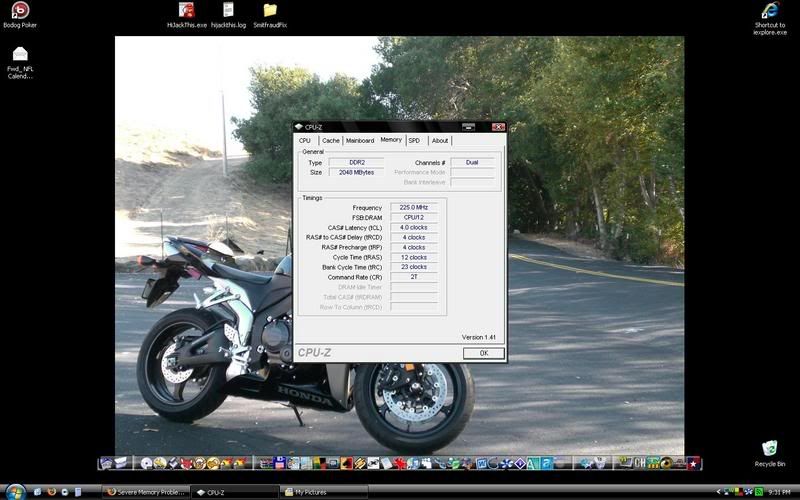
This is a screenshot with my new ram installed (Sorry if its hard to read) Should the frequency read 225 Mhz (Which is what its showing)? The timings are:
Frequency - 225.0 MHz
FSB RAM - CPU/12
tCL - 4
tRCD - 4
tRP - 4
tRAS - 12
Bank Cycle Time (tRC) - 23
Command Rate (CR) - 2T
I thought it was suppose to read 400 Mhz. I run my processor overclocked with a FSB of 225Mhz, and thats all I do. Do I need to change the timings or do something else? Thanks in advance for all the advice thats coming.
just ordered my 2nd gig of DDR2-800 Corsair xms for my computer:
Newegg Link
This is a screenshot with my new ram installed (Sorry if its hard to read) Should the frequency read 225 Mhz (Which is what its showing)? The timings are:
Frequency - 225.0 MHz
FSB
RAM - CPU/12tCL - 4
tRCD - 4
tRP - 4
tRAS - 12
Bank Cycle Time (tRC) - 23
Command Rate (CR) - 2T
I thought it was suppose to read 400 Mhz. I run my processor overclocked with a FSB of 225Mhz, and thats all I do. Do I need to change the timings or do something else? Thanks in advance for all the advice thats coming.
