JC2 Slow on new GPU

I picked up a 260. It can play BF3 on max at 35 FPS. It can play JC2 (just cause 2) on low with 35 FPS. What's up with this? I never messed with drivers or nothing. VSync is off. It can't play med or hi with a playable FPS.

 
How are you measuring your frames, and are you running at full 720p? Because a 4870, which is only slightly under your 260-216, runs out of power on BF3 @ medium with vsync off. I seriously doubt that running a weaker CPU (factual statement) and only fractionally faster GPU that you would jump to max. Especially considering it is DX11.

As for JC2, try running a smaller resolution, and search le google for any magic tricks for the 260 and JC2.
 
Fraps, and I'm running full 1366x768. I will go into BF3 tomorrow and check the settings, but I am 99 percent sure it's getting 35 FPS and on Ultra. Anyways, that's not my question. How can I get JC2 to run as it should? It should run minimum 50 FPS at low, and 40 to 50 on med, and 40 max.
 
It is a lack of power. you are saying you get 40+ FPS (btw, learn the placing of the + symbol. ) on a GTX 260. YOu don't have the power to do it. Even OCd to 700MHz and 1500 mem (iirc) on the 4870 (same basic power) it only gets about 30 frames at medium. Also note BF3 is pretty heavy on CPU power. You can easily gain 15% FPS or more when overclocking a 2600k with BF3.

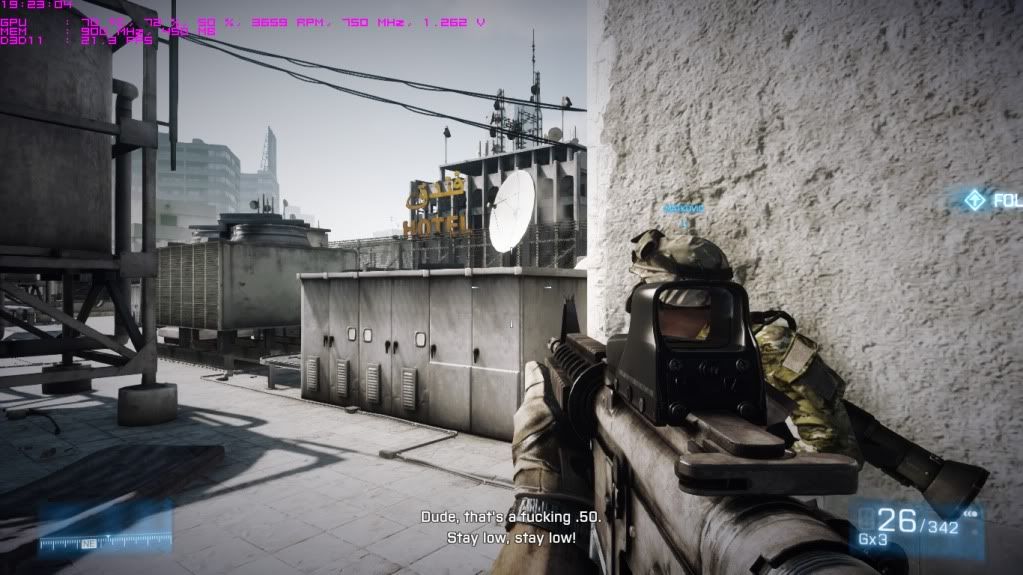
evidence on it.
bf3_2012_07_04_19_23_04_833.jpg

on settings
oops, don't have a screen of the settings, but it was basic medium with all extra eye candy turned off or way down.
 
Will post BF3 pic in a min.
Anyways, JC2 is still awful. I set the res and used those exact settings and got 15 FPS. I even reinstalled the game. Edit: Still need to post Pic, but its 30+ FPS with med terrain (terrain quality high is only DX 11) and no MSAA. 4x MSAA makes the FPS drop down a ton. In intesive scenes (lots of fire and smoke, shooting, etc.) I get around 20-25. In scenes with no movement really, I get 40+. All with HBAO, almost max settings.
 
Last edited:
I really don't know what the issue is Byte. :/ Try running it at a slightly lower resolution, it may just be your card isn't powerful enough. I struggle it run it at low on a 9800 GT at 1280x1024, it does appear to be quite a demanding game.
 
I think it could be either a hardware or a software conflict.... long shot but have you tried reseating your card and are you sure it's it the highest bandwidth PCI Express slot?
 
Fraps, and I'm running full 1366x768. I will go into BF3 tomorrow and check the settings, but I am 99 percent sure it's getting 35 FPS and on Ultra. Anyways, that's not my question. How can I get JC2 to run as it should? It should run minimum 50 FPS at low, and 40 to 50 on med, and 40 max.

You may want to check if it plays nice when FRAPS are off. Because fraps can lower your FPS pretty hard.
 
Download either EVGA precision or MSI Afterburner and set the options to show temp and FPS in on screen display. Hit apply and then minimize and start the game. That will give you a reading that does not hinder gameplay. If you are using fraps for screenshots, then setup the screen capture tabby too and you will have that option as well.

Otherwise, reseat the card. Update or roll back the drivers, try a beta driver too. Try overclocking the card, and try the game on a different computer if possible to rule it out.
Just remember, with computer issues, if it makes since you are doing it wrong.
 
Smile, and wolfe, I can tell its slow without fraps. I dont need fraps to tell its going at 15 FPS on high. Will try temps, and I guess reseat the card and beta drivers. Now, how do I turn the temp display on always with Afterburner?
 
Last edited:
If you set it to show temps in OSD, then it will be in the top left corner of the screen everytime you start a game with afterburner running. Works the same with all of the OSD readings.
If you want to see temps while not in game then you need to unminimize afterburner and look on the right side for the temps. It logs on screen for 30 minutes iirc.
 
I had a gtx 260 core 216 and an athlon x3 and ran it on almost full you need to trun off gpu water (IIRC, this causes frame drops even when no where near water) and turn off Bokeh Filter, again iirc I turned off ssao as it seem to help but not as much as the other two I mentioned, I found it then ran with smoothly 95% of the time (30-40 fps) ssao on made it only be smooth like 75% of the time.
(Also had aa set to max along with everything else apart from the settings above)

It also helps for the overall smoothness of the game to force triple buffering via d3doverider (btw if you install this but find that the gui does not load but still shows in task manager close it and then close your browser and open it again, this took me forever to figure out and sounds crazy but it works)

Edit also ran it at that exact resolution too.
 
Back
Top