
You are using an out of date browser. It may not display this or other websites correctly.
You should upgrade or use an alternative browser.
You should upgrade or use an alternative browser.
little problem wiv this pc for the geeks to solve plz
- Thread starter Splinter
- Start date

codeman0013
Active Member
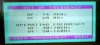
there this pc at ma mums work dat wnt turn on, it gets past the windows loading screen then comes up with a black screen till this box comes up with a frequency problem
heres the box
View attachment 1352
does anybody know wats wrong?
Thanks, Si.
btw i probly posted this in the wrong part sorry
my guess is that the video card is bad or going bad try replacing or reseating it it may not be making good contact also scan for virus/adaware/spyware too and ensure its not got one of those going on at the same time

jimmymac
VIP Member
easy lads, lets not getting him spending unecessary money, its seems someone has been messing with your video settings.
I think you can solve this one by booting into safe mode..
Start up the pc and after the post screen does its memory check keep tapping F8 until a menu screen comes up
select safe mode
let it boot (may take a while longer than normal)
once its fully loaded right click somewhere in the middle of the screen and select display properties.
Then go to the settings tab and click advanced, next click the monitor tab
here should be a box marked monitor settings and in it a drop down box for refresh rate
under here make sure the box is ticked that says "hide modes this monitor cannot display"
It should leave you with a couple of option in the drop down box, select a fairly low Hz value and select apply.
Now restart the computer and hopefully you will be able to boot up into windows normally.
I think thats the right way to go about it, someone will correct me if not
I think you can solve this one by booting into safe mode..
Start up the pc and after the post screen does its memory check keep tapping F8 until a menu screen comes up
select safe mode
let it boot (may take a while longer than normal)
once its fully loaded right click somewhere in the middle of the screen and select display properties.
Then go to the settings tab and click advanced, next click the monitor tab
here should be a box marked monitor settings and in it a drop down box for refresh rate
under here make sure the box is ticked that says "hide modes this monitor cannot display"
It should leave you with a couple of option in the drop down box, select a fairly low Hz value and select apply.
Now restart the computer and hopefully you will be able to boot up into windows normally.
I think thats the right way to go about it, someone will correct me if not
codeman0013
Active Member
duh stupid me jimmy you are right try his suggestion that will more then likely fix your problem