Loading Kernel DLL taking too long when re-installing

dell

Member
Just to give you some info, I have an optiplex gx270 windows xp home,my pc has been in perfect health untill I got the Smart HDD Virus. Iv tried to Download a few virus removers such as combofix ,Pc doctor, But the virus is not allowing me to run em,:mad:

Im trying to re-install windows xp, I put the disc in, it loads up, then when it gets to the part where the pc restarts, at the bottom of the blue screen it says Loading Kernel debugger DLL, I went out for a walk, about an hour, and it didnt move, no progress, iv done a few of these re-installs before, I know this is not normal. Please advise, thank you
 
Last edited:
If you can boot back into windows then do the following. You must run the rkill program (any version) before running malwarebytes. But do not reboot the system once rkill has temporarily killed the infection.

Please download Malwarebytes' Anti-Malware from here or here and save it to your desktop.
  • Double-click mbam-setup.exe and follow the prompts to install the program.
  • At the end, be sure a checkmark is placed next to
    • Update Malwarebytes' Anti-Malware
    • and Launch Malwarebytes' Anti-Malware
  • then click Finish.
  • If an update is found, it will download and install the latest version. Please keep updating until it says you have the latest version.
  • Once the program has loaded, select Perform quick scan, then click Scan.
  • When the scan is complete, click OK, then Show Results to view the results.
  • Be sure that everything is checked, and click Remove Selected.
  • A log will be saved automatically which you can access by clicking on the Logs tab within Malwarebytes' Anti-Malware

If for some reason Malwarebytes will not install or run please download and run Rkill.scr, Rkill.exe, or Rkill.com. If you are still having issues running rkill then try downloading these renamed versions of the same program.

EXPLORER.EXE
IEXPLORE.EXE
USERINIT.EXE
WINLOGON.EXE

But DO NOT reboot the system and then try installing or running Malwarebytes. If Rkill (which is a black box) appears and then disappears right away or you get a message saying rkill is infected, keep trying to run rkill until it over powers the infection and temporarily kills it. Once a log appears on the screen, you can try running malwarebytes or downloading other programs.


Download the HijackThis installer from here.
Run the installer and choose Install, indicating that you accept the licence agreement. The installer will place a shortcut on your desktop and launch HijackThis.

Click Do a system scan and save a logfile

Most of what HijackThis lists will be harmless or even essential, don't fix anything yet.

When the hijackthis log appears in a notepad file, click on the edit menu, click select all, then click on the edit menu again and click on copy. Come back to your reply and right click on your mouse and click on paste.

Post the logfile that HijackThis produces along with the Malwarebytes Anti-Malware log

 
HERE IS THE INFO FROM THE SCAN

Logfile of Trend Micro HijackThis v2.0.4
Scan saved at 12:27:44 AM, on 3/29/2012
Platform: Windows XP SP2 (WinNT 5.01.2600)
MSIE: Internet Explorer v6.00 SP2 (6.00.2900.2180)
Boot mode: Normal

Running processes:
C:\WINDOWS\System32\smss.exe
C:\WINDOWS\system32\winlogon.exe
C:\WINDOWS\system32\services.exe
C:\WINDOWS\system32\lsass.exe
C:\WINDOWS\system32\svchost.exe
C:\WINDOWS\System32\svchost.exe
C:\WINDOWS\system32\LEXBCES.EXE
C:\WINDOWS\system32\spoolsv.exe
C:\WINDOWS\system32\LEXPPS.EXE
C:\WINDOWS\Explorer.EXE
C:\Program Files\PC Tools\PC Tools Security\BDT\BDTUpdateService.exe
C:\Program Files\Java\jre6\bin\jqs.exe
C:\Program Files\PC Tools\PC Tools Security\pctsAuxs.exe
C:\WINDOWS\system32\igfxtray.exe
C:\Program Files\Malwarebytes' Anti-Malware\mbamgui.exe
C:\WINDOWS\system32\ctfmon.exe
C:\Documents and Settings\Owner\Local Settings\Application Data\Autobahn\nexdef.exe
C:\WINDOWS\system32\wscntfy.exe
C:\WINDOWS\System32\svchost.exe
C:\Program Files\Mozilla Firefox\firefox.exe
C:\WINDOWS\system32\wuauclt.exe
C:\WINDOWS\system32\msiexec.exe
C:\Program Files\Trend Micro\HiJackThis\HiJackThis.exe

R3 - URLSearchHook: PC Tools Browser Defender - {472734EA-242A-422b-ADF8-83D1E48CC825} - C:\Program Files\PC Tools\PC Tools Security\BDT\PCTBrowserDefender.dll
O2 - BHO: (no name) - {02478D38-C3F9-4efb-9B51-7695ECA05670} - (no file)
O2 - BHO: AcroIEHelperStub - {18DF081C-E8AD-4283-A596-FA578C2EBDC3} - C:\Program Files\Common Files\Adobe\Acrobat\ActiveX\AcroIEHelperShim.dll
O2 - BHO: Browser Defender BHO - {2A0F3D1B-0909-4FF4-B272-609CCE6054E7} - C:\Program Files\PC Tools\PC Tools Security\BDT\PCTBrowserDefender.dll
O2 - BHO: Increase performance and video formats for your HTML5 <video> - {326E768D-4182-46FD-9C16-1449A49795F4} - C:\Program Files\DivX\DivX Plus Web Player\ie\DivXHTML5\DivXHTML5.dll
O2 - BHO: Java(tm) Plug-In 2 SSV Helper - {DBC80044-A445-435b-BC74-9C25C1C588A9} - C:\Program Files\Java\jre6\bin\jp2ssv.dll
O2 - BHO: JQSIEStartDetectorImpl - {E7E6F031-17CE-4C07-BC86-EABFE594F69C} - C:\Program Files\Java\jre6\lib\deploy\jqs\ie\jqs_plugin.dll
O3 - Toolbar: PC Tools Browser Defender - {472734EA-242A-422B-ADF8-83D1E48CC825} - C:\Program Files\PC Tools\PC Tools Security\BDT\PCTBrowserDefender.dll
O4 - HKLM\..\Run: [IgfxTray] C:\WINDOWS\system32\igfxtray.exe
O4 - HKLM\..\Run: [ISTray] "C:\Program Files\PC Tools\PC Tools Security\pctsGui.exe /hideGUI"
O4 - HKLM\..\Run: [Malwarebytes' Anti-Malware] "C:\Program Files\Malwarebytes' Anti-Malware\mbamgui.exe" /starttray
O4 - HKCU\..\Run: [ctfmon.exe] C:\WINDOWS\system32\ctfmon.exe
O4 - Startup: NexDef Plug-in.lnk = C:\Documents and Settings\Owner\Local Settings\Application Data\Autobahn\nexdef.exe
O8 - Extra context menu item: En&queue current page with BID - file://C:\Program Files\Bulk Image Downloader\iemenu\iebidqueue.htm
O8 - Extra context menu item: Enqueue link tar&get with BID - file://C:\Program Files\Bulk Image Downloader\iemenu\iebidlinkqueue.htm
O8 - Extra context menu item: Open &link target with BID - file://C:\Program Files\Bulk Image Downloader\iemenu\iebidlink.htm
O8 - Extra context menu item: Open current page with BI&D - file://C:\Program Files\Bulk Image Downloader\iemenu\iebid.htm
O8 - Extra context menu item: Open current page with BID Link Explorer - file://C:\Program Files\Bulk Image Downloader\iemenu\iebidlinkexplorer.htm
O9 - Extra button: Messenger - {FB5F1910-F110-11d2-BB9E-00C04F795683} - C:\Program Files\Messenger\msmsgs.exe
O9 - Extra 'Tools' menuitem: Windows Messenger - {FB5F1910-F110-11d2-BB9E-00C04F795683} - C:\Program Files\Messenger\msmsgs.exe
O22 - SharedTaskScheduler: Browseui preloader - {438755C2-A8BA-11D1-B96B-00A0C90312E1} - C:\WINDOWS\system32\browseui.dll
O22 - SharedTaskScheduler: Component Categories cache daemon - {8C7461EF-2B13-11d2-BE35-3078302C2030} - C:\WINDOWS\system32\browseui.dll
O23 - Service: Browser Defender Update Service - Unknown owner - C:\Program Files\PC Tools\PC Tools Security\BDT\BDTUpdateService.exe
O23 - Service: Google Update Service (gupdate) (gupdate) - Google Inc. - C:\Program Files\Google\Update\GoogleUpdate.exe
O23 - Service: Google Update Service (gupdatem) (gupdatem) - Google Inc. - C:\Program Files\Google\Update\GoogleUpdate.exe
O23 - Service: Java Quick Starter (JavaQuickStarterService) - Sun Microsystems, Inc. - C:\Program Files\Java\jre6\bin\jqs.exe
O23 - Service: LexBce Server (LexBceS) - Lexmark International, Inc. - C:\WINDOWS\system32\LEXBCES.EXE
O23 - Service: MBAMService - Malwarebytes Corporation - C:\Program Files\Malwarebytes' Anti-Malware\mbamservice.exe
O23 - Service: PC Tools Auxiliary Service (sdAuxService) - PC Tools - C:\Program Files\PC Tools\PC Tools Security\pctsAuxs.exe

--
End of file - 4793 bytes
 
I need the malwarebytes log as well. It also may help to run this.

Please download and run TDSSkiller

When the program opens, click on the start scan button.

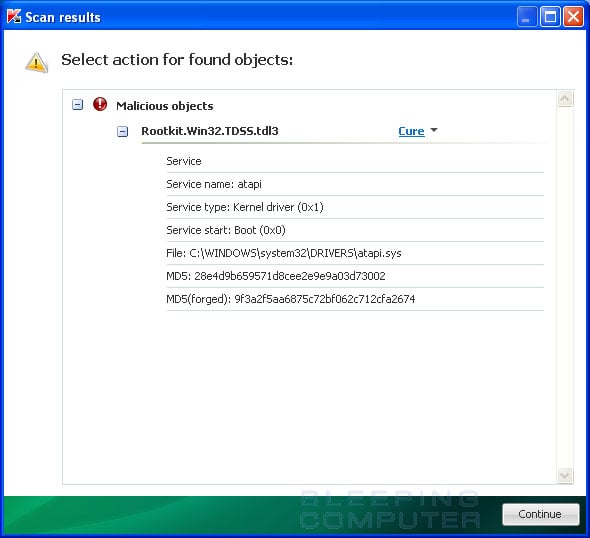
TDSSKiller will now scan your computer for the TDSS infection. When the scan has finished it will display a result screen stating whether or not the infection was found on your computer. If it was found it will display a screen similar to the one below.

infection-found.jpg


To remove the infection simply click on the Continue button and TDSSKiller will attempt to clean the infection.

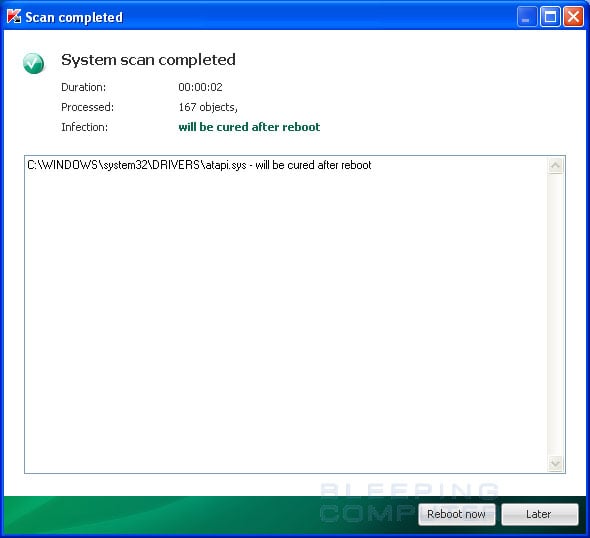
When it has finished cleaning the infection you will see a report stating whether or not it was successful as shown below.

scan-completed.jpg


If the log says will be cured after reboot, please reboot the system by pressing the reboot now button.

After running there will be a log that will be located at the root of your c:\ drive labeled tdsskiller with a series of numbers after it. Please open the log and copy and paste it back here.
 
I have tried downloading TDSSkiller, it downloads ok, but when I try to open the program, nothing happens
 
I also cant get combofix to run, Malware bytes and EXPLORER.EXE work fine. I will try in safe mode, thanks, ill get back soon
 
I think I have sorted it out. I Ran a Flurry of different anti virus programs and that seems to do the trick.
 
Back
Top