Losing gigabytes withouth reason

markpetter1

New Member
I have bought an ACER Aspire 4315 Vista. Since I bought it i lose sometimes one or two gigabytes withouth reason.
I only have on the C drive 13 Gig left and on the D drive 21 Gig. On the D drive the ACER Empower use it for back up.
What could be the reason and how to fix this?.
I use Kaspersky as antivirus.

Greateful for an answer
 
if you have service pack one installed then run the cleaner.

to do go to run and type in cmd>vsp1cln.exe and then hit Y for yes and that gets rid of about 1 gig of crap not needed from SP1 installation.
 
reply

Run the disk cleanup utility wizard.(right click on c:\properties)
it will probably show tons of space occupied by "per user qeued up error files" or "error dump files".
I was too worried about that some times ago, for the whereabout of almost 40GB on C: which was used by error files. I cleaned it and gained all the 40GB space.

Or some space can be sccupied by restore points also. use a utility(eg, tuneup utility 2009, to clean unneccessary restores.

Turning on 'hibernation Mode' aslo takes up 1-2 GB of space.
 
So basically your hard drive is filling up automatically? One of our regulars had a virus like that once and it looks like someone else is having the same problem... try what Respital said to do in that thread before going further.
 
Hello and Welcome to Computer Forum!

Please follow the steps below and tell me if you regain any disk space.

Download: CCleaner (freeware)
http://www.majorgeeks.com/download4191.html
Run the installer, and uncheck the option to install Yahoo toolbar (unless you want Yahoo toolbar).
Once installed, run CCleaner click the Windows [tab]
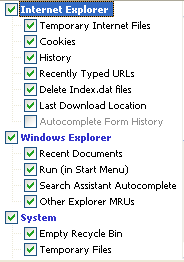
The following should be selected by default, if not, please select:
CCleanerA.png

Next: click Options click the Settings tab
Uncheck: "Only delete files older than 48 hrs.", click Ok
Then click Run Cleaner (bottom right) then Exit

There you go!
 
Back
Top