Lost wireless network on Acer

willjm3931

New Member
I am trying to help my daughter out. She is at college and all the sudden she lost her wireless internet. She moved into her apartment and doesn't have internet yet. When the computer was on it found wireless networks that were secured. She went to campus to connect to wi-fi and it doesn't work. Atheros AR5005g has a yellow exclamation point next to it in device manager. She has deleted it and re-installed. Still no luck. She ran all virus scans. I feel the wireless card died. I suggested waiting until she gets her cable and internet and plug in see what happens. It seem funny that it just stopped but I guess that is how things go. Any suggestions?

I don't know what model Acer laptop she has. It is 2 years old running XP.
 
Can it view the wireless networks and just not connect to them, or is there no wireless functionality at all?

I had a little trouble with an Acer laptop's wireless as well. This one had an Intel wireless card, and XP stopped being able to detect wireless networks for absolutely no reason. Installing Intel's own wireless network utility (the one that takes over from windows in seeking and connecting to Wi-Fi) fixed this.

Have you tried installing the atheros exquivalent to this? (I don't know if there is one, but if there is you can download it from www.acer.com, if you click on drivers at the top and select the model type and number).

The exclamation mark in Device Manager is...interesting. I assume the wireless is actually turned on by the switch. It isn't that likely to be a hardware problem, but it is possible.

EDIT: Most Acer laptops have the model number etc. written on them somewhere, usually the lower-right corner under the screen
 
Here is an update:
I tried the computer. Deleted the wireless card again and restarted the computer. It still shows up with yellow exclamation point. Click on properties and says it can't start. Error Code 10. I click on troubleshooting and can't find anywhere where it says what Code 10 is. Anyone know what it is were I can find out?
 
Here is an update:
I tried the computer. Deleted the wireless card again and restarted the computer. It still shows up with yellow exclamation point. Click on properties and says it can't start. Error Code 10. I click on troubleshooting and can't find anywhere where it says what Code 10 is. Anyone know what it is were I can find out?

I am still trying to figure out this problem. She has been using an USB wireless adapter but has broken 2 of them and getting a little expensive. Since then she has reloaded XP for a different problem. Still get the same thing as above.
Is the card bad? Is it a plug in replacement?
 
I'm not sure which drivers you installed, but are you sure they are the right ones?

If so, then all I can think of is that the card is dead. On a couple of the laptops that I have, the cards can be removed. If external adaptors cause too many issues, you could look into a replacement, although you might be a bit stuck due to the machines age.

Alternatively, you could get a removable expansion card for the PCMCIA slot or other.
 
The driver that is presently installed is Atheros version 5.3.0.67 date 7/26/07.
I have tried updating driver and it says that there are no other updated drivers.
 
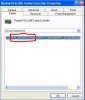
Sounds like you need updated drivers. If you can't find the model number of the laptop so we can find updated drivers for it, then do this. Go into device manager, right click on the atheros device and click on properties. Then click on the details tab, and give me the 4 digit vendor and device id numbers. They will look like this.
 

Attachments

  • device.JPG
    device.JPG
    31.8 KB · Views: 508
Sounds like you need updated drivers. If you can't find the model number of the laptop so we can find updated drivers for it, then do this. Go into device manager, right click on the atheros device and click on properties. Then click on the details tab, and give me the 4 digit vendor and device id numbers. They will look like this.

VEN_168C&DEV_001A&SUBSYS

Computer model is Acer 5100
 
Back
Top