
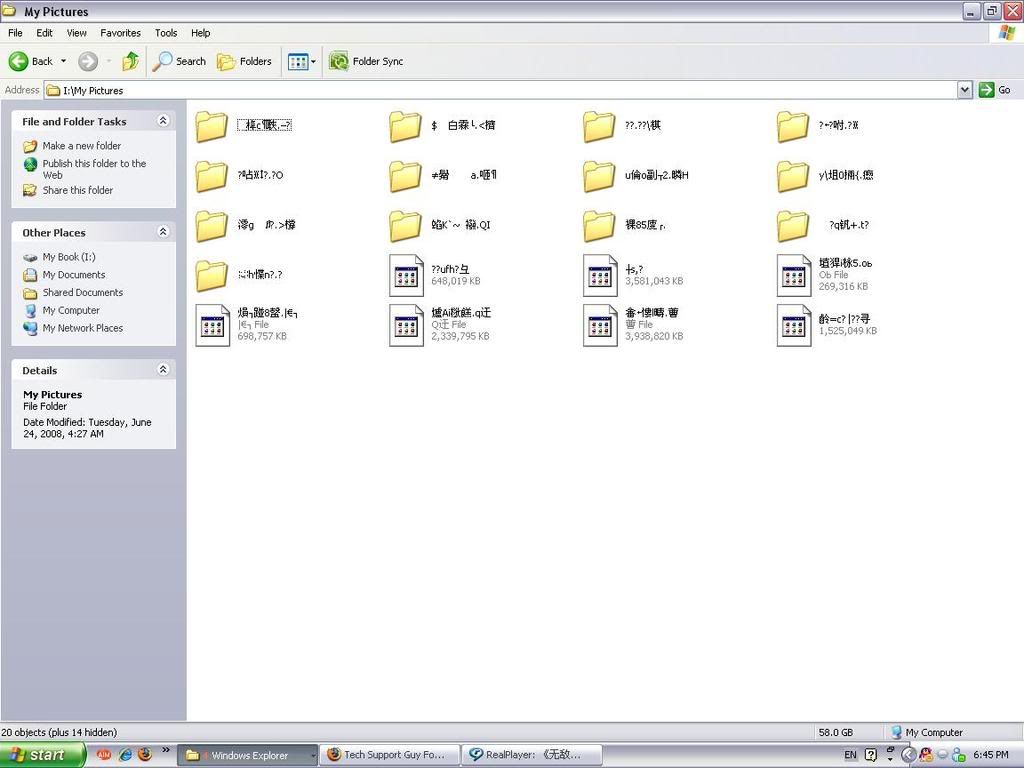
I open up my pictures folder in my External Hard Drive today and the file names are all messed up. When I click on them, I get error message saying it is not accessible. I tried to change my language setting from Chinese to English and change back to Chinese again, but it doesn't help at all :/ Does anyone know how to fix this problem? Thanks in advance.
Here is the image of how the folder looks like :/
Prior to this problem, I remember having a blue screen checking up the files. I immediately shut my computer off because the blue screen looked like as if it was constantly saying there were errors or something.. so yeah :s
Also, I can't even delete the folders >.<
Here is the image of how the folder looks like :/
Prior to this problem, I remember having a blue screen checking up the files. I immediately shut my computer off because the blue screen looked like as if it was constantly saying there were errors or something.. so yeah :s
Also, I can't even delete the folders >.<
