
Recently formatted my computer however brand new headset does not work. I've tried using 2 other microphones which also don't work
Here are some problems I have encountered so far with trying to fix this
Here's what my sound properties look like
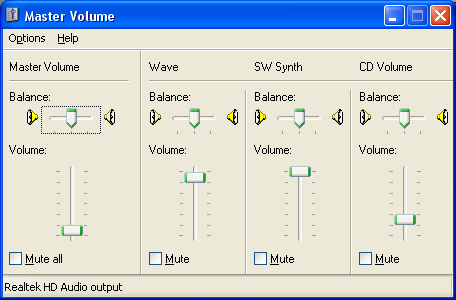
>run > sndvol32.exe > options > properties >
I can't manually select the recording bubble, but have to scroll mixer device until it reaches 'Realtek HD Audio Input' or 'Realtek HD Digital Input'
>Realtek HD Audio Input> following volume controls appear
Recording Control
CD Volume
Mic Volume
Line Volume
Stereo Mix
>click ok, this shows
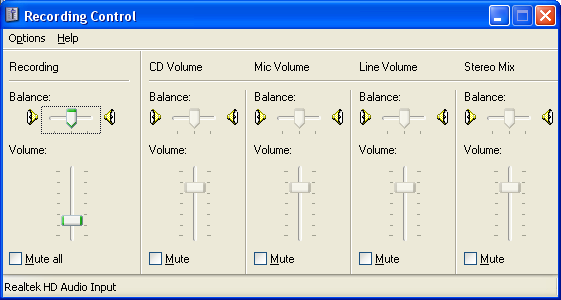
???
I am using Realtek HD Audio Manager ver. 5.10.00.5319
Can provide additional details, a friend says it might just be a hardware issue and another says it could be that my mic ports have been configured for a 6 channel speakers or something like that.
Please help! cheers!
Here are some problems I have encountered so far with trying to fix this
Here's what my sound properties look like
>run > sndvol32.exe > options > properties >
I can't manually select the recording bubble, but have to scroll mixer device until it reaches 'Realtek HD Audio Input' or 'Realtek HD Digital Input'
>Realtek HD Audio Input> following volume controls appear
Recording Control
CD Volume
Mic Volume
Line Volume
Stereo Mix
>click ok, this shows
???
I am using Realtek HD Audio Manager ver. 5.10.00.5319
Can provide additional details, a friend says it might just be a hardware issue and another says it could be that my mic ports have been configured for a 6 channel speakers or something like that.
Please help! cheers!

