missing dll

andyq

Member
i'm getting a message up stating that `isacommsport.dll' is missing. i've search high and low and can't find a replacement anywhere. whats the easiest way to replace it . i think its something to do with searches in Internet Exlorer. i'm being taken to the wrong sights occasionally.

ps windows XP pro
 
Means you are infected if you are being redirected to different sites when searching/browsing.

Please download Malwarebytes' Anti-Malware from here or here and save it to your desktop.
  • Double-click mbam-setup.exe and follow the prompts to install the program.
  • At the end, be sure a checkmark is placed next to
    • Update Malwarebytes' Anti-Malware
    • and Launch Malwarebytes' Anti-Malware
  • then click Finish.
  • If an update is found, it will download and install the latest version. Please keep updating until it says you have the latest version.
  • Once the program has loaded, select Perform quick scan, then click Scan.
  • When the scan is complete, click OK, then Show Results to view the results.
  • Be sure that everything is checked, and click Remove Selected.
  • A log will be saved automatically which you can access by clicking on the Logs tab within Malwarebytes' Anti-Malware

If for some reason Malwarebytes will not install or run please download and run Rkill.scr, Rkill.exe, or Rkill.com. If you are still having issues running rkill then try downloading these renamed versions of the same program.

EXPLORER.EXE
IEXPLORE.EXE
USERINIT.EXE
WINLOGON.EXE

But DO NOT reboot the system and then try installing or running Malwarebytes. If Rkill (which is a black box) appears and then disappears right away or you get a message saying rkill is infected, keep trying to run rkill until it over powers the infection and temporarily kills it. Once a log appears on the screen, you can try running malwarebytes or downloading other programs.


Download the HijackThis installer from here.
Run the installer and choose Install, indicating that you accept the licence agreement. The installer will place a shortcut on your desktop and launch HijackThis.

Click Do a system scan and save a logfile

Most of what HijackThis lists will be harmless or even essential, don't fix anything yet.

When the hijackthis log appears in a notepad file, click on the edit menu, click select all, then click on the edit menu again and click on copy. Come back to your reply and right click on your mouse and click on paste.

Post the logfile that HijackThis produces along with the Malwarebytes Anti-Malware log
 
many thanks for the reply
installed Malwarebytes but it wouldn't update came back with "program error updating(11004, no address found)" did a scan anyway 8 items found and removed. log below.

Malwarebytes' Anti-Malware 1.51.2.1300
www.malwarebytes.org

Database version: 7622

Windows 5.1.2600 Service Pack 3
Internet Explorer 8.0.6001.18702

02/11/2011 19:57:30
mbam-log-2011-11-02 (19-57-30).txt

Scan type: Quick scan
Objects scanned: 169560
Time elapsed: 24 minute(s), 50 second(s)

Memory Processes Infected: 0
Memory Modules Infected: 0
Registry Keys Infected: 2
Registry Values Infected: 0
Registry Data Items Infected: 6
Folders Infected: 0
Files Infected: 0

Memory Processes Infected:
(No malicious items detected)

Memory Modules Infected:
(No malicious items detected)

Registry Keys Infected:
HKEY_CURRENT_USER\SOFTWARE\Microsoft\Windows\CurrentVersion\Ext\Stats\{B64F4A7C-97C9-11DA-8BDE-F66BAD1E3F3A} (Rogue.WinAntiVirus) -> Quarantined and deleted successfully.
HKEY_CURRENT_USER\SOFTWARE\Microsoft\Windows\CurrentVersion\Ext\Stats\{F919FBD3-A96B-4679-AF26-F551439BB5FD} (Trojan.FakeAlert) -> Quarantined and deleted successfully.

Registry Values Infected:
(No malicious items detected)

Registry Data Items Infected:
HKEY_LOCAL_MACHINE\SOFTWARE\Microsoft\Security Center\AntiVirusDisableNotify (PUM.Disabled.SecurityCenter) -> Bad: (1) Good: (0) -> Quarantined and deleted successfully.
HKEY_LOCAL_MACHINE\SOFTWARE\Microsoft\Security Center\FirewallDisableNotify (PUM.Disabled.SecurityCenter) -> Bad: (1) Good: (0) -> Quarantined and deleted successfully.
HKEY_LOCAL_MACHINE\SYSTEM\CurrentControlSet\Services\Tcpip\Parameters\DhcpNameServer (Trojan.DNSChanger) -> Bad: (93.188.166.105) Good: () -> Quarantined and deleted successfully.
HKEY_LOCAL_MACHINE\SYSTEM\CurrentControlSet\Services\Tcpip\Parameters\DhcpNameServer (Trojan.DNSChanger) -> Bad: (93.188.161.105) Good: () -> Quarantined and deleted successfully.
HKEY_LOCAL_MACHINE\SYSTEM\CurrentControlSet\Services\Tcpip\Parameters\Interfaces\{5E91753B-3265-49AA-8B2E-5400062B3C37}\DhcpNameServer (Trojan.DNSChanger) -> Bad: (93.188.166.105) Good: () -> Quarantined and deleted successfully.
HKEY_LOCAL_MACHINE\SYSTEM\CurrentControlSet\Services\Tcpip\Parameters\Interfaces\{5E91753B-3265-49AA-8B2E-5400062B3C37}\DhcpNameServer (Trojan.DNSChanger) -> Bad: (93.188.161.105) Good: () -> Quarantined and deleted successfully.

Folders Infected:
(No malicious items detected)

Files Infected:
(No malicious items detected)

installed and ran hijackthis, still infected as your link was misdirected. results below

Logfile of Trend Micro HijackThis v2.0.4
Scan saved at 20:32:07, on 02/11/2011
Platform: Windows XP SP3 (WinNT 5.01.2600)
MSIE: Internet Explorer v8.00 (8.00.6001.18702)
Boot mode: Normal

Running processes:
C:\WINDOWS\System32\smss.exe
C:\WINDOWS\system32\winlogon.exe
C:\WINDOWS\system32\services.exe
C:\WINDOWS\system32\lsass.exe
C:\WINDOWS\system32\svchost.exe
C:\WINDOWS\System32\svchost.exe
C:\Program Files\Ahead\InCD\InCDsrv.exe
C:\WINDOWS\system32\svchost.exe
C:\WINDOWS\Explorer.EXE
C:\WINDOWS\system32\spoolsv.exe
C:\Program Files\Analog Devices\SoundMAX\SMTray.exe
C:\WINDOWS\System32\spool\DRIVERS\W32X86\3\E_S10IC2.EXE
C:\WINDOWS\system32\rundll32.exe
C:\PROGRA~1\EPSONS~1\EVENTM~1\EEventManager.exe
C:\Program Files\McAfee.com\Agent\mcagent.exe
C:\Program Files\Common Files\Java\Java Update\jusched.exe
C:\WINDOWS\system32\ctfmon.exe
C:\Program Files\Messenger\msmsgs.exe
C:\WINDOWS\System32\spool\DRIVERS\W32X86\3\E_FATIFIE.EXE
C:\Program Files\Google\GoogleToolbarNotifier\GoogleToolbarNotifier.exe
C:\Program Files\Labtec\Wireless Mouse\MulMouse.exe
C:\Program Files\Common Files\Apple\Mobile Device Support\bin\AppleMobileDeviceService.exe
C:\Program Files\IVT Corporation\BlueSoleil\BTNtService.exe
C:\Program Files\Bonjour\mDNSResponder.exe
C:\Program Files\Java\jre6\bin\jqs.exe
C:\Program Files\Kontiki\KService.exe
C:\Program Files\Google\Update\GoogleUpdate.exe
C:\ElsaWin\bin\LcSvrAdm.exe
C:\ElsaWin\bin\LcSvrDba.exe
C:\ElsaWin\bin\LcSvrHis.exe

do i need to run rkill, i think whatever has infected me is misdirecting the update link?
 
No, do not need to run rkill. You only posted part of the hijackthis log, I need the full log. However, please do the following procedure before posting a full hijackthis log.

Download and Run ComboFix
If you already have Combofix, please delete this copy and download it again as it's being updated regularly.
  • Download this file here :

    Combofix

  • When the page loads click on the blue combofix download link next to the BleepingComputer Mirror.
  • Save the file to your windows desktop. The combofix icon will look like this when it has downloaded to your desktop.

    cf-icon.jpg
  • We are almost ready to start ComboFix, but before we do so, we need to take some preventative measures so that there are no conflicts with other programs when running ComboFix. At this point you should do the following:

  • Close all open Windows including this one.
  • Close or disable all running Antivirus, Antispyware, and Firewall programs as they may interfere with the proper running of ComboFix. Instructions on disabling these type of programs can be found here.
    Once these two steps have been completed, double-click on the ComboFix icon found on your desktop. Please note, that once you start ComboFix you should not click anywhere on the ComboFix window as it can cause the program to stall. In fact, when ComboFix is running, do not touch your computer at all. The scan could take a while, so please be patient.
  • Please click on I agree on the disclaimer window.
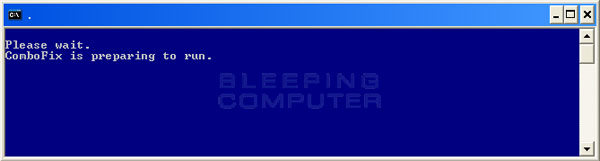
  • ComboFix will now install itself on to your computer. When it is done, a blue screen will appear as shown below.

    cf-preparing.jpg

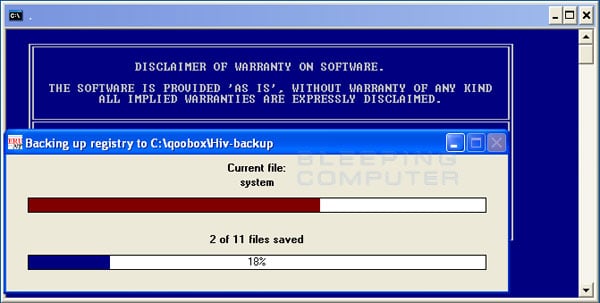
  • ComboFix is now preparing to run. When it has finished ComboFix will automatically attempt to create a System Restore point so that if any problems occur while using the program you can restore back to your previous configuration. When ComboFix has finished creating the restore point, it will then backup your Windows Registry as shown in the image below.

    erunt.jpg

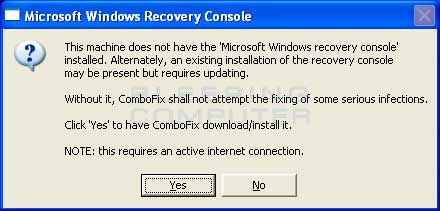
  • Once the Windows Registry has finished being backed up, ComboFix will attempt to detect if you have the Windows Recovery Console installed. If you already have it installed, you can skip to this section and continue reading. Otherwise you will see the following message as shown below:

    recovery-console-prompt.jpg

  • At the above message box, please click on the Yes button in order for ComboFix to continue. Please follow the steps and instructions given by ComboFix in order to finish the installation of the Recovery Console.
  • Please click on yes in the next window to continue scanning for malware.
  • ComboFix will now disconnect your computer from the Internet, so do not be surprised or concerned if you receive any warnings stating that you are no longer on the Internet. When ComboFix has finished it will automatically restore your Internet connection.
  • ComboFix will now start scanning your computer for known infections. This procedure can take some time, so please be patient.
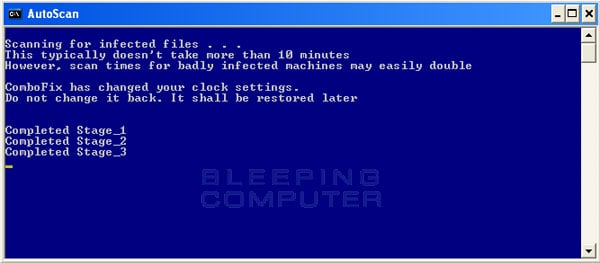
  • While the program is scanning your computer, it will change your clock format, so do not be concerned when you see this happen. When ComboFix is finished it will restore your clock settings to their previous settings. You will also see the text in the ComboFix window being updated as it goes through the various stages of its scan. An example of this can be seen below.

    still-scanning-clockchanges.jpg

  • When ComboFix has finished running, you will see a screen stating that it is preparing the log report.
  • This can take a while, so please be patient. If you see your Windows desktop disappear, do not worry. This is normal and ComboFix will restore your desktop before it is finished. Eventually you will see a new screen that states the program is almost finished and telling you the programs log file, or report, will be located at C:\ComboFix.txt.
  • When ComboFix has finished, it will automatically close the program and change your clock back to its original format. It will then display the log file automatically for you.
  • Now you just click on the edit menu and click on select all, then click on the edit menu again and click on copy. Then come to the forum in your reply and right click on your mouse and click on paste.


In your next reply please post:
  • The ComboFix log
  • A fresh HiJackThis log
  • An update on how your computer is running
 
combofix log
ComboFix 11-11-03.03 - andrew quarmby 03/11/2011 19:40:13.1.1 - x86
Microsoft Windows XP Professional 5.1.2600.3.1252.44.1033.18.991.651 [GMT 0:00]
Running from: c:\documents and settings\All Users\Desktop\ComboFix.exe
AV: McAfee Anti-Virus and Anti-Spyware *Disabled/Updated* {84B5EE75-6421-4CDE-A33A-DD43BA9FAD83}
FW: McAfee Firewall *Disabled* {94894B63-8C7F-4050-BDA4-813CA00DA3E8}
.
.
((((((((((((((((((((((((((((((((((((((( Other Deletions )))))))))))))))))))))))))))))))))))))))))))))))))
.
.
c:\documents and settings\andrew quarmby\Favorites\Videos.url
c:\documents and settings\andrew quarmby\GoToAssistDownloadHelper.exe
c:\documents and settings\andrew quarmby\WINDOWS
c:\windows\offitems.log
.
.
((((((((((((((((((((((((( Files Created from 2011-10-03 to 2011-11-03 )))))))))))))))))))))))))))))))
.
.
2011-11-02 20:31 . 2011-11-02 20:31 388096 ----a-r- c:\documents and settings\andrew quarmby\Application Data\Microsoft\Installer\{45A66726-69BC-466B-A7A4-12FCBA4883D7}\HiJackThis.exe
2011-11-02 20:31 . 2011-11-02 20:31 -------- d-----w- c:\program files\Trend Micro
2011-11-02 19:14 . 2011-11-02 19:14 -------- d-----w- c:\documents and settings\andrew quarmby\Application Data\Malwarebytes
2011-11-02 19:14 . 2011-11-02 19:14 -------- d-----w- c:\documents and settings\All Users\Application Data\Malwarebytes
2011-11-02 19:14 . 2011-08-31 17:00 22216 ----a-w- c:\windows\system32\drivers\mbam.sys
2011-11-02 19:14 . 2011-11-02 19:14 -------- d-----w- c:\program files\Malwarebytes' Anti-Malware
2011-10-30 11:43 . 2011-10-30 11:44 -------- d-----w- c:\windows\system32\NtmsData
2011-10-29 10:07 . 2011-10-29 10:07 -------- d-----w- c:\documents and settings\andrew quarmby\Application Data\DriverCure
2011-10-29 10:07 . 2011-10-29 10:07 -------- d-----w- c:\documents and settings\andrew quarmby\Application Data\SpeedMaxPc
2011-10-29 10:07 . 2011-10-29 10:07 -------- d-----w- c:\program files\Common Files\SpeedMaxPc
2011-10-29 10:06 . 2011-10-29 10:07 -------- d-----w- c:\documents and settings\All Users\Application Data\SpeedMaxPc
2011-10-29 10:06 . 2011-10-29 10:06 -------- d-----w- c:\program files\SpeedMaxPc
2011-10-28 19:29 . 2011-10-28 19:29 85504 ----a-w- c:\windows\system32\t7844el32.dll
2011-10-13 19:53 . 2011-10-13 19:53 85504 ----a-w- c:\windows\system32\t00el32.dll
.
.
.
(((((((((((((((((((((((((((((((((((((((( Find3M Report ))))))))))))))))))))))))))))))))))))))))))))))))))))
.
2011-10-23 08:14 . 2011-05-20 18:21 414368 ----a-w- c:\windows\system32\FlashPlayerCPLApp.cpl
2011-10-03 04:06 . 2010-04-20 19:44 472808 ----a-w- c:\windows\system32\deployJava1.dll
2011-10-03 01:37 . 2007-04-15 14:52 73728 ----a-w- c:\windows\system32\javacpl.cpl
2011-09-26 10:41 . 2008-07-29 19:59 611328 ----a-w- c:\windows\system32\uiautomationcore.dll
2011-09-26 10:41 . 2004-08-04 12:00 220160 ----a-w- c:\windows\system32\oleacc.dll
2011-09-26 10:41 . 2004-08-04 12:00 20480 ----a-w- c:\windows\system32\oleaccrc.dll
2011-09-09 09:12 . 2004-08-04 12:00 599040 ----a-w- c:\windows\system32\crypt32.dll
2011-09-06 13:20 . 2004-08-04 12:00 1858944 ----a-w- c:\windows\system32\win32k.sys
2011-08-22 23:48 . 2004-08-04 12:00 916480 ----a-w- c:\windows\system32\wininet.dll
2011-08-22 23:48 . 2004-08-04 12:00 43520 ----a-w- c:\windows\system32\licmgr10.dll
2011-08-22 23:48 . 2004-08-04 12:00 1469440 ------w- c:\windows\system32\inetcpl.cpl
2011-08-22 11:56 . 2004-08-04 12:00 385024 ----a-w- c:\windows\system32\html.iec
2011-08-19 14:59 . 2011-08-22 18:49 148520 ----a-w- c:\windows\system32\mfevtps.exe
2011-08-17 13:49 . 2004-08-04 12:00 138496 ----a-w- c:\windows\system32\drivers\afd.sys
2011-08-15 09:00 . 2011-08-22 19:00 9344 ----a-w- c:\windows\system32\drivers\mfeclnk.sys
2011-08-15 09:00 . 2011-08-22 19:00 89624 ----a-w- c:\windows\system32\drivers\mfetdi2k.sys
2011-08-15 09:00 . 2011-08-22 19:00 87808 ----a-w- c:\windows\system32\drivers\mferkdet.sys
2011-08-15 09:00 . 2011-08-22 19:00 83688 ----a-w- c:\windows\system32\drivers\mfendisk.sys
2011-08-15 09:00 . 2011-08-22 19:00 59288 ----a-w- c:\windows\system32\drivers\mfebopk.sys
2011-08-15 09:00 . 2011-08-22 19:00 57432 ----a-w- c:\windows\system32\drivers\cfwids.sys
2011-08-15 09:00 . 2011-08-22 19:00 338040 ----a-w- c:\windows\system32\drivers\mfefirek.sys
2011-08-15 09:00 . 2011-08-22 19:00 180072 ----a-w- c:\windows\system32\drivers\mfeavfk.sys
2011-08-15 09:00 . 2011-03-13 10:20 461864 ----a-w- c:\windows\system32\drivers\mfehidk.sys
2011-08-15 09:00 . 2011-03-13 10:20 119808 ----a-w- c:\windows\system32\drivers\mfeapfk.sys
.
.
((((((((((((((((((((((((((((((((((((( Reg Loading Points ))))))))))))))))))))))))))))))))))))))))))))))))))
.
.
*Note* empty entries & legit default entries are not shown
REGEDIT4
.
[HKEY_LOCAL_MACHINE\~\Browser Helper Objects\{A057A204-BACC-4D26-CFC3-3CECC9AB2EDA}]
.
[HKEY_LOCAL_MACHINE\software\microsoft\windows\currentversion\explorer\shelliconoverlayidentifiers\MOBK]
@="{3c3f3c1a-9153-7c05-f938-622e7003894d}"
[HKEY_CLASSES_ROOT\CLSID\{3c3f3c1a-9153-7c05-f938-622e7003894d}]
2010-04-13 19:11 2872120 ----a-w- c:\program files\McAfee Online Backup\MOBKshell.dll
.
[HKEY_LOCAL_MACHINE\software\microsoft\windows\currentversion\explorer\shelliconoverlayidentifiers\MOBK2]
@="{e6ea1d7d-144e-b977-98c4-84c53c1a69d0}"
[HKEY_CLASSES_ROOT\CLSID\{e6ea1d7d-144e-b977-98c4-84c53c1a69d0}]
2010-04-13 19:11 2872120 ----a-w- c:\program files\McAfee Online Backup\MOBKshell.dll
.
[HKEY_LOCAL_MACHINE\software\microsoft\windows\currentversion\explorer\shelliconoverlayidentifiers\MOBK3]
@="{b4caf489-1eec-c617-49ad-8d7088598c06}"
[HKEY_CLASSES_ROOT\CLSID\{b4caf489-1eec-c617-49ad-8d7088598c06}]
2010-04-13 19:11 2872120 ----a-w- c:\program files\McAfee Online Backup\MOBKshell.dll
.
[HKEY_CURRENT_USER\SOFTWARE\Microsoft\Windows\CurrentVersion\Run]
"swg"="c:\program files\Google\GoogleToolbarNotifier\GoogleToolbarNotifier.exe" [2007-06-16 68856]
.
[HKEY_LOCAL_MACHINE\SOFTWARE\Microsoft\Windows\CurrentVersion\Run]
"Smapp"="c:\program files\Analog Devices\SoundMAX\SMTray.exe" [2003-05-05 143360]
"SiSUSBRG"="c:\windows\SiSUSBrg.exe" [2002-07-12 106496]
"EPSON Stylus C44 Series"="c:\windows\System32\spool\DRIVERS\W32X86\3\E_S10IC2.EXE" [2002-12-10 75776]
"SiSPower"="SiSPower.dll" [2004-09-02 49152]
"BluetoothAuthenticationAgent"="bthprops.cpl" [2008-04-14 110592]
"EEventManager"="c:\progra~1\EPSONS~1\EVENTM~1\EEventManager.exe" [2009-04-07 673616]
"mcui_exe"="c:\program files\McAfee.com\Agent\mcagent.exe" [2011-09-16 1318552]
"SunJavaUpdateSched"="c:\program files\Common Files\Java\Java Update\jusched.exe" [2011-06-09 254696]
.
[HKEY_USERS\.DEFAULT\Software\Microsoft\Windows\CurrentVersion\Run]
"CTFMON.EXE"="c:\windows\system32\CTFMON.EXE" [2008-04-14 15360]
.
c:\documents and settings\All Users\Start Menu\Programs\Startup\
Labtec Mouse Software 2.0.lnk - c:\program files\Labtec\Wireless Mouse\MulMouse.exe [2006-1-7 253952]
.
[HKEY_LOCAL_MACHINE\SYSTEM\CurrentControlSet\Control\SafeBoot\Minimal\mcmscsvc]
@=""
.
[HKEY_LOCAL_MACHINE\SYSTEM\CurrentControlSet\Control\SafeBoot\Minimal\MCODS]
@=""
.
[HKLM\~\startupfolder\C:^Documents and Settings^All Users^Start Menu^Programs^Startup^Adobe Gamma Loader.lnk]
path=c:\documents and settings\All Users\Start Menu\Programs\Startup\Adobe Gamma Loader.lnk
backup=c:\windows\pss\Adobe Gamma Loader.lnkCommon Startup
.
[HKLM\~\startupfolder\C:^Documents and Settings^All Users^Start Menu^Programs^Startup^Adobe Reader Speed Launch.lnk]
path=c:\documents and settings\All Users\Start Menu\Programs\Startup\Adobe Reader Speed Launch.lnk
backup=c:\windows\pss\Adobe Reader Speed Launch.lnkCommon Startup
.
[HKLM\~\startupfolder\C:^Documents and Settings^All Users^Start Menu^Programs^Startup^BlueSoleil.lnk]
path=c:\documents and settings\All Users\Start Menu\Programs\Startup\BlueSoleil.lnk
backup=c:\windows\pss\BlueSoleil.lnkCommon Startup
.
[HKLM\~\startupfolder\C:^Documents and Settings^andrew quarmby^Start Menu^Programs^Startup^Microsoft Find Fast.lnk]
path=c:\documents and settings\andrew quarmby\Start Menu\Programs\Startup\Microsoft Find Fast.lnk
backup=c:\windows\pss\Microsoft Find Fast.lnkStartup
.
[HKLM\~\startupfolder\C:^Documents and Settings^andrew quarmby^Start Menu^Programs^Startup^Office Startup.lnk]
path=c:\documents and settings\andrew quarmby\Start Menu\Programs\Startup\Office Startup.lnk
backup=c:\windows\pss\Office Startup.lnkStartup
.
[HKEY_LOCAL_MACHINE\software\microsoft\shared tools\msconfig\startupreg\NokiaMServer]
c:\program files\Common Files\Nokia\MPlatform\NokiaMServer [X]
.
[HKEY_LOCAL_MACHINE\software\microsoft\shared tools\msconfig\startupreg\DriverUpdaterPro]
2008-04-15 09:10 2446884 ----a-w- c:\program files\XPC Tools\Driver Updater Pro\DriverUpdaterPro.exe
.
[HKEY_LOCAL_MACHINE\software\microsoft\shared tools\msconfig\startupreg\InCD]
2005-07-25 12:01 1397760 ------w- c:\program files\Ahead\InCD\InCD.exe
.
[HKEY_LOCAL_MACHINE\software\microsoft\shared tools\msconfig\startupreg\iTunesHelper]
2009-04-02 15:11 342312 ----a-w- c:\program files\iTunes\iTunesHelper.exe
.
[HKEY_LOCAL_MACHINE\software\microsoft\shared tools\msconfig\startupreg\NeroFilterCheck]
2001-07-09 10:50 155648 ----a-w- c:\windows\system32\NeroCheck.exe
.
[HKEY_LOCAL_MACHINE\software\microsoft\shared tools\msconfig\startupreg\NokiaMusic FastStart]
2010-10-20 15:32 2192752 ----a-w- c:\program files\Nokia\Ovi Player\NokiaOviPlayer.exe
.
[HKEY_LOCAL_MACHINE\software\microsoft\shared tools\msconfig\startupreg\swg]
2007-06-16 19:45 68856 ----a-w- c:\program files\Google\GoogleToolbarNotifier\GoogleToolbarNotifier.exe
.
[HKEY_LOCAL_MACHINE\software\microsoft\shared tools\msconfig\startupreg\TomTomHOME.exe]
2010-08-24 09:38 247144 ----a-w- c:\program files\TomTom HOME 2\TomTomHOMERunner.exe
.
[HKEY_LOCAL_MACHINE\software\microsoft\shared tools\msconfig\startupreg\updateMgr]
2006-03-30 16:45 313472 ----a-r- c:\program files\Adobe\Acrobat 7.0\Reader\AdobeUpdateManager.exe
.
[HKEY_LOCAL_MACHINE\software\microsoft\security center\Monitoring\McAfeeAntiVirus]
"DisableMonitoring"=dword:00000001
.
[HKEY_LOCAL_MACHINE\software\microsoft\security center\Monitoring\McAfeeFirewall]
"DisableMonitoring"=dword:00000001
.
[HKLM\~\services\sharedaccess\parameters\firewallpolicy\standardprofile]
"EnableFirewall"= 0 (0x0)
.
[HKLM\~\services\sharedaccess\parameters\firewallpolicy\standardprofile\AuthorizedApplications\List]
"%windir%\\system32\\sessmgr.exe"=
"c:\\Program Files\\ASUS\\AsusUpdate\\Update.exe"=
"%windir%\\Network Diagnostic\\xpnetdiag.exe"=
"c:\\Program Files\\IVT Corporation\\BlueSoleil\\BlueSoleil.exe"=
"c:\\Program Files\\Kontiki\\KService.exe"=
"c:\\Program Files\\Bonjour\\mDNSResponder.exe"=
"c:\\Program Files\\iTunes\\iTunes.exe"=
"c:\\Program Files\\Epson Software\\Event Manager\\EEventManager.exe"=
"c:\\Program Files\\Common Files\\Mcafee\\McSvcHost\\McSvHost.exe"=
.
R1 mfetdi2k;McAfee Inc. mfetdi2k;c:\windows\system32\drivers\mfetdi2k.sys [22/08/2011 19:00 89624]
R1 MOBKFilter;MOBKFilter;c:\windows\system32\drivers\MOBK.sys [22/08/2011 19:02 54776]
R3 Bonifay;Bonifay;c:\windows\system32\drivers\Bonifay.sys [07/12/2006 21:02 12288]
R3 cfwids;McAfee Inc. cfwids;c:\windows\system32\drivers\cfwids.sys [22/08/2011 19:00 57432]
R3 mfefirek;McAfee Inc. mfefirek;c:\windows\system32\drivers\mfefirek.sys [22/08/2011 19:00 338040]
R3 mfendiskmp;mfendiskmp;c:\windows\system32\drivers\mfendisk.sys [22/08/2011 19:00 83688]
S3 Gonzales;Gonzales;c:\windows\system32\drivers\Gonzales.sys [07/12/2006 21:02 7040]
S3 MBAMSwissArmy;MBAMSwissArmy;\??\c:\windows\system32\drivers\mbamswissarmy.sys --> c:\windows\system32\drivers\mbamswissarmy.sys [?]
S3 mfendisk;McAfee Core NDIS Intermediate Filter;c:\windows\system32\drivers\mfendisk.sys [22/08/2011 19:00 83688]
S3 mferkdet;McAfee Inc. mferkdet;c:\windows\system32\drivers\mferkdet.sys [22/08/2011 19:00 87808]
.
--- Other Services/Drivers In Memory ---
.
*Deregistered* - mfeavfk01
.
Contents of the 'Scheduled Tasks' folder
.
2010-08-24 c:\windows\Tasks\AppleSoftwareUpdate.job
- c:\program files\Apple Software Update\SoftwareUpdate.exe [2008-07-30 11:34]
.
2011-10-30 c:\windows\Tasks\Epson Printer Software Downloader.job
- c:\program files\EPSON\EPAPDL\E_SAPDL2.EXE [2009-05-26 11:43]
.
2011-11-03 c:\windows\Tasks\Google Software Updater.job
- c:\program files\Google\Common\Google Updater\GoogleUpdaterService.exe [2007-01-27 12:23]
.
2011-11-03 c:\windows\Tasks\GoogleUpdateTaskMachineCore.job
- c:\program files\Google\Update\GoogleUpdate.exe [2010-01-06 21:13]
.
2011-11-03 c:\windows\Tasks\GoogleUpdateTaskMachineUA.job
- c:\program files\Google\Update\GoogleUpdate.exe [2010-01-06 21:13]
.
2011-10-29 c:\windows\Tasks\SpeedMaxPc Defrag.job
- c:\program files\SpeedMaxPc\SpeedMaxPc\speedmaxpc.exe [2011-08-02 22:27]
.
2011-11-03 c:\windows\Tasks\SpeedMaxPc Registration3.job
- c:\program files\Common Files\SpeedMaxPc\UUS3\UUS3.dll [2010-11-02 18:09]
.
2011-10-29 c:\windows\Tasks\SpeedMaxPc Update3.job
- c:\program files\Common Files\SpeedMaxPc\UUS3\Update3.exe [2010-11-02 18:09]
.
2011-10-29 c:\windows\Tasks\SpeedMaxPc.job
- c:\program files\SpeedMaxPc\SpeedMaxPc\speedmaxpc.exe [2011-08-02 22:27]
.
2011-11-03 c:\windows\Tasks\WGASetup.job
- c:\windows\system32\KB905474\wgasetup.exe [2009-04-30 21:18]
.
.
------- Supplementary Scan -------
.
uStart Page = hxxp://www.google.co.uk/webhp?complete=0
uSearchMigratedDefaultURL = hxxp://www.google.com/search?q={searchTerms}&sourceid=ie7&rls=com.microsoft:en-US&ie=utf8&oe=utf8
uInternet Settings,ProxyOverride = *.local
uSearchAssistant = hxxp://www.google.com/ie
uSearchURL,(Default) = hxxp://uk.search.yahoo.com/search?fr=mcafee&p=%s
IE: Google Sidewiki... - c:\program files\Google\Google Toolbar\Component\GoogleToolbarDynamic_mui_en_7461B1589E8B4FB7.dll/cmsidewiki.html
Trusted Zone: internet
Trusted Zone: mcafee.com
TCP: DhcpNameServer = 93.188.166.105 93.188.161.105 1.2.3.4
.
- - - - ORPHANS REMOVED - - - -
.
HKCU-Run-isaCommsPort - c:\documents and settings\andrew quarmby\Local Settings\Application Data\i18AuthenticationTray\isaCommsPort.dll
SafeBoot-Wdf01000.sys
MSConfigStartUp-Nokia FastStart - c:\program files\Nokia\Nokia Music\NokiaMusic.exe
AddRemove-McAfee Virtual Technician - c:\program files\McAfee\Supportability\MVT\MVTInstaller.exe
.
.
.
**************************************************************************
.
catchme 0.3.1398 W2K/XP/Vista - rootkit/stealth malware detector by Gmer, http://www.gmer.net
Rootkit scan 2011-11-03 19:50
Windows 5.1.2600 Service Pack 3 NTFS
.
scanning hidden processes ...
.
scanning hidden autostart entries ...
.
scanning hidden files ...
.
scan completed successfully
hidden files: 0
.
**************************************************************************
.
--------------------- LOCKED REGISTRY KEYS ---------------------
.
[HKEY_USERS\S-1-5-21-2000478354-261903793-682003330-1003\Software\Microsoft\SystemCertificates\AddressBook*]
@Allowed: (Read) (RestrictedCode)
.
Completion time: 2011-11-03 19:59:23
ComboFix-quarantined-files.txt 2011-11-03 19:59
.
Pre-Run: 46,614,605,824 bytes free
Post-Run: 47,995,191,296 bytes free
.
WindowsXP-KB310994-SP2-Pro-BootDisk-ENU.exe
[boot loader]
timeout=2
default=multi(0)disk(0)rdisk(0)partition(1)\WINDOWS
[operating systems]
c:\cmdcons\BOOTSECT.DAT="Microsoft Windows Recovery Console" /cmdcons
UnsupportedDebug="do not select this" /debug
multi(0)disk(0)rdisk(0)partition(1)\WINDOWS="Microsoft Windows XP Professional" /noexecute=optin /fastdetect
.
- - End Of File - - ED8AF2592C55BC6AD579C590FD10B035

 
Last edited:
HijackThis log
Logfile of Trend Micro HijackThis v2.0.4
Scan saved at 20:32:07, on 02/11/2011
Platform: Windows XP SP3 (WinNT 5.01.2600)
MSIE: Internet Explorer v8.00 (8.00.6001.18702)
Boot mode: Normal

Running processes:
C:\WINDOWS\System32\smss.exe
C:\WINDOWS\system32\winlogon.exe
C:\WINDOWS\system32\services.exe
C:\WINDOWS\system32\lsass.exe
C:\WINDOWS\system32\svchost.exe
C:\WINDOWS\System32\svchost.exe
C:\Program Files\Ahead\InCD\InCDsrv.exe
C:\WINDOWS\system32\svchost.exe
C:\WINDOWS\Explorer.EXE
C:\WINDOWS\system32\spoolsv.exe
C:\Program Files\Analog Devices\SoundMAX\SMTray.exe
C:\WINDOWS\System32\spool\DRIVERS\W32X86\3\E_S10IC2.EXE
C:\WINDOWS\system32\rundll32.exe
C:\PROGRA~1\EPSONS~1\EVENTM~1\EEventManager.exe
C:\Program Files\McAfee.com\Agent\mcagent.exe
C:\Program Files\Common Files\Java\Java Update\jusched.exe
C:\WINDOWS\system32\ctfmon.exe
C:\Program Files\Messenger\msmsgs.exe
C:\WINDOWS\System32\spool\DRIVERS\W32X86\3\E_FATIFIE.EXE
C:\Program Files\Google\GoogleToolbarNotifier\GoogleToolbarNotifier.exe
C:\Program Files\Labtec\Wireless Mouse\MulMouse.exe
C:\Program Files\Common Files\Apple\Mobile Device Support\bin\AppleMobileDeviceService.exe
C:\Program Files\IVT Corporation\BlueSoleil\BTNtService.exe
C:\Program Files\Bonjour\mDNSResponder.exe
C:\Program Files\Java\jre6\bin\jqs.exe
C:\Program Files\Kontiki\KService.exe
C:\Program Files\Google\Update\GoogleUpdate.exe
C:\ElsaWin\bin\LcSvrAdm.exe
C:\ElsaWin\bin\LcSvrDba.exe
C:\ElsaWin\bin\LcSvrHis.exe
C:\ElsaWin\bin\LcSvrPas.exe
C:\ElsaWin\bin\LcSvrSaz.exe
C:\Program Files\Common Files\Mcafee\McSvcHost\McSvHost.exe
C:\WINDOWS\system32\mfevtps.exe
C:\Program Files\McAfee Online Backup\MOBKbackup.exe
C:\Program Files\Analog Devices\SoundMAX\SMAgent.exe
C:\WINDOWS\system32\svchost.exe
C:\Program Files\TomTom HOME 2\TomTomHOMEService.exe
C:\ElsaWin\bin\VSgate.exe
C:\Program Files\Common Files\McAfee\SystemCore\mcshield.exe
C:\Program Files\Common Files\McAfee\SystemCore\mfefire.exe
C:\ElsaWin\bin\LcSvrAuf.exe
C:\WINDOWS\system32\rundll32.exe
C:\WINDOWS\system32\msiexec.exe
C:\Program Files\Trend Micro\HiJackThis\HiJackThis.exe

R0 - HKCU\Software\Microsoft\Internet Explorer\Main,Start Page = http://www.google.co.uk/webhp?complete=0
R1 - HKLM\Software\Microsoft\Internet Explorer\Main,Default_Page_URL = http://go.microsoft.com/fwlink/?LinkId=69157
R1 - HKLM\Software\Microsoft\Internet Explorer\Main,Default_Search_URL = http://go.microsoft.com/fwlink/?LinkId=54896
R1 - HKLM\Software\Microsoft\Internet Explorer\Main,Search Page = http://go.microsoft.com/fwlink/?LinkId=54896
R0 - HKLM\Software\Microsoft\Internet Explorer\Main,Start Page = http://go.microsoft.com/fwlink/?LinkId=69157
R1 - HKCU\Software\Microsoft\Internet Explorer\SearchURL,(Default) = http://uk.search.yahoo.com/search?fr=mcafee&p=%s
R1 - HKCU\Software\Microsoft\Windows\CurrentVersion\Internet Settings,ProxyOverride = *.local
O2 - BHO: Adobe PDF Reader Link Helper - {06849E9F-C8D7-4D59-B87D-784B7D6BE0B3} - C:\Program Files\Adobe\Acrobat 7.0\ActiveX\AcroIEHelper.dll
O2 - BHO: McAfee Phishing Filter - {27B4851A-3207-45A2-B947-BE8AFE6163AB} - (no file)
O2 - BHO: scriptproxy - {7DB2D5A0-7241-4E79-B68D-6309F01C5231} - C:\Program Files\Common Files\McAfee\SystemCore\ScriptSn.20111011202540.dll
O2 - BHO: Easy Photo Print - {9421DD08-935F-4701-A9CA-22DF90AC4EA6} - C:\Program Files\Epson Software\Easy Photo Print\EPTBL.dll
O2 - BHO: Virgin Media Toolbar - {A057A204-BACC-4D26-CFC3-3CECC9AB2EDA} - C:\PROGRA~1\VIRGIN~2\VIRGIN~1.DLL
O2 - BHO: Google Toolbar Helper - {AA58ED58-01DD-4d91-8333-CF10577473F7} - C:\Program Files\Google\Google Toolbar\GoogleToolbar_32.dll
O2 - BHO: Google Toolbar Notifier BHO - {AF69DE43-7D58-4638-B6FA-CE66B5AD205D} - C:\Program Files\Google\GoogleToolbarNotifier\5.7.6406.1642\swg.dll
O2 - BHO: McAfee SiteAdvisor BHO - {B164E929-A1B6-4A06-B104-2CD0E90A88FF} - c:\PROGRA~1\mcafee\SITEAD~1\mcieplg.dll
O2 - BHO: Java(tm) Plug-In 2 SSV Helper - {DBC80044-A445-435b-BC74-9C25C1C588A9} - C:\Program Files\Java\jre6\bin\jp2ssv.dll
O2 - BHO: JQSIEStartDetectorImpl - {E7E6F031-17CE-4C07-BC86-EABFE594F69C} - C:\Program Files\Java\jre6\lib\deploy\jqs\ie\jqs_plugin.dll
O2 - BHO: EpsonToolBandKicker Class - {E99421FB-68DD-40F0-B4AC-B7027CAE2F1A} - C:\Program Files\EPSON\EPSON Web-To-Page\EPSON Web-To-Page.dll
O3 - Toolbar: Yahoo! Toolbar - {EF99BD32-C1FB-11D2-892F-0090271D4F88} - C:\Program Files\Yahoo!\Companion\Installs\cpn\yt.dll
O3 - Toolbar: Virgin Media Toolbar - {A057A204-BACC-4D26-CFC3-3CECC9AB2EDA} - C:\PROGRA~1\VIRGIN~2\VIRGIN~1.DLL
O3 - Toolbar: EPSON Web-To-Page - {EE5D279F-081B-4404-994D-C6B60AAEBA6D} - C:\Program Files\EPSON\EPSON Web-To-Page\EPSON Web-To-Page.dll
O3 - Toolbar: Easy Photo Print - {9421DD08-935F-4701-A9CA-22DF90AC4EA6} - C:\Program Files\Epson Software\Easy Photo Print\EPTBL.dll
O3 - Toolbar: Google Toolbar - {2318C2B1-4965-11d4-9B18-009027A5CD4F} - C:\Program Files\Google\Google Toolbar\GoogleToolbar_32.dll
O3 - Toolbar: McAfee SiteAdvisor Toolbar - {0EBBBE48-BAD4-4B4C-8E5A-516ABECAE064} - c:\PROGRA~1\mcafee\SITEAD~1\mcieplg.dll
O4 - HKLM\..\Run: [Smapp] C:\Program Files\Analog Devices\SoundMAX\SMTray.exe
O4 - HKLM\..\Run: [SiSUSBRG] C:\WINDOWS\SiSUSBrg.exe
O4 - HKLM\..\Run: [EPSON Stylus C44 Series] C:\WINDOWS\System32\spool\DRIVERS\W32X86\3\E_S10IC2.EXE /P23 "EPSON Stylus C44 Series" /O6 "USB001" /M "Stylus C44"
O4 - HKLM\..\Run: [SiSPower] Rundll32.exe SiSPower.dll,ModeAgent
O4 - HKLM\..\Run: [BluetoothAuthenticationAgent] rundll32.exe bthprops.cpl,,BluetoothAuthenticationAgent
O4 - HKLM\..\Run: [EEventManager] C:\PROGRA~1\EPSONS~1\EVENTM~1\EEventManager.exe
O4 - HKLM\..\Run: [KernelFaultCheck] %systemroot%\system32\dumprep 0 -k
O4 - HKLM\..\Run: [mcui_exe] "C:\Program Files\McAfee.com\Agent\mcagent.exe" /runkey
O4 - HKLM\..\Run: [SunJavaUpdateSched] "C:\Program Files\Common Files\Java\Java Update\jusched.exe"
O4 - HKCU\..\Run: [CTFMON.EXE] C:\WINDOWS\system32\ctfmon.exe
O4 - HKCU\..\Run: [MSMSGS] "C:\Program Files\Messenger\msmsgs.exe" /background
O4 - HKCU\..\Run: [EPSON SX510W Series] C:\WINDOWS\System32\spool\DRIVERS\W32X86\3\E_FATIFIE.EXE /FU "C:\WINDOWS\TEMP\E_SA9.tmp" /EF "HKCU"
O4 - HKCU\..\Run: [isaCommsPort] rundll32.exe "C:\Documents and Settings\andrew quarmby\Local Settings\Application Data\i18AuthenticationTray\isaCommsPort.dll",appCommsxx DevmapNotifier
O4 - HKCU\..\Run: [swg] "C:\Program Files\Google\GoogleToolbarNotifier\GoogleToolbarNotifier.exe"
O4 - HKUS\S-1-5-19\..\Run: [CTFMON.EXE] C:\WINDOWS\system32\CTFMON.EXE (User 'LOCAL SERVICE')
O4 - HKUS\S-1-5-20\..\Run: [CTFMON.EXE] C:\WINDOWS\system32\CTFMON.EXE (User 'NETWORK SERVICE')
O4 - HKUS\S-1-5-18\..\Run: [CTFMON.EXE] C:\WINDOWS\system32\CTFMON.EXE (User 'SYSTEM')
O4 - HKUS\.DEFAULT\..\Run: [CTFMON.EXE] C:\WINDOWS\system32\CTFMON.EXE (User 'Default user')
O4 - Global Startup: Labtec Mouse Software 2.0.lnk = C:\Program Files\Labtec\Wireless Mouse\MulMouse.exe
O8 - Extra context menu item: Google Sidewiki... - res://C:\Program Files\Google\Google Toolbar\Component\GoogleToolbarDynamic_mui_en_7461B1589E8B4FB7.dll/cmsidewiki.html
O9 - Extra button: (no name) - {e2e2dd38-d088-4134-82b7-f2ba38496583} - C:\WINDOWS\Network Diagnostic\xpnetdiag.exe
O9 - Extra 'Tools' menuitem: @xpsp3res.dll,-20001 - {e2e2dd38-d088-4134-82b7-f2ba38496583} - C:\WINDOWS\Network Diagnostic\xpnetdiag.exe
O9 - Extra button: Messenger - {FB5F1910-F110-11d2-BB9E-00C04F795683} - C:\Program Files\Messenger\msmsgs.exe
O9 - Extra 'Tools' menuitem: Windows Messenger - {FB5F1910-F110-11d2-BB9E-00C04F795683} - C:\Program Files\Messenger\msmsgs.exe
O10 - Unknown file in Winsock LSP: c:\windows\system32\t00el32.dll
O10 - Unknown file in Winsock LSP: c:\windows\system32\t7844el32.dll
O15 - Trusted Zone: http://*.mcafee.com
O16 - DPF: {17492023-C23A-453E-A040-C7C580BBF700} (Windows Genuine Advantage Validation Tool) - http://go.microsoft.com/fwlink/?linkid=39204
O16 - DPF: {406B5949-7190-4245-91A9-30A17DE16AD0} (Snapfish Activia) - http://www3.truprint.co.uk/TruprintActivia.cab
O16 - DPF: {6414512B-B978-451D-A0D8-FCFDF33E833C} (WUWebControl Class) - http://update.microsoft.com/windowsupdate/v6/V5Controls/en/x86/client/wuweb_site.cab?1135790674437
O16 - DPF: {6E32070A-766D-4EE6-879C-DC1FA91D2FC3} (MUWebControl Class) - http://update.microsoft.com/microsoftupdate/v6/V5Controls/en/x86/client/muweb_site.cab?1229803787671
O16 - DPF: {FD0EBBED-0C42-4D0F-82DA-44399B5C420A} (VM_1.VM_Control) - http://downloads.virginmedia.com/CST/ver1/xp_mail.cab
O18 - Protocol: dssrequest - {5513F07E-936B-4E52-9B00-067394E91CC5} - c:\PROGRA~1\mcafee\SITEAD~1\mcieplg.dll
O18 - Protocol: sacore - {5513F07E-936B-4E52-9B00-067394E91CC5} - c:\PROGRA~1\mcafee\SITEAD~1\mcieplg.dll
O18 - Protocol: vw-wi - {0F3C833F-FB28-40EA-8CB9-6A55B996C3F6} - C:\ElsaWin\bin\wiProt.dll
O18 - Filter: application/x-mfe-ipt - {3EF5086B-5478-4598-A054-786C45D75692} - c:\progra~1\mcafee\msc\mcsniepl.dll
O22 - SharedTaskScheduler: Browseui preloader - {438755C2-A8BA-11D1-B96B-00A0C90312E1} - C:\WINDOWS\system32\browseui.dll
O22 - SharedTaskScheduler: Component Categories cache daemon - {8C7461EF-2B13-11d2-BE35-3078302C2030} - C:\WINDOWS\system32\browseui.dll
O23 - Service: Apple Mobile Device - Apple Inc. - C:\Program Files\Common Files\Apple\Mobile Device Support\bin\AppleMobileDeviceService.exe
O23 - Service: BlueSoleil Hid Service - Unknown owner - C:\Program Files\IVT Corporation\BlueSoleil\BTNtService.exe
O23 - Service: Bonjour Service - Apple Inc. - C:\Program Files\Bonjour\mDNSResponder.exe
O23 - Service: Google Update Service (gupdate) (gupdate) - Google Inc. - C:\Program Files\Google\Update\GoogleUpdate.exe
O23 - Service: Google Update Service (gupdatem) (gupdatem) - Google Inc. - C:\Program Files\Google\Update\GoogleUpdate.exe
O23 - Service: Google Software Updater (gusvc) - Google - C:\Program Files\Google\Common\Google Updater\GoogleUpdaterService.exe
O23 - Service: InCD Helper (InCDsrv) - Nero AG - C:\Program Files\Ahead\InCD\InCDsrv.exe
O23 - Service: iPod Service - Apple Inc. - C:\Program Files\iPod\bin\iPodService.exe
O23 - Service: Java Quick Starter (JavaQuickStarterService) - Sun Microsystems, Inc. - C:\Program Files\Java\jre6\bin\jqs.exe
O23 - Service: KService - Kontiki Inc. - C:\Program Files\Kontiki\KService.exe
O23 - Service: ELSA Administration Service (LcSvrAdm) - Volkswagen AG - C:\ElsaWin\bin\LcSvrAdm.exe
O23 - Service: ELSA Auftragsverwaltungs Service (LcSvrAuf) - Volkswagen AG - C:\ElsaWin\bin\LcSvrAuf.exe
O23 - Service: ELSA DBA Server (LcSvrDba) - Volkswagen AG - C:\ElsaWin\bin\LcSvrDba.exe
O23 - Service: ELSA Historie Server (LcSvrHis) - Volkswagen AG - C:\ElsaWin\bin\LcSvrHis.exe
O23 - Service: ELSA PASS Server (LcSvrPAS) - Volkswagen AG - C:\ElsaWin\bin\LcSvrPas.exe
O23 - Service: ELSA APOSpro Server (LcSvrSaz) - Volkswagen AG - C:\ElsaWin\bin\LcSvrSaz.exe
O23 - Service: McAfee SiteAdvisor Service - McAfee, Inc. - C:\Program Files\Common Files\Mcafee\McSvcHost\McSvHost.exe
O23 - Service: McAfee Personal Firewall Service (McMPFSvc) - McAfee, Inc. - C:\Program Files\Common Files\Mcafee\McSvcHost\McSvHost.exe
O23 - Service: McAfee Services (mcmscsvc) - McAfee, Inc. - C:\Program Files\Common Files\Mcafee\McSvcHost\McSvHost.exe
O23 - Service: McAfee VirusScan Announcer (McNaiAnn) - McAfee, Inc. - C:\Program Files\Common Files\Mcafee\McSvcHost\McSvHost.exe
O23 - Service: McAfee Network Agent (McNASvc) - McAfee, Inc. - C:\Program Files\Common Files\Mcafee\McSvcHost\McSvHost.exe
O23 - Service: McAfee Scanner (McODS) - McAfee, Inc. - C:\Program Files\McAfee\VirusScan\mcods.exe
O23 - Service: McAfee Proxy Service (McProxy) - McAfee, Inc. - C:\Program Files\Common Files\Mcafee\McSvcHost\McSvHost.exe
O23 - Service: McAfee McShield (McShield) - McAfee, Inc. - C:\Program Files\Common Files\McAfee\SystemCore\\mcshield.exe
O23 - Service: McAfee Firewall Core Service (mfefire) - McAfee, Inc. - C:\Program Files\Common Files\McAfee\SystemCore\\mfefire.exe
O23 - Service: McAfee Validation Trust Protection Service (mfevtp) - McAfee, Inc. - C:\WINDOWS\system32\mfevtps.exe
O23 - Service: McAfee Online Backup (MOBKbackup) - McAfee, Inc. - C:\Program Files\McAfee Online Backup\MOBKbackup.exe
O23 - Service: McAfee Anti-Spam Service (MSK80Service) - McAfee, Inc. - C:\Program Files\Common Files\Mcafee\McSvcHost\McSvHost.exe
O23 - Service: ServiceLayer - Nokia - C:\Program Files\PC Connectivity Solution\ServiceLayer.exe
O23 - Service: SoundMAX Agent Service (SoundMAX Agent Service (default)) - Analog Devices, Inc. - C:\Program Files\Analog Devices\SoundMAX\SMAgent.exe
O23 - Service: TomTomHOMEService - TomTom - C:\Program Files\TomTom HOME 2\TomTomHOMEService.exe
O23 - Service: ELSA Vaudis Service (VSGate) - Volkswagen AG - C:\ElsaWin\bin\VSgate.exe

--
End of file - 12888 bytes
 
Ok, I see some issues that need to be dealt with. Need to have you do 2 more things before I have you do some fixes.

1.

Please download and run TDSSkiller

When the program opens, click on the start scan button.

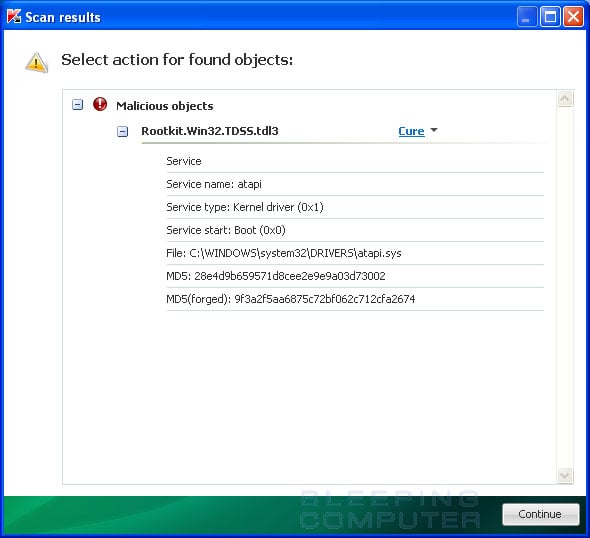
TDSSKiller will now scan your computer for the TDSS infection. When the scan has finished it will display a result screen stating whether or not the infection was found on your computer. If it was found it will display a screen similar to the one below.

infection-found.jpg


To remove the infection simply click on the Continue button and TDSSKiller will attempt to clean the infection.

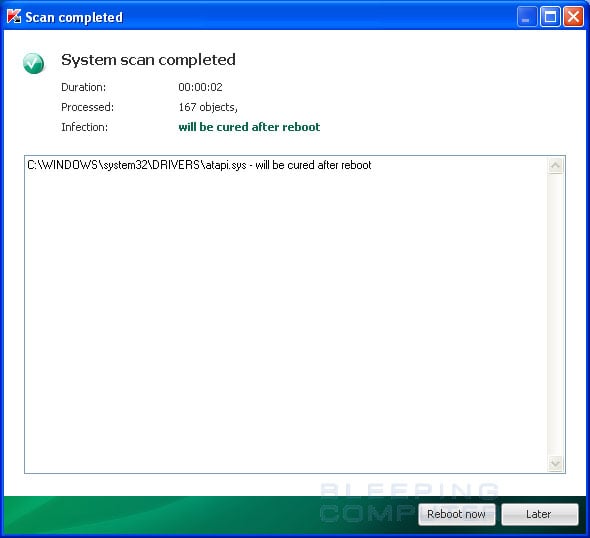
When it has finished cleaning the infection you will see a report stating whether or not it was successful as shown below.

scan-completed.jpg


If the log says will be cured after reboot, please reboot the system by pressing the reboot now button.

After running there will be a log that will be located at the root of your c:\ drive labeled tdsskiller with a series of numbers after it. Please open the log and copy and paste it back here.

2.

I need you to post a log that combofix automatically created. Please navigate to c:\qoobox and in that folder will be a file named "add-remove programs.txt" Please open that file and copy and paste the contents back here.
 
[Update report/COLOR]

rebooted and missing dll warning no longer appears. all my favorites sites work no problem but on everything else i'm still being heavily misdirected, worse than before. before second attemp usually got it, couldn't get ebay at all. struggled like hell to post these replies, tried to do it in one post and it froze after the combofix log paste. brought up task manager which stated missing internet explorer dll. hence the separate post.
many thanks for your help thus far
 
thanks john, will do these tommorrow, feeling tired and fed up so i'm calling it a day, well here's the add/remove thing

ABBYY FineReader 6.0 Sprint
Adobe Flash Player 11 ActiveX
Adobe Photoshop 7.0
Adobe Reader 7.0.9
Adobe SVG Viewer 3.0
Apple Mobile Device Support
Apple Software Update
AsusUpdate
Audacity 1.2.4
Avanquest update
AVerMedia DVD EZMarker Gold
AVIConverter 2.1
AVS DVDMenu Editor 1.2.1.19
AVS Video Converter 5.6
AVS4YOU Software Navigator 1.2
BBC iPlayer Download Manager
BlueSoleil
Bonjour
BroadJump Client Foundation
CDex extraction audio
Critical Update for Windows Media Player 11 (KB959772)
DiMAGE Viewer
Driver Detective
Driver Updater Pro
DVDStyler v1.7.1
Easy Password Manager V1.18 SE
ElsaWin
Email Updater
Epson Easy Photo Print 2
Epson Event Manager
EPSON PhotoQuicker3.4
EPSON Printer Software
Epson Printer Software Downloader
EPSON Scan
Epson Stylus SX510W_TX550W Manual
EPSON SX510W Series Printer Uninstall
EPSON Web-To-Page
EpsonNet Print
EpsonNet Setup
FLAC 1.2.1b (remove only)
Freecom Backup Software 1.15
Freecom Personal Media Suite 2.28
Google Earth
Google Toolbar for Internet Explorer
Google Update Helper
Google Updater
HiJackThis
Hotfix for Microsoft .NET Framework 3.5 SP1 (KB953595)
Hotfix for Microsoft .NET Framework 3.5 SP1 (KB958484)
Hotfix for Windows Internet Explorer 7 (KB947864)
Hotfix for Windows Media Format 11 SDK (KB929399)
Hotfix for Windows Media Player 11 (KB939683)
Hotfix for Windows XP (KB2158563)
Hotfix for Windows XP (KB2443685)
Hotfix for Windows XP (KB2570791)
Hotfix for Windows XP (KB952287)
Hotfix for Windows XP (KB954550-v5)
Hotfix for Windows XP (KB961118)
Hotfix for Windows XP (KB970653-v3)
Hotfix for Windows XP (KB976002-v5)
Hotfix for Windows XP (KB976098-v2)
Hotfix for Windows XP (KB979306)
Hotfix for Windows XP (KB981793)
ImgBurn
InCD
iTunes
J2SE Runtime Environment 5.0 Update 10
J2SE Runtime Environment 5.0 Update 11
J2SE Runtime Environment 5.0 Update 6
J2SE Runtime Environment 5.0 Update 9
Java Auto Updater
Java(TM) 6 Update 2
Java(TM) 6 Update 29
Java(TM) 6 Update 3
Java(TM) 6 Update 5
Java(TM) 6 Update 7
Java(TM) SE Runtime Environment 6 Update 1
KONICA_MINOLTA DiMAGE remote camera driver
Labtec Mouse Software 2.0
Malwarebytes' Anti-Malware version 1.51.2.1300
McAfee Internet Security
McAfee Online Backup
McAfee Virtual Technician
Microsoft .NET Framework 2.0 Service Pack 2
Microsoft .NET Framework 3.0 Service Pack 2
Microsoft .NET Framework 3.5 SP1
Microsoft Compression Client Pack 1.0 for Windows XP
Microsoft Internationalized Domain Names Mitigation APIs
Microsoft Kernel-Mode Driver Framework Feature Pack 1.7
Microsoft Kernel-Mode Driver Framework Feature Pack 1.9
Microsoft National Language Support Downlevel APIs
Microsoft Office 97, Professional Edition
Microsoft User-Mode Driver Framework Feature Pack 1.5
Microsoft Visual C++ 2005 ATL Update kb973923 - x86 8.0.50727.4053
Microsoft Visual C++ 2005 Redistributable
Microsoft Visual C++ 2008 ATL Update kb973924 - x86 9.0.30729.4148
Microsoft Visual C++ 2008 Redistributable - x86 9.0.30729.17
Microsoft Visual C++ 2008 Redistributable - x86 9.0.30729.6161
Motorola Phone Tools
MSVC80_x86_v2
MSVC90_x86
MSXML 4.0 SP2 (KB954430)
MSXML 4.0 SP2 (KB973688)
MSXML 6.0 Parser (KB933579)
My Drivers 3.00
neoDVDstandard
neoDVDstandard4
Nero Digital
Nero Media Player
Nero OEM
NeroVision Express Content
Nokia Connectivity Cable Driver
Nokia Ovi Player
Nokia Ovi Suite
Nokia Ovi Suite Software Updater
Nokia Photos
Nokia Software Updater
Nokia_Multimedia_Common_Components_2_5
Ovi Desktop Sync Engine
OviMPlatform
PC Connectivity Solution
PC Wizard 2006.1.661
QuickTime Alternative 2.7.0
ScanToWeb
Security Update for Microsoft .NET Framework 3.5 SP1 (KB2416473)
Security Update for Microsoft Windows (KB2564958)
Security Update for Windows Internet Explorer 7 (KB928090)
Security Update for Windows Internet Explorer 7 (KB929969)
Security Update for Windows Internet Explorer 7 (KB931768)
Security Update for Windows Internet Explorer 7 (KB933566)
Security Update for Windows Internet Explorer 7 (KB937143)
Security Update for Windows Internet Explorer 7 (KB938127)
Security Update for Windows Internet Explorer 7 (KB939653)
Security Update for Windows Internet Explorer 7 (KB942615)
Security Update for Windows Internet Explorer 7 (KB944533)
Security Update for Windows Internet Explorer 7 (KB950759)
Security Update for Windows Internet Explorer 7 (KB953838)
Security Update for Windows Internet Explorer 7 (KB956390)
Security Update for Windows Internet Explorer 7 (KB958215)
Security Update for Windows Internet Explorer 7 (KB960714)
Security Update for Windows Internet Explorer 7 (KB961260)
Security Update for Windows Internet Explorer 7 (KB963027)
Security Update for Windows Internet Explorer 7 (KB969897)
Security Update for Windows Internet Explorer 8 (KB2183461)
Security Update for Windows Internet Explorer 8 (KB2360131)
Security Update for Windows Internet Explorer 8 (KB2416400)
Security Update for Windows Internet Explorer 8 (KB2482017)
Security Update for Windows Internet Explorer 8 (KB2497640)
Security Update for Windows Internet Explorer 8 (KB2510531)
Security Update for Windows Internet Explorer 8 (KB2530548)
Security Update for Windows Internet Explorer 8 (KB2544521)
Security Update for Windows Internet Explorer 8 (KB2559049)
Security Update for Windows Internet Explorer 8 (KB2586448)
Security Update for Windows Internet Explorer 8 (KB969897)
Security Update for Windows Internet Explorer 8 (KB971961)
Security Update for Windows Internet Explorer 8 (KB972260)
Security Update for Windows Internet Explorer 8 (KB974455)
Security Update for Windows Internet Explorer 8 (KB976325)
Security Update for Windows Internet Explorer 8 (KB978207)
Security Update for Windows Internet Explorer 8 (KB981332)
Security Update for Windows Internet Explorer 8 (KB982381)
Security Update for Windows Media Player (KB2378111)
Security Update for Windows Media Player (KB911564)
Security Update for Windows Media Player (KB952069)
Security Update for Windows Media Player (KB954155)
Security Update for Windows Media Player (KB968816)
Security Update for Windows Media Player (KB973540)
Security Update for Windows Media Player (KB975558)
Security Update for Windows Media Player (KB978695)
Security Update for Windows Media Player 10 (KB911565)
Security Update for Windows Media Player 10 (KB917734)
Security Update for Windows Media Player 10 (KB936782)
Security Update for Windows Media Player 11 (KB936782)
Security Update for Windows Media Player 11 (KB954154)
Security Update for Windows Media Player 6.4 (KB925398)
Security Update for Windows XP (KB2079403)
Security Update for Windows XP (KB2121546)
Security Update for Windows XP (KB2160329)
Security Update for Windows XP (KB2229593)
Security Update for Windows XP (KB2259922)
Security Update for Windows XP (KB2279986)
Security Update for Windows XP (KB2286198)
Security Update for Windows XP (KB2296011)
Security Update for Windows XP (KB2296199)
Security Update for Windows XP (KB2347290)
Security Update for Windows XP (KB2360937)
Security Update for Windows XP (KB2387149)
Security Update for Windows XP (KB2393802)
Security Update for Windows XP (KB2412687)
Security Update for Windows XP (KB2419632)
Security Update for Windows XP (KB2423089)
Security Update for Windows XP (KB2436673)
Security Update for Windows XP (KB2440591)
Security Update for Windows XP (KB2443105)
Security Update for Windows XP (KB2476490)
Security Update for Windows XP (KB2476687)
Security Update for Windows XP (KB2478960)
Security Update for Windows XP (KB2478971)
Security Update for Windows XP (KB2479628)
Security Update for Windows XP (KB2479943)
Security Update for Windows XP (KB2481109)
Security Update for Windows XP (KB2483185)
Security Update for Windows XP (KB2485376)
Security Update for Windows XP (KB2485663)
Security Update for Windows XP (KB2503658)
Security Update for Windows XP (KB2503665)
Security Update for Windows XP (KB2506212)
Security Update for Windows XP (KB2506223)
Security Update for Windows XP (KB2507618)
Security Update for Windows XP (KB2507938)
Security Update for Windows XP (KB2508272)
Security Update for Windows XP (KB2508429)
Security Update for Windows XP (KB2509553)
Security Update for Windows XP (KB2511455)
Security Update for Windows XP (KB2524375)
Security Update for Windows XP (KB2535512)
Security Update for Windows XP (KB2536276-v2)
Security Update for Windows XP (KB2536276)
Security Update for Windows XP (KB2544893)
Security Update for Windows XP (KB2555917)
Security Update for Windows XP (KB2562937)
Security Update for Windows XP (KB2566454)
Security Update for Windows XP (KB2567053)
Security Update for Windows XP (KB2567680)
Security Update for Windows XP (KB2570222)
Security Update for Windows XP (KB2570947)
Security Update for Windows XP (KB2592799)
Security Update for Windows XP (KB923561)
Security Update for Windows XP (KB923689)
Security Update for Windows XP (KB938464)
Security Update for Windows XP (KB941569)
Security Update for Windows XP (KB946648)
Security Update for Windows XP (KB950760)
Security Update for Windows XP (KB950762)
Security Update for Windows XP (KB950974)
Security Update for Windows XP (KB951066)
Security Update for Windows XP (KB951376-v2)
Security Update for Windows XP (KB951376)
Security Update for Windows XP (KB951698)
Security Update for Windows XP (KB951748)
Security Update for Windows XP (KB952004)
Security Update for Windows XP (KB952954)
Security Update for Windows XP (KB953839)
Security Update for Windows XP (KB954211)
Security Update for Windows XP (KB954459)
Security Update for Windows XP (KB954600)
Security Update for Windows XP (KB955069)
Security Update for Windows XP (KB956391)
Security Update for Windows XP (KB956572)
Security Update for Windows XP (KB956744)
Security Update for Windows XP (KB956802)
Security Update for Windows XP (KB956803)
Security Update for Windows XP (KB956841)
Security Update for Windows XP (KB956844)
Security Update for Windows XP (KB957095)
Security Update for Windows XP (KB957097)
Security Update for Windows XP (KB958644)
Security Update for Windows XP (KB958687)
Security Update for Windows XP (KB958690)
Security Update for Windows XP (KB958869)
Security Update for Windows XP (KB959426)
Security Update for Windows XP (KB960225)
Security Update for Windows XP (KB960715)
Security Update for Windows XP (KB960803)
Security Update for Windows XP (KB960859)
Security Update for Windows XP (KB961371)
Security Update for Windows XP (KB961373)
Security Update for Windows XP (KB961501)
Security Update for Windows XP (KB968537)
Security Update for Windows XP (KB969059)
Security Update for Windows XP (KB969898)
Security Update for Windows XP (KB969947)
Security Update for Windows XP (KB970238)
Security Update for Windows XP (KB970430)
Security Update for Windows XP (KB971468)
Security Update for Windows XP (KB971486)
Security Update for Windows XP (KB971557)
Security Update for Windows XP (KB971633)
Security Update for Windows XP (KB971657)
Security Update for Windows XP (KB972270)
Security Update for Windows XP (KB973346)
Security Update for Windows XP (KB973354)
Security Update for Windows XP (KB973507)
Security Update for Windows XP (KB973525)
Security Update for Windows XP (KB973869)
Security Update for Windows XP (KB973904)
Security Update for Windows XP (KB974112)
Security Update for Windows XP (KB974318)
Security Update for Windows XP (KB974392)
Security Update for Windows XP (KB974571)
Security Update for Windows XP (KB975025)
Security Update for Windows XP (KB975467)
Security Update for Windows XP (KB975560)
Security Update for Windows XP (KB975561)
Security Update for Windows XP (KB975562)
Security Update for Windows XP (KB975713)
Security Update for Windows XP (KB977165)
Security Update for Windows XP (KB977816)
Security Update for Windows XP (KB977914)
Security Update for Windows XP (KB978037)
Security Update for Windows XP (KB978251)
Security Update for Windows XP (KB978262)
Security Update for Windows XP (KB978338)
Security Update for Windows XP (KB978542)
Security Update for Windows XP (KB978601)
Security Update for Windows XP (KB978706)
Security Update for Windows XP (KB979309)
Security Update for Windows XP (KB979482)
Security Update for Windows XP (KB979559)
Security Update for Windows XP (KB979683)
Security Update for Windows XP (KB979687)
Security Update for Windows XP (KB980195)
Security Update for Windows XP (KB980218)
Security Update for Windows XP (KB980232)
Security Update for Windows XP (KB980436)
Security Update for Windows XP (KB981322)
Security Update for Windows XP (KB981852)
Security Update for Windows XP (KB981957)
Security Update for Windows XP (KB981997)
Security Update for Windows XP (KB982132)
Security Update for Windows XP (KB982214)
Security Update for Windows XP (KB982665)
Security Update for Windows XP (KB982802)
SiS 651_661FX_741_760_760GX_M661FX_M661MX_M741_M760_M760GX
SiS 900 PCI Fast Ethernet Adapter Driver
SoundMAX
SpeedMaxPc SpeedMaxPc
SSC Service Utility v4.10
TomTom HOME 2.7.6.2056
TomTom HOME Visual Studio Merge Modules
TopfHDRead/Write V0.20
Topfield Windows Applications
Update for Microsoft .NET Framework 3.5 SP1 (KB963707)
Update for Windows Internet Explorer 8 (KB971930)
Update for Windows Internet Explorer 8 (KB976662)
Update for Windows Internet Explorer 8 (KB976749)
Update for Windows Internet Explorer 8 (KB980182)
Update for Windows XP (KB2141007)
Update for Windows XP (KB2345886)
Update for Windows XP (KB2467659)
Update for Windows XP (KB2541763)
Update for Windows XP (KB2607712)
Update for Windows XP (KB2616676)
Update for Windows XP (KB951072-v2)
Update for Windows XP (KB951978)
Update for Windows XP (KB955759)
Update for Windows XP (KB955839)
Update for Windows XP (KB967715)
Update for Windows XP (KB968389)
Update for Windows XP (KB971029)
Update for Windows XP (KB971737)
Update for Windows XP (KB973687)
Update for Windows XP (KB973815)
VideoReDo Plus Version 3.10.3.609
VideoReDo TVSuite Version 3.1.5.564
VideoReDo/Plus Version 2.5.6.512
Virgin Media Toolbar
WebFldrs XP
Windows Driver Package - Nokia pccsmcfd (08/22/2008 7.0.0.0)
Windows Genuine Advantage Notifications (KB905474)
Windows Genuine Advantage v1.3.0254.0
Windows Genuine Advantage Validation Tool (KB892130)
Windows Internet Explorer 7
Windows Internet Explorer 8
Windows Media Format 11 runtime
Windows Media Player 11
Windows XP Service Pack 3
WinRAR archiver
Yahoo! Toolbar
 
Last edited:
Please uninstall the following programs in add/remove programs.

Adobe Reader 7.0.9
J2SE Runtime Environment 5.0 Update 10
J2SE Runtime Environment 5.0 Update 11
J2SE Runtime Environment 5.0 Update 6
J2SE Runtime Environment 5.0 Update 9
Java(TM) 6 Update 2
Java(TM) 6 Update 3
Java(TM) 6 Update 5
Java(TM) 6 Update 7
Java(TM) SE Runtime Environment 6 Update 1
SpeedMaxPc SpeedMaxPc
Windows Internet Explorer 7 - If it appears in your list. It shouldn't be as you have IE 8 installed. You will have to click on show updates up top to see this one.

If you use adobe reader to read pdf's then go here to download the latest version.

http://get.adobe.com/reader/?promoid=BUIGO

Also, I'm curius why you have all those driver update programs installed. Most of them include malware so you should remove them. Besides, you can always get the most updated driver either through the pc makers website or the hardware makers website. I would never trust those driver update programs anyway. Also please uninstall anything that you may have gotten pirated/illegally.

I'm still waiting on the results of the tdsskiller scan. I have a feeling our culprit will be there.
 
Hi john
ran TDSSKiller and it found nothing, no log file found. remove the suggested programs apart from adobe reader, got the latest at work and i don't like it. couldn't find IE7 even with updates checked. why hasn't my Mcafee nailed this, i've run a full scan?
 
Can you tell me what your dns servers are? Open a command prompt and type ipconfig /all hit enter. Find the dns servers and let me know what the address is. Also look in your router to make sure they are the same. You may have dns poisoning.
 
dns servers are 93.188.166.105 & 93.188.161.105. how do i get onto the modem, i only installed it last week so its new to me. tonight i powered off my modem & router now my TV has lost the internet but my phone still connect wirlessly.
 
Ok, I noticed you are from the UK, however, your dns servers are located in the Ukraine. You need to call your internet provider to verify what they should be. I have a feeling this is where your redirecting issue is coming from.
 
Hi John
called my ISP and they did some tests and there're sending me a replacement modem. my TV has now got it's internet services back but now my McAfee is acting up as it can't update. seen as both the TV and computer are having trouble the common denominater is either the modem or the router. can a router be atttacked by a virus?, this router is secondhand from my a family member who downloads a load of illegal stuff from the bit torrents.
 
If he was downloading illegal things, then yes its very possible that the settings in the router can be changed. You should do a hard reset on the router to see if that fixes the redirect and your remaining issues.
 
Hi John
by hard reset do you mean a reset to default(factory) settings which i take it would then mean re-installing the router. or could i just connect the computer directly to the modem and see if that cures the problem? am i right in thinking its the DNS servers that connect me to my ISP and thus the internet? but then there is the question of my the DNS servers appear to be in the ukraine, my ISP is Virgin Media and their tect support is in India which isn't easy to deal with.
once again many thanks for your help
 
Yes, a hard reset would set all settings back to factory default and you would have to reinstall the router. But usually its just a matter of hooking everything up and your online. Some dsl ISP's can be a pain to get a router hooked up to though. What about using your local office for support? You can try hooking straight up to the modem and see what happens. If everything is fine then you know its the settings in the router.
 
Simply use any internet browser program to access the router and reset all options back to their standard default values like johnb35 said and remember to save before quit.You should get a message that all the setting are saved.So be sure you see that kind of message before closing the browser.

You can also try connecting a computer to a different router which is hooked up to another internet connection.If the problem still exists that the problem is somewhere on your HDD and not the router.

As for the McAfee,it is not enough to run a full scan lol.For example I use McAfee VirusScan Enterprise 8.5.0 and it has TONS of options which needs to be configured.If all those options are not configured properly,McAfee will simply not find all type of malicious software,viruses,spyware and so on...
After the McAfee is fully correctly configured then you will also need to update it several times all until you see that there are no more updates available for it.After you have done that too,restart your computer.After your computer has restarted,restart it again but this time into the SAFE MODE and THEN scan your computer from there.If the scan finds anything then keep scanning your system with McAfee until it finds nothing.

NOTE: If your system is badly infected,the simple installation of antivirus software such as McAfee will not go correctly and that will result in a PARTIAL functionality of the antivirus software instead of it's FULL functionality.So of that's that case,you will need to take your HDD out,connect it to some other computer and scan it from there.Just be sure that the antivirus protection is ALREADY RUNNING on that other computer before even connecting that HDD to that other computer.


I also noticed that you have TONS TONS TONS of Windows updates installed.Do you really need all of them? I don't think you do.So many many many updates will surely slow down your system and make it work unstable.By unstable it can be ANYTHING what in your case is surfing the internet.Updates should be used only when neccessary.Each update fixes some bugs,but if you do not have those bugs present,you should NOT install so many updates for them.
If it aint broken,don't fix it.
The only updates I have are SP1,SP2 and SP3 and everything works in order so why would I risk my system with SO many updates if everything works great.Same applies for you.


Cheers!
 
Last edited:
You can try hooking straight up to the modem and see what happens. If everything is fine then you know its the settings in the router.

tried this and lost the internet and email. put the router back and the internet is back. the cable modem itself has a mac address so i dont know how to get into its settings. if i reset the router back to factory settings would i then lose the internet again. an installation disc came with the modem will running that restore it back to the way it should be.
as for the updates i thought it recommended to have automatic updates on, that where they all came from.
 
Back
Top