

SubDude199
Member
(EDIT: I MADE A HUGE MISTAKE IN THE TITLE THAT IS NOT GOING TO MAKE PEOPLE HAPPY. I ACCIDENTLY TYPED 9700GT WHEN ITS REALLY A 9600GT. I CAN NOT EDIT THE TITLE, SO CAN AN ADMING CHANGE IT FOR ME, THEN DELETE THIS EDIT -- ALSO ITS PCMARK06 SCORE NOT 05)
I had a hard time finding a good review of the new 9600GT. But at a great price of $179 I decided to give it a try. Here is what I thought!
Test Rig:
MoBo: Asus PK5 Deluxe WiFi
Processor: Intel C2Q Q6600 SLACR G0 Stepper Running at 3.2Ghz with 1.400V To The Core (30% Overclock At The Moment - FSB @ 345MHz - PSI-E @ Stock 100MHz) (Normally 50%)
Cooler: ZEROtherm Nirvana NV120 20*C Idle (With OCZ Freeze Thermal Compound)
PSU: PC P&C Silencer 750W 60Amp 12V Rail
HDD: Dual 36G WD Raptors Running Raid0 With a 500GB Hitachi BackUp Drive
Case: Antec NineHundred (Four 120MM fans, One 200MM Fan all running full speed)
OSS: XP Pro Corp Stock
GPU: EVGA 7900GTO 720/880
Ram: 2 Gigs Corsair TWINX PC6400 DDR2 [/color]
My first impression was "This thing is so thin" Its only about half the width of my 7900GTO and about the same legnth. I dont like small video cards But it looks prety slick!


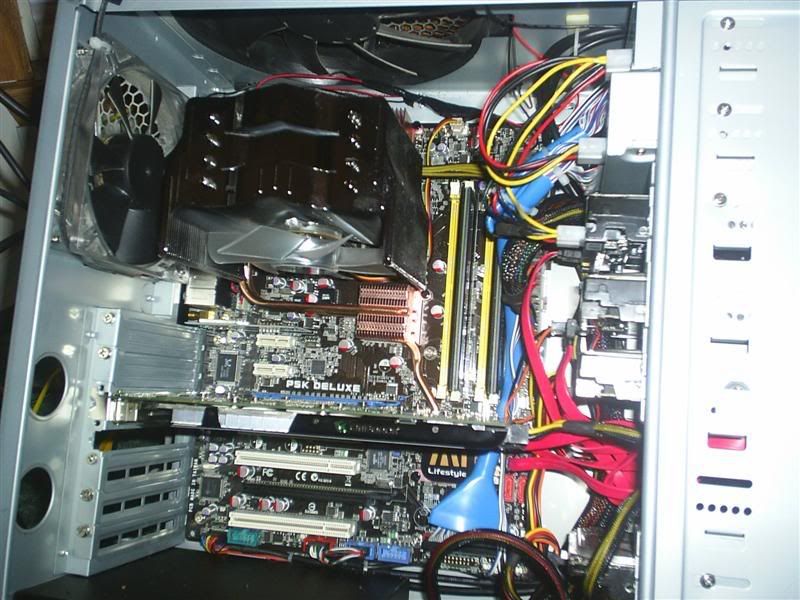

I installed the card and it booted right up. It defaulted to 800X600 like most cards. I went to download the drivers for Nvidia and the speed maxed out at 100KBs when I have a 30meg connection. I didnt like that but that has nothing to do with the performance of the card. To my supriuse it crashed to a blue screen when it was almost done donaloading. My machine was stable before swaping cards. I have heard that these cards cause crashes from time to time and thats exactly what it did. Great, This is not looking good right from the start. I made sure to disabling "blue screen of death" Auto Restart so I can read the error if (more like when) it happens again. So I decided to use the drivers off the Cd. I installed them and restarted. I did not have any more random "Blue Screen" crashes after the drivers were installed. (I surfed the web a bit and installed a few programs)
Once installed the first thing I did was to check the idle temp. Somehting I notice that I did not like was it did not have temp reading for diffrent parts of the card. It has one reading and does not specift what component it is. Either way it is either not accurate or it runs a little hot (I bet due to the TINY heatsink and fan!) Its idling at 36 celsus in a 20 degree room in an Antec NineHundred with all the fans cranked. Lets see how it does under a load later. The other thing is it does not display fan speed like my 7900GTO did.

The next test I ran was 3DMark06. The results were prety impressive for $179! This is a completly stock video card running 729/1836 (actually a 8% overclock from the factory). I will overclock this thing to the max tommorow and post new scored!
WOW, 72 FPS IN THE BEGINING (I was lucky to get 40 on my 7900)


I am very impressed with the temp of this card on this TINY air cooler. After a few mins of stressing the card the temp was only 56C. WOW

It looks like this is the best bang for you buck that the moment. I thin I will pick up a second and SLI them for about the same price as an 8800GTX!
I had a hard time finding a good review of the new 9600GT. But at a great price of $179 I decided to give it a try. Here is what I thought!
Test Rig:
MoBo: Asus PK5 Deluxe WiFi
Processor: Intel C2Q Q6600 SLACR G0 Stepper Running at 3.2Ghz with 1.400V To The Core (30% Overclock At The Moment - FSB @ 345MHz - PSI-E @ Stock 100MHz) (Normally 50%)
Cooler: ZEROtherm Nirvana NV120 20*C Idle (With OCZ Freeze Thermal Compound)
PSU: PC P&C Silencer 750W 60Amp 12V Rail
HDD: Dual 36G WD Raptors Running Raid0 With a 500GB Hitachi BackUp Drive
Case: Antec NineHundred (Four 120MM fans, One 200MM Fan all running full speed)
OSS: XP Pro Corp Stock
GPU: EVGA 7900GTO 720/880
Ram: 2 Gigs Corsair TWINX PC6400 DDR2 [/color]
My first impression was "This thing is so thin" Its only about half the width of my 7900GTO and about the same legnth. I dont like small video cards But it looks prety slick!
I installed the card and it booted right up. It defaulted to 800X600 like most cards. I went to download the drivers for Nvidia and the speed maxed out at 100KBs when I have a 30meg connection. I didnt like that but that has nothing to do with the performance of the card. To my supriuse it crashed to a blue screen when it was almost done donaloading. My machine was stable before swaping cards. I have heard that these cards cause crashes from time to time and thats exactly what it did. Great, This is not looking good right from the start. I made sure to disabling "blue screen of death" Auto Restart so I can read the error if (more like when) it happens again. So I decided to use the drivers off the Cd. I installed them and restarted. I did not have any more random "Blue Screen" crashes after the drivers were installed. (I surfed the web a bit and installed a few programs)
Once installed the first thing I did was to check the idle temp. Somehting I notice that I did not like was it did not have temp reading for diffrent parts of the card. It has one reading and does not specift what component it is. Either way it is either not accurate or it runs a little hot (I bet due to the TINY heatsink and fan!) Its idling at 36 celsus in a 20 degree room in an Antec NineHundred with all the fans cranked. Lets see how it does under a load later. The other thing is it does not display fan speed like my 7900GTO did.
The next test I ran was 3DMark06. The results were prety impressive for $179! This is a completly stock video card running 729/1836 (actually a 8% overclock from the factory). I will overclock this thing to the max tommorow and post new scored!
WOW, 72 FPS IN THE BEGINING (I was lucky to get 40 on my 7900)
I am very impressed with the temp of this card on this TINY air cooler. After a few mins of stressing the card the temp was only 56C. WOW
It looks like this is the best bang for you buck that the moment. I thin I will pick up a second and SLI them for about the same price as an 8800GTX!
Last edited:


