My PC Is Beeping

MrButterVenom

New Member
Hi. I recently opened my PC to check the side of the HDD ( kind of dumb I know ) and I took out the ram and placed it back. After a little bit I had realized I placed one the wrong way and I started my PC before I realized and it beeped so I opened it again to check what was wrong and I found out I had inserted the ram in correctly and I fixed it but it's still beeping and I don't know what's wrong with it now. I was wanting maybe a list of possible problems and if there was a quick way to fix it or not. Thanks in advance.
 
Opening the case was fine, but pulling out the ram stick and inserting it incorrectly is where your problem began. Most likely your ram chip has still not been re-inserted correctly, there is a groove towards the middle of the chip where the gold connectors are and this should line up with bump on the ram slot on the motherboard, this is to stop you inserting it the wrong way.

259.png


ddr3-vs-ddr2-ram.jpg


You also need to make sure that the white tabs you see on the sides of the slots in the first picture are locked into place and hook onto the ram correctly.
If after making sure the ram is seating correctly it still does not work try it in different slots, if it still does not work in any of the slots then try to carefully clean the gold connectors using alcohol and a lint free cloth. If it still does not work then post back.
 
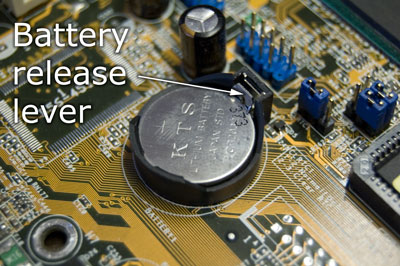
Clear CMOS by pulling out the CMOS battery (looks like a circular watch battery). Leave the battery out for 5 minutes then reinsert and try again.
 
Why did you remove the RAM to check the HDD? ;)

It's pretty impossible to install them backwards unless you HUGELY force it, although that hasn't stopped some people in the past lol.

You could try reseating it to make sure both clips are secured firmly and as above clear CMOS.

What specific beep pattern are you getting?
 
Why did you remove the RAM to check the HDD? ;)

It's pretty impossible to install them backwards unless you HUGELY force it, although that hasn't stopped some people in the past lol.

You could try reseating it to make sure both clips are secured firmly and as above clear CMOS.

What specific beep pattern are you getting?
[Edit] Well the beep pattern beeps 3 times and a fourth long beep
 
What motherboard do you have? Depending on BIOS type that could be either RAM or Video related.

Did you clear CMOS yet?
 
It probably just has a little latch on it or something that you might have to press. It's on your motherboard.

CMOS-Battery-3.jpg
 
Thats not right then. Do this to reset cmos. Unplug power cable from power supply, remove cmos battery from motherboard, press and hold power button on case for 10 seconds then wait 10 minutes. Then reinsert battery, reconnect power and press power button. You should have continuous beeps. This will tell you the motherboard doesn't have any ram installed.
 
Are you using onboard video or a dedicated video card? If dedicated card, you must have it installed in the system. Otherwise, I think you ruined the motherboard.
 
Back
Top