JesterOfSorts
New Member
Ok so I got the parts to build my computer (first build). Things were a bit overwhelming at first, but I took my time and got things done 1 at a time.
I was almost finished then I ran into a problem with the Hard-drive. My Mobo is the
Asus P5N-D
http://www.tigerdirect.ca/applicati...s.asp?EdpNo=3573170&sku=A455-2808&srkey=p5n-d
and the Hard Drive is
http://www.tigerdirect.ca/applications/SearchTools/item-details.asp?EdpNo=3167558&Sku=THD-500M3
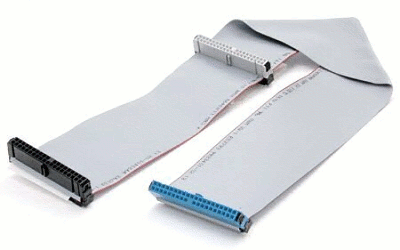
Now it seems I made the mistake of getting OEM, which leaves me without the cable I need to connect it (if I'm not mistaken). However I do not know what kind of cable I will need in order to connect it. So just asking for what it is, and where could I get it? Could I just get it at a futureshop or bestbuy or something? Also where in the mobo would it plug into?
Thanks.
Also though, while I'm posting here, another thing. I attached my brother's old comp's hard drive to my comp just to see if everything worked, which it looks like it's going pretty good except 1 thing. It brings me to the screen "Windows couldn't start up last time you tried" or w/e it says, and asks to start up normally, in safe mode, etc. When I click any option the screen goes black for a second then restarts my computer. I don't think it actually 'restarts' it, the fans don't stop for a second or anything, but it returns to the P5N-D screen, then re-loads the "windows could not start last time" screen.
Hopefully it's just something to do with the hard drive and once I get the new one working it'll be fine, or it's something I did wrong, that can easily be fixed.
Last thing. my bro's old hard-drive that I put in is under slave, how would I change it to master?
Thanks for the help, building the comp was fun...but frusturating with some of the little problems (not being able to connect hard-drive =( )
I was almost finished then I ran into a problem with the Hard-drive. My Mobo is the
Asus P5N-D
http://www.tigerdirect.ca/applicati...s.asp?EdpNo=3573170&sku=A455-2808&srkey=p5n-d
and the Hard Drive is
http://www.tigerdirect.ca/applications/SearchTools/item-details.asp?EdpNo=3167558&Sku=THD-500M3
Now it seems I made the mistake of getting OEM, which leaves me without the cable I need to connect it (if I'm not mistaken). However I do not know what kind of cable I will need in order to connect it. So just asking for what it is, and where could I get it? Could I just get it at a futureshop or bestbuy or something? Also where in the mobo would it plug into?
Thanks.
Also though, while I'm posting here, another thing. I attached my brother's old comp's hard drive to my comp just to see if everything worked, which it looks like it's going pretty good except 1 thing. It brings me to the screen "Windows couldn't start up last time you tried" or w/e it says, and asks to start up normally, in safe mode, etc. When I click any option the screen goes black for a second then restarts my computer. I don't think it actually 'restarts' it, the fans don't stop for a second or anything, but it returns to the P5N-D screen, then re-loads the "windows could not start last time" screen.
Hopefully it's just something to do with the hard drive and once I get the new one working it'll be fine, or it's something I did wrong, that can easily be fixed.
Last thing. my bro's old hard-drive that I put in is under slave, how would I change it to master?
Thanks for the help, building the comp was fun...but frusturating with some of the little problems (not being able to connect hard-drive =( )


 . Is the distance from the cd and hard drive able to be altered? cause from the picture it looks like they would be too close for my comp. None the less I'll have to head down to futureshop or something and get 1 tomorrow that works for my comp.