notebooks and heat

illius

New Member
Ok, over much consideration of computers I purchased an acer aspire 7741z-5731. I like it, amazing hd screen, good graphics. dual 2 core, 3gb ram, 250gb hard drive. I will surely be upgrading memory and the processor in the future if I can. I like it but am reconsidering, the reason why is I am reading things about heat issues with laptops and notebooks. Although mine does not get so hot to meltdown point, it does get warm and really warm when playing a game. My question is is this a good investment? I am a desktop person and was planning on building a pc for around $600 or so, but ended up with only a little over $500 to invest, so I got the acer mainly for the screen size(17.3") and a few other features.
I guess my main question is, how much of a heat issue is laptops or notebooks? And will I run into a problem with heat later on with upgrading components. I plan on purchasing a cooler, so hopefully that will be the extent of what I will have to go through to be able to game and do multimedia. But Ive read many posts about laptops getting so hot they burn to the touch, meltdown the processor or cut the lifespan of their laptop in half. Im kind of leary of it now.
 
Virtually all laptops will have heat problems....if you don't take care of them that is. Just keep the vents clear and always keep it dust free. If it gets a little warm, that is completely normal for laptops. however, if you are going to game, you will probably want a cooler or something while doing so, other than that it should be fine. and yes, some laptop designs are really poor and allow heat to build quickly and then it starts destroying stuff. this was especially prevalent in some pentium 4, dell laptops, and one reason was because the TDP was so high.but don't let that deter you from getting a laptop, they are really handy!
 
Ok, over much consideration of computers I purchased an acer aspire 7741z-5731. I like it, amazing hd screen, good graphics. dual 2 core, 3gb ram, 250gb hard drive. I will surely be upgrading memory and the processor in the future if I can. I like it but am reconsidering, the reason why is I am reading things about heat issues with laptops and notebooks. Although mine does not get so hot to meltdown point, it does get warm and really warm when playing a game. My question is is this a good investment? I am a desktop person and was planning on building a pc for around $600 or so, but ended up with only a little over $500 to invest, so I got the acer mainly for the screen size(17.3") and a few other features.
I guess my main question is, how much of a heat issue is laptops or notebooks? And will I run into a problem with heat later on with upgrading components. I plan on purchasing a cooler, so hopefully that will be the extent of what I will have to go through to be able to game and do multimedia. But Ive read many posts about laptops getting so hot they burn to the touch, meltdown the processor or cut the lifespan of their laptop in half. Im kind of leary of it now.
When it comes to laptops, all you have to do is make sure that you don't leave them out on soft surfaces and you shouldn't run into too much of a problem. By soft surfaces I mean beds, carpet, couches and anything that would block the fan. Tables and hard surfaces won't block it since laptops come with rubber pegs on the bottom. My Dell Latitude D410 gets pretty toasty under load, but it's under control with my cooling pad. Also, you might want to find a program to adjust the fan speeds on your brand of laptop. For my Dell, I use a program called I8kfanGUI. Between the cooling pad and the program forcing the CPU fan to high speed, I keep it in the high 50s Celsius at full load. To monitor your temps, there are numerous programs out there. One of my favorites for notebooks is mobilemeter:
http://www.softpedia.com/get/System/System-Info/MobileMeter.shtml
It also monitors your CPU frequency, HDD temp, and battery discharge and recharge. If it stays below 75C under full load you should be fine. In short, with the right precautions taken you'll be fine. The bigger thing I'd be worried about is the brand. I was worried when I got my Dell on ebay, but was pleasantly surprised with how well it's holding up. It even has a Hitachi Hard Drive, which I would have thought would die by now. When I check its S.M.A.R.T. data, it's supposedly perfectly fit. An Acer, on the other hand, I'd be more worried about. I've never heard good things about them. Go to device manager and check your hard drive's brand. If it's a Maxtor, Fujitsu, or some other oddball company, I'd be worried.
 
Last edited:
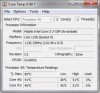
thanks for the replys. The program for monitoring temps did not work for some reason, it kept giving me a error message when trying to run it. I found an app called core temp. Here a screen shot of it, what does these numbers mean? As for a program to control the fan speed, from what I have found for some reason acers do not allowe third party control over fan speed, I will keep searching, maybe there is one somewhere compatible with the acer brand. I think I will hold off on playing games or doing heavy multimedia until I get a cooler for it. I was also curious is it possible to put another fan inside the computer to keep it cooler?

-Matthew
 

Attachments

  • CoreTemp-Scr.jpg
    CoreTemp-Scr.jpg
    19.5 KB · Views: 164
thanks for the replys. The program for monitoring temps did not work for some reason, it kept giving me a error message when trying to run it. I found an app called core temp. Here a screen shot of it, what does these numbers mean? As for a program to control the fan speed, from what I have found for some reason acers do not allowe third party control over fan speed, I will keep searching, maybe there is one somewhere compatible with the acer brand. I think I will hold off on playing games or doing heavy multimedia until I get a cooler for it. I was also curious is it possible to put another fan inside the computer to keep it cooler?

-Matthew
Those temps don't look bad at all. Try running Prime95, downloadable here:
http://www.mersenne.org/freesoft/
Run a torture test, and see how hot it gets. I don't think you should have much of a problem, but you may as well try.
 
Thanks for the reply, I downloaded the file from the link you suggested and will give it a torture test here in a few. What temps are standard for a laptop?
 
Thanks for the reply, I downloaded the file from the link you suggested and will give it a torture test here in a few. What temps are standard for a laptop?
I've seen laptops easily hit 70C, sometimes a bit over 75. It depends what CPU you have, really. Their max temps vary. I think most laptop CPUs have a max temp of around 100C. I would try not to put it above the high 70s Celsius at full load, mid 50s idle.
 
Back
Top