
lucasbytegenius
Well-Known Member
Building a new rig, and thought this SSD would be good for my OS partition: http://www.newegg.com/Product/Product.aspx?Item=N82E16820227611
Thoughts?
Thoughts?



You might as well go for this one... the 120GB version for like $10 more.
http://www.newegg.com/Product/Product.aspx?Item=N82E16820227590
Good SSD though.


Oh, sorry tech savvy, I didn't see your post. That looks pretty decenthere another 120gb SSD for $209. http://www.newegg.com/Product/Product.aspx?Item=N82E16820231372

Id honestly not recommend ditching the SSD idea,Because think about it...you could spend all that money on a shiny new pc,and regurdless of its specs...its always going to have a standard hard drive been a bottleneck all the time.
Trust me theres a huge diffrence with having an SSD.
Just get the 60GB version..its plenty for Windows,Antivirus & a few apps..i still have 36GB free on mine.
What are your planned specs btw?
Id honestly not recommend ditching the SSD idea,Because think about it...you could spend all that money on a shiny new pc,and regurdless of its specs...its always going to have a standard hard drive been a bottleneck all the time.
Trust me theres a huge diffrence with having an SSD.
Just get the 60GB version..its plenty for Windows,Antivirus & a few apps..i still have 36GB free on mine.
What are your planned specs btw?


Page files... that's it. You can move those to any available drives.Idk but the Windows 7 that I installed took out like 30GB+ of space and I have no idea how that happened.

x2 on both of those.Trust me theres a huge diffrence with having an SSD.
Just get the 60GB version..its plenty for Windows,Antivirus & a few apps..i still have 36GB free on mine.
We all know how big 7 is. I'm not sure of the other 2. My thought w/o research is not more than about 5 gb each.Well, I need quite a bit of space on it because it's going to be my OS partition, with Windows 7, Ubuntu, and OpenSUSE.
In a nutshell +1^. So something else going on there. User folders can get quite large-temp/user(including admin)/default/public/program/ can be relocated to hdd during 7 install. All but the admin acc can be moved after, altho it's a longer process. As far as pagefile, that's deleted at shutdown, and can be disabled, managed(to 0) as some prefere to call it, and again as Ethan said - relocated to hdd. If you have enough RAM, you may not need pagefile since 7 will only swap if it feels like it needs the physical RAM. But then who can understand the algorithms 7 uses to determine that. That's why I think having 2 or more gb RAM than you use, is a good idea with ssd. It lends to more choices in managing pagefile. There's pro's and cons to all sides of ssd-pagfile dos and don'ts. My though is, if I don't need it, and it stops some writes, then why not 0 it out.Idk but the Windows 7 that I installed took out like 30GB+ of space and I have no idea how that happened.Page files... that's it. You can move those to any available drives.


I have been looking at getting a Vertex 2 120gb drive for my rig. What is the life expectancy of SSD's? How much more maintenance is involved with SSD's? I am the kind that likes to turn it on and use it and not worry about it. What should I do or not do with SSD's?

.The vertex 3 is due for release soon.
Plus its sata 3 so thats what id wait for.
or this one has recieved fantastic reviewshttp://www.memoryc.com/products/des...SSD-read_355MB_sec-write_70MB_sec_/index.html
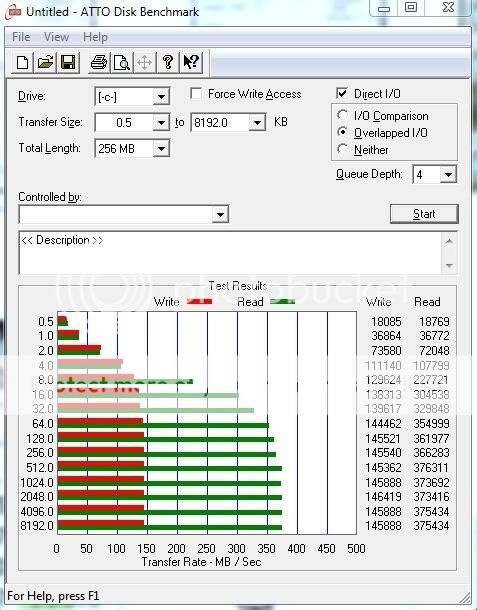
Page files... that's it. You can move those to any available drives.
I've got an 80 GB drive right now as my OS partition, and I install quite a bit of programs on all three OSs. For example, my Windows installation is 8 GB but my program folder is 12 GB, due to all that I have installed. And I use most of the programs. The Windows partition is 58 GB, and I have 18 GB free. The Ubuntu partition is 12 GB with 4 GB free, again due to programs. The OpenSUSE partition isn't even on that drive due to lack of space, it's taken up 5 GB of its 16 GB partiton so far, and I've hardly installed anything on it. I store my documents and things on two dedicated drives so that I access them in any of my OSs. So, I'm getting a 2 TB drive for my docs (which take up 120+ GB) and judging by the usage of my OS drive believe I will need a 120 GB SSD to be future proof.My thoughts.
x2 on both of those.
We all know how big 7 is. I'm not sure of the other 2. My thought w/o research is not more than about 5 gb each.
In a nutshell +1^. So something else going on there. User folders can get quite large-temp/user(including admin)/default/public/program/ can be relocated to hdd during 7 install. All but the admin acc can be moved after, altho it's a longer process. As far as pagefile, that's deleted at shutdown, and can be disabled, managed(to 0) as some prefere to call it, and again as Ethan said - relocated to hdd. If you have enough RAM, you may not need pagefile since 7 will only swap if it feels like it needs the physical RAM. But then who can understand the algorithms 7 uses to determine that. That's why I think having 2 or more gb RAM than you use, is a good idea with ssd. It lends to more choices in managing pagefile. There's pro's and cons to all sides of ssd-pagfile dos and don'ts. My though is, if I don't need it, and it stops some writes, then why not 0 it out.
lucasbytegenius: Some ^ may seem a bit off topic, but I wanted to add that when building a system w/, or just adding an ssd, having consideration on the amount of RAM may be usefull -depending on what your plans are for pagefile.
Using the Windows 7, Ubuntu, and OpenSUSE options available, you should be able to keep your ssd c: to a minimum size. I'm in agreement that 60gb would be plenty even if you have other bigs you want on there. Perhaps use your existing drive(s) for remaps/programs/storage? Consensious I've read says about 80-85% fill capacity to keep its speedy health.