Odd file popping up

This keeps popping up every now and then on my desktop.I also have been having lots of popups from IE.

untitled-7.jpg
 
Post a HijackThis log, and we'll see if there's anything malicious:

Please download the HijackThis installer from http://www.trendsecure.com/portal/en-US/threat_analytics/HJTInstall.exe.

Run the installer and choose Install, indicating that you accept the licence agreement. The installer will place a shortcut on your desktop and launch HijackThis.

Click Do a system scan and save a logfile

When the Notepad window opens choose Edit -> Select All to select the entire log, and copy and paste the log into a reply post.
Most of what it lists will be harmless or even essential, don't fix anything yet.
 
Logfile of Trend Micro HijackThis v2.0.2
Scan saved at 1:16:35 PM, on 12/21/2007
Platform: Windows XP SP2 (WinNT 5.01.2600)
MSIE: Internet Explorer v6.00 SP2 (6.00.2900.2180)
Boot mode: Normal

Running processes:
C:\WINDOWS\System32\smss.exe
C:\WINDOWS\system32\winlogon.exe
C:\WINDOWS\system32\services.exe
C:\WINDOWS\system32\lsass.exe
C:\WINDOWS\system32\Ati2evxx.exe
C:\WINDOWS\system32\svchost.exe
C:\WINDOWS\System32\svchost.exe
C:\Program Files\Common Files\Symantec Shared\ccSvcHst.exe
C:\Program Files\Common Files\Symantec Shared\AppCore\AppSvc32.exe
C:\WINDOWS\system32\spoolsv.exe
C:\Program Files\Symantec\LiveUpdate\ALUSchedulerSvc.exe
C:\Program Files\Grisoft\AVG Anti-Spyware 7.5\guard.exe
C:\WINDOWS\system32\HPZipm12.exe
C:\WINDOWS\system32\svchost.exe
C:\WINDOWS\Explorer.EXE
C:\Program Files\Common Files\Symantec Shared\ccApp.exe
C:\Program Files\AIM\aim.exe
C:\WINDOWS\system32\wuauclt.exe
C:\Program Files\Common Files\Symantec Shared\CCPD-LC\symlcsvc.exe
C:\WINDOWS\system32\wuauclt.exe
C:\Program Files\eMule\emule.exe
C:\Program Files\Mozilla Firefox\firefox.exe
C:\Program Files\Trend Micro\HijackThis\HijackThis.exe

R0 - HKCU\Software\Microsoft\Internet Explorer\Main,Start Page = about:blank
R0 - HKCU\Software\Microsoft\Internet Explorer\Main,Local Page = C:\WINDOWS\about.htm
R3 - URLSearchHook: &Yahoo! Toolbar - {EF99BD32-C1FB-11D2-892F-0090271D4F88} - (no file)
F2 - REG:system.ini: UserInit=C:\WINDOWS\system32\userinit.exe,C:\WINDOWS\system32\ntos.exe,
N3 - Netscape 7: user_pref("browser.startup.homepage", "google.com"); (C:\Documents and Settings\DEVON\Application Data\Mozilla\Profiles\default\4iuxpu6j.slt\prefs.js)
N3 - Netscape 7: user_pref("browser.search.defaultengine", "engine://C%3A%5CPROGRA%7E1%5CNETSCAPE%5CNETSCAPE%5Csearchplugins%5CSBWeb_01.src"); (C:\Documents and Settings\DEVON\Application Data\Mozilla\Profiles\default\4iuxpu6j.slt\prefs.js)
O1 - Hosts: entry DnsMap
O2 - BHO: (no name) - {006A4AF5-FA67-41E8-8199-D533F1F0F91E} - C:\Program Files\microsoft frontpage\ryxyfunoC:\WINDOWS\system32\oc9\qopre83122.exe.dll (file missing)
O2 - BHO: Yahoo! Toolbar Helper - {02478D38-C3F9-4EFB-9B51-7695ECA05670} - (no file)
O2 - BHO: (no name) - {2C80EAD3-74CD-4700-83A4-AA878CD1C03C} - C:\WINDOWS\system32\vturpml.dll (file missing)
O2 - BHO: SSVHelper Class - {761497BB-D6F0-462C-B6EB-D4DAF1D92D43} - C:\Program Files\Java\jre1.6.0_02\bin\ssv.dll
O2 - BHO: {9eb05e4a-b4c1-2e28-7224-ecfa1fc74e77} - {77e47cf1-afce-4227-82e2-1c4ba4e50be9} - C:\WINDOWS\system32\bfykjvht.dll (file missing)
O2 - BHO: (no name) - {A95B2816-1D7E-4561-A202-68C0DE02353A} - C:\WINDOWS\system32\enektufr.dll (file missing)
O2 - BHO: (no name) - {DF551DBA-9C66-4DC4-A099-BF4613355D6D} - C:\WINDOWS\system32\vtutu.dll (file missing)
O2 - BHO: (no name) - {F6541F87-3C59-4858-999D-0778C26FE6E3} - C:\WINDOWS\system32\DivX.dll
O3 - Toolbar: &Yahoo! Toolbar - {EF99BD32-C1FB-11D2-892F-0090271D4F88} - (no file)
O3 - Toolbar: Security Toolbar - {11A69AE4-FBED-4832-A2BF-45AF82825583} - C:\WINDOWS\system32\enektufr.dll (file missing)
O4 - HKLM\..\Run: [bm] "C:\Program Files\Common Files\SpyGuardPro\bm.exe" dm=http://spyguardpro.com ad=http://spyguardpro.com sd=http://ykeeper.spyguardpro.com
O4 - HKLM\..\Run: [ccApp] "C:\Program Files\Common Files\Symantec Shared\ccApp.exe"
O4 - HKLM\..\Run: [osCheck] "C:\Program Files\Norton AntiVirus\osCheck.exe"
O4 - HKLM\..\Run: [MSConfig] C:\WINDOWS\PCHealth\HelpCtr\Binaries\MSConfig.exe /auto
O4 - HKLM\..\RunServices: [IESet] IExplorer.dll .dbt
O4 - HKCU\..\Run: [AIM] C:\Program Files\AIM\aim.exe -cnetwait.odl
O4 - HKUS\S-1-5-18\..\Run: [IESet] IExplorer.dll .dbt (User 'SYSTEM')
O4 - HKUS\.DEFAULT\..\Run: [IESet] IExplorer.dll .dbt (User 'Default user')
O9 - Extra button: (no name) - {08B0E5C0-4FCB-11CF-AAA5-00401C608501} - C:\WINDOWS\system32\shdocvw.dll
O9 - Extra 'Tools' menuitem: Sun Java Console - {08B0E5C0-4FCB-11CF-AAA5-00401C608501} - C:\WINDOWS\system32\shdocvw.dll
O9 - Extra button: AIM - {AC9E2541-2814-11d5-BC6D-00B0D0A1DE45} - C:\Program Files\AIM\aim.exe
O9 - Extra button: (no name) - {e2e2dd38-d088-4134-82b7-f2ba38496583} - C:\WINDOWS\Network Diagnostic\xpnetdiag.exe
O9 - Extra 'Tools' menuitem: @xpsp3res.dll,-20001 - {e2e2dd38-d088-4134-82b7-f2ba38496583} - C:\WINDOWS\Network Diagnostic\xpnetdiag.exe
O9 - Extra button: Messenger - {FB5F1910-F110-11d2-BB9E-00C04F795683} - C:\Program Files\Messenger\msmsgs.exe
O9 - Extra 'Tools' menuitem: Windows Messenger - {FB5F1910-F110-11d2-BB9E-00C04F795683} - C:\Program Files\Messenger\msmsgs.exe
O15 - Trusted Zone: *.line6.net
O16 - DPF: {6414512B-B978-451D-A0D8-FCFDF33E833C} (WUWebControl Class) - http://update.microsoft.com/windowsupdate/v6/V5Controls/en/x86/client/wuweb_site.cab?1158691313890
O17 - HKLM\System\CCS\Services\Tcpip\..\{3C38660F-975E-483A-A073-321FDD11329A}: NameServer = 85.255.116.110,85.255.112.113
O17 - HKLM\System\CCS\Services\Tcpip\..\{9DDDEA5A-AFE0-405D-AFA8-5136587D1ADE}: NameServer = 85.255.116.110,85.255.112.113
O17 - HKLM\System\CCS\Services\Tcpip\..\{CC955B22-9AAE-4934-8C3C-F97893D2BB28}: NameServer = 85.255.116.110,85.255.112.113
O17 - HKLM\System\CS1\Services\Tcpip\Parameters: NameServer = 85.255.116.110 85.255.112.113
O17 - HKLM\System\CS1\Services\Tcpip\..\{3C38660F-975E-483A-A073-321FDD11329A}: NameServer = 85.255.116.110,85.255.112.113
O17 - HKLM\System\CS2\Services\Tcpip\Parameters: NameServer = 85.255.116.110 85.255.112.113
O17 - HKLM\System\CS2\Services\Tcpip\..\{3C38660F-975E-483A-A073-321FDD11329A}: NameServer = 85.255.116.110,85.255.112.113
O17 - HKLM\System\CS3\Services\Tcpip\Parameters: NameServer = 85.255.116.110 85.255.112.113
O17 - HKLM\System\CS3\Services\Tcpip\..\{3C38660F-975E-483A-A073-321FDD11329A}: NameServer = 85.255.116.110,85.255.112.113
O17 - HKLM\System\CCS\Services\Tcpip\Parameters: NameServer = 85.255.116.110 85.255.112.113
O20 - Winlogon Notify: enektufr - enektufr.dll (file missing)
O20 - Winlogon Notify: vturpml - vturpml.dll (file missing)
O20 - Winlogon Notify: winopn32 - winopn32.dll (file missing)
O23 - Service: Ati HotKey Poller - ATI Technologies Inc. - C:\WINDOWS\system32\Ati2evxx.exe
O23 - Service: ATI Smart - Unknown owner - C:\WINDOWS\system32\ati2sgag.exe (file missing)
O23 - Service: Automatic LiveUpdate Scheduler - Symantec Corporation - C:\Program Files\Symantec\LiveUpdate\ALUSchedulerSvc.exe
O23 - Service: AVG Anti-Spyware Guard - GRISOFT s.r.o. - C:\Program Files\Grisoft\AVG Anti-Spyware 7.5\guard.exe
O23 - Service: Symantec Event Manager (ccEvtMgr) - Symantec Corporation - C:\Program Files\Common Files\Symantec Shared\ccSvcHst.exe
O23 - Service: Symantec Settings Manager (ccSetMgr) - Symantec Corporation - C:\Program Files\Common Files\Symantec Shared\ccSvcHst.exe
O23 - Service: Symantec Lic NetConnect service (CLTNetCnService) - Symantec Corporation - C:\Program Files\Common Files\Symantec Shared\ccSvcHst.exe
O23 - Service: DomainService - Unknown owner - C:\WINDOWS\system32\edcsqvnw.exe (file missing)
O23 - Service: InstallDriver Table Manager (IDriverT) - Macrovision Corporation - C:\Program Files\Common Files\InstallShield\Driver\11\Intel 32\IDriverT.exe
O23 - Service: Symantec IS Password Validation (ISPwdSvc) - Symantec Corporation - C:\Program Files\Norton AntiVirus\isPwdSvc.exe
O23 - Service: LiveUpdate - Symantec Corporation - C:\PROGRA~1\Symantec\LIVEUP~1\LUCOMS~1.EXE
O23 - Service: LiveUpdate Notice Service - Symantec Corporation - C:\Program Files\Common Files\Symantec Shared\PIF\{B8E1DD85-8582-4c61-B58F-2F227FCA9A08}\PIFSvc.exe
O23 - Service: Pml Driver HPZ12 - HP - C:\WINDOWS\system32\HPZipm12.exe
O23 - Service: Symantec Core LC - Unknown owner - C:\Program Files\Common Files\Symantec Shared\CCPD-LC\symlcsvc.exe
O23 - Service: Symantec AppCore Service (SymAppCore) - Symantec Corporation - C:\Program Files\Common Files\Symantec Shared\AppCore\AppSvc32.exe
O23 - Service: Windows Management Service - Unknown owner - C:\WINDOWS\system32\dmcus.exe (file missing)

--
End of file - 8264 bytes


I noticed the IExplorer.exe .dbt was running at start up,manual delete did nothing.

i got rid of that ,and some yahoo toolbar stuff with hijackthis,but that window still just popped up..
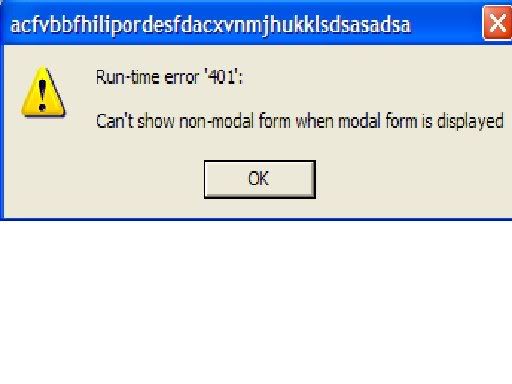
 
It's a fake popup for sure.
These don't look OK to me:
O20 - Winlogon Notify: enektufr - enektufr.dll (file missing)
O20 - Winlogon Notify: vturpml - vturpml.dll (file missing)
O20 - Winlogon Notify: winopn32 - winopn32.dll (file missing)
O2 - BHO: (no name) - {2C80EAD3-74CD-4700-83A4-AA878CD1C03C} - C:\WINDOWS\system32\vturpml.dll (file missing)
O2 - BHO: {9eb05e4a-b4c1-2e28-7224-ecfa1fc74e77} - {77e47cf1-afce-4227-82e2-1c4ba4e50be9} - C:\WINDOWS\system32\bfykjvht.dll (file missing)
O2 - BHO: (no name) - {A95B2816-1D7E-4561-A202-68C0DE02353A} - C:\WINDOWS\system32\enektufr.dll (file missing)
O2 - BHO: (no name) - {DF551DBA-9C66-4DC4-A099-BF4613355D6D} - C:\WINDOWS\system32\vtutu.dll (file missing)
O17 - HKLM\System\CCS\Services\Tcpip\..\{3C38660F-975E-483A-A073-321FDD11329A}: NameServer = 85.255.116.110,85.255.112.113
O17 - HKLM\System\CCS\Services\Tcpip\..\{9DDDEA5A-AFE0-405D-AFA8-5136587D1ADE}: NameServer = 85.255.116.110,85.255.112.113
O17 - HKLM\System\CCS\Services\Tcpip\..\{CC955B22-9AAE-4934-8C3C-F97893D2BB28}: NameServer = 85.255.116.110,85.255.112.113
O17 - HKLM\System\CS1\Services\Tcpip\Parameters: NameServer = 85.255.116.110 85.255.112.113
O17 - HKLM\System\CS1\Services\Tcpip\..\{3C38660F-975E-483A-A073-321FDD11329A}: NameServer = 85.255.116.110,85.255.112.113
O17 - HKLM\System\CS2\Services\Tcpip\Parameters: NameServer = 85.255.116.110 85.255.112.113
O17 - HKLM\System\CS2\Services\Tcpip\..\{3C38660F-975E-483A-A073-321FDD11329A}: NameServer = 85.255.116.110,85.255.112.113
O17 - HKLM\System\CS3\Services\Tcpip\Parameters: NameServer = 85.255.116.110 85.255.112.113
O17 - HKLM\System\CS3\Services\Tcpip\..\{3C38660F-975E-483A-A073-321FDD11329A}: NameServer = 85.255.116.110,85.255.112.113
O17 - HKLM\System\CCS\Services\Tcpip\Parameters: NameServer = 85.255.116.110 85.255.112.113

But I guess you better wait for ceewi1 for further instructions.
 
Your system is badly infected, I see signs of multiple infections including a password stealer trojan designed to steal passwords to online games. I recommend finding a known clean computer and changing any such passwords immediately.

Your logfile indicates that you are running SpywareGuardPro. This is a rogue security program, and I recommend uninstalling it immediately. Please click on Start - Control Panel -> Add or Remove Programs. Click on SpywareGuardPro and click Remove.

Please download FixWareout from one of these sites:
http://downloads.subratam.org/Fixwareout.exe
http://www.bleepingcomputer.com/files/lonny/Fixwareout.exe

Save it to your desktop and run it. Click Next, then Install, make sure Run fixit is checked and click Finish.
The fix will begin; follow the prompts. You will be asked to reboot your computer; please do so. Your system may take longer than usual to load; this is normal.

Please post the text that will open (report.txt) in your next reply.

Once done please do the following:
1. Please download this file - Combofix to your desktop
2. Double click ComboFix.exe & follow the prompts.
3. When finished, it shall produce a log for you. Post that log in your next reply together with a new HijackThis log.

Note:
Do not mouseclick ComboFix's window whilst it's running. That may cause it to stall

Please post:
  • The Fixwareout report
  • The ComboFix report
  • A new HijackThis log
 
Username "Devon" - 12/23/2007 16:48:51 [Fixwareout edited 9/01/2007]

~~~~~ Prerun check
HKLM\SOFTWARE\~\Winlogon\ "System"="csxbw.exe"

HKEY_LOCAL_MACHINE\SYSTEM\CurrentControlSet\Services\Tcpip\Parameters
"nameserver"="85.255.116.110 85.255.112.113" <Value cleared.
HKEY_LOCAL_MACHINE\system\currentcontrolset\services\tcpip\parameters\interfaces\{3C38660F-975E-483A-A073-321FDD11329A}
"nameserver"="85.255.116.110,85.255.112.113" <Value cleared.
HKEY_LOCAL_MACHINE\system\currentcontrolset\services\tcpip\parameters\interfaces\{9DDDEA5A-AFE0-405D-AFA8-5136587D1ADE}
"nameserver"="85.255.116.110,85.255.112.113" <Value cleared.
HKEY_LOCAL_MACHINE\system\currentcontrolset\services\tcpip\parameters\interfaces\{CC955B22-9AAE-4934-8C3C-F97893D2BB28}
"nameserver"="85.255.116.110,85.255.112.113" <Value cleared.
HKEY_LOCAL_MACHINE\system\currentcontrolset\services\tcpip\parameters\interfaces\{CC955B22-9AAE-4934-8C3C-F97893D2BB28}
"DhcpNameServer"="85.255.116.110,85.255.112.113" <Value cleared.
HKEY_LOCAL_MACHINE\system\currentcontrolset\services\tcpip\parameters\interfaces\{F201FD89-9614-47A8-8A44-C1766D774A13}
"DhcpNameServer"="85.255.116.110,85.255.112.113" <Value cleared.

Successfully flushed the DNS Resolver Cache.


System was rebooted successfully.

~~~~~ Postrun check
HKLM\SOFTWARE\~\Winlogon\ "system"=""
....
HKLM\SOFTWARE\Microsoft\Windows\CurrentVersion\Ruins "}974F66195D99-459B-0644-2EBC-EB071F76{" Deleted
HKLM\SOFTWARE\Microsoft\Windows\CurrentVersion\Ruins "}1FDE361CD928-F969-B0C4-1230-C0AC7C35{" Deleted
HKLM\SOFTWARE\Microsoft\Windows\CurrentVersion\Ruins "ytrmd" Deleted
HKLM\SOFTWARE\Microsoft\Windows\CurrentVersion\_r "}285CCEAF191B-97F9-B714-A298-96A0A046{" Deleted
HKLM\SOFTWARE\Microsoft\Windows\CurrentVersion\_r "}88C55D28F173-F5EB-8304-BADC-FD9E4841{" Deleted
HKLM\SOFTWARE\Microsoft\Windows\CurrentVersion\_r "rudmd" Deleted
HKLM\SOFTWARE\Microsoft\Windows\CurrentVersion\_r "}9EACCDC6DEB1-5D88-FFC4-08E2-A4D62F22{" Deleted
HKLM\SOFTWARE\Microsoft\Windows\CurrentVersion "ugesc" Value deleted
HKLM\SOFTWARE\Microsoft\Windows\CurrentVersion "wbxsc" Value deleted
HKCU\SOFTWARE\Microsoft\Windows\CurrentVersion "dmaic.exe" Value deleted
HKCU\SOFTWARE\Microsoft\Windows\CurrentVersion "dmcus.exe" Value deleted
HKCR\CLSID\{9D436B0A-02ED-4462-8E96-470ED8599162}\_h\4 Deleted.
HKCR\CLSID\{B5E6312D-C07A-4581-AB35-0812E2DB995C}\_h\4 Deleted.
....
~~~~~ Misc files.
....
~~~~~ Checking for older varients.
....

~~~~~ Current runs (hklm hkcu "run" Keys Only)
[HKEY_LOCAL_MACHINE\SOFTWARE\Microsoft\Windows\CurrentVersion\Run]
"ccApp"="\"C:\\Program Files\\Common Files\\Symantec Shared\\ccApp.exe\""
"osCheck"="\"C:\\Program Files\\Norton AntiVirus\\osCheck.exe\""
"IESet"="IExplorer.dll .dbt"
"KernelFaultCheck"=hex(2):25,73,79,73,74,65,6d,72,6f,6f,74,25,5c,73,79,73,74,\
65,6d,33,32,5c,64,75,6d,70,72,65,70,20,30,20,2d,6b,00

[HKEY_CURRENT_USER\SOFTWARE\Microsoft\Windows\CurrentVersion\Run]
"AIM"="C:\\Program Files\\AIM\\aim.exe -cnetwait.odl"
"IESet"="IExplorer.dll .dbt"
....
Hosts file was reset, If you use a custom hosts file please replace it...
~~~~~ End report ~~~~~
 
2007-03-24 20:27 5939 --a--c--- C:\Qoobox\Quarantine\C\Documents and Settings\Aggie\Application Data\FunWebProducts\Data\Aggie\avatar.dat.vir
2007-11-16 02:07 117913 --a------ C:\Qoobox\Quarantine\C\WINDOWS\system32\abc2\bmbrpl2.exe.vir
2007-11-16 22:05 15360 --a------ C:\Qoobox\Quarantine\C\WINDOWS\system32\drvgokr.dll.vir
2007-11-16 23:25 677989 --a------ C:\Qoobox\Quarantine\C\WINDOWS\system32\clbifede.ini.vir
2007-11-16 23:26 1262 --a------ C:\Qoobox\Quarantine\C\Documents and Settings\All Users\Start Menu\Live Safety Center.lnk.vir
2007-11-16 23:27 20810 --a------ C:\Qoobox\Quarantine\C\WINDOWS\system32\enektufr.dllbox.vir
2007-11-19 09:57 437099 --a------ C:\Qoobox\Quarantine\C\WINDOWS\system32\ututv.ini.vir
2007-11-19 09:57 437099 --a------ C:\Qoobox\Quarantine\C\WINDOWS\system32\ututv.ini2.vir
2007-12-18 13:16 2913 --a------ C:\Qoobox\Quarantine\C\Documents and Settings\Devon\ResErrors.log.vir
2007-12-20 10:37 40960 --a------ C:\Qoobox\Quarantine\C\WINDOWS\NOTEDAD.EXE.vir
2007-12-20 10:37 40960 --a------ C:\Qoobox\Quarantine\C\WINDOWS\system32\mp43.exe.vir
2007-12-21 13:16 0 --a------ C:\Qoobox\Quarantine\C\WINDOWS\system32\IExplorer.dll .dbt.vir
2007-12-23 14:13 36864 --a------ C:\Qoobox\Quarantine\C\WINDOWS\system32\explorer.exe.vir
2007-12-24 16:56 278 --a------ C:\Qoobox\Quarantine\Registry_backups\LEGACY_CORE.reg.dat
2007-12-24 16:56 2956 --a------ C:\Qoobox\Quarantine\Registry_backups\services_DomainService.reg.dat
2007-12-24 16:56 3887 --a------ C:\Qoobox\Quarantine\C\ComboFix\errdbg.dat.vir
2007-12-24 16:56 846 --a------ C:\Qoobox\Quarantine\Registry_backups\LEGACY_DOMAINSERVICE.reg.dat


Also how do i change my clock,it set it to military time..i changed the numbers but it still looks odd,it doesnt have AM/PM after it?
 
That looks like the Quarantined files report - please post the ComboFix log which popped up once you finished running ComboFix, it should be located at C:\ComboFix.txt along with a new HijackThis log.

You can change time back by going to Start -> Control Panel -> Regional and Language Options -> Customize -> Time. In Time format select h:mm:ss tt.

Did ComboFix run through completely? It should have changed the time back once it finished.
 
the first one is from the fix program,the second is the combo one.heres the hijack this one:

Logfile of Trend Micro HijackThis v2.0.2
Scan saved at 1:07:44 AM, on 2007-12-24
Platform: Windows XP SP2 (WinNT 5.01.2600)
MSIE: Internet Explorer v6.00 SP2 (6.00.2900.2180)
Boot mode: Normal

Running processes:
C:\WINDOWS\System32\smss.exe
C:\WINDOWS\system32\winlogon.exe
C:\WINDOWS\system32\services.exe
C:\WINDOWS\system32\lsass.exe
C:\WINDOWS\system32\Ati2evxx.exe
C:\WINDOWS\system32\svchost.exe
C:\WINDOWS\System32\svchost.exe
C:\Program Files\Common Files\Symantec Shared\ccSvcHst.exe
C:\Program Files\Common Files\Symantec Shared\AppCore\AppSvc32.exe
C:\WINDOWS\system32\spoolsv.exe
C:\Program Files\Symantec\LiveUpdate\ALUSchedulerSvc.exe
C:\Program Files\Grisoft\AVG Anti-Spyware 7.5\guard.exe
C:\WINDOWS\system32\HPZipm12.exe
C:\WINDOWS\system32\svchost.exe
C:\Program Files\Common Files\Symantec Shared\CCPD-LC\symlcsvc.exe
C:\WINDOWS\system32\winlogon.exe
C:\WINDOWS\Explorer.EXE
C:\WINDOWS\system32\wuauclt.exe
C:\Program Files\Common Files\Symantec Shared\ccApp.exe
C:\Program Files\AIM\aim.exe
C:\Program Files\eMule\emule.exe
C:\Program Files\Mozilla Firefox\firefox.exe
C:\Documents and Settings\Devon\Desktop\HiJackThis.exe

N3 - Netscape 7: user_pref("browser.startup.homepage", "google.com"); (C:\Documents and Settings\DEVON\Application Data\Mozilla\Profiles\default\4iuxpu6j.slt\prefs.js)
N3 - Netscape 7: user_pref("browser.search.defaultengine", "engine://C%3A%5CPROGRA%7E1%5CNETSCAPE%5CNETSCAPE%5Csearchplugins%5CSBWeb_01.src"); (C:\Documents and Settings\DEVON\Application Data\Mozilla\Profiles\default\4iuxpu6j.slt\prefs.js)
O2 - BHO: SSVHelper Class - {761497BB-D6F0-462C-B6EB-D4DAF1D92D43} - C:\Program Files\Java\jre1.6.0_02\bin\ssv.dll
O2 - BHO: (no name) - {F6541F87-3C59-4858-999D-0778C26FE6E3} - C:\WINDOWS\system32\DivX.dll
O4 - HKLM\..\Run: [ccApp] "C:\Program Files\Common Files\Symantec Shared\ccApp.exe"
O4 - HKLM\..\Run: [osCheck] "C:\Program Files\Norton AntiVirus\osCheck.exe"
O4 - HKCU\..\Run: [AIM] C:\Program Files\AIM\aim.exe -cnetwait.odl
O4 - HKUS\S-1-5-21-1454471165-515967899-682003330-1008\..\Run: [ctfmon.exe] C:\WINDOWS\system32\ctfmon.exe (User 'Josh')
O4 - HKUS\S-1-5-21-1454471165-515967899-682003330-1008\..\Run: [BgMonitor_{79662E04-7C6C-4d9f-84C7-88D8A56B10AA}] "C:\Program Files\Common Files\Ahead\lib\NMBgMonitor.exe" (User 'Josh')
O4 - HKUS\S-1-5-21-1454471165-515967899-682003330-1008\..\Run: [Window Washer] C:\Program Files\Webroot\Washer\wwDisp.exe (User 'Josh')
O4 - HKUS\S-1-5-21-1454471165-515967899-682003330-1008\..\Run: [IESet] IExplorer.dll .dbt (User 'Josh')
O4 - S-1-5-21-1454471165-515967899-682003330-1008 Startup: LimeWire On Startup.lnk = C:\Program Files\LimeWire\LimeWire.exe (User 'Josh')
O4 - S-1-5-21-1454471165-515967899-682003330-1008 User Startup: LimeWire On Startup.lnk = C:\Program Files\LimeWire\LimeWire.exe (User 'Josh')
O9 - Extra button: (no name) - {08B0E5C0-4FCB-11CF-AAA5-00401C608501} - C:\WINDOWS\system32\shdocvw.dll
O9 - Extra 'Tools' menuitem: Sun Java Console - {08B0E5C0-4FCB-11CF-AAA5-00401C608501} - C:\WINDOWS\system32\shdocvw.dll
O9 - Extra button: AIM - {AC9E2541-2814-11d5-BC6D-00B0D0A1DE45} - C:\Program Files\AIM\aim.exe
O9 - Extra button: (no name) - {e2e2dd38-d088-4134-82b7-f2ba38496583} - C:\WINDOWS\Network Diagnostic\xpnetdiag.exe
O9 - Extra 'Tools' menuitem: @xpsp3res.dll,-20001 - {e2e2dd38-d088-4134-82b7-f2ba38496583} - C:\WINDOWS\Network Diagnostic\xpnetdiag.exe
O15 - Trusted Zone: *.line6.net
O16 - DPF: {6414512B-B978-451D-A0D8-FCFDF33E833C} (WUWebControl Class) - http://update.microsoft.com/windowsupdate/v6/V5Controls/en/x86/client/wuweb_site.cab?1158691313890
O17 - HKLM\System\CS3\Services\Tcpip\Parameters: NameServer = 85.255.116.110 85.255.112.113
O17 - HKLM\System\CS3\Services\Tcpip\..\{3C38660F-975E-483A-A073-321FDD11329A}: NameServer = 85.255.116.110,85.255.112.113
O23 - Service: Ati HotKey Poller - ATI Technologies Inc. - C:\WINDOWS\system32\Ati2evxx.exe
O23 - Service: Automatic LiveUpdate Scheduler - Symantec Corporation - C:\Program Files\Symantec\LiveUpdate\ALUSchedulerSvc.exe
O23 - Service: AVG Anti-Spyware Guard - GRISOFT s.r.o. - C:\Program Files\Grisoft\AVG Anti-Spyware 7.5\guard.exe
O23 - Service: Symantec Event Manager (ccEvtMgr) - Symantec Corporation - C:\Program Files\Common Files\Symantec Shared\ccSvcHst.exe
O23 - Service: Symantec Settings Manager (ccSetMgr) - Symantec Corporation - C:\Program Files\Common Files\Symantec Shared\ccSvcHst.exe
O23 - Service: Symantec Lic NetConnect service (CLTNetCnService) - Symantec Corporation - C:\Program Files\Common Files\Symantec Shared\ccSvcHst.exe
O23 - Service: InstallDriver Table Manager (IDriverT) - Macrovision Corporation - C:\Program Files\Common Files\InstallShield\Driver\11\Intel 32\IDriverT.exe
O23 - Service: Symantec IS Password Validation (ISPwdSvc) - Symantec Corporation - C:\Program Files\Norton AntiVirus\isPwdSvc.exe
O23 - Service: LiveUpdate - Symantec Corporation - C:\PROGRA~1\Symantec\LIVEUP~1\LUCOMS~1.EXE
O23 - Service: LiveUpdate Notice Service - Symantec Corporation - C:\Program Files\Common Files\Symantec Shared\PIF\{B8E1DD85-8582-4c61-B58F-2F227FCA9A08}\PIFSvc.exe
O23 - Service: Pml Driver HPZ12 - HP - C:\WINDOWS\system32\HPZipm12.exe
O23 - Service: Symantec Core LC - Unknown owner - C:\Program Files\Common Files\Symantec Shared\CCPD-LC\symlcsvc.exe
O23 - Service: Symantec AppCore Service (SymAppCore) - Symantec Corporation - C:\Program Files\Common Files\Symantec Shared\AppCore\AppSvc32.exe

--
End of file - 5600 bytes
 
Please download AVG Anti-Spyware from HERE and save that file to your desktop.
  1. Once you have downloaded AVG Anti-Spyware, locate the icon on the desktop and double-click it to launch the set up program.
  2. Once the setup is complete you will need run AVG Anti-Spyware and update the definition files.
  3. On the main screen select the icon Update.
    • Next select the Start Update button, the update will start and a progress bar will show the updates being installed.
  4. Once the update has completed select the Scanner icon at the top of the screen, then select the Settings tab.
  5. Once in the Settings screen click on Recommended actions and then select Quarantine.
  6. Under Reports
    • Select Do not automatically generate reports
    • Un-Select Only if threats were found
  7. Select the Scanner icon at the top and then the Scan tab then click on Complete System Scan.
  8. AVG Anti-Spyware will now begin the scanning process, be patient this may take a little time.
    IMPORTANT: Do not open any other windows or programs while AVG Anti-Spyware is scanning, it may interfere with the scanning process.
    Once the scan is complete do the following:
  9. If you have any infections you will prompted, then select Apply all actions
  10. Next select the Reports icon at the top.
  11. Select the Save report as button in the lower left hand of the screen and save it to a text file on your system (make sure to remember where you saved that file, this is important).
  12. Close AVG Anti-Spyware

Please run HijackThis and choose Do a system scan only.

Place a check next to the following entries (where still present):
  • N3 - Netscape 7: user_pref("browser.search.defaultengine", "engine://C%3A%5CPROGRA%7E1%5CNETSCAPE%5CNETSCAPE%5Csearchpl ugins%5CSBWeb_01.src"); (C:\Documents and Settings\DEVON\Application Data\Mozilla\Profiles\default\4iuxpu6j.slt\prefs.j s)
  • O2 - BHO: (no name) - {F6541F87-3C59-4858-999D-0778C26FE6E3} - C:\WINDOWS\system32\DivX.dll
  • O4 - HKUS\S-1-5-21-1454471165-515967899-682003330-1008\..\Run: [IESet] IExplorer.dll .dbt (User 'Josh')
  • O17 - HKLM\System\CS3\Services\Tcpip\Parameters: NameServer = 85.255.116.110 85.255.112.113
  • O17 - HKLM\System\CS3\Services\Tcpip\..\{3C38660F-975E-483A-A073-321FDD11329A}: NameServer = 85.255.116.110,85.255.112.113
Please close all open windows except for HijackThis and choose Fix checked

Please delete the following file (if still present):
C:\Windows\System32\IExplorer.dll .dbt

Please reboot your PC and post a new HijackThis log along with the AVG Antispyware report you saved earlier. How are things running now?
 
Back
Top
