

speedyink
VIP Member
I have a couple questions about OSX Lion if anyone can help.
I'm looking to disable the "reopen windows when logging back in" checkbox, as it's annoying to uncheck everytime I shut the computer down. I found this but it seems to totally nuke the window restore feature throughout the OS as well. I'd like to avoid that if possible.
One other question, when viewing files in finder, is there anyway to organize by type that doesn't result in having to scroll sideways?
Example: Notice how I have to scroll sideways to access the rest of my files.
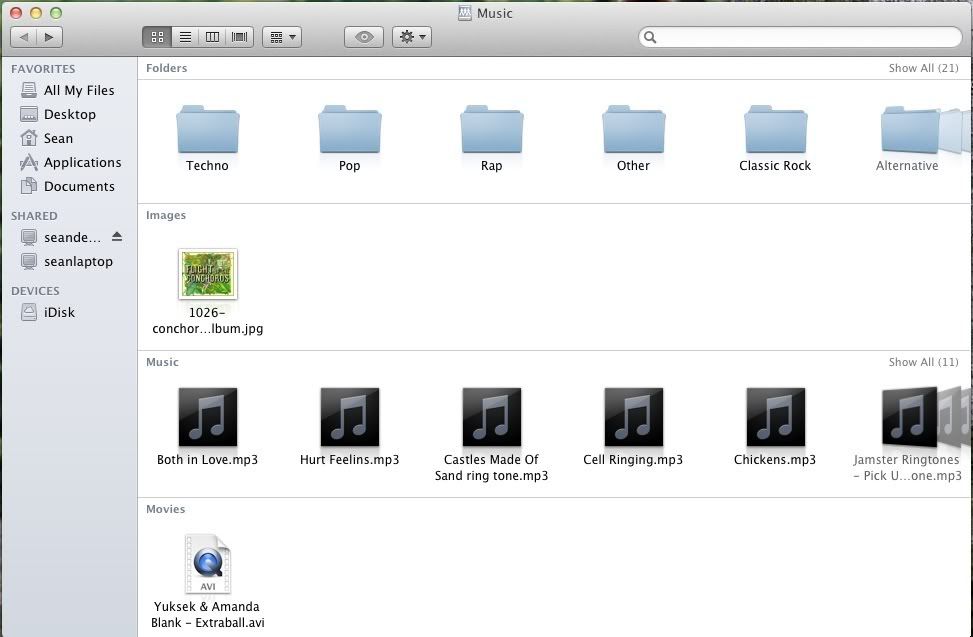
Basically what I'm trying to achieve is to have the folders on the top of the list, with the files underneath. It would also be nice if they appeared in alphabetical order as well, since when I set the view to type it just randomly throws them around (also seen in pic)
Edit: I want it like this:

Thanks in advance!
I'm looking to disable the "reopen windows when logging back in" checkbox, as it's annoying to uncheck everytime I shut the computer down. I found this but it seems to totally nuke the window restore feature throughout the OS as well. I'd like to avoid that if possible.
One other question, when viewing files in finder, is there anyway to organize by type that doesn't result in having to scroll sideways?
Example: Notice how I have to scroll sideways to access the rest of my files.
Basically what I'm trying to achieve is to have the folders on the top of the list, with the files underneath. It would also be nice if they appeared in alphabetical order as well, since when I set the view to type it just randomly throws them around (also seen in pic)
Edit: I want it like this:
Thanks in advance!
Last edited:
