Logfile of HijackThis v1.99.1
Scan saved at 16:33:58, on 10/07/2008
Platform: Windows XP SP2 (WinNT 5.01.2600)
MSIE: Internet Explorer v6.00 SP2 (6.00.2900.2180)
Running processes:
C:\WINDOWS\System32\smss.exe
C:\WINDOWS\system32\winlogon.exe
C:\WINDOWS\system32\services.exe
C:\WINDOWS\system32\lsass.exe
C:\WINDOWS\system32\svchost.exe
C:\WINDOWS\System32\svchost.exe
C:\WINDOWS\system32\spoolsv.exe
C:\WINDOWS\Explorer.EXE
C:\PROGRA~1\AVG\AVG8\avgwdsvc.exe
C:\Program Files\Google\Common\Google Updater\GoogleUpdaterService.exe
C:\WINDOWS\system32\nvsvc32.exe
C:\WINDOWS\system32\RUNDLL32.EXE
C:\Program Files\Microsoft IntelliType Pro\itype.exe
C:\Program Files\Microsoft IntelliPoint\ipoint.exe
C:\PROGRA~1\AVG\AVG8\avgtray.exe
C:\Program Files\Creative\Sound Blaster X-Fi\Volume Panel\VolPanlu.exe
C:\WINDOWS\system32\Rundll32.exe
C:\WINDOWS\system32\ctfmon.exe
C:\Program Files\Google\GoogleToolbarNotifier\GoogleToolbarNotifier.exe
C:\Program Files\Microsoft IntelliType Pro\dpupdchk.exe
C:\PROGRA~1\AVG\AVG8\avgrsx.exe
C:\PROGRA~1\AVG\AVG8\avgemc.exe
C:\PROGRA~1\AVG\AVG8\aAvgApi.exe
C:\Program Files\Internet Explorer\iexplore.exe
C:\Program Files\Internet Explorer\iexplore.exe
C:\Program Files\Hijackthis\HijackThis.exe
O2 - BHO: Adobe PDF Reader Link Helper - {06849E9F-C8D7-4D59-B87D-784B7D6BE0B3} - C:\Program Files\Common Files\Adobe\Acrobat\ActiveX\AcroIEHelper.dll
O2 - BHO: WormRadar.com IESiteBlocker.NavFilter - {3CA2F312-6F6E-4B53-A66E-4E65E497C8C0} - C:\Program Files\AVG\AVG8\avgssie.dll
O2 - BHO: AVG Security Toolbar - {A057A204-BACC-4D26-9990-79A187E2698E} - C:\PROGRA~1\AVG\AVG8\AVGTOO~1.DLL
O2 - BHO: Google Toolbar Notifier BHO - {AF69DE43-7D58-4638-B6FA-CE66B5AD205D} - C:\Program Files\Google\GoogleToolbarNotifier\2.1.1119.1736\swg.dll
O3 - Toolbar: AVG Security Toolbar - {A057A204-BACC-4D26-9990-79A187E2698E} - C:\PROGRA~1\AVG\AVG8\AVGTOO~1.DLL
O4 - HKLM\..\Run: [Adobe Reader Speed Launcher] "C:\Program Files\Adobe\Reader 8.0\Reader\Reader_sl.exe"
O4 - HKLM\..\Run: [NvCplDaemon] RUNDLL32.EXE C:\WINDOWS\system32\NvCpl.dll,NvStartup
O4 - HKLM\..\Run: [nwiz] nwiz.exe /install
O4 - HKLM\..\Run: [NvMediaCenter] RUNDLL32.EXE C:\WINDOWS\system32\NvMcTray.dll,NvTaskbarInit
O4 - HKLM\..\Run: [itype] "C:\Program Files\Microsoft IntelliType Pro\itype.exe"
O4 - HKLM\..\Run: [IntelliPoint] "C:\Program Files\Microsoft IntelliPoint\ipoint.exe"
O4 - HKLM\..\Run: [AVG8_TRAY] C:\PROGRA~1\AVG\AVG8\avgtray.exe
O4 - HKLM\..\Run: [VolPanel] "C:\Program Files\Creative\Sound Blaster X-Fi\Volume Panel\VolPanlu.exe" /r
O4 - HKLM\..\Run: [P17Helper] Rundll32 SPIRun.dll,RunDLLEntry
O4 - HKCU\..\Run: [CTFMON.EXE] C:\WINDOWS\system32\ctfmon.exe
O4 - HKCU\..\Run: [swg] C:\Program Files\Google\GoogleToolbarNotifier\GoogleToolbarNotifier.exe
O9 - Extra button: Messenger - {FB5F1910-F110-11d2-BB9E-00C04F795683} - C:\Program Files\Messenger\msmsgs.exe
O9 - Extra 'Tools' menuitem: Windows Messenger - {FB5F1910-F110-11d2-BB9E-00C04F795683} - C:\Program Files\Messenger\msmsgs.exe
O16 - DPF: {F6ACF75C-C32C-447B-9BEF-46B766368D29} (Creative Software AutoUpdate Support Package) -
http://www.creative.com/softwareupdate/su/ocx/15102/CTPID.cab
O18 - Protocol: linkscanner - {F274614C-63F8-47D5-A4D1-FBDDE494F8D1} - C:\Program Files\AVG\AVG8\avgpp.dll
O20 - AppInit_DLLs: avgrsstx.dll
O23 - Service: AVG Free8 E-mail Scanner (avg8emc) - AVG Technologies CZ, s.r.o. - C:\PROGRA~1\AVG\AVG8\avgemc.exe
O23 - Service: AVG Free8 WatchDog (avg8wd) - AVG Technologies CZ, s.r.o. - C:\PROGRA~1\AVG\AVG8\avgwdsvc.exe
O23 - Service: Google Updater Service (gusvc) - Google - C:\Program Files\Google\Common\Google Updater\GoogleUpdaterService.exe
O23 - Service: NVIDIA Display Driver Service (NVSvc) - NVIDIA Corporation - C:\WINDOWS\system32\nvsvc32.exe


 which NOD32 didnt even pick up.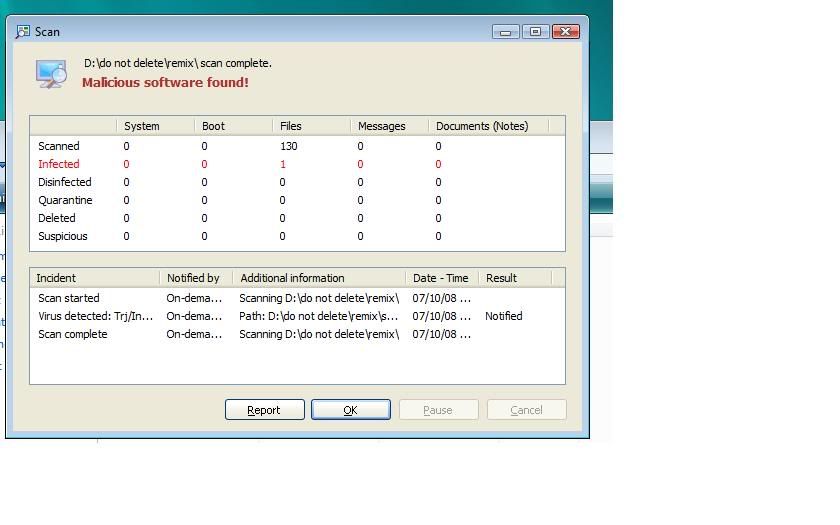
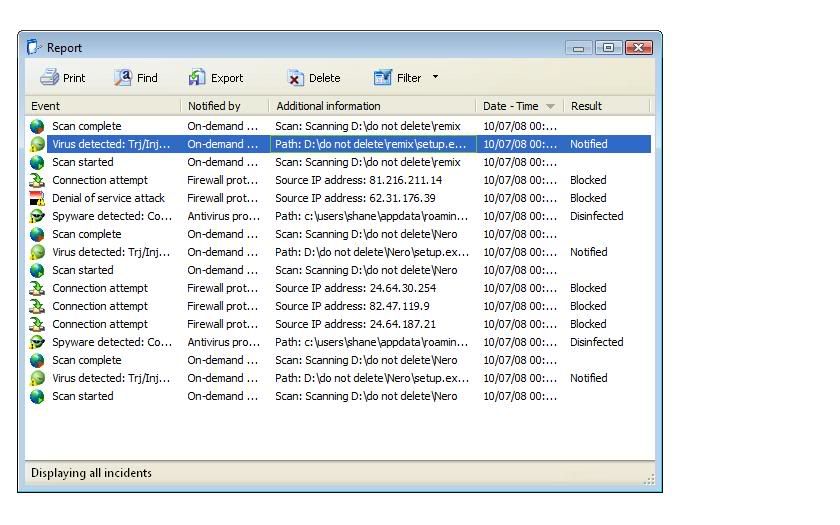


 well i says its gone anyway.