Possible hard drive failure?

Harmfulseth

New Member
Hello!
Ive come to this forum several times whenever Ive had a problem with my computers, and every single damn time the awesome people here have helped me out.

So here I am again, with my latest issue: possible hard drive failure.
As of late, ive been plagued with strange crashes and odd mishaps in my system that I have never encountered before. Here is what is happening
______________________________________________________________

-Explorer randomly crashing
-Heavy programs ( such as team fortress 2) crashing randomly
-entire D: drive goes missing
- This strange error when opening Zune to access my D drive to play music
http://support.microsoft.com/kb/929...n=4.7.1404.0&userlocale=409&system=zuneClient
-upon bootup, AVG and windows defender are randomly turned of (only happened once)
-Upon my most recent restart after a crash, Windows did the risk check on my C drive.


So is this a faulty hard drive? Ive read all over other forums and long boot-up time and other strange noises seem to be accompanying these problems, yet I have yet to see any of them.

Any suggestions?
 
What drive do you have? I'd recommend going to the manufacturer website and downloading their diagnostic tool.
 
I ran dskchk and the disk check from Westerd digital, here it what it said :
(also it took forever and I got an error the first tome starting it up, and creating a folder took 15 seconds and renaming it took a while as I got several odd location-based errors.)


Test Option: EXTENDED TEST

Model Number: WDC WD800JD-00LSA0
Firmware Number: 06.01D06
Capacity: 80.03 GB
SMART Status: PASS
Test Result: PASS
Test Time: 18:58:29, August 02, 2011
 
It may be a windows/virus related issue.

Download HijackThis from HERE. Click on "Do a system scan and save a logfile". Post that log here.
 
Run Malwarebytes first.

Please download Malwarebytes' Anti-Malware from here or here and save it to your desktop.
  • Double-click mbam-setup.exe and follow the prompts to install the program.
  • At the end, be sure a checkmark is placed next to
    • Update Malwarebytes' Anti-Malware
    • and Launch Malwarebytes' Anti-Malware
  • then click Finish.
  • If an update is found, it will download and install the latest version. Please keep updating until it says you have the latest version.
  • Once the program has loaded, select Perform quick scan, then click Scan.
  • When the scan is complete, click OK, then Show Results to view the results.
  • Be sure that everything is checked, and click Remove Selected.
  • A log will be saved automatically which you can access by clicking on the Logs tab within Malwarebytes' Anti-Malware

If for some reason Malwarebytes will not install or run please download and run Rkill.scr, Rkill.exe, or Rkill.com. If you are still having issues running rkill then try downloading these renamed versions of the same program.

EXPLORER.EXE
IEXPLORE.EXE
USERINIT.EXE
WINLOGON.EXE

But DO NOT reboot the system and then try installing or running Malwarebytes. If Rkill (which is a black box) appears and then disappears right away or you get a message saying rkill is infected, keep trying to run rkill until it over powers the infection and temporarily kills it. Once a log appears on the screen, you can try running malwarebytes or downloading other programs.


Download the HijackThis installer from here.
Run the installer and choose Install, indicating that you accept the licence agreement. The installer will place a shortcut on your desktop and launch HijackThis.

Click Do a system scan and save a logfile

Most of what HijackThis lists will be harmless or even essential, don't fix anything yet.

When the hijackthis log appears in a notepad file, click on the edit menu, click select all, then click on the edit menu again and click on copy. Come back to your reply and right click on your mouse and click on paste.

Post the logfile that HijackThis produces along with the Malwarebytes Anti-Malware log
 
I am in the process of doing what you recommend, and while I value your advice tremendously, I doubt I have a virus. But Ill post the logs here soon.

Thank you all so much!
 
MalwareBytes Anti-Malware log:

"Malwarebytes' Anti-Malware 1.51.1.1800
www.malwarebytes.org

Database version: 7361

Windows 6.1.7601 Service Pack 1
Internet Explorer 8.0.7601.17514

8/2/2011 9:26:37 PM
mbam-log-2011-08-02 (21-26-37).txt

Scan type: Quick scan
Objects scanned: 179531
Time elapsed: 2 minute(s), 19 second(s)

Memory Processes Infected: 0
Memory Modules Infected: 0
Registry Keys Infected: 0
Registry Values Infected: 0
Registry Data Items Infected: 0
Folders Infected: 0
Files Infected: 0

Memory Processes Infected:
(No malicious items detected)

Memory Modules Infected:
(No malicious items detected)

Registry Keys Infected:
(No malicious items detected)

Registry Values Infected:
(No malicious items detected)

Registry Data Items Infected:
(No malicious items detected)

Folders Infected:
(No malicious items detected)

Files Infected:
(No malicious items detected)"
 
As far as Hijack this goes Ive encountered problems. here's what happened:

upon pressing "system scan and save a logfile" (after the scan is completed) I get a message reading

"Cannot Find the C:/Program Files (x86)\TrendMicro\hijackThis\Hijackthis.jog file.
do you want to create a new file?"

And upon pressing yes, it opens a blank notepad document... nothing else. Nothing to paste.
 
Right click on the hijackthis icon on your desktop and click on "run as" If the option doesn't appear then press and hold the shift key while right clicking on hijackthis to get the "run as" option to appear.
 
Wow. Im amazed that worked so well. here you go:

Logfile of Trend Micro HijackThis v2.0.4
Scan saved at 10:26:45 PM, on 8/2/2011
Platform: Windows 7 SP1 (WinNT 6.00.3505)
MSIE: Internet Explorer v8.00 (8.00.7601.17514)
Boot mode: Normal

Running processes:
C:\Program Files (x86)\Common Files\Java\Java Update\jusched.exe
C:\Program Files (x86)\Common Files\ArcSoft\Connection Service\Bin\ACDaemon.exe
C:\Windows\SysWOW64\DVAPTray.exe
C:\Program Files (x86)\Common Files\ArcSoft\Connection Service\Bin\ArcCon.ac
C:\Program Files (x86)\AVG\AVG10\avgtray.exe
D:\Program Files\iTunes\iTunesHelper.exe
C:\Program Files (x86)\AVG\AVG10\Identity Protection\agent\bin\avgidsmonitor.exe
C:\Program Files (x86)\Mozilla Firefox\firefox.exe
C:\Program Files (x86)\Mozilla Firefox\plugin-container.exe
C:\Program Files (x86)\Trend Micro\HiJackThis\HiJackThis.exe

R1 - HKCU\Software\Microsoft\Internet Explorer\Main,Search Page = http://go.microsoft.com/fwlink/?LinkId=54896
R0 - HKCU\Software\Microsoft\Internet Explorer\Main,Start Page = http://go.microsoft.com/fwlink/?LinkId=69157
R1 - HKLM\Software\Microsoft\Internet Explorer\Main,Default_Page_URL = http://go.microsoft.com/fwlink/?LinkId=69157
R1 - HKLM\Software\Microsoft\Internet Explorer\Main,Default_Search_URL = http://go.microsoft.com/fwlink/?LinkId=54896
R1 - HKLM\Software\Microsoft\Internet Explorer\Main,Search Page = http://go.microsoft.com/fwlink/?LinkId=54896
R0 - HKLM\Software\Microsoft\Internet Explorer\Main,Start Page = http://go.microsoft.com/fwlink/?LinkId=69157
R0 - HKLM\Software\Microsoft\Internet Explorer\Search,SearchAssistant =
R0 - HKLM\Software\Microsoft\Internet Explorer\Search,CustomizeSearch =
R0 - HKLM\Software\Microsoft\Internet Explorer\Main,Local Page = C:\Windows\SysWOW64\blank.htm
R1 - HKCU\Software\Microsoft\Windows\CurrentVersion\Internet Settings,ProxyOverride = *.local
R0 - HKCU\Software\Microsoft\Internet Explorer\Toolbar,LinksFolderName =
F2 - REG:system.ini: UserInit=userinit.exe
O2 - BHO: AcroIEHelperStub - {18DF081C-E8AD-4283-A596-FA578C2EBDC3} - C:\Program Files (x86)\Common Files\Adobe\Acrobat\ActiveX\AcroIEHelperShim.dll
O2 - BHO: WormRadar.com IESiteBlocker.NavFilter - {3CA2F312-6F6E-4B53-A66E-4E65E497C8C0} - C:\Program Files (x86)\AVG\AVG10\avgssie.dll
O2 - BHO: Windows Live ID Sign-in Helper - {9030D464-4C02-4ABF-8ECC-5164760863C6} - C:\Program Files (x86)\Common Files\Microsoft Shared\Windows Live\WindowsLiveLogin.dll
O2 - BHO: SkypeIEPluginBHO - {AE805869-2E5C-4ED4-8F7B-F1F7851A4497} - C:\Program Files (x86)\Skype\Toolbars\Internet Explorer\skypeieplugin.dll
O2 - BHO: Java(tm) Plug-In 2 SSV Helper - {DBC80044-A445-435b-BC74-9C25C1C588A9} - C:\Program Files (x86)\Java\jre6\bin\jp2ssv.dll
O4 - HKLM\..\Run: [HDAudDeck] C:\Program Files (x86)\VIA\VIAudioi\VDeck\VDeck.exe -r
O4 - HKLM\..\Run: [SunJavaUpdateSched] "C:\Program Files (x86)\Common Files\Java\Java Update\jusched.exe"
O4 - HKLM\..\Run: [QuickTime Task] "C:\Program Files (x86)\QuickTime\QTTask.exe" -atboottime
O4 - HKLM\..\Run: [Adobe ARM] "C:\Program Files (x86)\Common Files\Adobe\ARM\1.0\AdobeARM.exe"
O4 - HKLM\..\Run: [ArcSoft Connection Service] C:\Program Files (x86)\Common Files\ArcSoft\Connection Service\Bin\ACDaemon.exe
O4 - HKLM\..\Run: [DVAPTray] C:\Windows\System32\DVAPTray.exe
O4 - HKLM\..\Run: [AVG_TRAY] C:\Program Files (x86)\AVG\AVG10\avgtray.exe
O4 - HKLM\..\Run: [iTunesHelper] "D:\Program Files\iTunes\iTunesHelper.exe"
O4 - HKLM\..\RunOnce: [Malwarebytes' Anti-Malware] C:\Program Files (x86)\Malwarebytes' Anti-Malware\mbamgui.exe /install /silent
O4 - HKCU\..\Run: [Sidebar] C:\Program Files\Windows Sidebar\sidebar.exe /autoRun
O4 - HKCU\..\Run: [uTorrent] "C:\Program Files (x86)\uTorrent\uTorrent.exe"
O4 - HKUS\S-1-5-19\..\Run: [Sidebar] %ProgramFiles%\Windows Sidebar\Sidebar.exe /autoRun (User 'LOCAL SERVICE')
O4 - HKUS\S-1-5-19\..\RunOnce: [mctadmin] C:\Windows\System32\mctadmin.exe (User 'LOCAL SERVICE')
O4 - HKUS\S-1-5-20\..\Run: [Sidebar] %ProgramFiles%\Windows Sidebar\Sidebar.exe /autoRun (User 'NETWORK SERVICE')
O4 - HKUS\S-1-5-20\..\RunOnce: [mctadmin] C:\Windows\System32\mctadmin.exe (User 'NETWORK SERVICE')
O4 - HKUS\S-1-5-21-3816669632-107249852-1620721138-1004\..\Run: [Sidebar] %ProgramFiles%\Windows Sidebar\Sidebar.exe /autoRun (User 'UpdatusUser')
O4 - HKUS\S-1-5-21-3816669632-107249852-1620721138-1004\..\RunOnce: [mctadmin] C:\Windows\System32\mctadmin.exe (User 'UpdatusUser')
O8 - Extra context menu item: E&xport to Microsoft Excel - res://C:\PROGRA~2\MICROS~2\Office14\EXCEL.EXE/3000
O8 - Extra context menu item: Se&nd to OneNote - res://C:\PROGRA~2\MICROS~2\Office14\ONBttnIE.dll/105
O9 - Extra button: Skype Plug-In - {898EA8C8-E7FF-479B-8935-AEC46303B9E5} - C:\Program Files (x86)\Skype\Toolbars\Internet Explorer\skypeieplugin.dll
O9 - Extra 'Tools' menuitem: Skype Plug-In - {898EA8C8-E7FF-479B-8935-AEC46303B9E5} - C:\Program Files (x86)\Skype\Toolbars\Internet Explorer\skypeieplugin.dll
O10 - Unknown file in Winsock LSP: c:\program files (x86)\common files\microsoft shared\windows live\wlidnsp.dll
O17 - HKLM\System\CCS\Services\Tcpip\..\{4962D49E-28CF-4DC7-8D13-DD5AA7EB6509}: NameServer = 8.8.8.8,8.8.4.4
O17 - HKLM\System\CS1\Services\Tcpip\..\{4962D49E-28CF-4DC7-8D13-DD5AA7EB6509}: NameServer = 8.8.8.8,8.8.4.4
O17 - HKLM\System\CS2\Services\Tcpip\..\{4962D49E-28CF-4DC7-8D13-DD5AA7EB6509}: NameServer = 8.8.8.8,8.8.4.4
O18 - Protocol: linkscanner - {F274614C-63F8-47D5-A4D1-FBDDE494F8D1} - C:\Program Files (x86)\AVG\AVG10\avgpp.dll
O18 - Protocol: skype-ie-addon-data - {91774881-D725-4E58-B298-07617B9B86A8} - C:\Program Files (x86)\Skype\Toolbars\Internet Explorer\skypeieplugin.dll
O18 - Protocol: wlpg - {E43EF6CD-A37A-4A9B-9E6F-83F89B8E6324} - C:\Program Files (x86)\Windows Live\Photo Gallery\AlbumDownloadProtocolHandler.dll
O23 - Service: ArcSoft Connect Daemon (ACDaemon) - ArcSoft Inc. - C:\Program Files (x86)\Common Files\ArcSoft\Connection Service\Bin\ACService.exe
O23 - Service: Adobe Acrobat Update Service (AdobeARMservice) - Adobe Systems Incorporated - C:\Program Files (x86)\Common Files\Adobe\ARM\1.0\armsvc.exe
O23 - Service: @%SystemRoot%\system32\Alg.exe,-112 (ALG) - Unknown owner - C:\Windows\System32\alg.exe (file missing)
O23 - Service: AVGIDSAgent - AVG Technologies CZ, s.r.o. - C:\Program Files (x86)\AVG\AVG10\Identity Protection\Agent\Bin\AVGIDSAgent.exe
O23 - Service: AVG WatchDog (avgwd) - AVG Technologies CZ, s.r.o. - C:\Program Files (x86)\AVG\AVG10\avgwdsvc.exe
O23 - Service: Bonjour Service - Apple Inc. - C:\Program Files (x86)\Bonjour\mDNSResponder.exe
O23 - Service: @%SystemRoot%\system32\efssvc.dll,-100 (EFS) - Unknown owner - C:\Windows\System32\lsass.exe (file missing)
O23 - Service: @%systemroot%\system32\fxsresm.dll,-118 (Fax) - Unknown owner - C:\Windows\system32\fxssvc.exe (file missing)
O23 - Service: FLEXnet Licensing Service - Acresso Software Inc. - C:\Program Files (x86)\Common Files\Macrovision Shared\FLEXnet Publisher\FNPLicensingService.exe
O23 - Service: Google Update Service (gupdate) (gupdate) - Google Inc. - C:\Program Files (x86)\Google\Update\GoogleUpdate.exe
O23 - Service: Google Update Service (gupdatem) (gupdatem) - Google Inc. - C:\Program Files (x86)\Google\Update\GoogleUpdate.exe
O23 - Service: iPod Service - Apple Inc. - D:\Program Files\iPod\bin\iPodService.exe
O23 - Service: @keyiso.dll,-100 (KeyIso) - Unknown owner - C:\Windows\system32\lsass.exe (file missing)
O23 - Service: @comres.dll,-2797 (MSDTC) - Unknown owner - C:\Windows\System32\msdtc.exe (file missing)
O23 - Service: @%SystemRoot%\System32\netlogon.dll,-102 (Netlogon) - Unknown owner - C:\Windows\system32\lsass.exe (file missing)
O23 - Service: NVIDIA Display Driver Service (nvsvc) - Unknown owner - C:\Windows\system32\nvvsvc.exe (file missing)
O23 - Service: NVIDIA Update Service Daemon (nvUpdatusService) - NVIDIA Corporation - C:\Program Files (x86)\NVIDIA Corporation\NVIDIA Updatus\daemonu.exe
O23 - Service: PnkBstrA - Unknown owner - C:\Windows\system32\PnkBstrA.exe
O23 - Service: @%systemroot%\system32\psbase.dll,-300 (ProtectedStorage) - Unknown owner - C:\Windows\system32\lsass.exe (file missing)
O23 - Service: @%systemroot%\system32\Locator.exe,-2 (RpcLocator) - Unknown owner - C:\Windows\system32\locator.exe (file missing)
O23 - Service: @%SystemRoot%\system32\samsrv.dll,-1 (SamSs) - Unknown owner - C:\Windows\system32\lsass.exe (file missing)
O23 - Service: @%SystemRoot%\system32\snmptrap.exe,-3 (SNMPTRAP) - Unknown owner - C:\Windows\System32\snmptrap.exe (file missing)
O23 - Service: @%systemroot%\system32\spoolsv.exe,-1 (Spooler) - Unknown owner - C:\Windows\System32\spoolsv.exe (file missing)
O23 - Service: @%SystemRoot%\system32\sppsvc.exe,-101 (sppsvc) - Unknown owner - C:\Windows\system32\sppsvc.exe (file missing)
O23 - Service: Steam Client Service - Valve Corporation - C:\Program Files (x86)\Common Files\Steam\SteamService.exe
O23 - Service: @%SystemRoot%\system32\ui0detect.exe,-101 (UI0Detect) - Unknown owner - C:\Windows\system32\UI0Detect.exe (file missing)
O23 - Service: @%SystemRoot%\system32\vaultsvc.dll,-1003 (VaultSvc) - Unknown owner - C:\Windows\system32\lsass.exe (file missing)
O23 - Service: @%SystemRoot%\system32\vds.exe,-100 (vds) - Unknown owner - C:\Windows\System32\vds.exe (file missing)
O23 - Service: @%systemroot%\system32\vssvc.exe,-102 (VSS) - Unknown owner - C:\Windows\system32\vssvc.exe (file missing)
O23 - Service: @%SystemRoot%\system32\Wat\WatUX.exe,-601 (WatAdminSvc) - Unknown owner - C:\Windows\system32\Wat\WatAdminSvc.exe (file missing)
O23 - Service: @%systemroot%\system32\wbengine.exe,-104 (wbengine) - Unknown owner - C:\Windows\system32\wbengine.exe (file missing)
O23 - Service: @%Systemroot%\system32\wbem\wmiapsrv.exe,-110 (wmiApSrv) - Unknown owner - C:\Windows\system32\wbem\WmiApSrv.exe (file missing)
O23 - Service: @%PROGRAMFILES%\Windows Media Player\wmpnetwk.exe,-101 (WMPNetworkSvc) - Unknown owner - C:\Program Files (x86)\Windows Media Player\wmpnetwk.exe (file missing)

--
End of file - 10189 bytes

 
I don't see any issues in the logs, however, I do see you have utorrent installed and running at bootup. Utorrent is p2p software and is used to mainly download illegal copyrighted material. I highly recommend uninstalling this program.

Since you already have ran WD's diagnostic program on your drive and it came up clean, the next step would be to make sure the power and data cables going to the drive are tight.

I would also like for you to do the following so we can get a better idea if there is anything going on in the system as far as malware goes.

1.

Please download and run TDSSkiller

When the program opens, click on the start scan button.

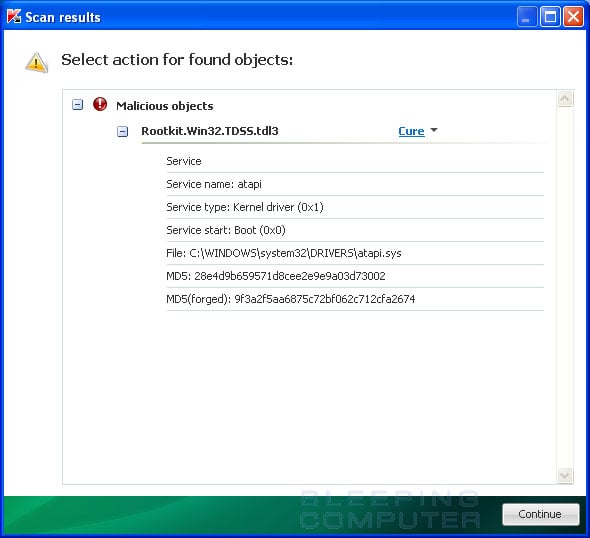
TDSSKiller will now scan your computer for the TDSS infection. When the scan has finished it will display a result screen stating whether or not the infection was found on your computer. If it was found it will display a screen similar to the one below.

infection-found.jpg


To remove the infection simply click on the Continue button and TDSSKiller will attempt to clean the infection.

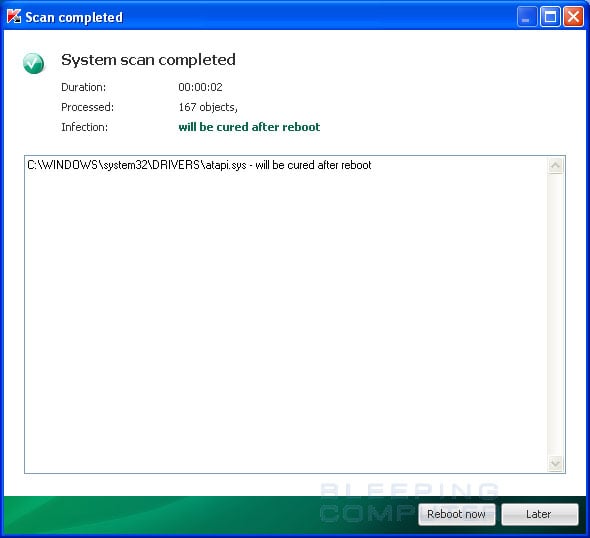
When it has finished cleaning the infection you will see a report stating whether or not it was successful as shown below.

scan-completed.jpg


If the log says will be cured after reboot, please reboot the system by pressing the reboot now button.

After running there will be a log that will be located at the root of your c:\ drive labeled tdsskiller with a series of numbers after it. Please open the log and copy and paste it back here.


2.

Download and Run ComboFix
If you already have Combofix, please delete this copy and download it again as it's being updated regularly.
  • Download this file here :

    Combofix

  • When the page loads click on the blue combofix download link next to the BleepingComputer Mirror.
  • Save the file to your windows desktop. The combofix icon will look like this when it has downloaded to your desktop.

    cf-icon.jpg
  • We are almost ready to start ComboFix, but before we do so, we need to take some preventative measures so that there are no conflicts with other programs when running ComboFix. At this point you should do the following:

  • Close all open Windows including this one.
  • Close or disable all running Antivirus, Antispyware, and Firewall programs as they may interfere with the proper running of ComboFix. Instructions on disabling these type of programs can be found here.
    Once these two steps have been completed, double-click on the ComboFix icon found on your desktop. Please note, that once you start ComboFix you should not click anywhere on the ComboFix window as it can cause the program to stall. In fact, when ComboFix is running, do not touch your computer at all. The scan could take a while, so please be patient.
  • Please click on I agree on the disclaimer window.
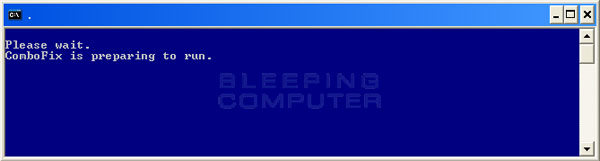
  • ComboFix will now install itself on to your computer. When it is done, a blue screen will appear as shown below.

    cf-preparing.jpg

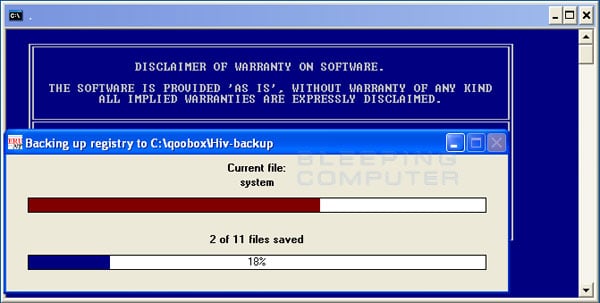
  • ComboFix is now preparing to run. When it has finished ComboFix will automatically attempt to create a System Restore point so that if any problems occur while using the program you can restore back to your previous configuration. When ComboFix has finished creating the restore point, it will then backup your Windows Registry as shown in the image below.

    erunt.jpg

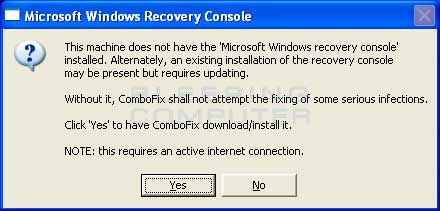
  • Once the Windows Registry has finished being backed up, ComboFix will attempt to detect if you have the Windows Recovery Console installed. If you already have it installed, you can skip to this section and continue reading. Otherwise you will see the following message as shown below:

    recovery-console-prompt.jpg

  • At the above message box, please click on the Yes button in order for ComboFix to continue. Please follow the steps and instructions given by ComboFix in order to finish the installation of the Recovery Console.
  • Please click on yes in the next window to continue scanning for malware.
  • ComboFix will now disconnect your computer from the Internet, so do not be surprised or concerned if you receive any warnings stating that you are no longer on the Internet. When ComboFix has finished it will automatically restore your Internet connection.
  • ComboFix will now start scanning your computer for known infections. This procedure can take some time, so please be patient.
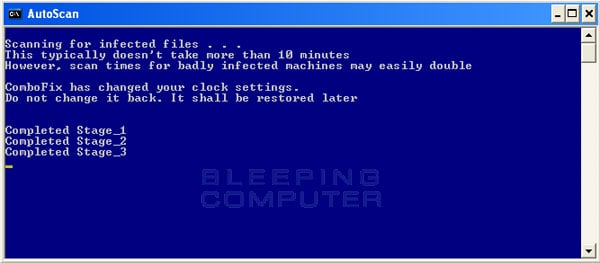
  • While the program is scanning your computer, it will change your clock format, so do not be concerned when you see this happen. When ComboFix is finished it will restore your clock settings to their previous settings. You will also see the text in the ComboFix window being updated as it goes through the various stages of its scan. An example of this can be seen below.

    still-scanning-clockchanges.jpg

  • When ComboFix has finished running, you will see a screen stating that it is preparing the log report.
  • This can take a while, so please be patient. If you see your Windows desktop disappear, do not worry. This is normal and ComboFix will restore your desktop before it is finished. Eventually you will see a new screen that states the program is almost finished and telling you the programs log file, or report, will be located at C:\ComboFix.txt.
  • When ComboFix has finished, it will automatically close the program and change your clock back to its original format. It will then display the log file automatically for you.
  • Now you just click on the edit menu and click on select all, then click on the edit menu again and click on copy. Then come to the forum in your reply and right click on your mouse and click on paste.


In your next reply please post:
  • The ComboFix log
  • A fresh HiJackThis log
  • An update on how your computer is running
 
Today when starting up my computer, I had planned on following your advice and using those programs when I got a BSOD on startup!!!! Wndows is now launching startup repair but seems unable to do anything. One I'm on my 5th try to startup and I'm still getting the BSOD.

UGH! I can't figure out what's wrong, all of my parts on my pc are less than 6 months old but the hdd. Any help? Or is a reformat the only way out of this??

Here is something I thought may be worth mentioning: upon the death of my last pc about a year ago, I brought along both of the hard drives to my new build as the were both functoning fine.
However, when I formatted my c drive to put the new OS on it, I opted for a quick reformat... I've heard some people Having problems form that... I'm not sure.
 
Last edited:
Also, I am Still quite sure that this is not a virus. In have delt with them before and can usually sniff one out from a mile away,this I'd not something ive ever seen a virus do.

Strangely enough, my computer seemed to be fine yesterday..... Not a single odd problem.
 
Last edited:
It just doesn't seem right though. You tested your drive with the WD diagnostic program and it came back ok. What is the blue screen error you are getting?
 
Verbatim, here is what the BSOD says
"STOP: c000021a {fatal system error}
the inital session process or system process terminated unexpectedly with a status of 0x00000000 (0x0000001 0x00100630).
The system has been shut down."
 
Have you tried using safe mode options and choosing "last known good configuration"?
 
I can't even get to safe mode.... I press f8 and I get a bios selection screen on what device I'd like to choose for startup.
 
On some machines you will get that. go ahead and select cdrom and then immediately press F8 again to get the safe mode options.
 
Back
Top