
Problem reformatting

55dollarbill

New Member
I just reformatted yesterday with no problems, but after updating my bios now, and not being able to boot into windows I decided reformatting would be a quick solution (seeing as how I have nearly no apps installed anyways) however, when I get to the screen where you need to partition a disk, I can partition it and everything, but when I get to a screen like this
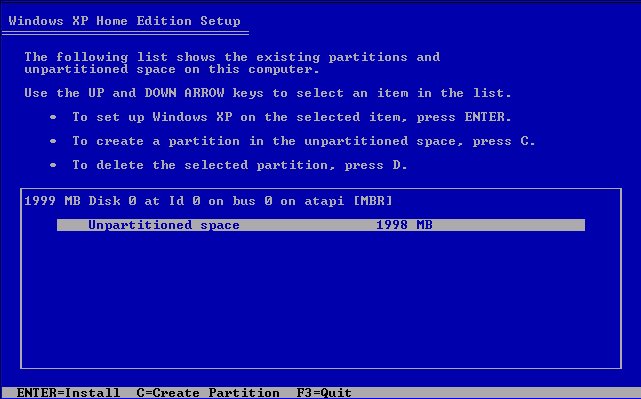
createpartition.jpg
the next step is to press enter, and it should give you ways of formatting it to NTFS, but instead now it's giving me that it's not in proper format for windows to install to, please go back and select a different one... I'm confused, it's supposed to give me an option to format it, not tell me to go back and select one thats already properly formatted

thanks
 
You need to create a partition first by hitting "C" (on the bottom) then once the partition is created you're good to format and install.
 
I've tried that too, still doesn't work for some reason, it says select the other drive, so I try that, and the other one doesn't work either.. I'm thinking it might have something to do with me updating my BIOS. and when my computer restarted now it has the "CMOS Checksum Bad" error, and it wouldn't boot up, I've heard that happens a lot when you upgrade your BIOS to a certain one or whatever, I just used the software that came with the motherboard thinking it would actually work, boy was I wrong. lol So I put in the software CD and put old BIOS back on but I still have the CMOS error, should I try resetting it by taking out the battery and doing the jumper thing for a few seconds, then try to install windows?
 
You have a hardware issue somewhere. That screen only shows about 2gb of free space. Thats not enough to install XP to. I think your bios setting may be wrong or your update went bad.
 
If you're using a SATA hard drive, you probably need to install XP SATA controller drivers. That 2GB partition leads me to believe that the correct HD isn't being recognized.
 
If you're using a SATA hard drive, you probably need to install XP SATA controller drivers. That 2GB partition leads me to believe that the correct HD isn't being recognized.

I'll look into what you said, but that's not my computer thats just a screenshot of the screen that I found in a google search on how to reformat. Sorry for not clearing that up before, I have a 70 something gig harddrive to install XP onto, another of the same harddrive but it's being used for music right now. I'm 98% sure those harddrives are IDE but I didn't buy them so I couldn't 100% you on it.
 
Last edited:
Okay, I see. Well, the SATA drivers can be downloaded from your motherboard manufacturer's website, or, if it's branded machine, from that companies support site. Don't know if that's the issue, but it's worth looking into.

EDIT: If they're IDE, then you obviously don't need to worry about that - it's another issue.
 
Last edited:
K I solved it with a little more research but thanks for the help everyone!

I'll share what I did just incase anyone with the same problem happens to read this thread.

The harddrives are SATA, what I did was I reverted the BIOS to default settings, and unplugged all harddrives not in use, and plugged the one I needed into the primary spot. Now it works.. Wierd, oh well thanks
 
Back
Top