Problem with 'fuzziness' on one monitor - please help!!!

Fionnmac

New Member
Hi,

Sorry guys this is long and boring, but please take time to read it. I promise a small cash reward via paypal if someone provides a solution (i've posted on various forums and haven't had many replies unfortunately) £50 reward to the poster who provides the solution

Background (non-essential) - I have 2 monitors, and recently reinstalled windows after it crashed, however i was lucky enough to keep my harddrive. All the settings had been reset though, and i had to download my software again (For instance i still had itunes tracks but had to reinstall itunes). The resolutions are both set to their maximum, 1600x1024 and 1600x1200.

Problem - My left monitor (dell 2007wfp on the left and a 2007fp) seems to display text very poorly, they look quite 'fuzzy' while my right monitor is perfect. The fonts in particular are blurred, and although it is not terrible and still manageable, the right monitor is definitely sharper.

I installed a graphics card from NVIDIA, although i already had one, in an attempt to fix another problem with some software, but later fixed the problem by changing the dpi settings to 96 (I need to keep this at this level).

So, by installing this graphics card, have i done more harm than good? Should i just uninstall it, or is there something completely different causing this. Is changing the dpi setting an issue?

Also, why is it just one monitor? Feel free to ask any more details etc.

Cheers in advance for any replies
 
Last edited:
It may be set on it's maximum resolution, but make sure that that resolution is its native resolution. LCDs can look fuzzy and blurry if not set on their native resolution. According to Dell, the native resolution for the 2007WFP is 1650x1080.

Also, the monitor on the left isn't by any chance connected via VGA, is it?
 
thanks for your reply, you have no idea how much i appreciate it, i've been having this problem for a week now and it's driving me crazy lol.

The resolution is set to 1600x1024, which appears to be the maximum i can set it to.

The monitor in the left is attached via a VGA yes (if that's the blue one) while the one on the right is attached by a DVI. This shouldn't be the problem though because before i have used this set up for a few months and have only just recently (since my computer crashed) been having these problems.

I may have fond something. You know how i mentioned i had installed a NVIDIA driver? Well, if i click on the NVIDIA icon in the task bar it says 'GeForce 7300 LE (Display 2 - Digital' and 'GeForce 7300 LE (Display 2 - Analog'. I assume display 1 and 2 refers to the 2 monitors? So could the problem be that my left monitor has been set to analog? I tried, but couldn't find a way to change this..
 
I've had this problem before, but with mine there was a hardware problem and I'm not sure how it was fixed, it happened a while ago.
 
The monitor in the left is attached via a VGA yes (if that's the blue one) while the one on the right is attached by a DVI. This shouldn't be the problem though because before i have used this set up for a few months and have only just recently (since my computer crashed) been having these problems.

I may have fond something. You know how i mentioned i had installed a NVIDIA driver? Well, if i click on the NVIDIA icon in the task bar it says 'GeForce 7300 LE (Display 2 - Digital' and 'GeForce 7300 LE (Display 2 - Analog'. I assume display 1 and 2 refers to the 2 monitors? So could the problem be that my left monitor has been set to analog? I tried, but couldn't find a way to change this..

Analog= VGA, Digital=DVI. There's no way to change that, other than to buy a video card with two DVI outputs, or another video card with a DVI output.

I personally saw a HUGE difference between VGA and DVI. When I set my monitor to 1280x1024 while connected via VGA, I got headaches, and it looked small and blurry. Now it's on DVI, and it looks amazingly clear, and I don't get headaches, etc.
 
Ok, this is ridiculous. I have posted this at more than half a dozen pc forums and no one seems to be able to help me.

REWARD = £50 for the poster who provides the solution. I'm serious. I'll send via paypal possibly another method. I am 100% serious, i need help on this asap. I am an online poker professional and this problem is costing me money on a daily basis.

I think it's to do with drivers and graphics cards etc. I downloaded some of the files that Dell recommended in the link here -

http://support.dell.com/support/dow...temID=DIM_P4_E521&os=WW1&osl=en&catid=&impid=

The left monitor was no longer fuzzy, however some other settings were messed up, for example the right monitor was a mirror image of the left, and everything was huge (maybe the resolution was increased). There seemed to be no way to change this.

So we can assume that something i installed fixed the problem. I installed all of the "urgent" files and some of the recommended ones. The question is, which one fixed the fuzziness problem? Can someone predict this?

PLEASE HELP ME! I AM DESPERATE!

thanks alot
 
Ok, this is ridiculous. I have posted this at more than half a dozen pc forums and no one seems to be able to help me.

REWARD = £50 for the poster who provides the solution. I'm serious. I'll send via paypal possibly another method. I am 100% serious, i need help on this asap. I am an online poker professional and this problem is costing me money on a daily basis.

I think it's to do with drivers and graphics cards etc. I downloaded some of the files that Dell recommended in the link here -

http://support.dell.com/support/dow...temID=DIM_P4_E521&os=WW1&osl=en&catid=&impid=

The left monitor was no longer fuzzy, however some other settings were messed up, for example the right monitor was a mirror image of the left, and everything was huge (maybe the resolution was increased). There seemed to be no way to change this.

So we can assume that something i installed fixed the problem. I installed all of the "urgent" files and some of the recommended ones. The question is, which one fixed the fuzziness problem? Can someone predict this?

PLEASE HELP ME! I AM DESPERATE!

thanks alot


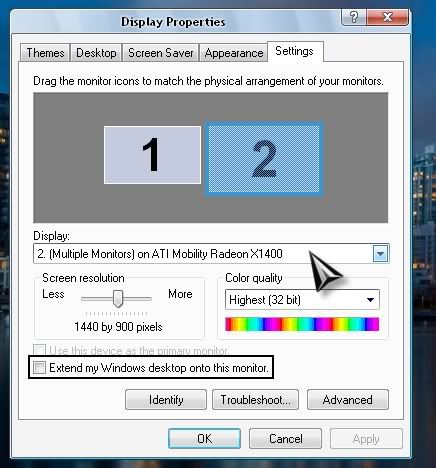
right click on your desktop>properties>settings>

Untitled-23.jpg


Make sure that is checked.

And make sure the slider is set to the monitors native resolution as stated in previous posts.
 
thanks for your reply, but that is not it.

Both monitors are working and are set to their native resolution. It's just the left one has a poor display.

I am 90% sure it is to do with not having the neccessary software installed.

Note: My PC crashed a few weeks ago, and most of my harddrive was saved but not all. Things like codecs, drivers and plug-ins had to be reinstalled. Surely it is something along those lines
 
thanks for your reply, but that is not it.

Both monitors are working and are set to their native resolution. It's just the left one has a poor display.

I am 90% sure it is to do with not having the neccessary software installed.

Note: My PC crashed a few weeks ago, and most of my harddrive was saved but not all. Things like codecs, drivers and plug-ins had to be reinstalled. Surely it is something along those lines

if everyhing was re-installed then it should all work properly. Re-install everything agian. or the monitor is going bad. Shit happens my freind.
 
Ok, this is ridiculous. I have posted this at more than half a dozen pc forums and no one seems to be able to help me.

REWARD = £50 for the poster who provides the solution. I'm serious. I'll send via paypal possibly another method. I am 100% serious, i need help on this asap. I am an online poker professional and this problem is costing me money on a daily basis.

I think it's to do with drivers and graphics cards etc. I downloaded some of the files that Dell recommended in the link here -

http://support.dell.com/support/dow...temID=DIM_P4_E521&os=WW1&osl=en&catid=&impid=

The left monitor was no longer fuzzy, however some other settings were messed up, for example the right monitor was a mirror image of the left, and everything was huge (maybe the resolution was increased). There seemed to be no way to change this.

So we can assume that something i installed fixed the problem. I installed all of the "urgent" files and some of the recommended ones. The question is, which one fixed the fuzziness problem? Can someone predict this?

PLEASE HELP ME! I AM DESPERATE!

thanks alot

Everything would have gotten bigger because the resolution was lowered when you reinstalled the drivers, which is a pretty common occurance.

Update the video and monitor drivers [again] than see what problems you run into and we'll fix it from there. If it's big again, we can raise the resolution/lower the DPI. To set the monitors so it's not cloning it, do as dmw said to set it to extend the desktop.
 
Listen, when i installled all that stuff, it ****ed up EVERYTHING. I'm not a total computer noob, i know how to change resolution and extend desktop to 2 monitors etc, but when i installed the drivers, this option was NOT possible. I've been working on this problem for more than a week and have had a couple of computer tech guys look at it, so please understand, it's not gunna be fixed by a basic method, they have all been checked.

PLEASE have a look at the link i posted above.

http://support.dell.com/support/down...atid=&impi d=

There's something i installed there that helped. But i don't know what. Forget anything to do with VGA, resolution etc, it is to do with things (or more precisely thing NOT) installed on my computer, such as drivers/graphics cards and what not.

Is it worth making a check point, then installing something and if if goes wrong just use system restore? And trying over and over again till i find what it is that works?

Cheers
 
There's another way you can change resolution/extend the desktop, it's through the Nvidia control panel. Right click on that little eye thing in the system tray, then click "Nvidia Control Panel". There are options for monitor resolution and monitor setup there.
 
Back
Top