Problem with loading desktop

A slight problem, every-time i load up my main PC it freezes up at the desktop some of the programme icons turn into a blank image and the mouse doesnt have the loading symbol

so im assuming everything loaded but just frozen, the internet icon in the corner doesn't connect either.

OS Windows 7 64bit

what could it be ?


now everything seems to have loaded but i cant click anything on the taskbar
 
It seems like the "explorer.exe" program blocks every time you boot to your desktop.Try this:

-open the Task Manager...
-go to the "Processes" tab...
-find the process called "explorer.exe" and then right click on it and click "End Process" and then confirm with "Yes"...
-now click "File" -> "New Task (Run...)" and there write "explorer.exe" and then press the "OK" button and then exit the Task Manager...


Now try to click things on taskbar and tell us if it works...
 
then go to windows key R (run)
Type cmd and right click on it and run as administrator
Insert your windows xp disk
In command prompt type (with spaces) sfc /scannow

This will ensure all your windows files are ok/

Then update windows
Check for viruses.
 
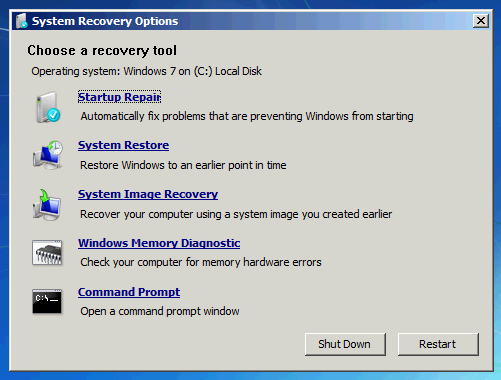
If mine or bigfella's soulutuons do not solve your problem then boot from your Windows 7 DVD-ROM disk,go to the SYSTEM RECOVERY OPTIONS and perform the repair of the operating system.The option is called STARTUP REPAIR.Here is the image:
windows7repair6.png


Cheers!
By the way...XP ROCKS!!!YEA!!!!!!!!!!!!:D
 
The whole thing freezes so i cant press any keyboard shortcuts or open anything so if i done any of the things suggested in safe mode i wouldn't be able to see if its worked properly.


also have problems with updating drivers in device manager, it would say like error or an error has occurred. What could solve that?
 
Last edited:
then go to windows key R (run)
Type cmd and right click on it and run as administrator
Insert your windows xp disk
In command prompt type (with spaces) sfc /scannow

This will ensure all your windows files are ok/

Then update windows
Check for viruses.

btw he doesn't need a disc when executing that command in Windows 7 or Vista. The installation files are stored locally.
 
Please download and install PC Wizard from my sig.

Run it and go to File, Save as and click ok.

Save the text file and copy its contents into this thread. I am particularly intrerested in whether you have a creative sound card, however please post full specs in the manner described.
 
Back
Top