
Hi all,
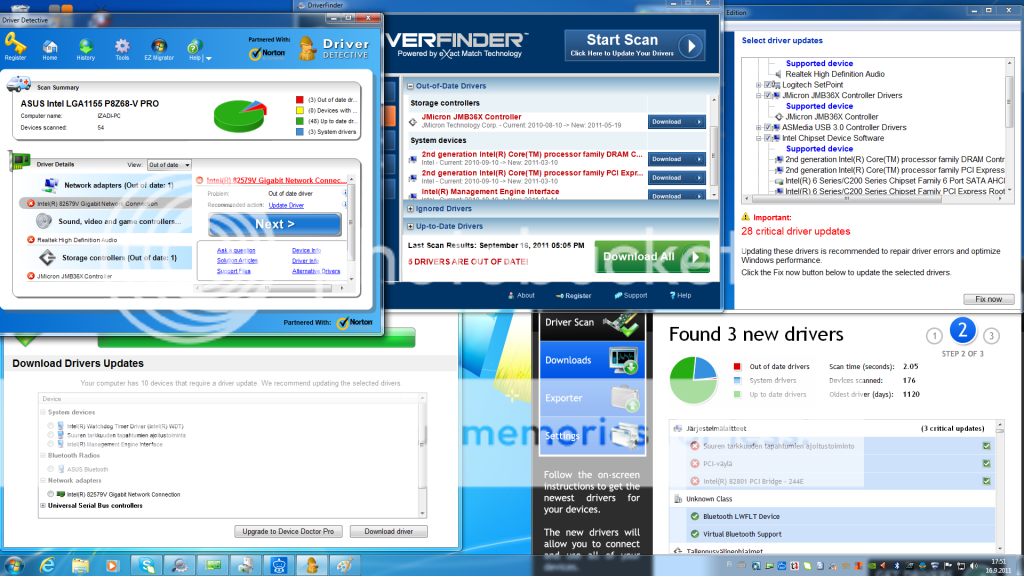
I just bought and assembled a new PC. I've installed all drivers from the motherboard DVD. I also updated my graphics card driver to the newest version. Now I've been trying to update my motherboard's drivers. I downloaded a few driver update programs to locate the drivers that need updates. They all point to 3-10 drivers that are not up to date. Its confusing that many of them actually point to different drivers. These are some drivers they all point to:
Various Intel chipset device software drivers (f.ex PCI express port)
Jmicron controller
Realtek high def audio
The catch is, that when I download and install the drivers from ASUS's support page they still show up in the driver update programs as not up to date (the date in the programs show that there is a newer update available which doesn't exist in the support page). Some of the drivers that are pointed out are not even there in the support page per se. For example there is just one chipset driver in the support page, whereas the update programs point to multiple chipset drivers. What should I do?
Asus support page:
http://support.asus.com/download.as...68-V&p=1&s=39&os=30&hashedid=f0AT3LgZYgFPjNJ8
Any help is very much appreciated!
I just bought and assembled a new PC. I've installed all drivers from the motherboard DVD. I also updated my graphics card driver to the newest version. Now I've been trying to update my motherboard's drivers. I downloaded a few driver update programs to locate the drivers that need updates. They all point to 3-10 drivers that are not up to date. Its confusing that many of them actually point to different drivers. These are some drivers they all point to:
Various Intel chipset device software drivers (f.ex PCI express port)
Jmicron controller
Realtek high def audio
The catch is, that when I download and install the drivers from ASUS's support page they still show up in the driver update programs as not up to date (the date in the programs show that there is a newer update available which doesn't exist in the support page). Some of the drivers that are pointed out are not even there in the support page per se. For example there is just one chipset driver in the support page, whereas the update programs point to multiple chipset drivers. What should I do?
Asus support page:
http://support.asus.com/download.as...68-V&p=1&s=39&os=30&hashedid=f0AT3LgZYgFPjNJ8
Any help is very much appreciated!
Last edited:
