quick noob question

teh_J0kerer

New Member
I want to upgrade my RAM from 1 Gb to 2Gb.

I have 4 slots for Ram in my motherboard. There are currently 2 512Mb sticks in there. Is there anything wrong with getting 1 additional 1Gb stick, or for some reason am I supposed to get another 2 512Mb sticks?

Or should I get rid of my old ram and get 2 1Gb sticks?

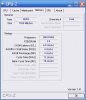
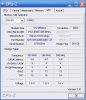
Edit: I ran CPUZ on my system, and it says my current ram sticks are 266Mhz in speed. Is this really crappy? My PC is a Dell..
 
Last edited:
I want to upgrade my RAM from 1 Gb to 2Gb.

I have 4 slots for Ram in my motherboard. There are currently 2 512Mb sticks in there. Is there anything wrong with getting 1 additional 1Gb stick, or for some reason am I supposed to get another 2 512Mb sticks?

Or should I get rid of my old ram and get 2 1Gb sticks?

You can add a 1 GB stick without problems. Make sure the RAM you purchase is the same speed as the current RAM. You should consider getting 2X 1GB if your mobo supports dual channel speeds. An easy way to tell is if your memory slots are multicolored. The dual channel slots are usually the first and third slots from the left.
 
Last edited:
What model of Dell is your computer? What information does CPU-Z say about your Random Access Memory? What Operating System are you running? Windows XP 32-bit or Windows Vista 64-bit or 32-bit?
 
What model of Dell is your computer? What information does CPU-Z say about your Random Access Memory? What Operating System are you running? Windows XP 32-bit or Windows Vista 64-bit or 32-bit?

Its an XPS 400. Im running windows XP, but I will likely upgrade to vista (presumably 64 bit?)

Ive attached screenshots of the CPU-Z info. Slot#2 looks exactly the same as slot #1.
 

Attachments

  • ram.jpg
    ram.jpg
    40.9 KB · Views: 35
  • slot1.jpg
    slot1.jpg
    49.6 KB · Views: 37
Click here. The XPS 400 will support speeds up to 667 MHz. I would recommend installing 2X 1GB of RAM in the dual channel slots, and placing the 2X 512 MB in the remaining slots.
 
Its an XPS 400. Im running windows XP, but I will likely upgrade to vista (presumably 64 bit?)

Ive attached screenshots of the CPU-Z info. Slot#2 looks exactly the same as slot #1.

I would pull the old memory stick out and sell it or put it someplace safe for future use when you buy new memory.

If you are using this system for normal computer activities I would recommend this memory:

Crucial 2 gigabytes (2 x 1 gigabyte) 240-Pin PC2-4200 Dual Channel Kit
http://www.newegg.com/Product/Product.aspx?Item=N82E16820146569


If you want some high quality memory try ordering this:

OCZ 2 gigabytes (2 x 1 gigabyte) 240-Pin PC2-5400 Dual Channel Kit
http://www.newegg.com/Product/Product.aspx?Item=N82E16820227118

In my own opinion, I would avoid Windows Vista 64-bit for about another year until they work all the bugs out of it.
 
Back
Top