RCA, Svideo, and VGA.. (Thatguy16)

oscaryu1

VIP Member
Soo... I wish to use either an:

Gamecube Monitor, 5 or 5.4"

http://cgi.ebay.com/Gamecube-5-Colo...ryZ20389QQssPageNameZWDVWQQrdZ1QQcmdZViewItem
The Screen,

Then With my GFX, I get :

http://cgi.ebay.com/S-Video-4-pin-J...ryZ73388QQssPageNameZWDVWQQrdZ1QQcmdZViewItem

Then I can pluggy and play?

And the resolution comes into the business... will it work? If I go to lowest (800x600) I can't seem to get any lower... I would do 320x whatever if someone could help me do it?

OR

PS2 Screen (Thatguy16)

I have absolutely no idea how to do this. I will take over the power however... Thatguy16? Please help?
 
Lower the better in resolution, on mine i have to go into "advanced" and the lowest is like 640 by something. The ps2 screen or the gamecube screen would work as long as you buy the adapter, my video card come with the adaptor. In your case the gamecube screen may be better since its small and you could either leave it in the housing or remove it and create your own way of mounting.

Other than that, its just plug and play... but like i said on a screen that small and such small resolution you'll have a hard time to use it as the "main" monitor as far as text goes...

Just so you know, this is the one i have
http://www.amazon.com/Intec-PlaySta...28?ie=UTF8&s=videogames&qid=1191805084&sr=8-4

alot of people use this one, the circuit board is in a circle shape, the visual quality may be better... i don't know
http://www.amazon.com/PS-One-LCD-Sc...28?ie=UTF8&s=videogames&qid=1191805084&sr=8-3
 
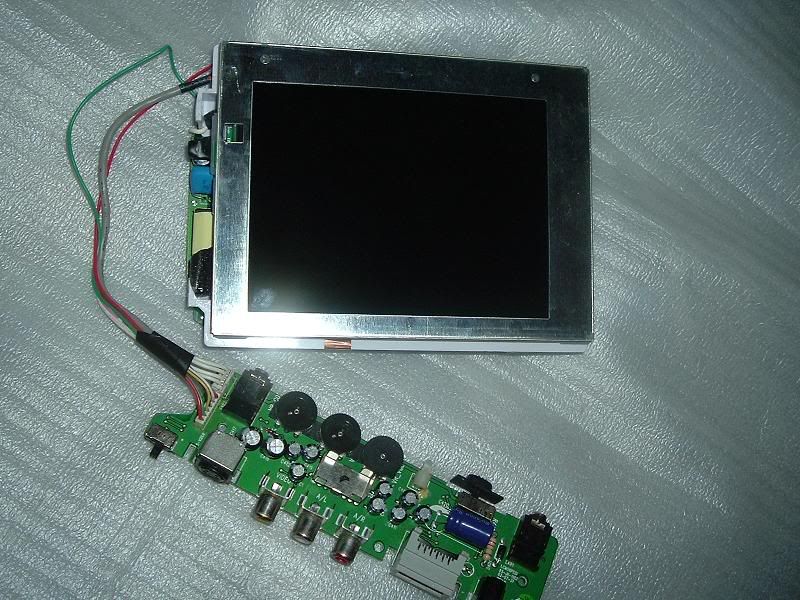
Here, i just took this so you can see what it looks like out of the housing. Only thin i done to it was cut away some screw tabs that stuck out from the sides
DSCF2320.jpg
 
Whaa? Looks so simple now! Well The_Other_One suggested an PS1 screen... and I'm going for it. But do you know how big and how any volts it sucks?

And will an Svideo to RCA, then RCA to RCA work with an PS1 screen? And if so, what is the cheapest PS2 LCD you can find?

THANK YOU
 
I would suggest the PS1/PS2 or a Xbox screen, some of the ones for the Xbox are up to 7". The one you linked may work but im not sure on what it has as far as the connectors...

On mine you have to adjust the color/brightness but you may on all of them... don't know.

This is the one i have LINK, the only reason i used this one is because i already had it from when i used it for my old ps2
 
Last edited:
Lower the better in resolution, on mine i have to go into "advanced" and the lowest is like 640 by something. The ps2 screen or the gamecube screen would work as long as you buy the adapter, my video card come with the adaptor. In your case the gamecube screen may be better since its small and you could either leave it in the housing or remove it and create your own way of mounting.

Other than that, its just plug and play... but like i said on a screen that small and such small resolution you'll have a hard time to use it as the "main" monitor as far as text goes...

Just so you know, this is the one i have
http://www.amazon.com/Intec-PlaySta...28?ie=UTF8&s=videogames&qid=1191805084&sr=8-4

alot of people use this one, the circuit board is in a circle shape, the visual quality may be better... i don't know
http://www.amazon.com/PS-One-LCD-Sc...28?ie=UTF8&s=videogames&qid=1191805084&sr=8-3

And yeah I saw the PS1 screens, one I asked (the unofficial one) said the screen was 3"... not really good visibility, but will go for it if yalls say so..
 
Back
Top