

WinDOS
banned
EDIT: This only works if your computer has a dual core processor or higher. This IS NOT an ideal fix. This is just one of the less famous ways of achieving a faster pc.
If your computer takes a long time to start up. Just read this post instead of posting a question hope it helps. This should work on any computer from Windows 98 and Up. Windows ME and 2000 need to download MSCONFIG off of A computer that is XP or lower, or off of Google.
This quick tutorial will show you how to boost your system boot time. (The time the computer takes to start up!). This is a perfectly safe LEGAL modification that will not damage your system as long as this tutorial is followed correctly. I am not held liable for any damages, continue at your own risk.
Method.
1.)Press the Windows Key and the letter "R" together once. - This will open the "Run" Menu. XP users can alternatively access the Run command in the start menu. Vista and 7 just use the search box in the start menu in step 2.
2.)Type in "msconfig" and press enter. (See Image)
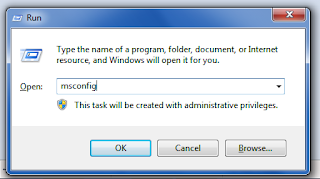
Run Command.
3.) A window should now appear. Click the Boot Tab.
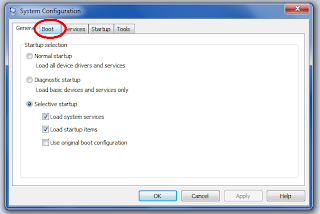
MSCONFIG - First Glance
4.) Tick the "NO GUI BOOT" and "OS BOOT INFORMATION" boxes. This will change the boot screen from a Moving Bar on Vista, "Starting Windows" on Windows 7 and will replace the latter with a "DOS" style interface displaying files that are currently being loaded. This may not work on XP, so it is not mandatory. This step will not speed up your computer, but help you notify any errors on start up. It will also distinguish if the computer has froze. It is recommended that you do this.
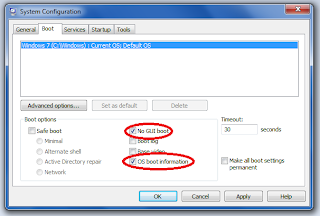
Changing how your computer boots
5.) Now to preform the main step that will speed up your computers boot sequence. It will tweak how the processors run. Click Advanced Options.
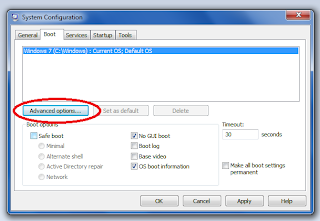
Advanced Settings.
6.) Now check the "processors" box. Notice that the nulled-out drop down box besides it will now allow you to modify it. It should say "1". Click the drop down box and select the HIGHEST option (At the bottom of the list.) Such as (in the image) 2, or if your PC is a quad-core, 4, etc. Once done, OK the window, and you will be returned to the boot options list.
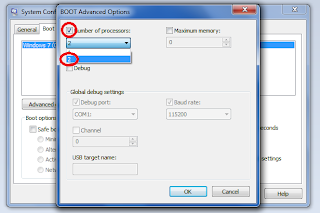
Processor usage.
7.) Apply and OK the Window. You will get a prompt to restart, click Restart. (As long as you have saved all work.)
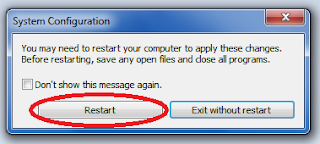
C'est Fini!
8.) You have successfully sped up your boot time. If you get a notification on logging on afterwards that your computer is in a boot safe mode, tick the box saying run normally and OK the window.
Optional 9.) This does not include the Motherboard BIOS/CMOS Boot sequence, your BIOS should have a built in "Fast Boot" option. You will also have to run this wizard on every operating system on a multi-os computer.
If your computer takes a long time to start up. Just read this post instead of posting a question
hope it helps. This should work on any computer from Windows 98 and Up. Windows ME and 2000 need to download MSCONFIG off of A computer that is XP or lower, or off of Google.This quick tutorial will show you how to boost your system boot time. (The time the computer takes to start up!). This is a perfectly safe LEGAL modification that will not damage your system as long as this tutorial is followed correctly. I am not held liable for any damages, continue at your own risk.
Method.
1.)Press the Windows Key and the letter "R" together once. - This will open the "Run" Menu. XP users can alternatively access the Run command in the start menu. Vista and 7 just use the search box in the start menu in step 2.
2.)Type in "msconfig" and press enter. (See Image)
Run Command.
3.) A window should now appear. Click the Boot Tab.
MSCONFIG - First Glance
4.) Tick the "NO GUI BOOT" and "OS BOOT INFORMATION" boxes. This will change the boot screen from a Moving Bar on Vista, "Starting Windows" on Windows 7 and will replace the latter with a "DOS" style interface displaying files that are currently being loaded. This may not work on XP, so it is not mandatory. This step will not speed up your computer, but help you notify any errors on start up. It will also distinguish if the computer has froze. It is recommended that you do this.
Changing how your computer boots
5.) Now to preform the main step that will speed up your computers boot sequence. It will tweak how the processors run. Click Advanced Options.
Advanced Settings.
6.) Now check the "processors" box. Notice that the nulled-out drop down box besides it will now allow you to modify it. It should say "1". Click the drop down box and select the HIGHEST option (At the bottom of the list.) Such as (in the image) 2, or if your PC is a quad-core, 4, etc. Once done, OK the window, and you will be returned to the boot options list.
Processor usage.
7.) Apply and OK the Window. You will get a prompt to restart, click Restart. (As long as you have saved all work.)
C'est Fini!
8.) You have successfully sped up your boot time. If you get a notification on logging on afterwards that your computer is in a boot safe mode, tick the box saying run normally and OK the window.
Optional 9.) This does not include the Motherboard BIOS/CMOS Boot sequence, your BIOS should have a built in "Fast Boot" option. You will also have to run this wizard on every operating system on a multi-os computer.

