repurposing a network computer to home internet

Y2KEDDIE

New Member
I acquired an older Windows XP desktop computer which was last used on a business network.
I connected my home (RJ65) internet cable to it but can not get it to connect. A message comes up saying this computer is assigned to a domain.

How do I clear the network setup and setup for home use.

Step by step please, I'm slow and a little illiterate at this.
 
  1. Right click my computer
  2. Properties
  3. Computer Name
  4. Change from domain to workgroup
  5. Reboot
This is from memory but I believe that is what it would look like for you on XP. I assume you have the login credentials to login to the computer.
 
I did the steps you said. Renamed the computer, changed to work group, & rebooted. I still can't get rid of the Old ip address & default gateway.

The two adapters are: Boardcom NetXtreme Gigabit Ethernet,
1394 Connection

Win Proxy enabled'
both connected (100Mbps)
sending, but not receiving packets.

I get: " FTP folder error: windows cannot access this folder. make sureyou typed the file name correctly and have permission to access folder.
Details: The server name or address could not be resolved."
 
Last edited:
How/where do i do that
Open network properties in the control panel, right click the connection, and choose properties. Select TCP/IP from the list and click Properties. Choose both radio buttons to automatic and click okay. Click okay again and you should get an address.
 
Start
Settings
Control panel
Network Connections
right click : local area connection (Broadcom Net Xtreme)
Properties
Unselect : Client for MS Networks, File & Printer Sharing, etc tcp/ip vers.
Reboot

Everything comes back, I can not delete
 
Start
Settings
Control panel
Network Connections
right click : local area connection (Broadcom Net Xtreme)
Properties
Unselect : Client for MS Networks, File & Printer Sharing, etc tcp/ip vers.
Reboot

Everything comes back, I can not delete
Did you not read what I posted?

xp_ip.png
 
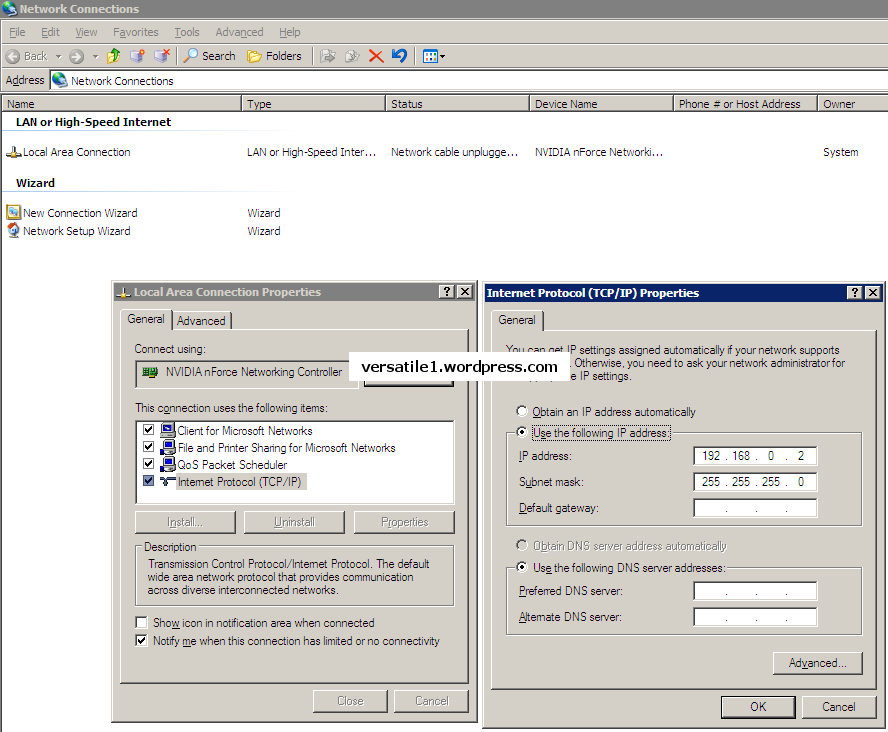
I followed your instructions: When I got the box on the left, I high-lited "Internet Protocol (TCP/IP), clicked on it, then clicked "properties": I got the box on the right.
Then I changed both radio buttons to automatic. Clicked "OK". Now all the address boxes are blank (empty). Re-booted, still empty.
 
They're supposed to be empty. Nothing will go into them. Can you get online?

If you want to check your IP address, click Start, choose Run, and type cmd.

When the command window opens, type ipconfig to see your IP address information.
 
No, I still can not get online. s
When I click on the Boardcom Net Extreme adapter it show sending data, but nothing received.
 
Are you getting an IP address? Follow the steps I mentioned before to find your IP address.
 
When you log onto the machine what type of login do you get? If you are logging into a domain then you will need to get rid of that first. I had to do that a few times for some of my clients.
 
Your user name or something that was already created? Is it asking you to login to a domain? Did you change the domain setting to workgroup? If I remember correctly there is another step to complete. Maybe removing a protocol or service in the tcp/ip properties. It's been so long, I don't remember. I'll try researching it.

However, do you have the XP install cd so that you can do a fresh install? Its the easier way. There may be many domain settings enabled that will cause you issues such as browsing limitations and such.
 
Yes, originally it said something about a domain. I changed it to work group and renamed the computer.

When I do an Ipconfig command it still has the old addresses, even though they no longer show up in the "internet Protocol (TCP/IP)" dialog box, after clicking properties.

Unfortunately I don't have the Install disk, I have the license number (taped to the back of the tower), but I don't know how to go about getting a copy. I don't mind logging in, as I know the name and password, it would be nice to get rid of it. Nothing ever easy anymore, LOL.
 
If you go into the local area connections properties box, what entries are listed in that box?
 
Local Area Connection Properties:

Client services for NetWare NOT CHECKED
Client for Microsoft Networks CHECKED
Service Advertising Protocol CHECKED
File and Printer Sharing for Microsoft Networks CHECKED
Qos Packet Scheduler CHECKED
NWLink NetBIOS NOT CHECKED
NWLink IPX?SPX/NetBIOS Compatible Transport Protocol NOT CHECKED
Microsoft TCP/IP version 6 NOT CHECKED
Network Monitor Driver NOT CHECKED
Internet Protocol (TCP/IP) CHECKED
 
Last edited:
Back
Top