
nascarfan999
New Member
Hello all,
I'm hoping someone can help troubleshoot an odd monitor/video card issue I'm dealing with where a program running behind the one I am using suddenly displays on the monitor. For example, I may have ITunes running and maximized, but I am also using an internet browser. From time to time, the ITunes display somehow becomes what I am looking at instead of my browser. When this happens, the browser is still the primary window and and clicking/typing I do is still affecting the browser and not ITunes. It seems to be triggered by movement of the program in the background (in other words, it only happens if the "image" of the program in the background changes). Once it happens, any movement of the program in the foreground will make the foreground image show up once again. This hasn't really caused any problems, but it can become quite an annoyance sometimes.
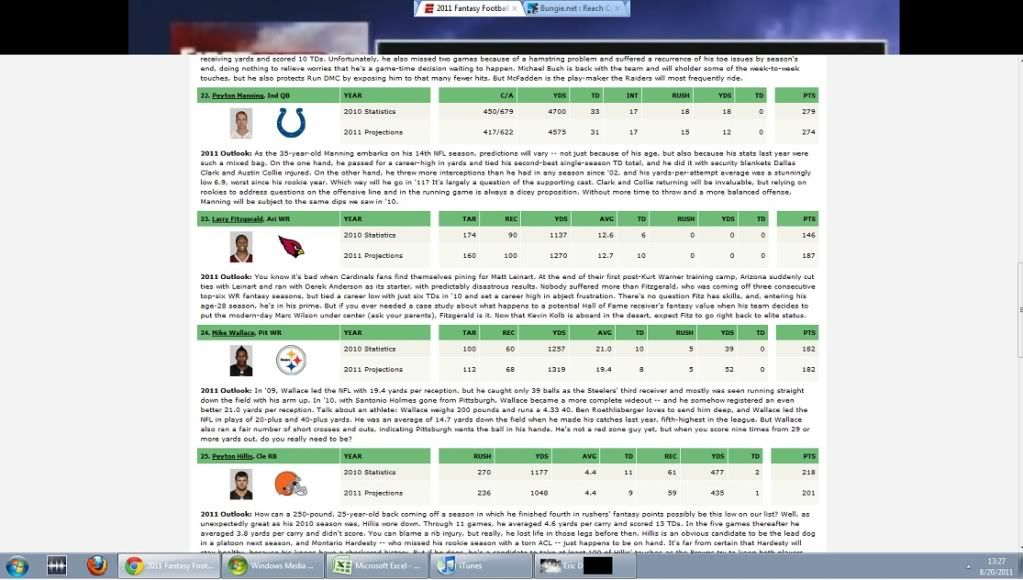
I was able to get a screenshot of one example of it happening to hopefully help illustrate what happens. In this case, I was surfing the Internet checking fantasy football rankings while a video was playing in the background. The video became visible over the top portion of the Internet Browser (in this case, Google Chrome).
This has happened with multiple monitors, so I am thinking it is something with the video card. The computer is a Dell Inspiron 537S and the video card is an ATI Radeon HD 4350.
Any suggestions on how to stop this from happening, or even any insight into why it happens would be greatly appreciated as it has me completely stumped.
Thank you,
I'm hoping someone can help troubleshoot an odd monitor/video card issue I'm dealing with where a program running behind the one I am using suddenly displays on the monitor. For example, I may have ITunes running and maximized, but I am also using an internet browser. From time to time, the ITunes display somehow becomes what I am looking at instead of my browser. When this happens, the browser is still the primary window and and clicking/typing I do is still affecting the browser and not ITunes. It seems to be triggered by movement of the program in the background (in other words, it only happens if the "image" of the program in the background changes). Once it happens, any movement of the program in the foreground will make the foreground image show up once again. This hasn't really caused any problems, but it can become quite an annoyance sometimes.
I was able to get a screenshot of one example of it happening to hopefully help illustrate what happens. In this case, I was surfing the Internet checking fantasy football rankings while a video was playing in the background. The video became visible over the top portion of the Internet Browser (in this case, Google Chrome).
This has happened with multiple monitors, so I am thinking it is something with the video card. The computer is a Dell Inspiron 537S and the video card is an ATI Radeon HD 4350.
Any suggestions on how to stop this from happening, or even any insight into why it happens would be greatly appreciated as it has me completely stumped.
Thank you,

