
Seagate Drive Issue

Twist86

Active Member
So I been living with this for a bit but its kinda annoying me. I wanna make sure though before I buy a new drive.

This drive will "hang" on Vista splash and slow the boot time by 30 seconds before fully loading. It clears up after a format but then it will happen again within 2 weeks.
This annoys the piss out of me and others have the same issue with this drive (seagate really went down hill the past few years)
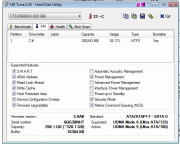


I am curious HD Tune says it is in UDMA 5 more but 6 is supported....what exactly is that and would it cause drive issues to slow it down??


It makes a good storage drive but I wanted to make sure before I bought a WD drive to replace it as my primary.


My HDD is a ST3320620AS its a .10 drive
 
Last edited:
If it shows UDMA at all the controller is running in IDE mode. Even so it should show UDMA 6 for a SATA 3.0 drive. You dont have the jumper on the pins in the back that forces it in SATA 1.5 mode? Never had any problems with the .10 drives. The .11 drives sucked.
 
Showing UDMA 5 and hanging on startup, something is going on. Have you tried maybe reinstalling your chipset drivers? Does the drive make any odd sounds, clicking or a got a gravel in it sound.
 
Not my chipset drivers but the sound it makes is not a click or tick but more of like it gets stuck and keeps going and can't.

I will have to see if I can't get a audio file of it.

*edit* nevermind microphone pics up to much of the fan noise....it basically sounds like a HDD at full write mode cept about 2x louder.


I will update my drivers right now.
 
Last edited:
It could have a drive motor going out. I use to have a old Samsung drive that lost it ability to spin down. After shutting the computer down you could hear it spinning for like a full minute:D
 
Well the strange part is if I was to format right now...it would no longer happen but within 2 weeks or 2 months it will start right back up. Though the delay is still there.

Also default chipset is still the most up to date one. I guess I will use it as a "what ever" storage drive and get a better primary.
 
After a install, if its fine other than the startup, sorta sound like a driver issue. Have you ever had it running in SATA mode and not IDE. I have no idea if Vista has the P45 chipset SATA drivers by default or if you have to load them during the install.
 
I have no clue to be honest with you....these were my first 2 SATA drives and it never asked for a driver during install.
 
Well if the bios has the SATA ports set as Native IDE mode it wont ask for them. It just treats them as IDE drives. Most boards now have the SATA set as Native IDE by default. You would have to go into the bios and set them in AHIC mode. But not with the OS already installed, it wont boot.
 
Right, more than likely Vista and 7 has the SATA drivers. I've just done AMD installs for the last two years and both have the 700 series SATA drivers. I looked at your board at Gigabyte and the pre install SATA driver says for Non Vista, more or less its for XP. That would lead me to believe that they were already on Vista and 7 disks.
 
I see well I can't do it yet but will do it tomorrow.

Will update the thread when I do. Thanks for the assist and with luck it works out :)
 
Well nothing on the original HD tune screenshot has changed will have to see if the drive stays quite as it is in the following months. The burst however was a little bit better then usual 50/70 with a 136mb burst.
 
Last edited:
Back
Top