Seond HDD won't show up

bsquared63

New Member
I got a second internal HDD for my computer, but windows is failing to detect it. When I run Linux off an external the harddrive will appear, and I can use. I've tried running through the Disk Management, but it doesn't appear there either. Do I need to try formatting it in Linux so it will show up, or how do I get it to work?

I'm running a Asus G50VT if that helps any.
 
Are you sure that disk mangement isn't detecting it? Can you post a screen shot of your disk management?
 
It shows up in the BIOS, and I know the connections work, because when I remove it and place my HDD with windows on it in the second slot the computer boots up.

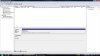
Here's a screen shot of my disk management showing my DVD ROM and my first HDD.
 

Attachments

  • Disk Management.jpg
    Disk Management.jpg
    95.7 KB · Views: 51
Nothing happens when I scan for hardware changes and there is only the two SATA connectors on the motherboard, I'm starting to think it may be a power issue with the motherboard.
 
Back
Top