
You are using an out of date browser. It may not display this or other websites correctly.
You should upgrade or use an alternative browser.
You should upgrade or use an alternative browser.
Setting multi-boot
- Thread starter sizk
- Start date

krncho
banned
I did partition but I'm not offered to choose a primary partition drive to boot from.
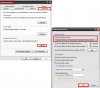
Well in this case, Boot into either windows XP or Vista. Then when it boots up, go to Start => My comuter(right click on it) Then you get the pop-up menu. Then on that menu, go to properties. On the properties window, there should be a tab at the top called "Advanced". Go there and click on "Startup and Recovery. At the very top, there will be a drop down menu saying stuff like "Microsoft Windows XP Home Edition" /Fastdetect /NoExecute..." Click on the drop down selection, then you will see both titles of "Windows XP" or "Windows Vista." What you have to do is, in your case you want to put Winodws XP as the primary right? So just click on "Windows XP on the drop down selection/menu, and Windows XP will be the primary choice for the operating system menu.
krncho
banned
I did partition but I'm not offered to choose a primary partition drive to boot from.
Well in this case, Boot into either windows XP or Vista. Then when it boots up, go to Start => My comuter(right click on it) Then you get the pop-up menu. Then on that menu, go to properties. On the properties window, there should be a tab at the top called "Advanced". Go there and click on "Startup and Recovery. At the very top, there will be a drop down menu saying stuff like "Microsoft Windows XP Home Edition" /Fastdetect /NoExecute..." Click on the drop down selection, then you will see both titles of "Windows XP" or "Windows Vista." What you have to do is, in your case you want to put Winodws XP as the primary right? So just click on "Windows XP on the drop down selection/menu, and Windows XP will be the primary choice for the operating system menu.
btw, sorry for the crap picture =P
Attachments
krncho
banned
Sweet!!
Thank you
You're welcome =D

thewahlrus
New Member
Well in this case, Boot into either windows XP or Vista. Then when it boots up, go to Start => My comuter(right click on it) Then you get the pop-up menu. Then on that menu, go to properties. On the properties window, there should be a tab at the top called "Advanced". Go there and click on "Startup and Recovery. At the very top, there will be a drop down menu saying stuff like "Microsoft Windows XP Home Edition" /Fastdetect /NoExecute..." Click on the drop down selection, then you will see both titles of "Windows XP" or "Windows Vista." What you have to do is, in your case you want to put Winodws XP as the primary right? So just click on "Windows XP on the drop down selection/menu, and Windows XP will be the primary choice for the operating system menu.
I am sort of having the same problem, but I installed xp after Vista (some games crashed) and The Vista is not an option in that menu. It's like I only have 1 operating sytem installed. Vista's on C, XP on D.
krncho
banned
I am sort of having the same problem, but I installed xp after Vista (some games crashed) and The Vista is not an option in that menu. It's like I only have 1 operating sytem installed. Vista's on C, XP on D.
So you mean that you don't have an OS choice menu?
thewahlrus
New Member
Correct, no choise. It just goes to XP. I tried adding a line to boot.ini with dirve(0) partition (1) and just made some stuff up, but It did not work.
Gee? And I just installed Vista for the third time to get it to recognise the XP Pro installation as well as the XP Home primary. Once the mbr was repaired for the XP installation on the primary drive the Vista installation could no longer load that even with VistaBootPRO or EasyBCD editing tools to add either or both XP installations into the Vista boot loader. The command prompt method also proved "worthless. Finally after the second installation failed to correct that mess from those mehtods the third now sees the option again after a reformat of the secondary ide drive to load a previous version of Windows with both Home and Pro seen.
You may see better results since Vista is on the same drive as XP there. The VistaBootPRO or EasyBCD tools are freewares found at the links here. For VistaBootPRO, http://www.vistabootpro.org/ The EasyBCD BCDEdit tool wasn't as colorful as the other but can be found at http://www.techspot.com/downloads/3112-easybcd.html
You may see better results since Vista is on the same drive as XP there. The VistaBootPRO or EasyBCD tools are freewares found at the links here. For VistaBootPRO, http://www.vistabootpro.org/ The EasyBCD BCDEdit tool wasn't as colorful as the other but can be found at http://www.techspot.com/downloads/3112-easybcd.html
krncho
banned
Correct, no choise. It just goes to XP. I tried adding a line to boot.ini with dirve(0) partition (1) and just made some stuff up, but It did not work.
Alrighty. I know what to do with this situation. Go to google. Then type "Vista Boot pro" Then go to the first result, then download the program. From the program, Find the "Restore Vista bootloader" Tab or button. (I can't remember
 ) Then it works!!! The Vista bootloader is restored. The reason why the Vista Bootloader disappeared is because you installed Windows XP after Vista. When you install XP after Vista, the Vista bootloader (Actually, this applies to any OS installation) gets replaced by the Windows XP boot loader, therefore, you cannot choose Vista because Windows XP does not recognize Vista.
thewahlrus
New Member
thanks
i found this, which worked for me.
now i have a choice between between vista and xp.
The processes below enable one to recover the ability to boot into Windows Vista in the instance where Windows Vista was installed on the system drive and the boot system files [Boot (folder), bootmgr, Boot.BAK and BOOTSECT.BAK], have not been damaged or removed.
1. To install a previous version of Windows onto a computer running Windows Vista (Post-Beta 2)
With Windows Vista Beta 2 as well as in Windows Vista Build 5456, the only command one needs to run is:
bootsect /NT60 ALL
(Copy bootsect.exe from the boot folder of your Windows Vista DVD and paste it into your Windows XP Windows\system32 folder)
This pulls all Windows operating systems into the Windows Vista boot menu.
from...
http://www.pro-networks.org/forum/viewtopic.php?p=607987
WTF Microsoft, that's pretty weak.
thanks people!
i found this, which worked for me.
now i have a choice between between vista and xp.
The processes below enable one to recover the ability to boot into Windows Vista in the instance where Windows Vista was installed on the system drive and the boot system files [Boot (folder), bootmgr, Boot.BAK and BOOTSECT.BAK], have not been damaged or removed.
1. To install a previous version of Windows onto a computer running Windows Vista (Post-Beta 2)
With Windows Vista Beta 2 as well as in Windows Vista Build 5456, the only command one needs to run is:
bootsect /NT60 ALL
(Copy bootsect.exe from the boot folder of your Windows Vista DVD and paste it into your Windows XP Windows\system32 folder)
This pulls all Windows operating systems into the Windows Vista boot menu.
from...
http://www.pro-networks.org/forum/viewtopic.php?p=607987
WTF Microsoft, that's pretty weak.
thanks people!
i found this, which worked for me.
now i have a choice between between vista and xp.
The processes below enable one to recover the ability to boot into Windows Vista in the instance where Windows Vista was installed on the system drive and the boot system files [Boot (folder), bootmgr, Boot.BAK and BOOTSECT.BAK], have not been damaged or removed.
1. To install a previous version of Windows onto a computer running Windows Vista (Post-Beta 2)
With Windows Vista Beta 2 as well as in Windows Vista Build 5456, the only command one needs to run is:
bootsect /NT60 ALL
(Copy bootsect.exe from the boot folder of your Windows Vista DVD and paste it into your Windows XP Windows\system32 folder)
This pulls all Windows operating systems into the Windows Vista boot menu.
from...
http://www.pro-networks.org/forum/viewtopic.php?p=607987
WTF Microsoft, that's pretty weak.
thanks people!
har! har! har!
You may want to review the step by step method outlined in the blog seen at http://www.apcstart.com/5485/dualbooting_vista_and_xp I went through all of these after reinstalling Pro on the sata drive after having removed the Home installation on the primary. Even using the command promppt is no guaranty of results with the bcdeditor. Once the VistaBootPRO and EasyBCD as well as backups were removed and the second drive reformatted the Vista installer put it's own boot loader on the XP primary. When booting with the Vista dvd you can also try the repair option for fixing problems with starting up.
thewahlrus
New Member
Thanks, I think it would be better if I had the guts to go Linux. I seriously hate having to boot to XP just to play S.T.A.L.K.E.R. I just figured out how to get Company of Heores to work in Vista. There was a post on the developer's website about turning down the graphics settings so it would be stable. WTF! I didn't buy two f'ing 8800 GTS cards just to turn my graphics settings down. If I wanted to play at 'medium' settings I would have kept my x1600.by the way, your computer is sick!
And where the crap are did my overclocking options go for my graphics cards? Did windows develop Vista over a long weekend? Blitzkrieg? No one saw this coming? NVidia asleep at the wheel?
This is why I *ahem* haven't really bought any software in years. Because they reek. I sometimes think I should have saved some dough and bought a PS3.
That Viewsonic monitor is the best though, Windows even looks good when it's crashing.